
Key takeaways
What this article covers, in order:
- Key takeaways
- What is an outstanding payments report?
- Why this report matters for small businesses in India
- What should be included in an outstanding payments report?
- Receivables vs payables: why you need both in one place
- How to prepare an outstanding payments report
An outstanding payments report is a simple view of who owes your business money, who you still need to pay, and when each amount is due. For a small business in India, it is one of the most useful reports for protecting cash flow because it helps you follow up on receivables, avoid late supplier payments, and plan bank balances with more confidence.
Key takeaways
- An outstanding payments report combines unpaid customer invoices and unpaid supplier bills in one place.
- It helps you track receivables and payables by party, due date, invoice age and amount.
- Small businesses in India can use this report to improve collections, avoid payment delays and reduce cash flow surprises.
- The most useful format includes ageing buckets such as current, 1-30 days, 31-60 days and 60+ days overdue.
- If your team still works in spreadsheets or Tally, a shared, updated report can save hours of manual follow-up.
- Software can make this easier by linking invoicing, expenses and bank data in one workflow.
What is an outstanding payments report?
An outstanding payments report is a business report that shows all unpaid amounts at a given date. It covers two sides of your cash flow.
First, it shows receivables. These are invoices you have raised on customers but have not yet collected.
Second, it shows payables. These are bills, purchase invoices or expenses you owe to suppliers, vendors or service providers.
In many small businesses, these two views sit in separate files. Sales is tracking customer dues in Excel. Accounts is tracking vendor bills in another sheet. The founder checks the bank balance and tries to guess what is coming in and going out next week.
That works for a while. Then the business grows. You start selling in multiple cities, receive payments over UPI and bank transfer, raise GST invoices, and deal with more suppliers. Suddenly, no one has one clear answer to a simple question: What money is stuck, what money is due, and when?
That is where an outstanding payments report helps.
Why this report matters for small businesses in India
Cash flow issues often do not begin with low sales. They begin with delayed collections, missed follow-ups and poor visibility.
A business in Mumbai may show healthy monthly revenue, but still struggle to pay salaries on time if customer payments are delayed by 45 days. A wholesaler in Pune may be profitable on paper but still face pressure because several supplier bills fall due in the same week. A services firm in Bengaluru may lose time every month just matching invoices, WhatsApp reminders and bank credits.
An outstanding payments report helps you avoid these problems because it gives you a practical working view of cash flow.
It shows your real cash position
Your bank balance only tells you how much money is in the account today. It does not tell you:
- how much should have already come in
- how much is due next week
- how much is overdue
- how much you must keep ready for vendors
The report adds this missing context.
It improves collection discipline
When customer dues are visible by invoice and due date, follow-up becomes easier. Your team can call the right customer first instead of chasing everyone randomly.
It helps avoid supplier friction
Payables matter as much as receivables. If you regularly delay vendors, they may stop supplies, remove credit terms or ask for advance payment.
It supports better planning
A good report helps you answer practical questions like:
- Can we pay all vendors this Friday?
- Which customers should we follow up this week?
- How much cash is likely to come in before month-end?
- Which overdue bills could attract penalties or hurt relationships?
What should be included in an outstanding payments report?
The best outstanding payments report is not complicated. It is just complete and up to date.
Core fields for receivables
For customer dues, include:
- Customer name
- Invoice number
- Invoice date
- Due date
- Total invoice amount
- Amount received
- Balance outstanding
- Ageing bucket
- Sales person or account owner
- Notes on follow-up status
Core fields for payables
For supplier dues, include:
- Supplier name
- Bill or invoice number
- Bill date
- Due date
- Total amount payable
- Amount already paid
- Balance outstanding
- Ageing bucket
- Expense category
- Notes on approval or payment status
Useful filters and groupings
The report becomes much more useful when you can filter by:
- customer or supplier
- city or branch
- due this week or this month
- overdue only
- large balances first
- sales person or business unit
Ageing buckets to add
Ageing helps you see urgency quickly. Common buckets are:
- Current
- 1-30 days overdue
- 31-60 days overdue
- 61-90 days overdue
- 90+ days overdue
You can keep the buckets simple. The main goal is to spot delayed items fast.
Receivables vs payables: why you need both in one place
Many businesses track receivables carefully and treat payables as an afterthought. That creates a blind spot.
If you only track customer collections, you may feel positive because ₹8 lakh is expected this month. But if ₹11 lakh of supplier payments, rent and other bills are due in the same period, you still have a problem.
If you only track vendor dues, you may delay payments unnecessarily because you do not realise a large customer payment is due in three days.
Seeing receivables and payables together helps with timing. It gives you a more realistic cash flow picture.
Example
Imagine a trading business in Ahmedabad has:
- Customer receivables due in 7 days: ₹6,40,000
- Overdue customer invoices: ₹2,10,000
- Supplier payments due in 5 days: ₹5,75,000
- Salary and other fixed outflows due in 10 days: ₹2,80,000
Without one combined view, the owner may assume the business is comfortable because collections are expected. But once overdue risk and fixed outflows are added, the picture changes. The owner can immediately prioritise collections, stagger non-urgent payments and protect working capital.
How to prepare an outstanding payments report
You can build this report in a spreadsheet, in Tally, or in accounting software in India. The process is the same.
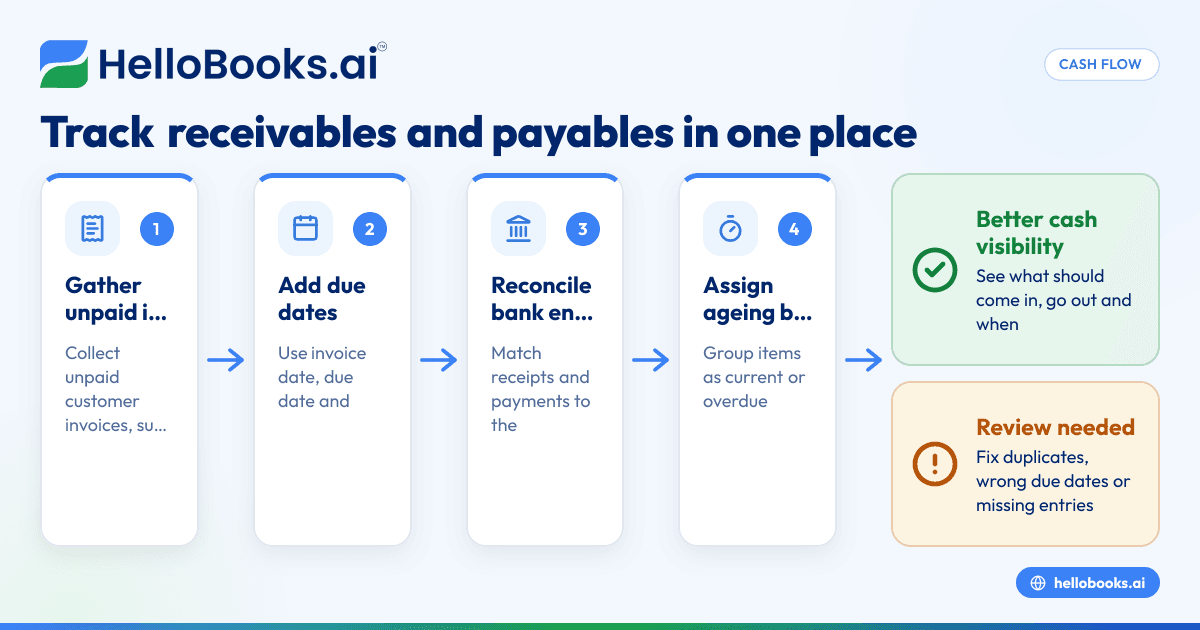
1. Gather all unpaid sales invoices
Pull every invoice that has not been fully paid by customers. Make sure you include partial payments. If a customer paid ₹30,000 against a ₹50,000 invoice, only ₹20,000 should remain outstanding.
2. Gather all unpaid purchase bills and expenses
Add all supplier invoices, contractor payments, office expenses and other bills that are approved but unpaid. Do not leave out recurring items like rent, internet or outsourced services.
3. Add invoice dates and due dates
This is essential. Without due dates, you cannot tell what is current and what is overdue.
4. Reconcile payments received and made
Match bank receipts and bank payments against the correct invoices and bills. This step is where many errors happen, especially when customers make combined payments or vendors are paid in parts.
Using bank reconciliation software can reduce manual matching work here.
5. Calculate the outstanding balance
For each line item, calculate:
Outstanding amount = total invoice or bill amount - amount already paid
6. Assign ageing buckets
Compare the due date with today’s date and place each item in the right bucket.
7. Review for duplicates and missing entries
Check for:
- duplicate invoices
- wrong due dates
- credit notes not adjusted
- payments entered twice
- unpaid bills missing from the list
8. Summarise for action
Your final report should show:
- total receivables outstanding
- total payables outstanding
- overdue receivables
- overdue payables
- top 10 customers by amount due
- top 10 suppliers by amount payable
Common mistakes to avoid
A report is only useful if people trust it. These are the most common problems.
Mixing invoice date and due date
An invoice raised on 01/09/2026 may be due on 30/09/2026. If you age by invoice date instead of due date, the report becomes misleading.
Ignoring partial payments
This is very common in businesses that receive staggered payments. A customer may pay 50% now and the rest later. If your report still shows the full invoice amount, collections look worse than they are.
Not updating bank entries regularly
If receipts and payments are updated only once a month, the report is always behind. This leads to duplicate follow-ups and poor planning.
Tracking receivables but not payables
This gives an incomplete view of cash flow.
No ownership for follow-up
A report without action is just a file. Someone must own customer reminders, escalation and vendor payment planning.
How often should you review it?
For most small businesses, a weekly review is the minimum. A daily review is better if your cash flow is tight or your invoice volume is high.
Good review rhythms
- Daily: businesses with many transactions, tight margins or frequent collections
- Weekly: most SMEs with regular billing and vendor payments
- Monthly: too slow for active cash flow management
A simple weekly routine works well:
- Review overdue receivables.
- Assign collection follow-ups.
- Review payables due in the next 7-14 days.
- Compare expected inflows with planned outflows.
- Delay non-essential payments if needed.
- Escalate high-value overdue items.
How to use the report to improve cash flow
The report should not just sit in accounts. It should drive decisions.
Prioritise collections by amount and ageing
Start with invoices that are both old and high value. A ₹2,00,000 invoice overdue by 45 days deserves more attention than a ₹5,000 invoice due tomorrow.
Segment customers by payment behaviour
Some customers always pay after one reminder. Some delay until the third call. Track this pattern and adjust your follow-up process.
Set vendor payment priorities
Not every payable has the same urgency. Prioritise based on:
- due date
- supplier importance
- stock dependency
- penalty risk
- relationship history
Forecast short-term cash gaps
If payables due in the next 10 days are higher than likely collections, you can act early. You may speed up collections, renegotiate payment timing, or slow discretionary spending.
Use clear reminders and records
If most customer follow-up happens on WhatsApp, record the outcome in the report. Otherwise, one team member may not know what another already discussed.
Spreadsheet, Tally or software: what works best?
A spreadsheet can work for very small teams with low transaction volume. It is flexible and familiar. But it also creates problems.
When spreadsheets start breaking
Spreadsheets become difficult when:
- more than one person updates them
- invoice volume increases
- payments are partial or frequent
- due dates change often
- bank matching is manual
- reports are needed daily
Version control becomes messy. One file is on email. Another is on desktop. A third is edited after a meeting and no one knows which one is final.
Tally can help, but manual effort remains
Many Indian businesses use Tally. It can produce receivable and payable reports. But teams often still export data, adjust it manually and share separate files for action.
That is where modern accounting software for small business can be more practical. It brings invoicing, expenses, bank matching and reports together.
If your team is evaluating a move from older workflows, a Tally alternative may be worth considering.
What software should make easier
Look for a system that helps you:
- raise invoices and track status
- record supplier bills
- match receipts and payments
- view receivables and payables together
- generate ageing reports instantly
- reduce manual follow-up work
- maintain one shared source of truth
For example, AI accounting software or AI bookkeeping tools can reduce repetitive data entry and make reports more current.
A practical format for your outstanding payments report
Here is a simple structure you can use.
Section 1: Receivables summary
Include:
- Total outstanding receivables
- Current receivables
- Overdue receivables
- Top overdue customers
- Collections due this week
Section 2: Payables summary
Include:
- Total outstanding payables
- Current payables
- Overdue payables
- Top supplier dues
- Payments due this week
Section 3: Detailed ageing tables
List every unpaid invoice and bill with ageing buckets.
Section 4: Action notes
This section matters more than most people think. Add simple notes like:
- Reminder sent on 28/09/2026
- Customer promised payment by Friday
- Supplier agreed extension till 10/10/2026
- Payment held due to approval pending
These notes turn the report into a working tool.
Where compliance and records matter
If your outstanding payments report is linked to invoices and bills, keep your records clean and organised. This is especially important when GST entries, invoice values and customer details need to match your books.
If your business raises a high volume of tax invoices, tools like invoice software, GST return filing software and e-invoicing software can help reduce errors across billing and reporting.
If the report includes customer or vendor contact details, handle personal data carefully and follow applicable privacy requirements, including the DPDP Act 2023 where relevant. This article is general information, not tax or legal advice.
How HelloBooks can help
HelloBooks is built for small businesses that want less manual work and better cash visibility. Instead of maintaining separate files for invoices, bills, expenses and bank entries, you can manage them in one place and get a clearer outstanding payments report.
That means your team can track customer dues, supplier payments, bank matches and reporting without so much spreadsheet clean-up. For businesses moving away from disconnected tools, this can make weekly cash flow reviews much easier.
If you want to see how HelloBooks can help you track receivables and payables in one place, you can book a demo or compare plans on the pricing page.
Frequently asked questions
What is the difference between an outstanding payments report and an ageing report?
An outstanding payments report shows unpaid receivables and payables at a point in time. An ageing report is usually a part of that report and groups those unpaid amounts by how old they are. In practice, many businesses use the terms together.
How often should a small business update its outstanding payments report?
Weekly is a good starting point for most small businesses. If your business has frequent transactions or tight cash flow, update it daily. The more current the report, the more useful it is for decisions.
Should receivables and payables be tracked in the same report?
Yes, if your goal is cash flow control. Looking at both together helps you see expected inflows and planned outflows in one view. That makes it easier to decide what to collect first and what to pay first.
Can I create an outstanding payments report in Excel?
Yes, many small businesses start with Excel or Google Sheets. It works for low volumes and simple workflows. But once invoices, bills and bank matching increase, software is usually more reliable and easier to maintain.


