
Key takeaways
What this article covers, in order:
- Key takeaways
- Why month-end close matters for small businesses in Canada
- What is a practical 7-day month-end close process?
- What should be on a month end close checklist Canada businesses can actually use?
- Day 1: Freeze the month and gather missing items
- Day 2: Reconcile bank accounts and cash
Month-end close is the set of checks you complete after each month to make sure your books are accurate, complete, and ready for decisions, tax filings, and year-end work. For a small business in Canada using QuickBooks Online or Xero, the best close process is simple, repeatable, and done on the same days every month.
Key takeaways
- A strong month end close checklist in Canada helps you catch errors before they affect cash flow, GST/HST reporting, and management reports.
- Most small businesses can complete a practical close in seven days if they assign owners and use a standard checklist.
- The most important tasks are bank and credit card reconciliations, receivables, payables, payroll checks, and review of unusual transactions.
- QuickBooks Online and Xero both support a clean close process, but your results depend more on discipline than software.
- AI tools can reduce manual coding, document collection, and matching work, especially for high-volume transactions.
- This article is general information, not tax or legal advice.
Why month-end close matters for small businesses in Canada
If your books are updated but not properly closed, you can still make poor decisions. A sales spike may look real when it is only timing. Expenses may appear low because supplier bills were not entered. Cash may seem healthy while customer payments are overdue.
That is why a reliable month end close checklist Canada businesses can actually follow matters more than a long technical list copied from a large company.
For many small businesses in Toronto, Vancouver, or Montreal, the close needs to do four things:
- Confirm cash and card balances are correct.
- Record all sales, bills, and expenses for the month.
- Review taxes and payroll-related entries.
- Produce reports the owner can trust.
If you use QuickBooks Online or Xero, you already have the basic tools to do this. The challenge is usually process. Teams leave receipts in email. Bills come in late. Bank feeds contain duplicates. Customers pay without clear references. Then the finance lead spends the first week of the new month cleaning up.
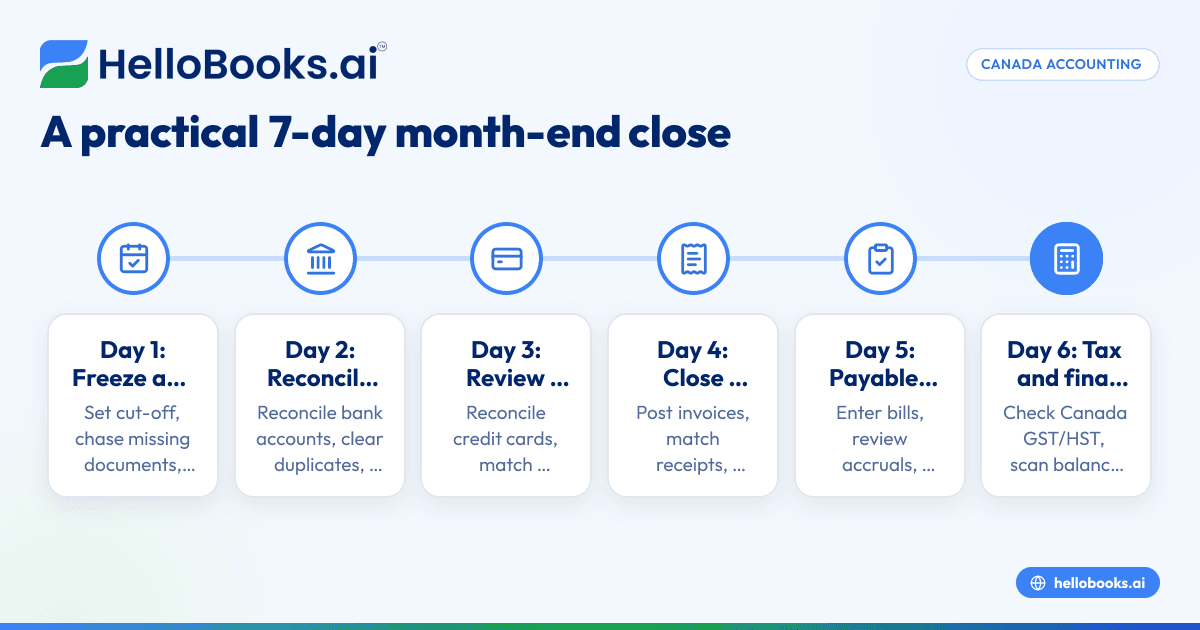
A better approach is to use a fixed seven-day close. Each day has a small number of tasks, a clear owner, and a deadline. That reduces last-minute work and makes your reports more dependable.
What is a practical 7-day month-end close process?
A practical seven-day close means you finish the main checks and reports within seven calendar days after month-end. It focuses on the work that materially affects accuracy, not on unnecessary perfection.
For a small business, that usually means closing the month by Day 7 with reconciled cash, updated receivables and payables, reviewed payroll, reasonable accruals, and final management reports.
You do not need a large finance team to make this work. You need a checklist, cut-off rules, and one person who owns completion.
Set your close principles before Day 1
Before you start the seven-day cycle, agree on a few rules:
- All sales invoices for the month must be raised by a fixed date.
- All supplier bills and employee expenses must be submitted by a fixed date.
- Bank and card feeds should be reviewed throughout the month, not only at month-end.
- Unusual transactions must be flagged when posted.
- One person approves the final month-end reports.
This is also where modern AI bookkeeping tools can help. They can reduce chasing, categorisation, and matching work so your team spends more time reviewing and less time entering data.
What should be on a month end close checklist Canada businesses can actually use?
Start with cash, then move to customers, suppliers, payroll, taxes, and final review. Keep the checklist short enough that your team follows it every month.
Here is the practical version:
Core tasks every month
- Confirm all bank feeds are up to date.
- Reconcile every bank account.
- Reconcile every credit card account.
- Review uncategorised and suspense transactions.
- Check duplicate income or expense entries.
- Confirm all customer invoices for the month are posted.
- Match customer receipts to open invoices.
- Review overdue receivables.
- Enter all supplier bills received for the month.
- Review unpaid bills and cut-off.
- Record employee expenses and reimbursements.
- Review payroll journals and remittances posted in the books.
- Check GST/HST coding on unusual transactions.
- Review prepaid expenses, accruals, and loan balances if relevant.
- Compare profit and loss to last month and budget, if used.
- Compare balance sheet accounts to prior month.
- Lock or close the period after review.
Optional tasks for growing businesses
As your business grows, add these items:
- Inventory adjustments and stock variance review.
- Deferred revenue review.
- Fixed asset additions and depreciation entries.
- Intercompany balances, if applicable.
- Department or location reporting.
- Bilingual invoice and customer communication checks where relevant.
If your team still relies on spreadsheets around QuickBooks Online or Xero, consider whether accounting software for small business with more automation would reduce handoffs and rework.
Day 1: Freeze the month and gather missing items
Day 1 is about cut-off. You want to stop the month from drifting while documents keep arriving informally.
Your Day 1 steps
- Confirm the month-end date you are closing.
- Ask sales, operations, and admin teams for any missing invoices, bills, or receipts.
- Make sure bank feeds are current.
- Export or note open items from the prior month that still need attention.
- Mark any large or unusual transactions for review.
What to watch for
The most common Day 1 issue is incomplete source documents. A supplier invoice may sit in someone’s inbox. A customer invoice may be drafted but not sent. A card expense may have no receipt.
Set a hard internal deadline for submission. If something still has not arrived, note it and decide whether an accrual is needed.
This is where an expense management software workflow can help. It keeps receipts and claims in one place so fewer items go missing at close.
Day 2: Reconcile bank accounts and cash
Cash is usually the first area to reconcile because it affects every report.
Your Day 2 steps
- Reconcile each bank account to the month-end statement.
- Investigate unmatched deposits and withdrawals.
- Clear transfers posted twice.
- Review bank fees, interest, and direct debits.
- Follow up on stale reconciling items.
Common Canadian small business issues
A common problem is customer payments that hit the bank without a clear invoice reference. Another is duplicated transactions from manual uploads plus bank feeds. You may also see loan payments posted entirely to expense instead of split between principal and interest.
If your business has many transactions, bank reconciliation software can speed up matching and reduce manual review.
Review merchant settlements
If you accept card payments, compare deposits to expected sales after fees and timing differences. Do not assume one daily deposit equals one invoice total. Payment processors often batch multiple sales and deduct fees before settlement.
Day 3: Reconcile credit cards and employee expenses
Card activity often causes month-end delays because receipts arrive late and coding is inconsistent.
Your Day 3 steps
- Reconcile each credit card to its statement.
- Match receipts to each material transaction.
- Code meals, travel, software, subscriptions, and office costs carefully.
- Review employee reimbursements still unpaid.
- Check for personal spending mixed into business cards.
Why this day matters
Small errors here create larger reporting issues later. Marketing spend may be overstated. Owner drawings may sit in operating expenses. GST/HST treatment may be wrong on card transactions if the supporting document is missing.
If you use shared company cards, assign one owner to review each card monthly. Accountability shortens the close.
Day 4: Close accounts receivable
Receivables affect cash planning and revenue accuracy. This day is not only about unpaid invoices. It is also about whether income was recorded in the right period.
Your Day 4 steps
- Confirm all sales invoices for the month were created.
- Match receipts to open invoices.
- Review unapplied cash.
- Run an aged receivables report.
- Flag old balances for follow-up or write-off review.
- Check credit notes and refunds issued during the month.
Look at cut-off, not just collections
Ask whether late-month work was invoiced in the correct month. If your team delivered the service before month-end but invoiced later, your revenue may be understated.
For service businesses in cities like Toronto or Vancouver, this matters when month-end falls near a busy project delivery date. For product businesses, check whether shipped orders and invoicing are aligned.
If invoicing is still manual, invoice software can make billing more consistent and reduce the number of draft invoices left open at month-end.
Day 5: Close accounts payable and payroll
Payables and payroll usually contain the most forgotten items after cash.
Your Day 5 steps
- Enter all supplier bills received for the month.
- Review recurring bills and subscription charges.
- Check the aged payables report.
- Identify expenses incurred but not yet billed.
- Review payroll entries posted to the books.
- Confirm employer costs and deductions are recorded correctly.
- Review loans, leases, and scheduled payments.
Do not miss cut-off expenses
A clean profit and loss statement depends on including expenses in the month they relate to, even if the supplier bill arrives later. Examples include utilities, contractor work completed before month-end, and monthly software charges.
For payroll, compare payroll reports to the accounting entries. Make sure wages, source deductions, and employer costs are posted to the right accounts. If payroll is processed outside QuickBooks Online or Xero, this review is especially important.
Day 6: Review GST/HST, balance sheet accounts, and unusual entries
By Day 6, most transaction-level work should be done. Now you move to review.
Your Day 6 steps
- Scan GST/HST coding on unusual income and expense transactions.
- Review balance sheet accounts for negative or unexpected balances.
- Check loan, tax, and clearing accounts.
- Review prepaid expenses and accruals if used.
- Compare this month to the prior month and investigate large movements.
Be careful with tax coding
Coding errors often hide in one-off purchases, mixed-use expenses, and manual journal entries. You do not need to recheck every small transaction if earlier steps were strong. Focus on exceptions and accounts with unusual movement.
If your business files indirect taxes, make sure the books support your return. Do not treat the month-end close as a filing exercise, but do use it to reduce surprises later. If you need more automation around tax workflows, GST return filing software may be relevant depending on your process.
Use variance analysis
Look at your profit and loss and balance sheet side by side with last month. Ask simple questions:
- Why did gross margin change?
- Why are advertising costs much higher?
- Why did receivables grow faster than sales?
- Why is a liability account negative?
You are not looking for perfection. You are looking for items that could materially mislead you.
How can ai month end tools help small businesses?
AI month end tools help by collecting documents, suggesting categories, matching transactions, and flagging exceptions faster. They do not replace review, but they can reduce repetitive work and shorten the time from month-end to reliable reports.
A practical use case is high-volume bookkeeping. If you have many card transactions, supplier bills, or bank movements, automation can identify likely matches and surface only the items needing human attention. That speeds up close without lowering control.
Good AI accounting software can also help standardise your process. It can remind teams about missing documents, reduce manual coding, and make it easier to review exceptions. The value is not only speed. It is consistency from one month to the next.
That matters when your business is growing and the owner can no longer inspect every transaction personally.
What reports should you review before you finalise the month?
Review the profit and loss, balance sheet, cash position, aged receivables, and aged payables. If one report looks wrong, go back to the reconciliations before sharing numbers.
Minimum report pack for a small business
Before you mark the month complete, review:
- Profit and loss for the current month and year to date
- Balance sheet as of month-end
- Aged receivables
- Aged payables
- Cash balance summary
- Budget versus actual, if you use budgets
What a good final review looks like
The owner or finance lead should ask:
- Do cash balances tie to statements?
- Are there old receivables that need action?
- Are any large supplier bills missing?
- Are tax and payroll balances plausible?
- Are there material changes from last month?
Then lock the period in QuickBooks Online or Xero to reduce accidental edits.
A simple month-end close checklist template
You can copy this into your task manager or spreadsheet.
Day 1
- Freeze month-end date
- Chase missing invoices, bills, receipts
- Confirm bank feeds updated
- List open issues
Day 2
- Reconcile all bank accounts
- Clear duplicates and unmatched items
- Review merchant settlements
Day 3
- Reconcile credit cards
- Match receipts
- Review reimbursements and personal items
Day 4
- Post final sales invoices
- Match receipts to invoices
- Review aged receivables
- Check credit notes and refunds
Day 5
- Enter supplier bills
- Review aged payables
- Record accruals where needed
- Review payroll postings
Day 6
- Review GST/HST coding
- Review balance sheet accounts
- Investigate unusual variances
- Post final adjustments
Day 7
- Review final reports
- Approve month-end pack
- Lock the accounting period
- Record lessons for next month
Common mistakes that slow down the close
Most delays come from process gaps, not accounting complexity.
1. Leaving reconciliations until month-end
If you wait until the new month begins, the backlog is harder to untangle. Review bank and card feeds every week.
2. No clear cut-off rules
Without deadlines, invoices and bills keep arriving after you think the month is done. Publish internal cut-off dates.
3. Too many manual workarounds
Spreadsheets, email approvals, and separate receipt folders create bottlenecks. Standardise your flow wherever possible.
4. No owner for each task
A checklist without names becomes a wish list. Assign one person to each account or process.
5. Sharing reports before review
A quick first draft can become the official number if it reaches management too early. Finish reconciliations first.
When to improve your system
If your close regularly takes more than seven days, look for root causes instead of pushing the team harder.
Typical signs you need a better process or platform include:
- Many uncategorised bank transactions each month
- Repeated duplicate entries
- Missing receipts and slow approvals
- Frequent rework after reports are shared
- Heavy dependence on one staff member
- Difficulty keeping QuickBooks Online or Xero clean as volume grows
At that point, a QuickBooks alternative may be worth reviewing if your current setup depends on too many manual fixes.