
Key takeaways
What this article covers, in order:
- Key takeaways
- What is a month-end close for a small business?
- Why the month-end close matters in United States small businesses
- Month-end close checklist for small businesses in United States
- A simple month-end close timeline
- Common month-end close mistakes small businesses make
Month-end close is the process of reviewing, correcting, and finalizing your books for the previous month. For a small business in the United States, a good month-end close checklist helps you catch errors early, keep cash flow visible, and make faster decisions without waiting until tax season.
Key takeaways
- A month-end close checklist helps small businesses keep accurate books and avoid last-minute cleanup.
- The most important tasks are bank reconciliation, AR and AP review, expense categorization, and financial report checks.
- A simple close process works best when each task has an owner, deadline, and standard review step.
- Small businesses in the United States should also watch for sales tax, payroll entries, and 1099-related vendor records where relevant.
- The goal is not just clean books. It is timely numbers you can use to run the business.
What is a month-end close for a small business?
A month-end close is the routine you follow after each month ends to make sure your accounting records are complete and accurate. You confirm that money in and money out has been recorded, accounts match source documents, and the month’s reports make sense.
For a small business, this does not need to feel like a corporate finance project. A practical month-end close checklist small business owners can follow usually includes:
- Reconciling bank and credit card accounts
- Recording unpaid bills and customer invoices
- Reviewing payroll entries
- Checking loan balances
- Cleaning up expense categories
- Reviewing profit and loss, balance sheet, and cash flow
If you run a retail store in Chicago, a design firm in Austin, or a parts distributor in Detroit, the close serves the same purpose. It turns raw transactions into usable financial information.
Without a monthly close, problems pile up. Duplicate expenses stay hidden. Customer payments get applied incorrectly. Sales tax liability can drift away from actual collections. By the time you notice, several months may need repair.
Why the month-end close matters in United States small businesses
Many small businesses in the United States still rely on spreadsheets, a basic bookkeeping setup, or a mix of tools like QuickBooks, Stripe, and bank feeds. That stack can work, but only if someone checks the output every month.
It helps you make decisions from current numbers
If your books are closed by the 5th or 10th business day, you can review margins, overhead, and cash flow while the month is still fresh. That is much more useful than reviewing three-month-old numbers.
It reduces tax-time stress
A clean monthly process makes year-end filing easier. Your CPA or accountant spends less time fixing the books and more time advising you. This article is general information, not tax or legal advice.
It improves collections and bill control
A close forces you to review aged receivables and payables. That helps you follow up on overdue invoices and avoid missed vendor bills.
It supports compliance and reporting
Depending on your business, you may need to track sales tax, payroll liabilities, or vendor details for 1099 reporting. Month-end is a good point to confirm those records are complete.
Month-end close checklist for small businesses in United States
Below is a practical checklist you can use each month. You can assign these tasks to an owner, bookkeeper, finance lead, or outside accountant.
1. Close the month in your systems
Start by defining the cutoff date. For example, if you are closing March, include transactions dated 03/01 through 03/31 only.
Then do three things:
- Download or sync all bank and credit card transactions.
- Gather missing bills, invoices, receipts, and payroll reports.
- Freeze the prior month from casual edits if your system allows it.
This first step reduces back-and-forth later. It also keeps new-month work from mixing with last-month cleanup.
2. Reconcile bank accounts
Bank reconciliation is one of the most important close tasks. Compare your book balance to the ending bank statement balance for each operating account.
Look for:
- Deposits recorded in books but not at the bank
- Bank fees or interest not yet recorded
- Duplicate entries
- Unmatched transfers between accounts
- Customer payments posted to the wrong invoice
If you run multiple accounts, reconcile each one separately. If this step is painful every month, dedicated bank reconciliation software can help reduce manual matching.
3. Reconcile credit card accounts
Credit card accounts often create hidden errors. Small subscriptions, employee purchases, and uncategorized charges build up fast.
Review each card statement and confirm:
- Every charge is recorded once
- Personal charges are identified
- Receipts are attached where needed
- Interest or fees are posted correctly
- Credits and refunds are matched properly
This is also a good point to flag recurring software charges you no longer need.
4. Review accounts receivable
Accounts receivable shows who owes you money. At month-end, review your customer aging report and clean up anything that looks off.
Check for:
- Old unpaid invoices that need follow-up
- Payments received but not applied
- Credit notes or refunds still open
- Duplicate invoices
- Revenue booked for work not yet invoiced, if applicable
For a service business in Houston, this review can quickly show whether a few slow-paying customers are putting pressure on cash flow.
5. Review accounts payable
Accounts payable is not just a list of bills. It is also your view of short-term obligations.
At month-end:
- Enter all vendor bills dated in the month.
- Review unpaid bills and due dates.
- Accrue any significant expenses incurred but not yet billed, if you use accrual accounting.
- Remove duplicates or incorrect entries.
This keeps expenses in the right period and helps avoid surprises in the next month.
6. Record payroll and payroll liabilities
Payroll is often handled in a separate system, but the accounting entries still need to land correctly in your books.
Confirm that you have recorded:
- Gross wages
- Employer payroll taxes
- Employee tax withholdings
- Benefits and deductions
- Payroll cash movement
- Any payroll liabilities still unpaid at month-end
If you use outside payroll software, compare the payroll summary report to the journal entries posted in your accounting system.
7. Review sales tax liability, if applicable
In the United States, sales tax rules vary by state and sometimes by local jurisdiction. If your business collects sales tax, month-end is a good time to compare:
- Sales tax collected in your sales system
- Sales tax payable in your books
- Any returns, exemptions, or adjustments
- State-by-state balances where relevant
If you sell in multiple states, this review matters even more. Even when filing happens later, the monthly tie-out helps prevent mismatches.
8. Review vendor records for 1099 readiness
If you pay contractors or certain non-employees, accurate vendor records matter throughout the year. Do not wait until January to discover missing tax information.
At month-end, check whether relevant vendors have:
- Correct legal name
- Correct address
- Taxpayer information on file where needed
- Payments coded consistently to the right expense accounts
This does not mean every vendor gets a 1099. It means your records should be complete enough to review properly at year-end.
9. Categorize and review expenses
Expense categorization is where many small business books go off track. Auto-imported bank feeds are helpful, but they still need review.
Look for:
- Uncategorized transactions
- Meals, travel, software, and advertising posted inconsistently
- Owner draws or personal expenses mixed into business spending
- Capital purchases incorrectly booked as regular expenses
- Duplicate subscription or recurring charges
If your team handles many receipts, expense management software can help collect backup and keep coding cleaner.
10. Review loans and other balance sheet accounts
Your profit and loss gets attention, but the balance sheet catches many important issues. Review all major balance sheet accounts every month.
That includes:
- Loans and lines of credit
- Fixed assets
- Sales tax payable
- Payroll liabilities
- Prepaid expenses
- Undeposited funds
- Owner contributions or distributions
For loans, compare your book balance to the lender statement. Split payments correctly between principal and interest.
11. Check inventory, if you carry stock
If your business sells physical goods, inventory should be part of your close.
Review:
- Ending inventory quantity
- Obsolete or damaged stock
- Large purchase entries
- Cost of goods sold reasonableness
- Inventory adjustments and write-downs, if needed
A distributor in Detroit or a light manufacturer using an ERP system should still reconcile what the ERP shows against what reaches the accounting records.
12. Review fixed assets and depreciation
If you purchased equipment, furniture, vehicles, or major software implementations, review whether they should be capitalized rather than expensed immediately.
At minimum, track:
- Asset purchase date
- Cost
- Asset category
- Useful life used in your records
- Depreciation posted, if applicable
Many small businesses leave this until year-end. Monthly review makes the year-end close easier.
13. Reconcile inter-account transfers
Transfers between checking, savings, credit card, and loan accounts often create duplicate income or expense entries if they are posted incorrectly.
Check that each transfer appears once in the sending account and once in the receiving account. It should not show as revenue or operating expense unless it truly is one.
14. Review deferred revenue or prepaid items, if relevant
If customers pay in advance, or if you prepay annual software or insurance, you may need to spread those amounts over time.
Common examples include:
- Annual insurance premiums
- Prepaid rent
- Customer retainers
- Support contracts billed upfront
This step matters more if you follow accrual accounting. It helps your monthly results reflect actual business activity.
15. Run and review financial reports
Once entries and reconciliations are complete, review the core reports:
- Profit and loss
- Balance sheet
- Cash flow statement
- AR aging
- AP aging
Ask simple questions:
- Does revenue look reasonable compared with last month?
- Are gross margins in the expected range?
- Did any expense category spike unusually?
- Do bank balances match actual cash?
- Are liabilities believable?
Good financial review is not just accounting hygiene. It is management control.
A simple month-end close timeline
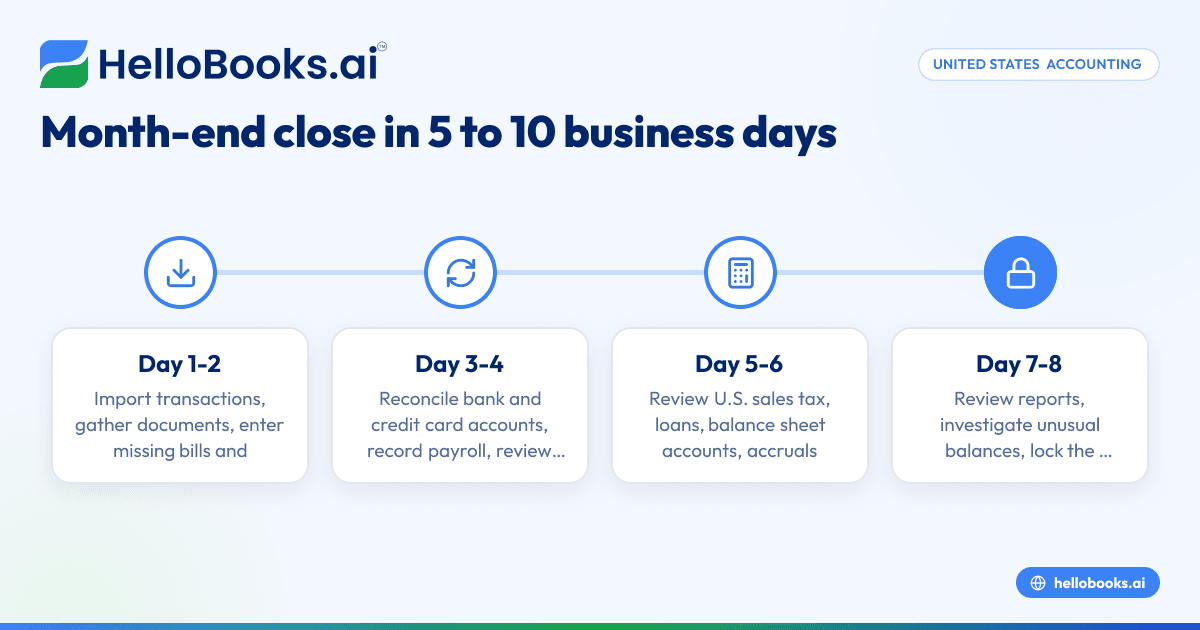
A checklist works better when paired with a timeline. Most small businesses should aim to close within 5 to 10 business days.
Example close calendar
Day 1-2
- Import transactions
- Gather documents
- Enter missing bills and invoices
Day 3-4
- Reconcile bank and credit card accounts
- Record payroll
- Review AR and AP
Day 5-6
- Review sales tax, loans, and balance sheet accounts
- Post accruals, prepaids, and inventory adjustments
Day 7-8
- Review reports
- Investigate unusual balances
- Lock the month
If your close regularly drifts past the middle of the next month, the process likely needs simplification.
Common month-end close mistakes small businesses make
Even a short checklist can fail if the same issues repeat each month.
Waiting for the perfect receipt file
Close the books with the best available information, then document exceptions. Do not delay the whole close because one receipt is missing.
Mixing personal and business transactions
This creates cleanup work and can distort expense trends. Separate cards and bank accounts make the close much easier.
Relying only on bank feeds
Bank feeds save time, but they do not replace review. They cannot always tell the difference between a transfer, loan payment, software expense, or owner draw.
Ignoring the balance sheet
Many owners only look at revenue and expenses. But unreconciled liabilities, loans, and asset balances can hide significant issues.
Not assigning ownership
Every task should have a clear owner and due date. Even in a very small company, someone should be accountable for finishing the close.
How to make your monthly close faster
Speed comes from consistency, not from rushing.
Standardize the checklist
Use the same order every month. Keep a shared checklist in your accounting SOPs or project tool.
Set cutoff rules
Tell your team when bills, expenses, and customer invoices must be submitted. Late documents should be handled through a clear adjustment process.
Reduce manual entry
Recurring bills, bank rules, and automated matching can cut repetitive work. If your process still depends on spreadsheets and manual categorization, AI bookkeeping tools may help reduce cleanup time.
Keep your chart of accounts simple
Too many categories create confusion and miscoding. A lean chart of accounts makes reporting easier to review.
Use the right software stack
Many small businesses outgrow basic bookkeeping habits before they outgrow revenue targets. If your team wants a more automated workflow, it may be worth reviewing accounting software in the USA or modern accounting software for small business.
Who should own the month-end close?
The answer depends on your business size.
Owner-led close
Very small businesses often have the owner handling approvals and final review. This can work if transaction volume is low.
Bookkeeper-led close
A bookkeeper can own reconciliations, coding, and support schedules. The owner or finance lead can then review final reports.
Accountant or finance lead review
As the business grows, someone should review trends, accruals, and reporting quality. If you need outside help, you can find an accountant for setup or periodic review.
The key is separation of duties where possible. The person entering transactions should not be the only person reviewing them.
A practical month-end close template you can reuse
Here is a simple monthly checklist format:
- Lock prior period and gather source documents
- Reconcile all bank accounts
- Reconcile all credit cards
- Review and clean AR
- Review and clean AP
- Record payroll and liabilities
- Review sales tax balances
- Check vendor records for 1099 completeness
- Categorize and review expenses
- Reconcile loans and balance sheet accounts
- Review inventory, fixed assets, and prepaids
- Run financial reports and investigate exceptions
- Final review and close the month
A tool with automation can make this smoother, especially when transaction volume grows. If you are comparing systems, look at an AI accounting software option or a QuickBooks alternative if your current process feels too manual.
A faster month-end close gives you cleaner books, better visibility, and fewer year-end surprises. If you want a simpler way to manage bookkeeping, invoicing, expenses, and reconciliations, you can book a demo or compare options on the pricing page.
Frequently asked questions
How long should a month-end close take for a small business?
For many small businesses, the close should take 5 to 10 business days after month-end. If it regularly takes longer, the process may have too many manual steps or unresolved data issues.
What is the most important step in a month-end close checklist?
Bank and credit card reconciliation are usually the most critical steps. If cash accounts are wrong, the rest of the financial statements become harder to trust.
Do cash-basis small businesses still need a month-end close?
Yes. Even cash-basis businesses benefit from a monthly review of cash, unpaid invoices, bills, payroll, and expense categories. The close gives you a clearer view of performance and helps prevent bookkeeping backlog.


