
Key takeaways
What this article covers, in order:
- Key takeaways
- Why month-end close matters for QuickBooks users
- What is a good month end close checklist quickbooks process?
- 12-step month-end close checklist for QuickBooks users in the United States
- How can you speed up the close without losing control?
- What usually slows down a QuickBooks month-end close?
Month-end close in QuickBooks means turning a month of transactions into clean, reliable financial statements. A good checklist helps you catch missing entries, clear suspense items, and reconcile accounts faster, so you can trust your numbers before you make decisions.
Key takeaways
- A solid month end close checklist quickbooks process reduces errors, late adjustments, and reporting delays.
- The fastest closes follow the same order every month, with clear owners and due dates.
- Bank, credit card, AR, AP, payroll, and sales tax reviews usually drive most close delays.
- QuickBooks works better when you lock the period after review and keep support for every adjustment.
- AI tools can speed coding, matching, and exception review, but someone still needs final approval.
Why month-end close matters for QuickBooks users
If you use QuickBooks every day, month-end can feel bigger than it should. Transactions pile up. Receipts are missing. A few customer payments sit unmatched. One payroll entry lands in the wrong month. Then your profit and loss changes after you already shared it.
That is why a repeatable close checklist matters.
For a business in Chicago, Houston, or Detroit, the close is not just an accounting task. It affects cash planning, owner decisions, lender reporting, and tax readiness. If your books are late, every downstream task gets harder.
QuickBooks is flexible, but that flexibility can create inconsistency. Different people may post expenses to different accounts. Bank feeds may suggest the wrong match. Duplicate bills or deposits can slip in. A structured close reduces those issues.
The goal is not perfection on day one. The goal is to close faster with fewer surprises each month.
What is a good month end close checklist quickbooks process?
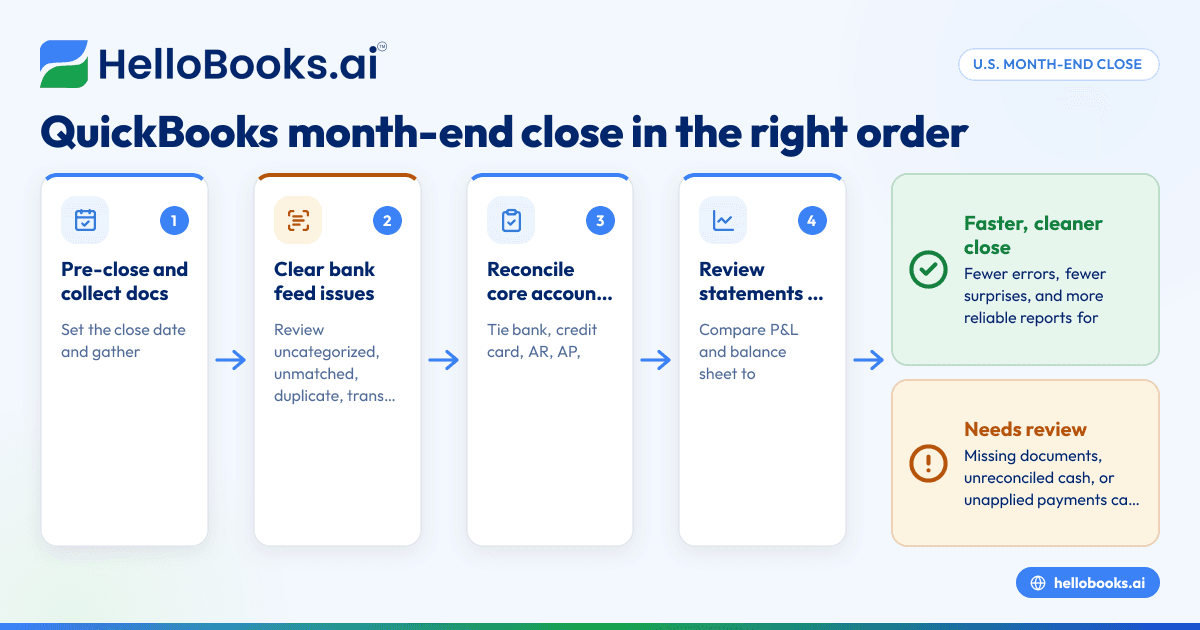
A good process is the same every month, in the same order, with one owner for each task. Start with transaction completeness, then reconcile cash, then review balance sheet accounts, then check revenue and expenses, and finally lock the period after approval.
If your team changes the order every month, you will waste time chasing the same errors.
A clean close process usually has three parts:
- Pre-close work Capture bills, receipts, invoices, payroll reports, and bank activity before review starts.
- Core reconciliations Reconcile bank and card accounts, then review AR, AP, loans, payroll, and taxes.
- Final review and lock Compare results to prior months, post adjustments, and close the month to prevent edits.
If you want less manual work during this process, tools like AI bookkeeping and bank reconciliation software can help reduce transaction cleanup before review starts.
12-step month-end close checklist for QuickBooks users in the United States
Follow these steps in order. That order matters because later steps depend on earlier ones being complete.
1. Set your close date and gather missing documents
Start by choosing a target close date for the month. Many small businesses aim to close within 5 to 10 business days.
Then collect what is still missing:
- Vendor bills
- Customer invoices
- Expense receipts
- Bank and credit card statements
- Loan statements
- Merchant processor reports
- Payroll reports
Without source documents, every later review takes longer. Make this step the owner’s first checkpoint.
2. Review uncategorized and unmatched bank feed transactions
Open your bank feed in QuickBooks and clear the items sitting in review. Look for:
- Uncategorized expenses
- Duplicate imports
- Transfers posted as expenses
- Deposits that should match customer payments
- Personal transactions in business accounts
Do not auto-add blindly. QuickBooks rules save time, but a bad rule can create a month of errors quickly. Review any high-volume rule that posts directly to an expense account.
3. Reconcile all bank accounts
This is the backbone of your close. Reconcile every operating, savings, and payroll account to the month-end bank statement.
Check for:
- Missing checks
- Duplicate deposits
- Bank fees
- Interest income
- Transfers between accounts
- Old outstanding items
If the reconciliation does not tie, do not force it. A forced reconciliation hides the real problem and pushes it into next month.
Many teams save time here by using accounting software in the USA that automates matching and flags exceptions before the close starts.
4. Reconcile credit cards and employee card activity
Credit card reconciliations often get delayed because receipts are missing. Still, the statement must reconcile.
Review:
- Card charges posted twice
- Payments booked against expense instead of liability
- Personal or nonbusiness charges
- Tips, fuel, travel, and subscription charges
- Credits and refunds
If employees use cards often, ask for receipts before month-end, not after. That changes close speed more than almost anything else.
5. Match customer payments and review accounts receivable
Now review invoices, payments, and deposits. The goal is to make sure revenue and cash were recorded in the correct month.
Check:
- Open invoices that should have been paid
- Payments received but not applied
- Duplicate invoices
- Credit memos not cleared
- Deposits posted directly to income instead of AR
- Aging balances that are no longer collectible
For businesses billing from QuickBooks, a clear invoicing workflow matters. If your current setup creates errors, invoice software can help standardize how invoices and collections flow into the books.
6. Review accounts payable and unpaid bills
Next, make sure your vendor obligations are complete. AP errors often understate expenses and overstate profit.
Look for:
- Bills received but not entered
- Duplicate vendor bills
- Credits not applied
- Payments posted without matching the bill
- Old unpaid balances that need investigation
If you pay vendors by ACH, check whether the bank cleared after month-end. The bill belongs in the month you incurred the expense, even if payment cleared later.
7. Record payroll, payroll taxes, and benefits correctly
Payroll is one of the easiest places to misstate a month. Post payroll journals using payroll reports, not estimates.
Review:
- Gross wages
- Employer payroll taxes
- Employee withholdings
- Benefits and deductions
- Bonuses or commissions
- Accrued payroll at month-end, if needed
Also check whether payroll cash cleared in the same month or the next one. Timing issues can make your cash and liability accounts look wrong.
This article is general information, not tax or legal advice. If you are unsure how to record payroll liabilities or tax payments, confirm the treatment with your accountant.
How can you speed up the close without losing control?
Standardize your checklist, assign one owner per task, and review exceptions first. Use automation for coding and matching, but keep human approval for unusual items, reconciliations, and final journal entries.
That short answer is the core of a faster close. Most delays do not come from the number of transactions alone. They come from inconsistent workflows.
To speed things up safely:
- Create a close calendar Set due dates for bank recs, AP cutoff, AR review, payroll, and management review.
- Use thresholds Review every unusual transaction, but do not spend 20 minutes on a $6 duplicate that is already corrected.
- Keep a recurring issue log If the same payment gateway mapping breaks every month, fix the source instead of correcting it manually forever.
- Automate routine matching This is where an ai month end workflow can help. AI can suggest matches, classify routine expenses, and flag exceptions. Your team then reviews only the items that need judgment.
- Lock the month after review This prevents someone from changing prior-period numbers after reports go out.
If you are outgrowing spreadsheets and basic cleanup, AI accounting software or accounting software for small business can help reduce manual close work.
8. Review loans, financing, and interest
If you have a line of credit, equipment loan, or other financing, compare QuickBooks to lender statements.
Confirm:
- Principal versus interest split
- Ending balances
- Auto-debits posted correctly
- New fees or charges
- Covenant reporting adjustments, if any
A common error is posting the full payment to interest expense. That overstates expense and understates liabilities.
9. Review fixed assets, depreciation, and prepaid expenses
Not every business needs complex schedules, but many still have items that should not hit expense all at once.
Review:
- Equipment purchases
- Leasehold improvements
- Software implementation costs
- Annual insurance payments
- Prepaid rent or service contracts
If your CPA or accountant calculates depreciation outside QuickBooks, make sure the journal entry is posted before final reports go out.
10. Check sales tax payable and filings in QuickBooks
If your business collects state or local sales tax, compare QuickBooks balances to your sales tax reports and filing records.
Review:
- Tax collected on taxable sales
- Exempt sales support
- Adjustments or credits
- Payments already made
- Jurisdiction balances that look unusual
Do not assume QuickBooks setup is always correct. Product taxability, shipping treatment, and location settings can affect the numbers. If you sell across multiple states, review your setup regularly.
11. Review the profit and loss and balance sheet for unusual changes
Now step back from transaction detail and look at the financial statements.
Compare this month to:
- Last month
- The same month last year
- Budget, if you have one
Ask simple questions:
- Did gross margin change sharply?
- Did rent, software, travel, or contractor costs jump?
- Does cash movement make sense?
- Did liabilities drop for no clear reason?
- Are there negative asset balances?
- Is retained earnings changing unexpectedly?
Analytical review catches errors that reconciliations miss. A payment may reconcile perfectly and still be posted to the wrong account.
12. Post final adjustments, save support, and lock the month
Once reviews are complete, post your adjusting entries. Then save the support behind each material entry.
That support might include:
- Bank statements
- Payroll reports
- Loan statements
- Depreciation schedules
- Revenue support
- Sales tax reports
- Adjustment memos
After that, close the period in QuickBooks. Use a closing date and restrict edits to prior periods. This protects your reports and gives your team one version of the truth.
What usually slows down a QuickBooks month-end close?
Missing source documents, unreconciled cash accounts, unapplied customer payments, and last-minute adjustments cause most delays. The fastest teams solve those issues during the month, not only at month-end.
Here are the most common causes in small businesses:
Too much cleanup left for the end
If receipts, bills, and coding are all delayed until month-end, the close becomes a catch-up project. Spread the work across the month.
No clear cutoff rules
Decide when to stop accepting routine entries for the month. If everyone keeps posting late items without review, reports keep changing.
Unclear ownership
Every close task needs an owner. If bank recs belong to one person but AR review belongs to no one, the whole process stalls.
Overreliance on bank feed guesses
Bank feeds are helpful, not authoritative. They cannot replace document review, proper coding, and accrual logic.
No review of prior-period edits
Sometimes the issue is not this month. It is a silent change to last month. Run an audit trail report if numbers move unexpectedly.
A simple month-end close timeline for a small business
You do not need a large accounting team to close well. You need a realistic timeline.
Days 1-3
- Import and review bank and card activity.
- Enter missing bills and invoices.
- Collect payroll and loan statements.
- Clear obvious unmatched items.
Days 4-6
- Reconcile all bank accounts.
- Reconcile all credit cards.
- Review AR and AP aging.
- Record payroll and recurring accruals.
Days 7-8
- Review loans, prepaids, and fixed assets.
- Check sales tax balances.
- Compare statements to prior month.
- Investigate unusual variances.
Days 9-10
- Post final adjustments.
- Save support files.
- Review management reports.
- Lock the month.
If your close takes much longer, track where the time goes. Usually one or two steps are causing most of the delay.
When to move beyond a basic QuickBooks close process
QuickBooks can support a lot of growing businesses. But some signs show your current process is stretched.
Watch for these signs:
- Close takes more than 10 business days every month
- You rely on spreadsheets to reconcile core accounts
- Multiple entities or locations create manual work
- Revenue and deposits are hard to match
- Expense coding changes by person
- Reports change after leadership reviews them
At that stage, it may help to look at a QuickBooks alternative or add specialized tools like expense management software to reduce manual entry and improve control.
If your team also needs outside support, you can find an accountant for review help or cleanup guidance.
A faster close is not only about software. It is about process, ownership, and fewer exceptions.
Closing the books should not take over your month. If you want to see how HelloBooks can simplify transaction coding, reconciliation, and reporting, you can book a demo or compare options on the pricing page.
Frequently asked questions
How long should a month-end close take in a small business?
Many small businesses aim to close within 5 to 10 business days. The right timeline depends on transaction volume, number of accounts, and how much cleanup happens during the month.
Should I reconcile accounts before reviewing the profit and loss?
Yes. Reconcile cash and liability accounts first. If those balances are wrong, your income statement review will take longer and may lead you to the wrong conclusions.
Can I use bank feeds alone to finish month-end in QuickBooks?
No. Bank feeds help with imports and suggested matches, but they do not replace document review, accrual entries, or final account reconciliations. You still need to confirm the accounting is correct.
Do I need to lock the month after closing?
Yes, in most cases. Setting a closing date helps prevent accidental edits to completed periods. That keeps your reports consistent after leadership, lenders, or advisors review them.
What is the biggest mistake in a QuickBooks month-end close?
Forcing reconciliations is a common mistake. It makes the month look finished, but it hides unresolved errors that return later and become harder to fix.