
Key takeaways
What this article covers, in order:
- Key takeaways
- Why month-end close matters for ecommerce businesses in United States
- What should be on a month-end close checklist for ecommerce?
- The month-end close checklist for ecommerce businesses in United States
- How do you reconcile Stripe at month-end?
- Review sales tax collected and payable by state
Month-end close for an ecommerce business in the United States means turning messy transaction data into clean, decision-ready books. A strong checklist helps you reconcile Stripe deposits, record refunds and fees correctly, review sales tax, and confirm inventory and cost of goods sold before you close the month.
Key takeaways
- Ecommerce month-end close is harder than standard bookkeeping because orders, payouts, fees, refunds, and inventory move in different systems.
- Stripe deposits should be reconciled to gross sales, processing fees, refunds, chargebacks, and timing differences, not booked as simple sales.
- Sales tax collected from customers is usually a liability, not revenue, and should be reviewed monthly by state.
- Refunds, returns, discounts, and gift card activity can distort margins if they are not recorded cleanly.
- Inventory and cost of goods sold should be reviewed every month, especially if you sell across your own site, marketplaces, and wholesale channels.
- Using AI bookkeeping tools can reduce manual matching work and speed up the close.
Why month-end close matters for ecommerce businesses in United States
Ecommerce accounting looks simple from the outside. Money comes in, orders go out, and Stripe sends payouts to your bank.
In practice, the books get messy fast. Your store may show one sales number. Stripe may deposit a lower amount. Refunds may happen days later. Sales tax may be collected in several states. Inventory may be sitting in a warehouse while your accounting file still shows old costs.
That is why a month end close checklist ecommerce united states process matters. It gives you a repeatable way to verify revenue, cash, liabilities, and margins every month.
A clean close helps you answer basic questions with confidence:
- How much did we actually sell this month?
- How much of our Stripe activity was fees, refunds, or chargebacks?
- How much sales tax do we owe by state?
- What did inventory really cost us?
- What was our true gross margin?
Without a checklist, many ecommerce businesses close the month based on bank activity alone. That creates bad reports and even worse decisions.
What should be on a month-end close checklist for ecommerce?
A complete ecommerce close should tie together orders, payouts, fees, taxes, refunds, and inventory so your financial statements reflect what happened in the month. At minimum, reconcile cash, Stripe, sales tax liabilities, returns, and inventory movement before you finalize the books.
For most ecommerce businesses in the United States, the close should cover five core areas:
- Cash and bank balances
- Payment processor activity, especially Stripe
- Revenue, refunds, discounts, and chargebacks
- Sales tax collected and payable
- Inventory, purchases, and cost of goods sold
If your business also sells through marketplaces, wholesale, or retail locations, you may need more checks. But these five are the foundation.
The month-end close checklist for ecommerce businesses in United States
Use this checklist in the same order every month. That helps your team find issues faster and avoid duplicate work.
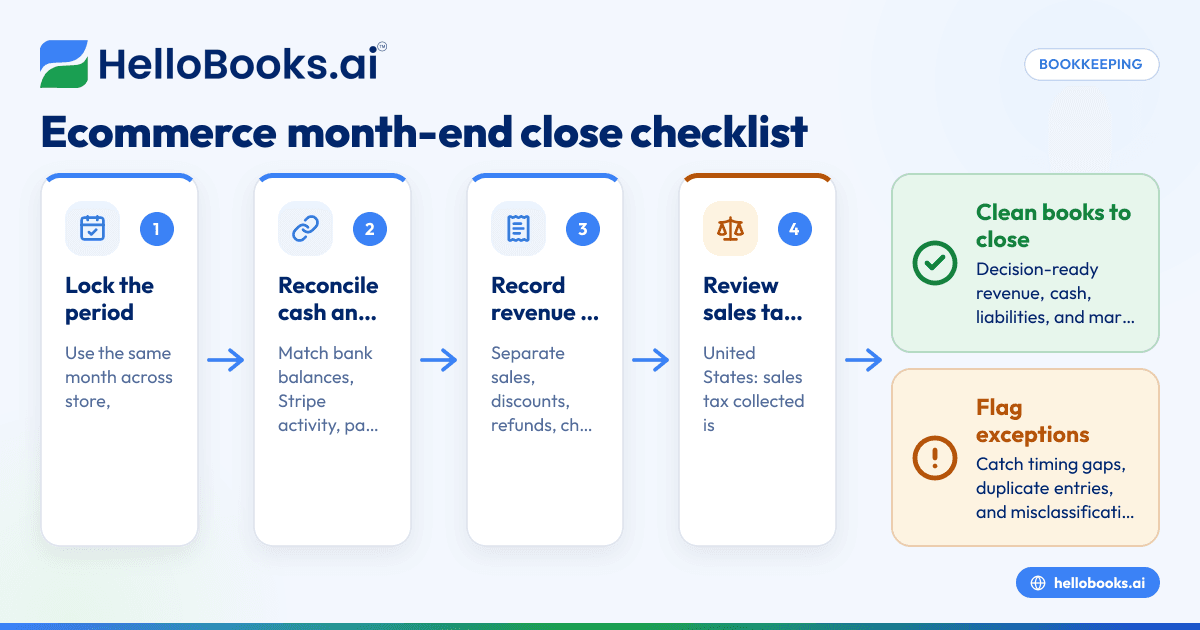
1. Lock the reporting period
Start by defining the exact month you are closing. Use the same start and end dates across your ecommerce platform, Stripe, bank statements, and accounting system.
This sounds basic, but timing errors are common. A payout that lands on 04/01/2026 may include sales from 03/31/2026. If you book by deposit date only, revenue will shift into the wrong month.
Make sure your team agrees on the basis for the close:
- Sales date
- Refund date
- Payout date
- Inventory movement date
Document this once and follow it every month.
2. Reconcile bank accounts
Before you touch revenue, confirm your cash balances. Reconcile every operating account, savings account, and credit card used by the business.
Match:
- Beginning balance
- Deposits
- Withdrawals
- Transfers
- Ending balance
Investigate anything old or unclear. Common examples include duplicate transfers, failed payouts, and processor deposits that were posted manually and also imported automatically.
If your team is still using spreadsheets for this step, bank reconciliation software can save hours each month.
3. Reconcile Stripe activity the right way
Stripe is one of the biggest sources of month-end confusion. The bank deposit is not the same as sales.
A proper Stripe reconciliation usually needs these pieces:
- Gross customer payments
- Stripe processing fees
- Refunds
- Chargebacks and disputes
- Reserve or hold activity, if any
- Net payouts to the bank
- Timing differences between transaction date and payout date
For example, your Shopify or other storefront may show $120,000 in gross sales for the month. Stripe may deposit only $111,500. That difference may include fees, refunds, and transactions that have not paid out yet.
Your accounting should reflect the full activity, not just the net deposit.
A simple approach is:
- Record gross sales by date.
- Record sales tax collected as a liability.
- Record Stripe fees as an expense.
- Record refunds and chargebacks separately.
- Clear the remaining net amount against Stripe payouts to the bank.
This makes your revenue and expense reporting much cleaner. It also helps you explain why platform sales and bank deposits do not match.
4. Review revenue recognition and sales cutoffs
Ecommerce businesses often recognize revenue based on order data. But month-end errors happen when sales are booked in the wrong period.
Review cutoff issues such as:
- Orders placed on the last day of the month
- Orders paid but not yet shipped, if your accounting policy treats these differently
- Partial shipments
- Canceled orders still sitting in sales reports
- Marketplace settlements posted after month-end
The goal is consistency. Choose an accounting method and apply it the same way every month.
If your books are still heavily manual, AI accounting software can help organize transaction flows and reduce coding errors.
5. Record refunds, returns, and discounts separately
Refunds reduce revenue or sit in a separate contra-revenue account, depending on your setup. Discounts also need clear treatment. Do not bury both inside one large adjustment account.
At month-end, review:
- Customer refunds issued
- Returns received but not yet refunded
- Promotional discounts
- Store credits
- Gift card redemptions
- Chargebacks
This matters because margin analysis depends on clean classifications. A business in Chicago may think paid ads are hurting profitability, when the real issue is a spike in refunds and return shipping costs.
Returns can also affect inventory. If goods were returned to stock, inventory may need to increase. If the item is damaged or unsellable, it may need a write-down instead.
How do you reconcile Stripe at month-end?
Reconcile Stripe by matching gross charges, refunds, fees, disputes, and payout timing to the deposits that hit your bank. Do not book the net Stripe payout as revenue. Use a clearing account or processor account so the activity ties out month by month.
Under the hood, this process works best when you treat Stripe like a sub-ledger. The payout is simply the final cash movement.
A practical monthly Stripe review includes:
- Export or review Stripe activity for the month.
- Summarize gross charges, refunds, disputes, and fees.
- Compare Stripe net payouts to bank deposits received.
- Identify payouts in transit at month-end.
- Post any missing fees or refund entries.
- Confirm the Stripe clearing balance makes sense.
If the clearing account grows every month, something is wrong. Usually, the issue is timing, duplicate entries, or fees not being booked.
Review sales tax collected and payable by state
Sales tax is one of the most important month-end checks for ecommerce companies in the United States. In most cases, sales tax collected from customers is not revenue. It is money you may owe to a state or local jurisdiction.
Your monthly review should answer:
- How much sales tax was collected this month?
- In which states was it collected?
- Has it been posted to a liability account?
- Does the liability balance agree with your tax reports?
- Were any filings or payments made during the month that need to reduce the payable?
If you sell in several states, review your sales tax reports by state before closing the month. Do not assume the amount sitting in your accounting file is correct.
Also watch for these issues:
- Sales posted gross instead of net of tax
- Refunds that included sales tax but were not adjusted
- Journal entries that reduce the liability without a matching payment
- Prior month payments booked to expense instead of the liability account
This post is general information, not tax or legal advice. If you file sales tax returns, confirm your filing requirements and treatment with your tax advisor.
What about inventory and cost of goods sold?
At month-end, inventory should reflect what you still own and cost of goods sold should reflect what was actually sold. Review purchase receipts, inventory adjustments, damaged goods, and returns so your balance sheet and gross margin are not distorted.
Inventory problems often hide in growing ecommerce businesses. Sales can look strong while gross profit looks weak or inconsistent.
Review these areas every month:
Inventory quantity changes
Compare beginning inventory, purchases, sales-related reductions, returns, and ending inventory. Investigate big swings in units or dollar value.
Cost updates
If supplier costs changed during the month, make sure your accounting method captures that change properly. This matters when freight, packaging, or landed costs rise.
Shrinkage and damage
Unsellable items should not stay on the books at full cost forever. Record write-downs when needed.
Inventory in transit
If inventory was purchased but not yet received, decide whether it belongs in inventory, prepaid assets, or another account based on your accounting policy.
Returns to stock
When customers return products, inventory may come back into stock. But not every returned item is sellable. Separate good returns from damaged returns.
For ecommerce brands with their own warehouse or a third-party fulfillment partner, this review is essential. A wrong inventory balance affects the balance sheet, gross margin, and cash planning at the same time.
Build a simple closing schedule your team can follow
A checklist only works if someone owns each step. Create a closing calendar and assign deadlines.
A basic schedule might look like this:
Day 1-2: Gather source data
Pull reports from:
- Bank accounts
- Stripe
- Ecommerce platform
- Inventory system
- Sales tax reports
- Credit cards
- Loan accounts, if relevant
Day 2-4: Reconcile cash and processor accounts
Complete all bank reconciliations first. Then work through Stripe and any other payment platforms.
Day 3-5: Book revenue, refunds, and fees
Post or review sales entries, discounts, refunds, and processing costs.
Day 4-6: Review inventory and cost of goods sold
Confirm purchases, stock changes, returns, and write-downs.
Day 5-7: Review liabilities and finalize reports
Check sales tax payable, credit card balances, loans, accrued expenses, and any payroll-related accounts. Then review the profit and loss statement and balance sheet for anything unusual.
A documented close schedule is also where an ai month end workflow can help. The biggest win is consistency. The software should surface exceptions, flag unmatched transactions, and reduce repetitive review work.
Common month-end close mistakes for ecommerce businesses
Even smart teams make the same few mistakes. Watch for these issues every month.
Booking Stripe deposits as revenue
This is the most common problem. It understates fees, hides refunds, and makes revenue reporting unreliable.
Leaving sales tax in income
Sales tax collected should usually sit in a liability account, not revenue.
Ignoring payout timing differences
Late-month sales often get paid out in the next month. If you skip this review, cash and revenue will not line up.
Mixing refunds with expenses
Refunds should be tracked clearly. If they are buried in miscellaneous expense, you lose visibility into customer and product issues.
Not reconciling inventory monthly
If inventory is only reviewed at year-end, margin reports can be wrong for months.
Closing without reviewing exceptions
Always scan for negative inventory, old unreconciled balances, duplicate deposits, and unusual swings in ad spend, shipping, or fees.
A practical monthly close review for owners and finance leads
After the accounting team finishes the entries, one person should do a final review. This can be the owner, controller, or finance lead.
Ask these questions:
- Does cash agree to the bank statements?
- Does Stripe activity tie to payouts and open balances?
- Does sales tax payable look reasonable compared to sales?
- Did refunds or chargebacks rise this month?
- Does gross margin make sense?
- Did inventory move in line with sales volume?
- Are there any large one-time entries or reclasses?
This review does not need to take hours. In many small businesses, 30 minutes is enough if the books were prepared well.
If your team needs a more repeatable system, accounting software in the USA or accounting software for small business can help centralize the close process and reduce spreadsheet risk.
When to automate your ecommerce month-end close
Manual closing works for a while. Then transaction volume grows. More orders come in. Refunds increase. State tax exposure expands. The close starts taking too long.
It may be time to automate when:
- Your close takes more than a week every month
- Stripe reconciliations need heavy spreadsheet work
- Refunds and fees are often misclassified
- Sales tax balances keep needing cleanup
- Inventory adjustments are frequent
- Management reports are delayed
Automation does not remove accounting judgment. It removes repetitive work.
For ecommerce businesses, that often means faster import, smarter matching, cleaner categorization, and fewer month-end surprises. If you are evaluating tools, a QuickBooks alternative may be worth a look if your current process depends too much on manual cleanup.
A simple month-end close checklist you can copy
Here is a practical version you can reuse each month:
- Confirm the month-end reporting period.
- Reconcile all bank accounts and credit cards.
- Reconcile Stripe gross activity, fees, refunds, disputes, and payouts.
- Confirm revenue entries match order activity for the month.
- Review refunds, returns, discounts, and gift card activity.
- Check sales tax collected and payable by state.
- Review inventory balances, purchases, returns, and write-downs.
- Confirm cost of goods sold is reasonable.
- Review accrued expenses and other liabilities.
- Scan the profit and loss statement for unusual movements.
- Scan the balance sheet for old or unmatched balances.
- Lock the month after review and keep supporting reports.
Consistency matters more than perfection at first. Start with a checklist your team can actually follow. Then improve it over time.
If you want to simplify repetitive bookkeeping work, see HelloBooks’ invoice software, expense management software, or compare options on the pricing page.
Frequently asked questions
How long should a monthly close take for an ecommerce business?
For a small ecommerce business, a monthly close often takes a few business days if records are clean. If Stripe, inventory, and sales tax are messy, it can take much longer. The goal is not just speed. It is reliable reporting.