
Key takeaways
What this article covers, in order:
- Key takeaways
- Why month-end close matters for service businesses in United States
- What is a month end close checklist for small business?
- What should be done before the five-day close starts?
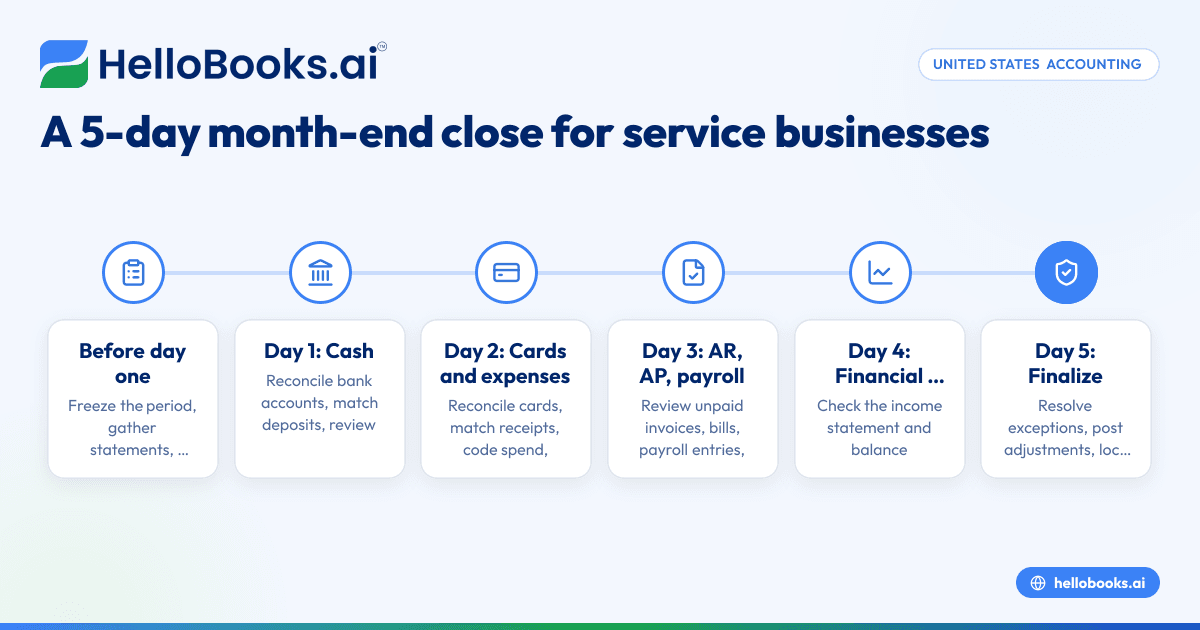
- The 5-day month-end close calendar
- Day 1: Reconcile cash and record all deposits
A month-end close checklist for small business is a repeatable list of tasks that turns daily transactions into clean, decision-ready financials. For a service business in the United States, a practical close can often be finished in five business days if you focus on cash, cards, unpaid bills, payroll, and expense review in the right order.
Key takeaways
- A 5-day close works best when each day has one clear goal and one owner.
- Service businesses should reconcile bank accounts, credit cards, merchant deposits, and expenses before reviewing profit.
- The close should catch missing receipts, duplicate charges, uncleared transfers, and miscategorized spending.
- A simple month end close checklist for small business helps reduce surprises before payroll, tax filings, and lender requests.
- Automation can speed up repetitive work, but someone still needs to review exceptions and unusual transactions.
- Clean books make it easier to bill clients, manage cash flow, and answer questions from your CPA or tax preparer.
Why month-end close matters for service businesses in United States
A service business usually has fewer inventory issues than a product business. But it often has more payment flow issues. That includes delayed client payments, card charges that need receipts, monthly software bills, contractor payments, and payroll timing differences.
If you run an agency in Chicago, a consulting firm in Houston, or a home services company in Detroit, your close is how you confirm that cash in the bank matches your books. It is also how you make sure every expense is real, coded correctly, and tied to the right month.
Without a close process, you may still have reports. But those reports are often incomplete. You may look profitable while missing unpaid subscriptions, duplicate card charges, or client refunds that were never matched. That leads to bad decisions.
A strong close does three things:
- Confirms what happened last month.
- Finds errors before they become tax or reporting problems.
- Gives you numbers you can actually use.
For most small service businesses, the goal is not a perfect enterprise close. The goal is a fast, consistent close with enough control to trust the results.
What is a month end close checklist for small business?
It is a short, repeatable list of tasks used to verify balances and finalize the prior month’s books. For a service business, the checklist usually covers bank reconciliation, credit cards, expense review, payroll entries, accounts receivable, accounts payable, and management review.
A checklist keeps the process from living in one person’s head. It also helps when ownership changes. Your bookkeeper, controller, office manager, or outside accountant can see what was done and what still needs review.
At a minimum, your checklist should answer these questions:
- Did every bank and card account get reconciled?
- Were all client payments recorded and matched?
- Were recurring expenses posted to the correct month?
- Were any personal or unusual charges flagged?
- Were contractor payments and 1099-related vendor payments reviewed?
- Did someone review the income statement and balance sheet for reasonableness?
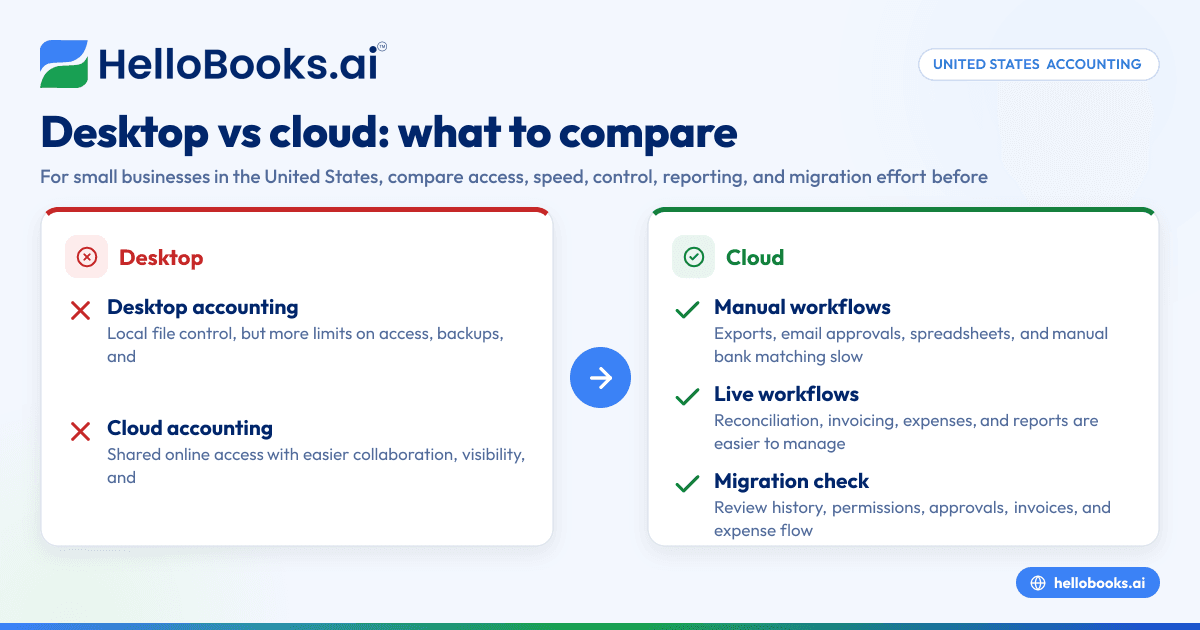
If your team still closes from spreadsheets and manual exports, a tool like accounting software in the USA can reduce hand entry and make reconciliation easier. The point is not to add complexity. It is to remove avoidable work.
What should be done before the five-day close starts?
Gather statements, receipts, payroll reports, and a list of expected deposits and bills before day one. Lock down who owns each task, what date range is included, and when the books are considered final for management review.
Preparation is what makes a 5-day close realistic. If your team starts hunting for receipts on day three, the close will drag. If client payments are still sitting unmatched at month-end, reconciliation will slow down.
Before the close begins, set these rules:
1. Freeze the period
Decide when the prior month is closed for normal entries. That does not mean you can never post an adjustment. It means everyone knows which month they are working on.
2. Collect source documents
You should have:
- Bank statements
- Credit card statements
- Merchant processor reports
- Payroll summaries
- Outstanding invoice list
- Unpaid bill list
- Loan statements if you have debt
- Expense receipts for large or unusual purchases
3. Define material exceptions
Not every $7 subscription issue needs the owner’s attention. But large one-time charges, duplicate payments, or unfamiliar vendors should be flagged.
4. Assign owners
In a small business, one person may own most tasks. That is fine. But there should still be a reviewer, usually the owner, finance lead, or outside accountant.
5. Keep a close checklist in one place
This can be inside your accounting system, a shared task tracker, or a close workbook. The main point is consistency.
The 5-day month-end close calendar
Below is a simple close calendar for a service business. It assumes basic accrual bookkeeping and a modest transaction volume. You can tighten or expand it based on your business.
Day 1: Reconcile cash and record all deposits
Start with your bank accounts. Cash is the anchor for the rest of the close. If cash is wrong, everything downstream is harder.
Day 1 tasks
- Import or sync all bank transactions for the month.
- Match client payments to open invoices.
- Record deposits that are not yet categorized.
- Review transfers between accounts.
- Reconcile each bank account to the statement or online ending balance.
- Flag stale checks, duplicate deposits, or unexplained withdrawals.
What to look for
Service businesses often receive payments through ACH, checks, card processors, and bank wires. Some deposits hit net of fees. Others come in batches. If you only record the net deposit, your revenue and merchant fees may be wrong.
Watch for these common issues:
- Deposits posted to income with no customer attached
- Transfers recorded as income
- Returned payments not reversed correctly
- Cash withdrawals or owner draws coded as expenses
- Prior-month deposits entered in the current month
If you handle a lot of recurring billing, invoice software can help keep invoice and payment records aligned. That makes day one much easier.
Day 2: Reconcile credit cards and review expenses
Credit cards create some of the most common month-end errors in small businesses. Transactions are frequent, receipts go missing, and software subscriptions renew quietly.
Day 2 tasks
- Import all card activity.
- Match transactions to receipts when available.
- Categorize uncoded transactions.
- Separate personal, reimbursable, and business charges.
- Reconcile each card to the statement balance.
- Review recurring charges for duplicates or canceled tools still billing.
Expense review rules that work
Use a short set of rules your team follows every month:
- Large purchases need a receipt.
- Unknown vendors get flagged.
- Personal charges get reclassified promptly.
- Annual software charges are reviewed for prepayment treatment if material.
- Contractor payments are coded clearly to support year-end 1099 review.
This is also the day to review employee reimbursements and card charges that should have been billed to a client.
A dedicated expense management software workflow can reduce receipt chasing and coding delays. But even with automation, someone needs to review exceptions.
Can you close the books in five days without a full finance team?
Yes. Most small service businesses can do it if transactions are current, bank feeds are working, and one person reviews exceptions daily instead of saving everything for the last day.
The five-day target only works when bookkeeping is not a once-a-month scramble. If you wait until month-end to enter bills, upload receipts, and match deposits, even a simple close becomes messy.
To stay on pace:
- Post transactions weekly.
- Review open invoices during the month.
- Keep vendor records clean.
- Require receipts for card spend quickly.
- Reconcile your main bank account more than once a month if volume is high.
This is where AI bookkeeping can help. A good system can auto-categorize common transactions, surface exceptions, and reduce manual matching. Some teams even build an ai month end routine around daily syncs and exception review, so the actual close window is shorter.
Day 3: Review accounts receivable, accounts payable, and payroll
By day three, cash and cards should be mostly settled. Now focus on timing items and obligations.
Accounts receivable review
Run your aging report and review:
- Old unpaid invoices
- Credits not applied
- Client payments received but not matched
- Revenue recorded without an invoice if that is not your policy
- Write-offs or disputes that need approval
Service businesses often delay this step because they are focused on billing first. But unpaid invoices affect both cash planning and the accuracy of your receivables balance.
Accounts payable review
Check:
- Bills received but not entered
- Recurring monthly vendors
- Accrued expenses if you use accrual accounting
- Duplicate bills
- Vendor credits not applied
If your business uses contractors, this is also a good point to confirm vendor records are complete for year-end 1099 reporting. This article is general information, not tax or legal advice.
Payroll review
Payroll can create hidden timing issues. Wages may be earned in one month and paid in the next. Benefits, payroll taxes, and reimbursements also need correct coding.
Review:
- Payroll journal entries
- Employer tax expense postings
- Benefit deductions
- Reimbursements
- Any payroll liabilities still on the balance sheet
Do not move on until you understand any unusual swings in payroll expense. For service businesses, payroll is often the largest cost line.
Day 4: Review the income statement and balance sheet
Now that the transaction-level work is mostly complete, step back and review the reports like an owner.
Income statement review
Compare the current month to:
- The prior month
- The same month last year if available
- Your budget or internal target
Look for:
- Revenue dips or spikes
- Gross margin changes if you track direct labor
- Software spend increases
- Travel and meals that seem high
- One-time legal, recruiting, or equipment expenses
Balance sheet review
A lot of close problems show up here first. Review:
- Bank balances
- Credit card balances
- Accounts receivable
- Undeposited funds
- Prepaid expenses
- Fixed assets if you bought equipment
- Loans and other liabilities
- Owner distributions or contributions
If a balance sheet account keeps growing with no clear reason, your close is not finished. For example, an old undeposited funds balance often means payment matching is off. A suspense or uncategorized expense balance usually means someone postponed decisions.
Using bank reconciliation software can help reduce carryover errors that make the balance sheet harder to trust.
What mistakes slow down a month-end close the most?
The biggest delays come from missing receipts, unmatched deposits, unclear owner transactions, and bills entered in the wrong month. Most close problems are not technical. They are process problems that pile up until month-end.
Here are the most common slowdowns in service businesses:
Transactions are not reviewed during the month
When everything waits until the first week of the next month, the close becomes detective work.
Merchant deposits are booked net
If processor fees are not broken out correctly, revenue and expense reports will be off.
Personal and business spending mix
This creates coding problems and awkward cleanup. It also weakens reporting.
No one owns the checklist
Tasks fall through the cracks when there is no single owner for completion.
The review step is skipped
A fast close is useless if the income statement and balance sheet are never challenged.
If you are replacing a manual setup, AI accounting software can shorten the review cycle by surfacing anomalies sooner. The benefit is not just speed. It is fewer surprises.
Day 5: Final review, lock the month, and share the numbers
The fifth day is for signoff, not cleanup. If major issues still remain on day five, the process needs tighter daily control next month.
Day 5 tasks
- Resolve outstanding reconciliation exceptions.
- Post final recurring entries and approved adjustments.
- Review management reports.
- Lock or close the accounting period based on your process.
- Share the financial package with the owner or leadership team.
- Note what slowed the close and update the checklist.
What to include in the monthly package
Keep it simple. Most small businesses need:
- Income statement
- Balance sheet
- Cash flow summary
- Accounts receivable aging
- Accounts payable aging
- Short notes on unusual items
The notes matter. If software expense jumped because of an annual renewal, say so. If revenue dipped because a large client paid late but the invoice is still open, say so. Good commentary saves time in review meetings.
A simple month-end close checklist for small business
Use this as a practical template for a service business.
Daily or weekly during the month
- Sync bank and card transactions
- Match client payments
- Enter vendor bills
- Collect receipts
- Review unknown transactions
- Monitor open invoices
Day 1
- Reconcile all bank accounts
- Match deposits to invoices
- Review transfers
- Flag unexplained cash activity
Day 2
- Reconcile all credit cards
- Categorize expenses
- Review subscriptions and recurring charges
- Separate personal or reimbursable spend
Day 3
- Review accounts receivable aging
- Review accounts payable aging
- Record missing bills
- Review payroll entries and liabilities
Day 4
- Review income statement
- Review balance sheet
- Investigate unusual variances
- Confirm accruals and prepaids if used
Day 5
- Post final adjustments
- Finalize management reports
- Lock the month
- Document process issues for next month
If your team has outgrown spreadsheets or a patchwork workflow, accounting software for small business can make this checklist easier to run consistently.
How to make the close faster without losing control
Speed comes from fewer exceptions, not from skipping review. The best close processes remove repetitive work and keep human attention for judgment calls.
Standardize your chart of accounts
Too many categories create hesitation. Too few hide useful detail. Keep it practical.
Create vendor rules
Recurring vendors should not need fresh decisions every month.
Require quick receipt submission
A 48-hour rule is easier to enforce than a month-end chase.
Review cash twice a month
This reduces surprise exceptions on day one.
Use automation carefully
Automation should suggest and match. It should not silently post everything without oversight.
If you are evaluating a QuickBooks alternative, look for strong transaction matching, expense capture, and simple month-end review workflows. Those are the features that save real time in a service business close.
When should a small business ask for outside help?
You should consider outside help when reconciliations keep rolling forward unresolved, reports are always late, or no one on the team can explain major balance sheet accounts. Those are signs the close process needs cleanup, not just more effort.
An outside accountant or bookkeeping partner can help when: