
Key takeaways
What this article covers, in order:
- Key takeaways
- What is Making Tax Digital for VAT in United Kingdom?
- Who needs to follow MTD for VAT?
- What small businesses must do to comply
- The records you should review before each VAT period
- A simple step-by-step MTD for VAT checklist
Making Tax Digital for VAT in United Kingdom means keeping VAT records digitally and submitting VAT returns to HMRC using compatible software. For most VAT-registered businesses, this is now the standard way to manage VAT. If you run a small business in the UK, the key job is simple: make sure your records, software and filing process meet HMRC’s MTD rules.
Key takeaways
- Making Tax Digital for VAT in United Kingdom requires digital VAT records and software that can file directly to HMRC.
- Most VAT-registered businesses need to follow MTD for VAT, unless HMRC has agreed an exemption.
- Spreadsheets can still be used in some cases, but they must work with compatible software and maintain digital links where required.
- Good setup matters. Your VAT periods, VAT codes, invoices and bank reconciliation process all need to be accurate.
- MTD is about more than filing. It affects how you store data, review transactions and correct mistakes.
- If your current process is slow or manual, modern AI accounting software can reduce admin and improve accuracy.
What is Making Tax Digital for VAT in United Kingdom?
Making Tax Digital, often shortened to MTD, is HMRC’s programme to move tax record-keeping and submissions onto digital systems. For VAT, this means businesses must keep certain records in digital form and use MTD-compatible software to send VAT returns to HMRC.
In practice, HMRC wants to reduce manual retyping and spreadsheet-based errors. If your team still copies figures from one sheet into another, or types totals into a government portal by hand, that is the kind of process MTD was designed to replace.
For a small business in London, Manchester or Birmingham, this usually changes three things:
- How you keep VAT records
- How figures move between systems
- How you submit your VAT return
MTD for VAT applies in the United Kingdom. Rules can change over time, so always check the latest HMRC guidance for your exact position. This article is general information, not tax or legal advice.
Who needs to follow MTD for VAT?
In broad terms, VAT-registered businesses in the United Kingdom are expected to follow MTD for VAT. For many businesses, this is no longer optional.
That includes small limited companies, sole traders and partnerships that are registered for VAT. If you charge VAT on sales and file VAT returns with HMRC, you should assume MTD matters to you unless you have confirmed otherwise.
Some businesses may be exempt, but exemptions are limited. HMRC may allow an exemption in certain cases, such as where it is not reasonably practical to use digital tools because of age, disability, remoteness or other specific reasons. Exemption is not automatic. You would normally need HMRC to agree it.
If you have inherited an older process using paper files, standalone spreadsheets or a desktop package that is no longer suitable, now is the time to review it carefully.
What small businesses must do to comply
MTD for VAT is not just about pressing a submit button in software. It requires a compliant record-keeping and filing process.
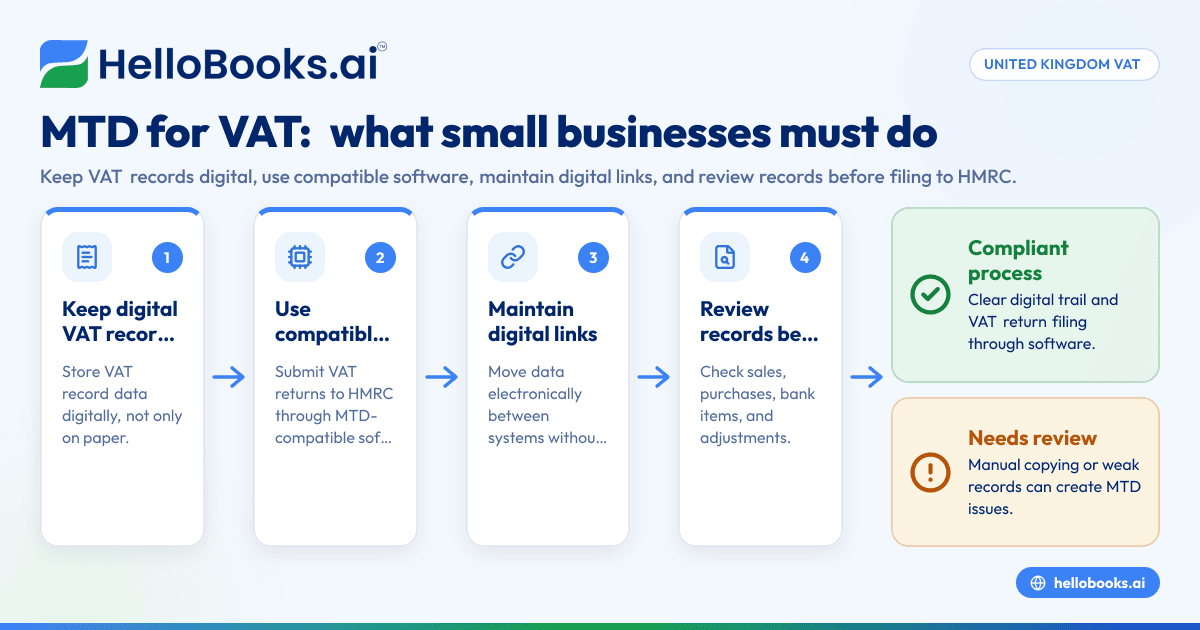
1. Keep digital VAT records
You need to keep certain VAT records digitally. The exact records will depend on your business, but the core idea is clear. Your VAT data should exist in digital form, not only on paper.
Digital records usually include details such as:
- Your business name
- Your principal business address
- Your VAT registration number
- Details of VAT accounting schemes used, if relevant
- The VAT charged on sales
- The VAT claimed on purchases
- Information needed to complete your VAT return
That does not always mean every document must start digitally. For example, you may still receive paper receipts. But the VAT record used for accounting and filing needs to be held digitally.
2. Use compatible software
Your VAT return must be submitted through software that works with HMRC’s MTD system. This may be a cloud accounting tool, bridging software connected to spreadsheets, or another compatible package.
Many small businesses already use software such as Xero or Sage. Others still rely on spreadsheets plus manual adjustments. If that is your setup, you need to check whether your current process is truly MTD-compliant, not just familiar.
If invoicing, expenses and reconciliations happen in separate places, the software should still support an accurate digital trail. This is where tools such as invoice software, expense management software and bank reconciliation software can make the process easier.
3. Maintain digital links where required
A digital link means data moves from one part of your system to another electronically, without manual copying and pasting. This matters if you use more than one system or spreadsheet.
For example, if sales are recorded in one spreadsheet and the VAT return is prepared in another, the transfer should happen through formulas, linked cells or software connections. Manually typing totals from one file into another creates risk and may not meet HMRC’s expectations.
For small businesses, digital links are often the weakest part of the process. The return may be filed through MTD software, but the figures may still be prepared manually in a way that creates errors.
The records you should review before each VAT period
Many businesses assume MTD compliance is only a year-end or quarter-end issue. It is not. The best time to fix VAT problems is during the period, not the day before filing.
Sales records
Check that sales invoices are dated correctly and have the right VAT treatment. Review zero-rated, exempt and standard-rated sales carefully. If your business serves both UK and overseas customers, make sure the tax treatment is consistent with the transaction type.
Purchase records
Supplier bills often cause VAT errors. Missing invoices, duplicate entries and incorrect VAT codes are common problems. This is especially true when staff upload receipts from email, paper or mobile photos.
Bank transactions
Your bank feed or imported transactions should match the sales and purchase records in your accounts. Unreconciled items can hide missing VAT, duplicate income or expenses posted to the wrong period.
Adjustments and journals
Manual journals should be reviewed with care. If your accountant posts quarter-end VAT adjustments, keep clear notes on why they were made. Too many unexplained journals can make HMRC reviews harder.
A simple step-by-step MTD for VAT checklist
If you want a practical way to get ready, use this checklist.
Step 1: Confirm your VAT registration and filing setup
Check your VAT number, filing frequency and accounting method. Confirm who files the return and where deadlines are tracked. Many small businesses rely on one person who “just knows” the process. That creates risk.
Step 2: Map your current records
List where your VAT data lives today. This may include:
- Sales invoices
- Supplier bills
- Expense receipts
- Bank statements
- Spreadsheets
- Cloud accounting software
- Accountant workbooks
The goal is to see the full journey from transaction to VAT return.
Step 3: Identify manual copying points
Look for any stage where numbers are typed from one system into another. Common examples include copying spreadsheet totals into filing tools, re-entering supplier VAT, or manually rebuilding reports for your accountant.
These are the areas most likely to cause MTD issues and filing errors.
Step 4: Check whether your software is MTD-compatible
Ask your software provider or accountant whether your current setup supports MTD filing and digital records. If you use spreadsheets, ask whether bridging software is still enough for your business, or whether a proper accounting system would be better.
For some businesses, moving to accounting software for small business is the easiest way to reduce risk.
Step 5: Clean up VAT codes and transaction rules
Your software is only as good as the setup behind it. Review VAT codes, default tax rates, customer and supplier settings, and recurring transaction rules. A wrong default setting can affect many entries before anyone notices.
Step 6: Reconcile every month, not only at filing time
Monthly reconciliation gives you time to fix issues early. Match bank activity, review unpaid invoices, and confirm that the VAT control position makes sense before the return is due.
Step 7: File through compatible software and save the audit trail
When you submit, keep copies of the return, supporting reports and any notes on adjustments. Good records help if questions come up later from HMRC or your accountant.
Can you still use spreadsheets for MTD for VAT?
Yes, in some cases, but with limits.
HMRC’s MTD rules do not automatically ban spreadsheets. A small business can still use spreadsheets as part of its VAT process if the overall setup meets MTD requirements. The key point is that records remain digital and the submission to HMRC happens through compatible software.
That said, spreadsheets become risky when they depend on manual copy-paste work, hidden formulas or one person’s personal knowledge. This is common in growing businesses where finance processes evolved over time.
A spreadsheet-based setup may still work if:
- Records are kept digitally
- Figures flow through digital links
- Compatible software is used to file to HMRC
- There is a clear review process before submission
If your VAT data sits across email attachments, Excel files and paper notes, you may technically be digital in places but still have a fragile system. In that case, moving to a more connected setup can save time and reduce errors. Businesses comparing finance tools often start with a QuickBooks alternative if their current workflow feels too manual.
Common mistakes small businesses make
MTD for VAT problems are often process problems, not software problems.
Treating filing software as the whole solution
Some businesses buy a filing tool and assume they are compliant. But if the records behind it are incomplete or manually rebuilt, the risk remains.
Leaving bookkeeping until the quarter end
Backdated bookkeeping creates rushed coding decisions and missed transactions. VAT errors are more likely when staff are trying to reconstruct three months of activity at once.
Using the wrong VAT treatment
Mixed supplies, international sales and unusual supplier invoices can create confusion. If your business has anything beyond straightforward domestic trading, get the treatment checked.
Forgetting about bank reconciliation
A return can look complete while key entries remain unmatched. Proper reconciliation is one of the simplest ways to spot VAT issues before filing.
Overusing manual journals
Frequent quarter-end journals may hide weak day-to-day bookkeeping. If your VAT return needs many last-minute fixes, the process upstream likely needs work.
How to make MTD for VAT easier in a growing business
As your business grows, VAT gets harder. You have more invoices, more suppliers, more payment methods and more people involved in finance.
The answer is not usually “work longer at quarter end”. It is better systems and cleaner workflows.
Standardise how records enter the system
Use one process for customer invoices, one process for supplier bills and one process for expenses. Avoid letting each team member submit records in a different format.
Reconcile regularly
Weekly or monthly reviews are much easier than quarter-end rescue work. This is especially true if you run ecommerce, hospitality, professional services or multi-location operations.
Limit manual intervention
Automation helps, but only if rules are reviewed. Good AI bookkeeping tools can reduce repetitive data entry, but finance staff still need to check VAT treatment and exceptions.
Work with your accountant on exceptions
Your accountant should not need to rebuild the books each quarter. A better model is this: your team keeps records current, and your accountant reviews unusual items, VAT treatment questions and final filing quality.
If you need help setting up a cleaner process, it may be worth asking a specialist to find an accountant who understands modern digital bookkeeping.
Choosing software for MTD for VAT in United Kingdom
The best software is the one that fits your process and reduces manual work. For a small UK business, that usually means three things:
- It keeps digital records clearly
- It supports VAT return filing to HMRC
- It makes reconciliation and document collection easier
If you are reviewing options, look beyond the VAT filing screen. Ask practical questions:
- How are invoices created and tracked?
- How are expense receipts captured?
- How are bank transactions matched?
- How easy is it to review VAT codes?
- Can your accountant access clean reports?
Businesses moving away from spreadsheet-heavy processes often want one system for bookkeeping, invoicing and reporting. In that case, AI bookkeeping and AI accounting software can help reduce repetitive work while keeping the finance team in control.
What to do if you think your current process is not compliant
Do not wait for the next deadline and hope for the best. Fixing the process early is usually much easier than rebuilding it under pressure.
Start with these actions:
- Review how your records are kept today.
- Check whether your filing method is genuinely MTD-compatible.
- Identify any copy-paste steps between systems.
- Reconcile your VAT data before the next filing period.
- Speak to your accountant if you are unsure about VAT treatment or exemptions.
For many small businesses, the main issue is not refusal to comply. It is simply that the process grew in pieces over time. Sales moved into one tool, expenses into another, and VAT was pulled together at the end. MTD requires that process to be more structured.
If your business is outgrowing spreadsheets or old desktop software, a modern digital workflow can make VAT filing much less stressful.
If you want a simpler way to manage bookkeeping, invoicing and VAT-ready records, you can book a demo or compare options on our pricing page.
Frequently asked questions
Is Making Tax Digital for VAT mandatory in the United Kingdom?
For most VAT-registered businesses, yes. MTD for VAT is the standard method for keeping VAT records and filing returns with HMRC. If you think you may be exempt, check HMRC’s current rules and get confirmation where needed.
Can I use Excel for Making Tax Digital for VAT?
You may be able to use spreadsheets as part of your process, but the setup still needs to meet MTD requirements. Records must be digital, the submission must go through compatible software, and data transfers should not rely on manual copy-paste steps.
What records do I need to keep digitally for MTD for VAT?
You need digital records that support your VAT return, including key business details and transaction data for sales and purchases. The exact records depend on your business, but they should be complete enough to prepare and support the return submitted to HMRC.