
Key takeaways
What this article covers, in order:
- Key takeaways
- What is InvoiceNow in Singapore?
- Why InvoiceNow matters for small businesses
- PEPPOL basics for small business owners
- How InvoiceNow works in practice
- InvoiceNow vs emailed PDF invoices
InvoiceNow in Singapore helps small businesses send and receive e-invoices in a standard digital format through the PEPPOL network. In simple terms, it reduces manual data entry, speeds up invoice approvals, and makes billing more reliable than emailing PDF invoices back and forth.
Key takeaways
- InvoiceNow is Singapore’s e-invoicing framework built on the PEPPOL network.
- It lets small businesses send invoices directly from one system to another in a structured format.
- Faster processing means fewer keying errors, fewer missed invoices, and quicker payment workflows.
- Setup usually involves choosing an InvoiceNow-ready provider, registering your business, and testing your invoice process.
- InvoiceNow is different from GST filing, but it can improve invoice quality and support cleaner records for IRAS reporting.
- Small businesses should review invoice approval steps, customer readiness, and data handling before rollout.
What is InvoiceNow in Singapore?
InvoiceNow is Singapore’s nationwide e-invoicing initiative based on the PEPPOL framework. It allows businesses to exchange invoices and related documents directly between accounting or billing systems using a common standard.
For a small business in Singapore, this matters because traditional invoicing often depends on PDFs, email attachments, and manual entry. That creates delays. It also creates avoidable mistakes, especially when one team sends an invoice and another team rekeys the same data into finance software.
With InvoiceNow, invoice data moves in a structured format. The buyer’s system can read key fields automatically. This includes supplier details, invoice number, dates, line items, and payment amounts. That means less manual work and a better chance of invoices being processed on time.
If you run a trading company, services business, consultancy, agency, or growing SME in Singapore, InvoiceNow can make billing easier to control. It is especially useful when you send recurring invoices, work with larger corporate customers, or want cleaner accounts receivable processes.
Why InvoiceNow matters for small businesses
Small businesses often feel the pain of invoicing more than large companies do. A delayed invoice can affect cash flow quickly. A missed invoice can lead to payment disputes. A simple typo can hold up approvals for weeks.
InvoiceNow helps solve these practical problems.
Less manual data entry
When invoice details move directly between systems, your team spends less time copying values from one place to another. That saves time for founders, finance leads, and admin teams who already handle too many tasks.
Fewer invoice errors
Manual entry often causes mistakes in invoice numbers, amounts, GST treatment, or purchase order references. Structured e-invoicing reduces these issues because systems use standard fields.
Faster approvals and payment cycles
When customers receive invoice data in a format their systems can process, the approval flow can start faster. That can reduce payment delays caused by unreadable PDFs, missing fields, or inbox backlogs.
Better record-keeping
A consistent invoice trail supports cleaner bookkeeping. That makes month-end closing easier. It can also help when preparing records for GST and financial reporting. This is general information, not tax or legal advice.
Stronger digital operations
InvoiceNow fits well with broader finance automation. If your business is already improving billing, expenses, and reconciliations, it works best as part of a wider move to invoice software, bank reconciliation software, and expense management software.
PEPPOL basics for small business owners
To understand InvoiceNow, you need a simple view of PEPPOL.
PEPPOL is an international framework for exchanging electronic business documents. In Singapore, InvoiceNow uses PEPPOL standards so different systems can connect in a common way.
You do not need to become a technical expert to use it. But it helps to know the basic parts.
1. Structured invoice data
A PDF is easy to read by a person. It is not always easy for software to process. A PEPPOL invoice contains data in a structured digital format that business systems can understand.
2. Access points
Businesses do not usually connect to the full network on their own. Instead, they work through approved service providers or software providers that connect through PEPPOL access points.
3. Business identifiers
To send an invoice over the network, businesses need to be identifiable within the framework. Your provider will usually guide you through the registration process.
4. Interoperability
The real advantage of PEPPOL is interoperability. If your supplier and buyer use different software systems, they can still exchange invoices if both are connected properly.
For a small business, that means you can work with more customers without building one custom invoicing process for each one.
How InvoiceNow works in practice
A simple example makes this easier to see.
Imagine a small IT services firm in Singapore sends monthly invoices to a corporate client. Today, the firm creates a PDF, emails it to accounts payable, waits for confirmation, and follows up if the client says the invoice was not received or was entered incorrectly.
With InvoiceNow, the process can look like this:
- The firm creates the invoice in its accounting or billing software.
- The software sends the invoice through an InvoiceNow-enabled connection.
- The customer’s system receives the invoice data directly.
- The customer’s finance team reviews and approves it within their workflow.
- Payment processing starts with fewer manual touchpoints.
This does not guarantee instant payment. Customers still follow their own approval and payment terms. But it removes common delays caused by file handling and re-entry.
InvoiceNow vs emailed PDF invoices
Many small businesses ask whether InvoiceNow replaces normal invoicing. The practical answer is that it improves how invoice data is exchanged. It does not remove the need for good billing discipline.
Here is the difference.
Emailed PDF invoices
- Easy to create
- Easy to send
- Often handled manually by the buyer
- More likely to be missed in crowded inboxes
- More likely to require rekeying into another system
InvoiceNow invoices
- Sent in a structured format
- Easier for the buyer’s system to process
- More consistent and traceable
- Better for businesses with regular invoice volume
- Useful when customers already prefer digital invoice workflows
For many SMEs, the best setup is not “PDF or InvoiceNow”. It is often both, depending on what each customer can receive.
How to set up InvoiceNow in Singapore
The setup process is usually straightforward when your software provider supports it well.
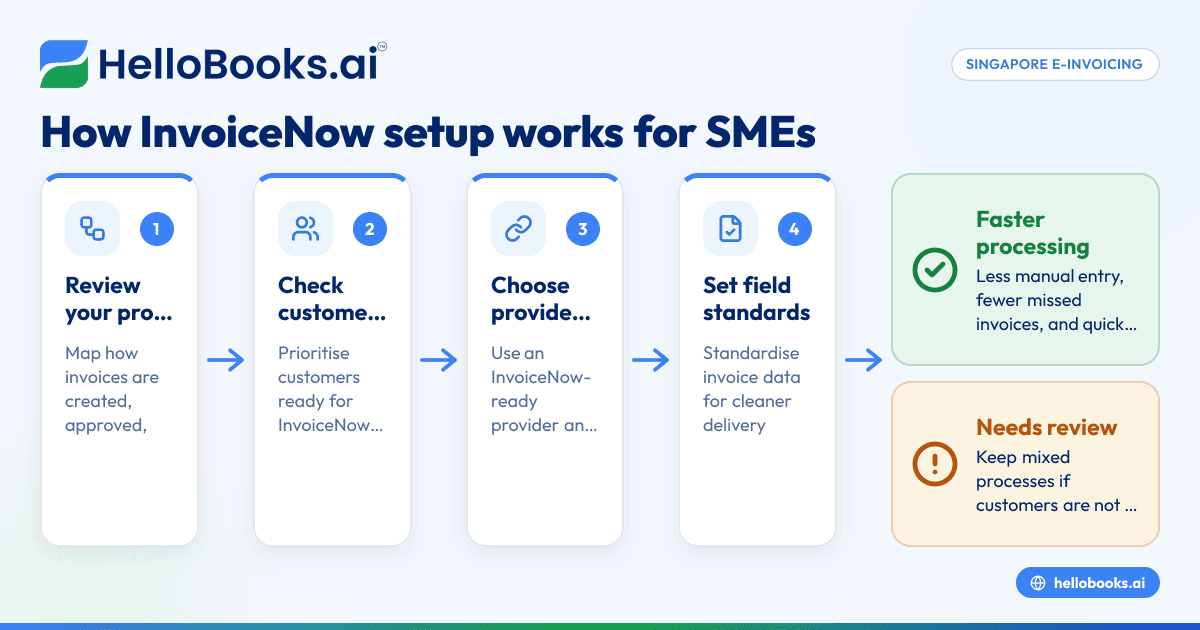
Step 1: Review your current invoicing process
Start with your current workflow. Note how invoices are created, approved, sent, and followed up. Look for slow points such as missing purchase order references, invoice formatting issues, or delayed customer acknowledgements.
This review helps you decide what you want InvoiceNow to fix first.
Step 2: Check whether your customers are ready
Not every customer will be ready to receive invoices through InvoiceNow. Some may still prefer email. Others may already be actively asking for PEPPOL-based invoicing.
List your top customers and segment them into:
- ready now
- likely soon
- email only for now
This helps you prioritise rollout.
Step 3: Choose software or a provider that supports InvoiceNow
Your invoicing tool should make it easy to create invoices, validate key fields, and send them through the network. For many SMEs, this is a good time to review whether their current tools still fit the business.
If your team is relying on disconnected spreadsheets or manual billing, moving to AI accounting software or accounting software for small business can reduce extra work around invoicing.
Step 4: Register your business for InvoiceNow
Your provider will usually guide you through registration and business identification steps required to send and receive documents over the network.
Follow the provider’s instructions carefully. Small errors in registration details can slow activation.
Step 5: Set invoice field standards
Before going live, standardise key data fields such as:
- legal business name
- billing address
- customer identifier
- invoice number format
- GST treatment
- payment terms
- item descriptions
- purchase order references where needed
Good data standards improve successful delivery and processing.
Step 6: Test with one or two customers
Do not start with every customer at once. Test with a small group first. Choose customers with predictable invoice flows and responsive finance teams.
Check whether:
- invoices are delivered successfully
- customer systems read the data correctly
- approval times improve
- disputes reduce
Step 7: Train your team
Even a simple rollout needs clear instructions. Your staff should know:
- when to use InvoiceNow
- what fields must be completed
- how to handle failed deliveries
- when to send a PDF backup
- how to follow up on payment status
A short internal process note can save many hours later.
Common mistakes to avoid
InvoiceNow works best when the underlying invoicing process is clean. These are the most common problems small businesses run into.
Treating setup as only a technical task
This is not just an IT project. It affects sales, operations, finance, and customer service. If invoice approvals depend on job completion, contracts, or purchase orders, those steps need to be mapped too.
Using inconsistent customer data
Different spellings, incomplete addresses, and missing buyer references can create processing problems. Clean customer master data before rollout.
Forgetting internal approval controls
Sending invoices faster is helpful. Sending the wrong invoice faster is not. Keep review controls for amounts, tax treatment, and supporting details.
Expecting all customers to switch immediately
Rollout takes time. Keep a mixed process if needed. Many SMEs will use InvoiceNow with some customers and email for others.
Ignoring bookkeeping impacts
Cleaner invoices lead to cleaner books only if posting, collections, and reconciliation also improve. A better invoicing workflow should connect with your broader finance process, including AI bookkeeping.
InvoiceNow and GST record-keeping
InvoiceNow is not the same as filing GST with IRAS. It does not replace your need to maintain accurate tax records, review invoice treatment, and prepare returns correctly.
But it can help in practical ways.
Structured invoice data can reduce missing fields and inconsistent records. That supports better internal controls over sales documentation. It can also reduce the time spent searching across inboxes and PDF attachments during month-end review.
If your business is GST-registered in Singapore, your invoicing workflow should still be reviewed for proper tax handling, especially when you have discounts, credit notes, exports, or mixed supplies. Software can support this process, but your finance team remains responsible for getting the treatment right.
Data handling and customer trust
Any digital invoicing rollout should include a basic review of data protection practices. In Singapore, businesses should handle personal data responsibly and align internal processes with the PDPA and relevant PDPC guidance where applicable.
For most small businesses, that means keeping the process practical:
- limit access to billing data
- use clear staff permissions
- avoid sending customer data through unnecessary channels
- keep records organised and retrievable
- document who can create, edit, and send invoices
If your invoicing workflow includes customer contact details for billing or follow-up, make sure your outreach process also respects applicable marketing and contact rules, including the Do Not Call framework where relevant.
How to decide if InvoiceNow is worth it
InvoiceNow is usually worth considering if your business has any of these signs:
- you send many invoices every month
- customers often complain about missing invoice information
- your team manually keys the same invoice into multiple systems
- payment delays often begin at the invoice receipt stage
- you want to strengthen finance operations before growing further
It may be less urgent if you send only a few invoices a month and each one is highly customised. Even then, it can still be useful if your customers strongly prefer PEPPOL-based invoicing.
A simple decision approach is this:
- Measure your invoice volume.
- Check average approval and payment delays.
- Count common invoice disputes.
- Review how much manual rework your team does.
- Compare that with the effort of setup and training.
If invoicing takes too much admin time today, automation usually pays back through faster finance operations and fewer avoidable errors.
Where software helps most
Software helps most when it removes repetitive work without making invoicing harder for your team. Look for tools that keep invoice creation simple, maintain clean records, and support downstream bookkeeping.
For small businesses moving away from spreadsheet-based finance or outdated tools, this is a good moment to review your full process. That can include invoicing, approvals, expense capture, and reconciliation in one flow rather than as separate tasks.
If you are comparing options, focus on practical questions:
- Can the team learn it quickly?
- Does it reduce manual invoice handling?
- Can it support cleaner records for GST and reporting?
- Does it fit how your customers actually receive invoices?
- Will it save finance time every month?
For businesses that want a more automated finance stack, e-invoicing software can be part of a larger move to modern accounting operations.
A practical rollout plan for a Singapore SME
If you want to start without overcomplicating it, use this simple plan.
Month 1: Prepare
- map current invoicing steps
- clean customer records
- choose software or provider
- identify pilot customers
Month 2: Test
- complete registration
- send test invoices
- confirm customer receipt and format
- document staff steps
Month 3: Expand
- move more repeat customers to InvoiceNow
- track approval and payment timing
- review failed or delayed invoices
- improve templates and controls
This phased approach reduces risk. It also helps your team build confidence before larger rollout.
If your current process still depends on spreadsheets, PDFs, and manual follow-ups, modern tools can save real time. You can explore HelloBooks as part of a broader move to smarter invoicing and bookkeeping, then compare options on pricing or speak with the team at book a demo.
Frequently asked questions
Is InvoiceNow mandatory for small businesses in Singapore?
Not all small businesses in Singapore are required to use InvoiceNow in every situation. Whether it is necessary depends on your customers, industry requirements, and any public sector or trading partner expectations. Many SMEs adopt it because it improves efficiency, not just because of compliance pressure.
Is InvoiceNow the same as PEPPOL?
InvoiceNow in Singapore is built on the PEPPOL framework, but the two terms are not exactly the same. PEPPOL is the wider international standard and network model. InvoiceNow is Singapore’s national e-invoicing initiative based on that framework.
Can I still send PDF invoices if I use InvoiceNow?
Yes, many small businesses continue to send PDF invoices to customers who are not ready for structured e-invoicing. In practice, SMEs often run both methods during rollout. The goal is to use InvoiceNow where it speeds up processing and keep other channels where needed.