


Key takeaways
What this article covers, in order:
- Why this comes up / what goes wrong
- Step-by-step
- Example (fictional figures)
- Common mistakes
- Doing this in HelloBooks
- Frequently asked questions
Inventory finance software is designed to help small businesses maintain accurate stock records, control inventory costs, and integrate inventory data with financial management. This software provides real-time stock valuation and reorder alerts, which are crucial for managing cash flow and avoiding stockouts or excess inventory. This article covers why small businesses need inventory finance software, the steps to evaluate and choose the right software, a detailed example with Indian figures, common mistakes to avoid, and how HelloBooks can assist with inventory management.
Why this comes up / what goes wrong
Many small business owners in India maintain inventory records manually using spreadsheets, Tally, or bill books. This approach often leads to inaccurate stock counts, delayed reorder decisions, and cash tied up in excess or obsolete inventory. Without real-time visibility into stock value and turnover, financing inventory becomes risky, leading to overborrowing or missed opportunities to optimise working capital. Inventory finance software addresses these issues by providing automated, up-to-date stock data linked to financial reports. This helps owners and finance leads plan purchases, track costs, and manage cash flow more effectively.
Step-by-step
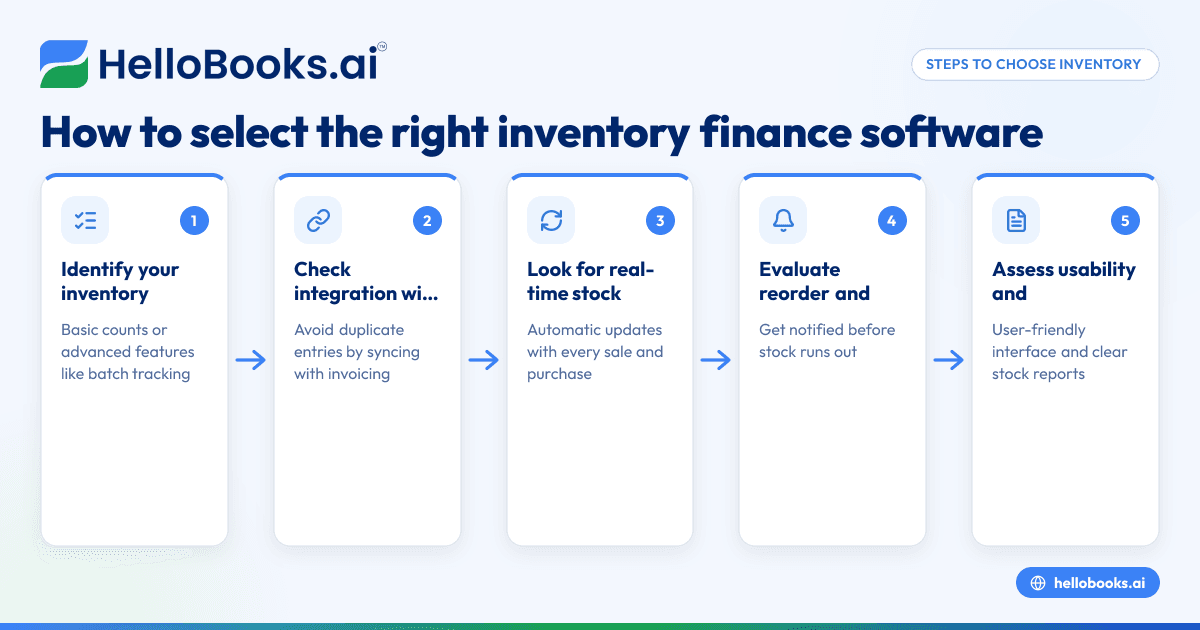
- Identify your inventory tracking needs: Determine if you need basic stock counts or advanced features like multiple warehouses, batch or lot tracking, and manufacturing support. This will guide you in selecting software with the right capabilities.
- Check integration with accounting and GST invoicing: Ensure the software integrates inventory data with your accounting system and GST invoicing to avoid duplicate data entry and errors. For example, HelloBooks offers inventory integrated with GST invoicing (/smart-invoicing).
- Look for real-time stock updates: Choose software that updates stock quantities automatically with every sale and purchase so the closing stock figure is always current without maintaining a separate register.
- Evaluate reorder and low-stock alerts: The software should notify you when stock falls below reorder points. This helps prevent stockouts and unexpected cash flow issues.
- Assess usability and reporting features: The interface should be user-friendly for your team, and reports should clearly show stock value, turnover, and ageing to help you make informed financial decisions.
- Consider scalability: Pick software that can grow with your business, offering advanced features like batch tracking or multi-warehouse management as needed.
- Review compliance and support: Confirm the software supports GST filing and inventory audits to keep your business compliant.
- Compare costs and plans: Balance the features you need against subscription costs and check if a trial or demo is available before purchasing.
Example (fictional figures)
A small electronics retailer in Mumbai uses inventory finance software to track stock and plan purchases for March 2024.
- Opening stock value on 01/03/2024: ₹2,00,000
- Purchases during March: ₹3,00,000
- Sales during March: ₹2,50,000
- Closing stock calculated by software: ₹2,50,000
Calculation:
Opening stock + Purchases = ₹2,00,000 + ₹3,00,000 = ₹5,00,000
Less sales (cost of goods sold assumed equal to sales value for simplicity) = ₹2,50,000
Closing stock = ₹5,00,000 - ₹2,50,000 = ₹2,50,000
This closing stock figure updates automatically as sales and purchases are recorded, helping the owner monitor stock value and avoid excess inventory.
Common mistakes
- Not updating stock data promptly: Avoid this by using software that automatically updates stock with every transaction, eliminating manual registers.
- Ignoring reorder alerts: Always respond promptly to low-stock notifications to prevent stockouts and lost sales.
- Using separate systems for inventory and finance: This causes reconciliation errors and data duplication. Integrated solutions like HelloBooks reduce these risks (/inventory).
- Overlooking batch or variant tracking when necessary: If your business handles expiry dates or product variants, use software with batch or lot tracking to prevent mismanagement.
- Not reviewing inventory reports regularly: Schedule monthly reviews to identify slow-moving stock or discrepancies that affect cash flow.
- Failing to train staff on software usage: Provide adequate training to ensure accurate data entry and effective use of inventory finance software.
Doing this in HelloBooks
HelloBooks offers inventory management where stock moves with every sale and purchase, so the closing stock figure is current without a separate register. It supports items, variants, reorder points, and low-stock alerts. This integration with GST invoicing (/smart-invoicing) reduces data entry and maintains accurate financial and stock records. Learn more about HelloBooks for India (/in) and how it simplifies inventory finance management.
Frequently asked questions
What is inventory finance software?
Inventory finance software tracks stock levels, values inventory, and links this data to financial records. It helps businesses manage cash flow by controlling stock purchases and turnover.
Can inventory finance software help with GST compliance?
Yes, software like HelloBooks integrates inventory with GST invoicing and filing, reducing errors and simplifying compliance (/smart-invoicing).
How does automated stock updating save time?
By updating stock quantities with every sale and purchase, it eliminates manual stock registers and reconciliation, saving time and improving accuracy.
Is batch or lot tracking necessary for all businesses?
No, it depends on your product type. Businesses dealing with expiry dates or variants benefit from batch tracking, which some software plans support (/inventory).
How do reorder alerts improve inventory finance?
Reorder alerts notify you before stock runs out, helping maintain smooth operations without overstocking, which ties up cash.
Can small businesses afford inventory finance software?
Many software options offer scalable plans suitable for small businesses. Evaluate features against cost and consider trial options.
Key takeaways
- Inventory finance software links stock data with financial decisions, improving cash flow.
- Choose software with real-time stock updates and reorder alerts.
- Integration with GST invoicing reduces errors and duplication.
- Avoid manual registers by using automated inventory management.
- Regularly review inventory reports to optimise stock and finance.
- HelloBooks provides inventory management that updates stock with every transaction.
To explore inventory finance software options and find the right fit for your business, Compare plans for India.


