
Key takeaways
What this article covers, in order:
- Before you start
- What is state code 07 in GST?
- How do I find and use the state code 07 on my GST returns?
- What does “ai state code” mean in the context of GST filing?
- How do I correctly report intra-state and inter-state supplies using state code 07?
- Step 1: Verify your GSTIN and ensure it starts with 07
How to Use State Code 07 for GST Returns in Delhi: A Practical Guide for SMEs
This guide is for small business owners, finance leads, and accountants in Delhi who want to correctly use state code 07 when filing GST returns. By the end, you will know what state code 07 means, how to apply it in your GST returns, and common mistakes to avoid.
Before you start
- Have your GSTIN (Goods and Services Tax Identification Number) handy.
- Understand your place of business and supply locations within Delhi.
- Access to your accounting or GST return filing software.
- Basic knowledge of GST return forms like GSTR-1 and GSTR-3B.
What is state code 07 in GST?
State code 07 is the numeric code assigned to Delhi under the GST system. It identifies Delhi as the place of business or supply in GST filings.
State codes are part of every GSTIN. For Delhi, all GSTINs start with 07, followed by other digits including the PAN. This code helps the tax department allocate GST collections to the correct state. Using the correct state code 07 in your returns ensures your Delhi-based transactions are properly recorded and taxed under Delhi GST administration.
How do I find and use the state code 07 on my GST returns?
State code 07 appears as the first two digits of your GSTIN for Delhi-registered businesses. When filing GST returns like GSTR-1 and GSTR-3B, you must use this code to denote your place of supply if it is in Delhi.
Ensure your accounting software or GST return filing tool automatically applies state code 07 for Delhi transactions. This is essential for correctly reporting intra-state supplies (Delhi to Delhi) where CGST and SGST apply, and distinguishing inter-state supplies that attract IGST.
A common error is mixing up the place of supply with the billing address or recipient location. Always use state code 07 if the supply occurs in Delhi, regardless of where the invoice is issued.
What does “ai state code” mean in the context of GST filing?
“AI state code” refers to how AI-powered accounting software automatically detects and assigns the correct state code, like 07 for Delhi, during GST return preparation. This reduces manual errors and speeds up compliance tasks.
Using AI bookkeeping tools ensures that your invoices and returns consistently use the right state code, even if you have branches in multiple states or complex supply chains. This automation helps keep your GST filings accurate and compliant.
How do I correctly report intra-state and inter-state supplies using state code 07?
Use state code 07 for all supplies where the place of supply is Delhi. For intra-state sales (Delhi to Delhi), report CGST and SGST. For inter-state sales (Delhi to other states), report IGST with the recipient state code.
When supplying goods or services within Delhi, classify them as intra-state supplies and apply CGST and SGST (usually 9% each for many services). Your GST returns should show Delhi as the place of supply with state code 07.
For sales from Delhi to customers in other states, treat them as inter-state supplies. Charge IGST at the applicable rate and use the recipient’s state code as the place of supply. This distinction affects your GSTR-1 and GSTR-3B filings and tax deposits.
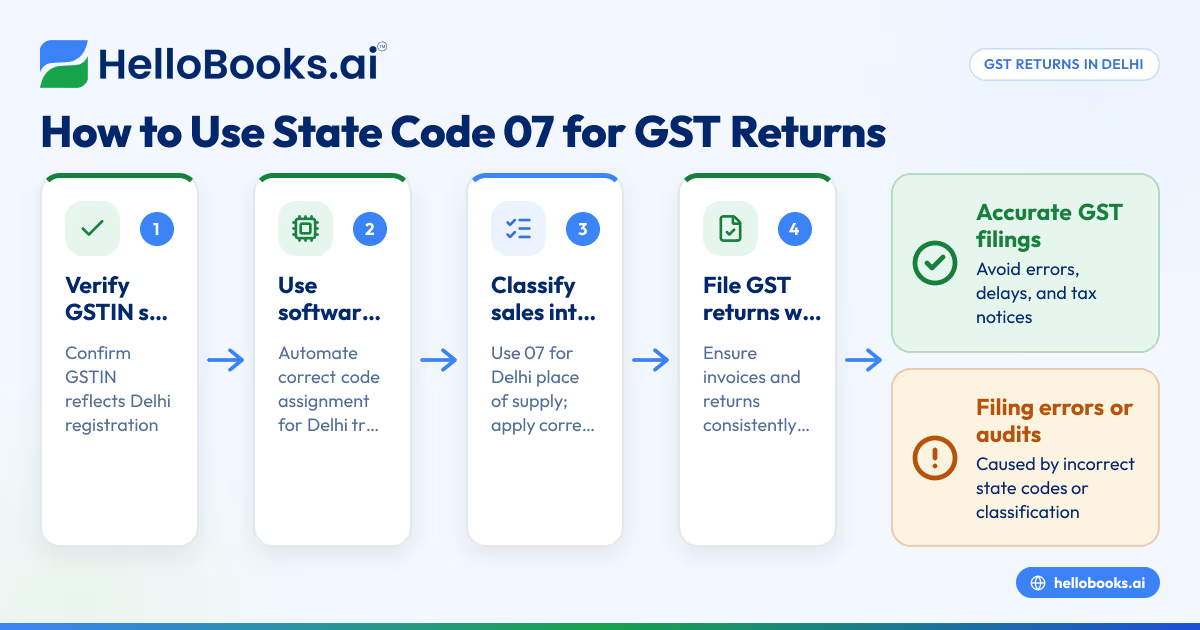
Step 1: Verify your GSTIN and ensure it starts with 07
Your GSTIN’s first two digits are the state code. For Delhi businesses, it must start with 07. Confirm this on your GST registration certificate.
This ensures your GSTIN matches your principal place of business. If you have branches in other states, each must have a GSTIN with that state’s code.
Common mistake: Using a GSTIN with the wrong state code for Delhi transactions can cause return rejections or tax notices.
Step 2: Use accounting software that supports state code 07 correctly
Choose accounting software in India or a Tally alternative that automatically assigns state code 07 for Delhi transactions. This reduces manual errors when creating invoices and filing GST returns.
Manual entry of state codes can cause mistakes, especially if your team is unfamiliar with GST rules. Automated software helps generate GST-compliant invoices with the correct state code embedded.
Common mistake: Forgetting to update the state code when the place of supply changes or entering the wrong code manually.
Step 3: Accurately classify your sales as intra-state or inter-state
For each invoice, determine if the supply is intra-state (within Delhi) or inter-state (Delhi to another state). Use state code 07 only when the place of supply is Delhi.
GST rates differ: intra-state supplies attract CGST and SGST, inter-state attract IGST.
Common mistake: Misclassifying Delhi customers under a different state code or vice versa, causing mismatches in GST returns.
Step 4: File your GST returns with correct state code 07 details
When filing GSTR-1 or GSTR-3B, ensure invoice details and place of supply state codes are accurate. Reconcile your sales ledger with GST returns to confirm state code 07 consistency.
Errors can delay refunds or trigger audits.
Common mistake: Uploading bulk invoice data with incorrect state codes leading to filing errors.
Step 5: Review and reconcile your GST returns regularly
Use bank reconciliation software and expense management software to cross-verify GST returns. Confirm all transactions tagged with state code 07 correspond to Delhi supplies.
Regular reconciliation prevents errors and penalties.
Common mistake: Ignoring reconciliation until filing deadlines, resulting in rushed mistakes.
Worked example: Filing GSTR-1 with state code 07 for a Delhi SME
A Delhi SME sells ₹2 lakh worth of goods to a customer in Delhi and ₹1.5 lakh worth to a customer in Bengaluru.
- GSTIN starts with 07, confirming Delhi registration.
- For ₹2 lakh intra-state sale, report state code 07 as place of supply. Charge CGST ₹18,000 and SGST ₹18,000 (assuming 9% each).
- For ₹1.5 lakh inter-state sale, place of supply is Karnataka (state code 29). Charge IGST ₹27,000 (18%).
- In GSTR-1, list the intra-state invoice with state code 07 and inter-state invoice with state code 29.
- In GSTR-3B, report ₹2 lakh under intra-state supplies and ₹1.5 lakh under inter-state, with corresponding taxes.
This clear segregation keeps GST returns accurate and compliant.
By following these steps, you can confidently use state code 07 in your GST filings without errors.
If you want to simplify this further, consider AI bookkeeping software like hellobooks.ai that automates GST return preparation, including state code assignment, invoicing, and reconciliation.
You can book a demo to see it in action or compare plans to find the best fit for your business.
Getting your GST returns right with state code 07 saves time and avoids costly mistakes. Start today by verifying your GSTIN and choosing the right tools for your Delhi SME.
Related reading
- GST return filing software
- How AI Bookkeeping Software Fully Supports Indian SMEs in Managing Complex GST Return Filing
- How Small Businesses in the United States Can Use AI for Accurate Sales Tax Tracking and Filing
Read next
This article covers one part of a bigger topic. For the complete picture, read our guide to state code 07.