
Key takeaways
What this article covers, in order:
- Before you start
- Step 1: What is GSTR-2B and why reconcile ITC with it?
- Step 2: How do I download and interpret GSTR-2B?
- Step 3: How do I reconcile purchase invoices with GSTR-2B?
- Step 4: What should I do if there are mismatches?
- Step 5: How to adjust ITC claims in your GST return?
How to Reconcile GST Input Tax Credit with GSTR-2B for Small Businesses in India
==============================================================================
This guide is for small business owners, finance leads, and accountants in India who want to accurately reconcile their GST input tax credit (ITC) using GSTR-2B. By the end, you will know how to match your purchase data with GSTR-2B, identify discrepancies, and ensure compliance for GST returns.
Before you start
- Access to your GSTR-2B auto-drafted input tax credit statement for the relevant tax period.
- Complete purchase invoices and bills with GST details recorded in your books or accounting software.
- Basic understanding of GST input tax credit rules and filing deadlines.
- A reliable accounting or [AI GST input] tool to automate data import and comparison helps reduce errors.
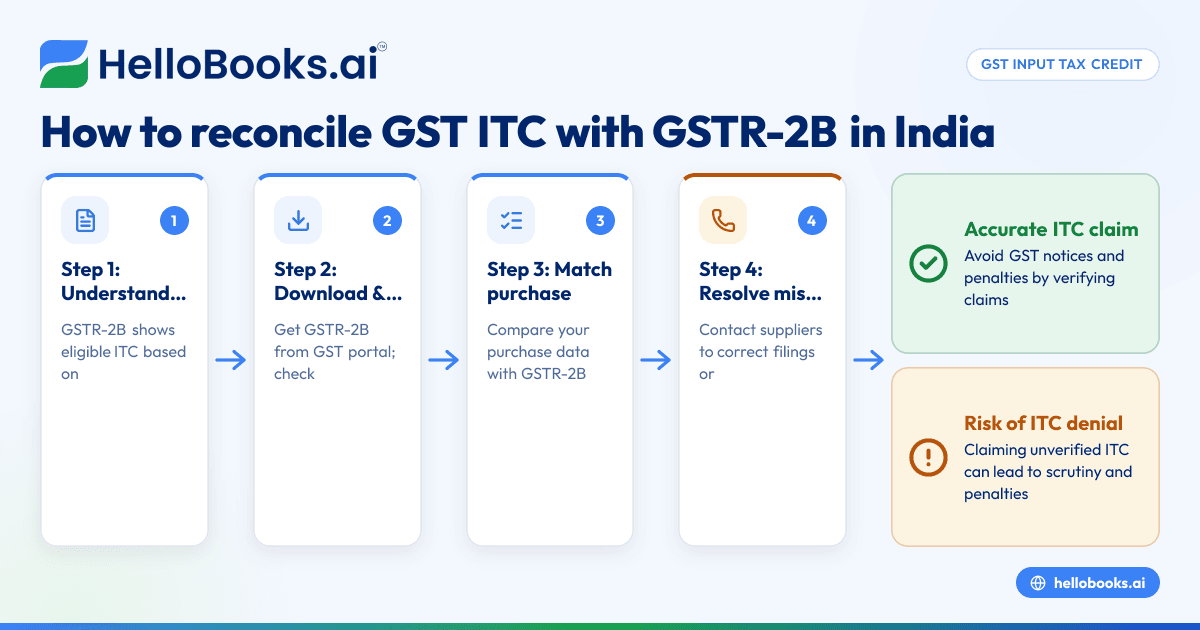
Step 1: What is GSTR-2B and why reconcile ITC with it?
GSTR-2B is a static monthly statement generated by the GST system that shows eligible and ineligible input tax credit for a business based on supplier filings. It helps you understand how much ITC you can claim for the tax period.
Reconciliation means matching your purchase invoices and GST paid, as recorded in your books, with the details in GSTR-2B. This process ensures you claim only the ITC you are entitled to and avoid notices or penalties from tax authorities.
Common mistake: Many businesses blindly claim ITC from their purchase register without checking GSTR-2B, leading to mismatches and GST scrutiny.
Step 2: How do I download and interpret GSTR-2B?
You can download your GSTR-2B statement from the GST portal by selecting the relevant month and your GSTIN. The statement is divided into sections like inward supplies from registered persons, imports, and others.
Each invoice or debit note is listed with GST amount, supplier details, and eligibility status of ITC (eligible, blocked, or ineligible).
Common mistake: Overlooking the blocked or ineligible ITC columns leads to wrong claims. Always cross-verify the eligibility status shown in GSTR-2B.
Step 3: How do I reconcile purchase invoices with GSTR-2B?
Start by listing all your purchase invoices for the tax period, including supplier GSTIN, invoice number, date, taxable value, and GST paid. Then, match these details with the entries in GSTR-2B.
Focus on:
- Invoices in your books but missing in GSTR-2B → may indicate supplier non-filing.
- Invoices in GSTR-2B but not in your books → check if you missed recording them.
- Differences in invoice value or GST amount → investigate discrepancies.
Using bank reconciliation software or [AI GST input] features within accounting software in India can automate this matching and highlight mismatches.
Common mistake: Ignoring small mismatches or not following up with suppliers delays corrections, risking ITC denial.
Step 4: What should I do if there are mismatches?
If you find invoices missing in GSTR-2B, contact your supplier to file or correct their GSTR-1 immediately. If invoices are missing in your books, obtain the invoice and record it properly.
For value mismatches, confirm with suppliers if invoices have been amended or credit notes issued. Keep communication and records handy for audit purposes.
Common mistake: Delaying resolution of mismatches until GST filing deadlines can cause ITC rejection and penalties.
Step 5: How to adjust ITC claims in your GST return?
After reconciliation, claim ITC in your GSTR-3B only for invoices that match GSTR-2B and are eligible. Avoid claiming ITC on invoices not appearing in GSTR-2B or marked as ineligible.
Ensure your purchase ledger and GST returns reflect the same ITC amount. This alignment reduces the risk of GST notices.
Common mistake: Claiming ITC on unverified invoices based on purchase bills leads to compliance issues.
Worked example: Reconciling GST ITC with GSTR-2B for a Bengaluru-based SME
Shivani runs a small IT services firm in Bengaluru. For April 2024, she has purchase invoices totalling ₹3,50,000 (₹40,000 CGST + ₹40,000 SGST). She downloads the GSTR-2B and finds:
- ₹3,00,000 of invoices match exactly.
- ₹30,000 of invoices from one supplier are missing in GSTR-2B.
- ₹20,000 of invoices have a ₹2,000 GST amount difference.
Shivani contacts the supplier, who confirms they missed filing those invoices in their GSTR-1. They agree to file immediately to update GSTR-2B. Shivani waits for the update and does not claim ITC on the missing invoices yet. For the ₹2,000 GST difference, she verifies with the supplier and adjusts the invoice records.
By following these steps, Shivani claims ₹3,20,000 of ITC correctly in her GSTR-3B, avoiding errors and potential GST notices.
What is the role of AI in GST input tax credit reconciliation?
AI-powered GST input reconciliation tools automatically import your purchase data and GSTR-2B, compare invoices line-by-line, and flag discrepancies in real time. This reduces manual errors, saves time, and improves accuracy in ITC claims.
Using such software integrates well with your existing accounting software for small business workflows, making monthly GST compliance simpler.
How often should I reconcile GST input tax credit with GSTR-2B?
Reconcile your GST input tax credit with GSTR-2B monthly, before filing your GSTR-3B returns. Doing this regularly helps catch discrepancies early, resolve supplier issues promptly, and ensures smooth GST return filing.
Waiting until the end of the quarter or year can cause last-minute panic and compliance risks.
Next steps
Start by downloading your latest GSTR-2B from the GST portal and gather your purchase invoices. Use an automated tool or spreadsheet to begin matching your records. If your business still uses manual processes or Tally, consider upgrading to AI accounting software like HelloBooks.ai for seamless GST input tax credit reconciliation and timely compliance.
Book a demo at /book-a-demo to see how HelloBooks can simplify your GST and accounting workflows or compare plans at /pricing.
Related reading
- How US Small Businesses Can Automate Sales Tax Filing with AI Accounting Software
- How Delaware Small-Business Owners Can Choose AI Accounting Software to Simplify Sales Tax and Bank Reconciliation
Read next
This article covers one part of a bigger topic. For the complete picture, read our guide to supported with caveat.