
Key takeaways
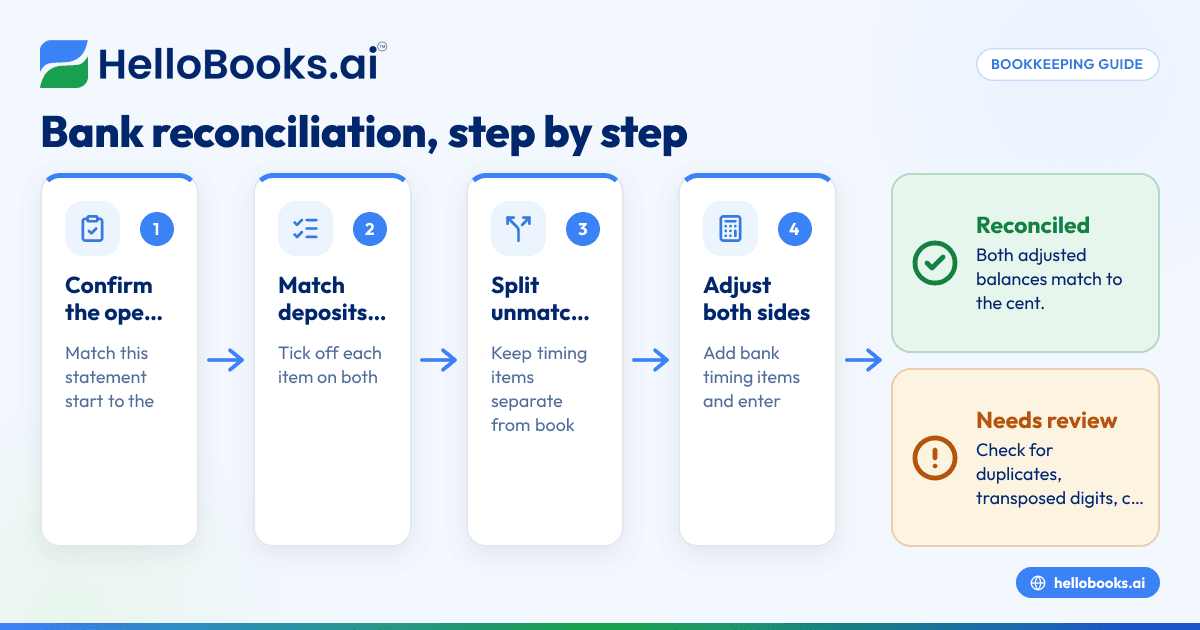
What this article covers, in order:
- Why your two balances almost never agree on day one
- What you need before you start
- Step 1: Confirm your starting point
- Step 2: Tick off every deposit
- Step 3: Tick off every withdrawal and check
- Step 4: List your timing items (the bank side)
To reconcile a bank statement, you take the ending balance the bank reports, adjust it for money that's moving but hasn't landed yet, adjust your own books for things only the bank knew about, and check that the two adjusted numbers agree to the cent. That's the whole idea. The rest of this guide walks through each step with a full worked example, so you can do it tonight with your own statement open.
Why your two balances almost never agree on day one
It's Oct 3, 2026. Your September 2026 statement just arrived. The bank says you had $18,642.75 on Sep 30, 2026. Your accounting software says $18,328.13. Neither number is wrong. They're just looking at the same money from two different places.
Your books record a check the moment you write it. The bank records it when the payee finally cashes it, which might be three days later or three weeks later. Going the other way, the bank knows about its own service fee and the interest it paid you before you do. Reconciliation is the routine that lines those two views up and flags anything that still doesn't fit.
If you skip it, small problems stack. A missed fee here, a duplicated deposit there, and by year-end your Balance Sheet is telling a story your bank account doesn't back up.
What you need before you start
Get these in front of you before touching a single number:
- The bank statement for the period (PDF or paper), including the beginning and ending balance.
- Your books for the same account, up to the same date.
- The ending balance from your last completed reconciliation.
- A list of checks you've written that you suspect haven't cleared.
- Deposit slips or payment-processor reports for anything deposited in the last few days of the period.
One rule that saves a lot of grief: reconcile one account and one period at a time, starting with the oldest unreconciled month.
Step 1: Confirm your starting point
Check that the beginning balance on this statement matches the ending balance of your last reconciliation. If last month closed at $16,904.20 adjusted, and this month opens somewhere else entirely, stop. Something in a prior period was edited, deleted or backdated after you reconciled it.
Fixing that first feels like a detour. It isn't. If the starting point is off, every step after it inherits the error and you'll chase ghosts for an hour.
Step 2: Tick off every deposit
Go down the statement's deposits and credits, and find each one in your books. Mark both sides as you go. A pencil tick on paper works. So does a "cleared" checkbox in software.
Watch for these:
- Batched deposits. You recorded three customer payments of $400, $650 and $300; the bank shows one deposit of $1,350. Same money, grouped differently.
- Net card deposits. A card processor might deposit $970 after taking a $30 fee from a $1,000 sale. Your books need both the $1,000 sale and the $30 fee.
- Deposits you never recorded. A customer paid by ACH and nobody entered it.
Step 3: Tick off every withdrawal and check
Now do the same for checks, debit card purchases, ACH payments and transfers. Match amount and payee, not just amount. Two $250 charges in the same week are easy to cross-match by mistake.
Anything on the statement with no match in your books goes on a "book adjustments" list. Anything in your books with no match on the statement goes on a "timing items" list. Keep the two lists separate. That separation is most of the trick.
Step 4: List your timing items (the bank side)
Timing items are real transactions that the bank simply hasn't processed yet. There are two kinds:
- Deposits in transit: money you deposited near the end of the period that shows up on the next statement.
- Outstanding checks: checks you wrote and recorded that the payee hasn't cashed.
Both adjust the bank balance, because your books are already right about them. The bank just hasn't caught up.
Step 5: List your book adjustments (the book side)
These are items the bank recorded first, which you now need to enter:
- Monthly service charges and wire fees
- Interest earned
- Returned customer checks (NSF) and the fee that comes with them
- Automatic payments you forgot to enter
- Your own errors, like a transposed amount
These adjust your books, because the bank is already right about them.
Step 6: Do the math on both sides
Here's the formula, written out plainly:
- Adjusted bank balance = statement ending balance + deposits in transit − outstanding checks
- Adjusted book balance = book balance + interest and unrecorded deposits − fees and unrecorded payments ± error corrections
When those two match, you're reconciled.
A full worked example
Maria runs a small commercial cleaning company in Phoenix. (She's an illustration, not a real customer.) Here's her September 2026 checking reconciliation.
What the documents say
- Bank statement ending balance, Sep 30, 2026: $18,642.75
- Book balance, Sep 30, 2026: $18,328.13
- Deposit made the evening of Sep 30, 2026, not on the statement: $1,350.00
- Check #1042 to a supply vendor, not cleared: $480.00
- Check #1045 to an equipment repair shop, not cleared: $1,215.50
- Monthly service charge on the statement, not in the books: $35.00
- Interest earned on the statement, not in the books: $4.12
Reconciliation table
| Bank side | Amount | Book side | Amount |
|---|---|---|---|
| Statement balance | $18,642.75 | Book balance | $18,328.13 |
| Add: deposit in transit | +$1,350.00 | Add: interest earned | +$4.12 |
| Less: check #1042 | −$480.00 | Less: service charge | −$35.00 |
| Less: check #1045 | −$1,215.50 | ||
| Adjusted bank balance | $18,297.25 | Adjusted book balance | $18,297.25 |
Let's check the arithmetic. Bank side: $18,642.75 + $1,350.00 = $19,992.75, minus $480.00 is $19,512.75, minus $1,215.50 is $18,297.25. Book side: $18,328.13 + $4.12 = $18,332.25, minus $35.00 is $18,297.25. They agree.
Step 7: Record the book adjustments
The bank-side items need no entries. They'll clear on their own next month. The book-side items do. For Maria, that's two simple entries:
| Entry | Debit | Credit |
|---|---|---|
| Record service charge | Bank fees expense $35.00 | Checking $35.00 |
| Record interest | Checking $4.12 | Interest income $4.12 |
After posting them, her books show $18,297.25 for checking, which is the true cash position as of Sep 30, 2026.
Step 8: Save the report and carry the timing items forward
Save the finished reconciliation with the statement attached. Next month, check that the $1,350.00 deposit and both checks actually clear. If check #1045 is still sitting there in Dec 2026, that's no longer a timing item. It's a question worth a phone call.
What if the numbers still don't match?
They won't always on the first pass. Before you panic, run through these in order:
- Is the difference exactly equal to one transaction? Search for that amount on both sides.
- Is it double one transaction? A deposit entered as a withdrawal (or the reverse) creates a gap of twice the amount.
- Does it divide evenly by 9? That's the classic sign of transposed digits, like $472 entered as $427 (a $45 gap).
- Did the opening balance move? Go back to Step 1.
- Is there a duplicate? Bank feeds and manual entry together are the usual source.
If you still can't find it after those checks, look at the period's cutoff dates. Statements that close on the 28th while your books run to the 30th will never agree until you line the dates up.
Common mistakes we see
- Plugging the difference. Booking an unexplained $63.40 to "miscellaneous" makes the report balance and hides the problem. If you truly can't find a small amount after a real search, record it to a clearly named suspense or "reconciliation discrepancy" account and leave a note, so someone revisits it.
- Editing reconciled transactions. Changing a cleared item from a closed month knocks out every reconciliation after it.
- Reconciling to the balance, not the statement. Your online banking balance today isn't the statement balance on the last day of the period.
- Treating transfers as income. Moving $2,000 from savings to checking isn't revenue. It's a transfer between two of your own accounts.
How long should this take?
For a business with 60 to 150 transactions a month and a connected bank feed, a clean monthly reconciliation usually takes 20 to 45 minutes. Your first one, or one that's been put off for months, takes longer. That's normal. The second month is always faster than the first because your starting point is finally solid.
How HelloBooks helps
HelloBooks lets you connect most US banks and credit cards, so transactions come into your books from the bank's own data rather than being retyped. If your bank won't connect, you can import a CSV statement instead. The steps above map onto the reconcile screen pretty directly. It lines your bank statement up against your ledger and puts an AI match suggestion on each line, with a confidence score and a short reason for the pick, so Steps 2 and 3 become a review of suggestions and you only work through the exceptions left over. If a suggested match is wrong, you can unmatch it in one click. Step 8 is covered too: the reconciliation report shows the opening balance, cleared items, outstanding items and closing balance, and exports as PDF or CSV. Once a period is reconciled and signed off, you can lock it, and reopening it later is logged. The Free plan includes 1 live bank feed and up to 200 transactions per year, plus P&L, Balance Sheet and Cash Flow reports. Starter ($14.99/month) adds AI auto-categorization and 3 bank connections, and Pro ($39.99/month) gives you unlimited bank connections. You can also invite your bookkeeper or CPA into the same books so they can review your reconciliations. See how it fits together on our bank reconciliation software page, or browse the full list of bookkeeping features. If you'd rather spend less time on the categorizing side, our automated bookkeeping page explains what the AI handles and what you still review.
FAQs
What's the difference between the bank balance and the book balance?
The bank balance is what the bank has processed as of the statement date. The book balance is what you've recorded. They differ because of timing (checks not yet cashed, deposits not yet credited) and because the bank records some items, like fees and interest, before you do.
Do deposits in transit go on the bank side or the book side?
The bank side. You've already recorded the deposit correctly in your books; the bank just hasn't processed it by the statement date. You add it to the statement balance.
Should I reconcile savings accounts and credit cards too?
Yes. Every account that shows up on your Balance Sheet with a statement behind it, including savings, credit cards and loan accounts, should be reconciled. Credit cards are the ones people skip most often.
What if I find an error from a month I already reconciled?
Fix it in the current period with a correcting entry and a clear note, rather than editing the old transaction. Editing closed periods breaks the reconciliations that came after them. For anything material, check with your bookkeeper or CPA before changing a closed year.
Can I reconcile without the paper statement?
You can reconcile against a downloaded PDF or CSV statement from your bank. What matters is that you're using the bank's ending balance for a fixed date, not a live balance that keeps changing.
How do clean reconciliations help at tax time?
Reconciled books mean your income and expense totals are backed by bank records. That makes year-end far easier for your CPA, who handles the actual filing.
Pick last month's statement, block off 45 minutes, and get one account fully reconciled. The second one will feel easy.
Start free, no credit card. Try HelloBooks Free