
Key takeaways
What this article covers, in order:
- Before you start
- Step 1: Why import invoices from CSV or PDF files?
- Step 2: How do I prepare my CSV file for GST invoice import?
- Step 3: Can AI help me import CSV or PDF invoices?
- Step 4: How do I upload invoices into my accounting or GST software?
- Worked example: How do I import sales invoices from a CSV file for GSTR-1 filing?
How to Import and Use CSV and PDF Invoices for GST Compliance in India
This guide is for small business owners, finance leads and accountants in India who handle manual invoice data entry and want to simplify GST compliance. By the end, you will be able to import invoice data from CSV or PDF files into your accounting system accurately and use it for GST return filing.
Before you start
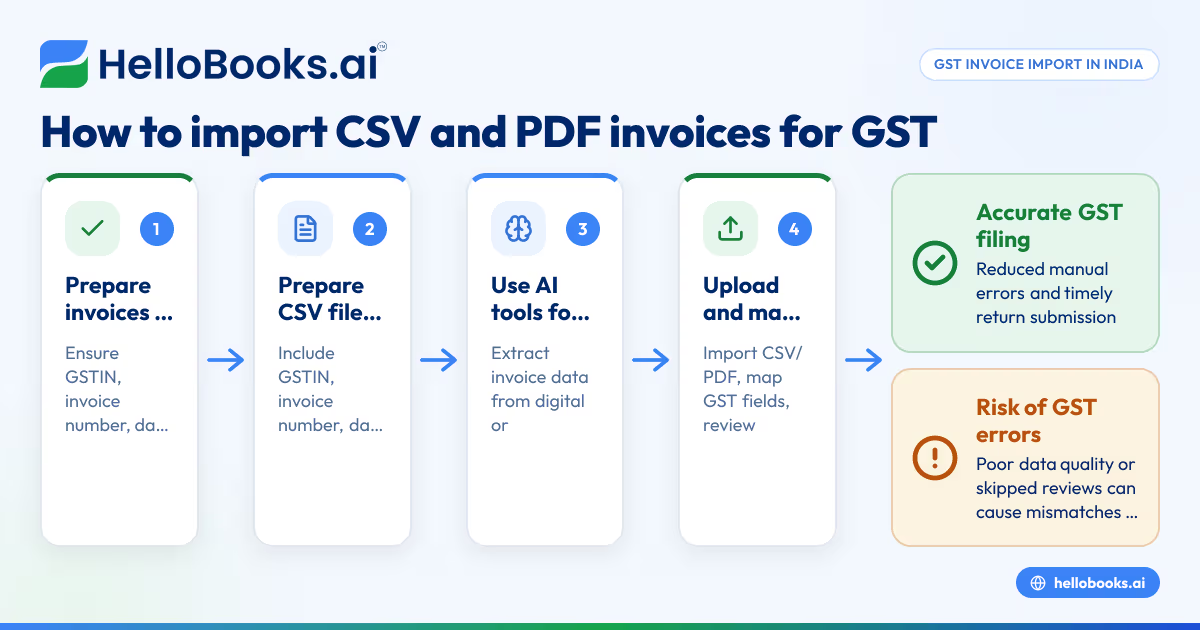
- Ensure your invoices contain all mandatory GST details: GSTIN, invoice number, invoice date, taxable value, GST rates and tax amounts.
- Choose software that supports import of CSV and PDF invoice data and maintains GST compliance.
- Keep a copy of your original invoices in digital format for verification and audits.
- Familiarise yourself with current GST return filing deadlines and rules (e.g. GSTR-1 due date).
- Organise all invoice files by month or tax period for easy retrieval during filing.
- Maintain a backup of your CSV and PDF files in a secure location, as digital records are essential for audits.
Step 1: Why import invoices from CSV or PDF files?
Importing invoices saves valuable time otherwise spent on manual entry and reduces errors. CSV files are simple structured data formats that make imports straightforward and error-checkable.
PDF invoices are often digital or scanned files from suppliers. Digitally created PDFs with embedded text allow easier data extraction, whereas scanned PDFs need Optical Character Recognition (OCR) or AI-powered tools. AI parsing of PDFs can speed up extraction significantly if quality is good.
A common mistake is bad PDF quality—low resolution or skewed scans lead to incorrect data extraction, causing GST filing mismatches or penalties. Always ask suppliers for clear, digital PDF invoices or high-quality scans.
Step 2: How do I prepare my CSV file for GST invoice import?
Your CSV must clearly include all GST-required fields in consistent formats. Export from invoice systems or platforms like IndiaMART or JustDial if possible.
Key columns:
- Invoice Number
- Invoice Date (DD/MM/YYYY)
- Customer or Supplier GSTIN (15 characters)
- Taxable Value
- CGST, SGST, IGST amounts separately
- HSN/SAC code for goods/services classification
- Invoice Type (B2B, B2C, Export etc.)
Check your CSV for missing values, consistency, and formatting errors before import. A frequent error is mixing date formats (e.g., 01/05/2024 and 05/01/2024), which disrupts GST period classification. Standardise all dates to DD/MM/YYYY. Also, remove extra spaces or hidden characters in GSTIN or HSN fields.
Step 3: Can AI help me import CSV or PDF invoices?
AI-based tools can automatically identify and extract invoice data from CSV or PDF files, speeding up bookkeeping. This is very helpful if your invoices come as PDFs without structured data.
AI parses scanned or digital PDFs to pick out supplier info, invoice numbers, dates, GSTINs, taxable values, and tax amounts. It reduces manual efforts and errors during import.
However, AI needs reasonably clear text and image quality to work well. Handwritten invoices or poor scans confuse AI, needing manual corrections. Always validate imported data against the original PDFs to avoid GST return mistakes.
Using AI CSV or PDF parsing tools increases efficiency but never skip the review step.
Step 4: How do I upload invoices into my accounting or GST software?
Most accounting software in India, including HelloBooks, offer invoice import options for CSV and PDF.
Typical steps:
- Log in to your software.
- Go to sales or purchase invoice import.
- Select the file format (CSV or PDF).
- For CSV, map columns like Invoice Number, GSTIN, Taxable Value etc.
- For PDF, let AI extract data or enter fields manually.
- Review the import preview carefully for missing GST details or errors.
- Fix errors in the tool, then confirm import.
- Imported invoices update your ledger and GST filing modules.
A common error is skipping the review, which may cause incorrect GST returns and notices.
Worked example: How do I import sales invoices from a CSV file for GSTR-1 filing?
Suppose you run a textile export business in Pune. Your sales team exports invoice data into a CSV:
| Invoice Number | Invoice Date | Customer GSTIN | Taxable Value | CGST @ 9% | SGST @ 9% | HSN | Invoice Type |
|---|---|---|---|---|---|---|---|
| INV001 | 01/05/2024 | 27AAEPM1234R1Z5 | ₹1,00,000 | ₹9,000 | ₹9,000 | 5208 | B2B |
| INV002 | 10/05/2024 | 27AAEPM9876Q1Z2 | ₹50,000 | ₹4,500 | ₹4,500 | 5208 | B2B |
Steps:
- Log in to your GST return filing software supporting CSV imports.
- Upload your CSV in the sales invoice import section.
- Map CSV columns to the software’s GST fields.
- Preview for missing GSTIN or tax errors.
- Import the data.
- Your invoices are ready for GSTR-1 submission.
This process saves hours over manual entry and reduces human errors.
What challenges might I face with PDF invoice imports?
AI tools struggle with handwritten invoices and poor-quality scans—blurred, shadowed or skewed images reduce accuracy. Unique supplier invoice layouts and multiple fonts or languages complicate extraction. Missing GST fields in PDFs may require manual editing or rejecting invoices.
Improving imports means requesting digitally generated PDFs with selectable text, scanning at 300 dpi or higher in good lighting, standardising supplier invoice formats where possible, and using AI tools that allow manual overrides and corrections.
What next after importing invoices for GST compliance?
After importing and verifying invoices, reconcile your transactions against bank statements using bank reconciliation software to ensure payment accuracy.
Then file your GST returns confidently with accurate data—GSTR-1 for outward supplies and GSTR-3B for summary declarations. Keep records of imported invoices and payment proofs for audits.
To further reduce manual work, try AI bookkeeping that automates invoice posting and reports.
Ready to reduce manual work and improve GST filing accuracy? You can book a demo with HelloBooks to see automated CSV and PDF invoice import in action or check our plans at pricing.
Getting your invoice data right is the foundation for smooth GST compliance and financial management. Use AI tools thoughtfully, double-check your imports, and keep your business books tidy and stress-free.
Related reading
Read next
This article covers one part of a bigger topic. For the complete picture, read our guide to csv or pdf.