
Key takeaways
What this article covers, in order:
- GSTR-3B ଆସଲେ କଣ, ଏବଂ ଏବେ କାହିଁକି ଯାଞ୍ଚ ବେଶି ଦରକାର
- ଫ୍ରି portal filing କରିବା ପୂର୍ବରୁ କେଉଁ records ତିଆରି ରଖିବେ
- GST Portal ରେ GSTR-3B ଖୋଲିଲେ କେଉଁ tables ଉପରେ ଧ୍ୟାନ ଦେବେ
- GST Portal ରେ ନିଜେ GSTR-3B ଫାଇଲ୍ କରିବାର ବ୍ୟବହାରିକ ଧାରା
- ଯେଉଁଠି Odisha ସହିତ ଭାରତର ଛୋଟ ବ୍ୟବସାୟମାନେ ଅଧିକ ଭୁଲ୍ କରନ୍ତି
- ଗୋଟିଏ ସତ୍ୟନିଷ୍ଠ ନମୁନା ହିସାବ, ଯାହା ପୁରାପୁରି illustrative ଏବଂ invented
Indiaରେ GSTR-3B ଅନଲାଇନ୍ ଫ୍ରିରେ ଫାଇଲ୍ କରିବାର ସରଳ ଉତ୍ତର ହେଲା: GST Portal ରେ login କରନ୍ତୁ, ସେହି tax period ପାଇଁ GSTR-1 ଏବଂ GSTR-2B ସହ ମେଳ ଯାଞ୍ଚ କରନ୍ତୁ, reverse charge ଓ ITC reversal ଠିକ୍ କରନ୍ତୁ, liability set-off କରି return submit କରନ୍ତୁ। GSTR-3B ମାନେ ଏବେ କେବଳ data entry ନୁହେଁ; GSTN ଚାଲିତ portal ଉପରେ ଏହା validation କାମ ଅଧିକ। ଠିକ୍ filing ପାଇଁ Central Goods and Services Tax Act, 2017 ଏବଂ CBIC ଙ୍କ current instructions ଦେଖିବା ଦରକାର।
GSTR-3B ଆସଲେ କଣ, ଏବଂ ଏବେ କାହିଁକି ଯାଞ୍ଚ ବେଶି ଦରକାର
GSTR-3B ହେଉଛି GST ଅଧୀନରେ ଦିଆଯାଉଥିବା ଗୋଟିଏ summary return। ଏଠାରେ ଆପଣ outward supplies, inward supplies liable to reverse charge, eligible input tax credit, tax payment ଏବଂ କିଛି other declarations ଦେଖାନ୍ତି। ଏହାର ଆଇନି ଭିତ୍ତି Central Goods and Services Tax Act, 2017 ଓ ସେଥିପାଇଁ ପ୍ରଣୀତ Rules; notifications, advisories ଏବଂ return changes ସାଧାରଣତଃ CBIC ଓ GST Portal/GSTN ର news-update ଭାଗରେ ପ୍ରକାଶ ହୁଏ।
ବ୍ୟବହାରିକ ଭାବରେ ଦେଖିଲେ, ଅନେକ taxpayer ମନେ କରନ୍ତି GSTR-3B ରେ ପୁନିଥରେ sale ଓ purchase ଲେଖିଦେଲେ କାମ ସରିଗଲା। ଏହା ଆଜିର ପରିସ୍ଥିତିରେ ଠିକ୍ ନୁହେଁ। ଆପଣଙ୍କ GSTR-1, GSTR-2B, invoice records, reverse charge entries ଓ electronic cash/credit ledger ମେଳ ଖାଉଛି କି ନାହିଁ ସେଇଥି ମୁଖ୍ୟ। ଏହିକାରଣରୁ ଜଣେ ବ୍ୟବସାୟୀ ଯଦି invoice ବନେଇବାବେଳେ CGST, SGST କିମ୍ବା IGST ଠିକ୍ split ରଖନ୍ତି ନାହିଁ, ପରେ GSTR-3B ରେ ସମସ୍ୟା ହୁଏ। ସେଠି smart invoicing ପରି ସେଟଅପ୍ ଉପକାରୀ, କାରଣ place of supply ଭୁଲ୍ ହେଲେ return ଭିତରେ tax head mismatch ହୁଏ।
ଫ୍ରି portal filing କରିବା ପୂର୍ବରୁ କେଉଁ records ତିଆରି ରଖିବେ
ପୋର୍ଟାଲ ଖୋଲିବା ପୂର୍ବରୁ ଏହି କାଗଜପତ୍ର କିମ୍ବା data ତିଆରି ରଖିଲେ filing ବହୁତ ସହଜ ହୁଏ:
- ସେହି period ପାଇଁ filed କିମ୍ବା ready GSTR-1
- GSTR-2B ଏବଂ purchase register ର ମେଳ
- reverse charge ଥିବା inward supplies ର ତାଲିକା
- blocked credit ଓ reversal ହେବାକୁ ଥିବା ITC ର note
- sales register, debit note, credit note
- electronic cash ledger ଓ credit ledger ର balance
- bank statement ଭିତ୍ତିକ receipt/payment cross-check
ଏଠି ଗୋଟିଏ ଭୁଲ୍ ବହୁତ ସାଧାରଣ: invoice book ଗୋଟେ ଜାଗାରେ, purchase bill PDF ଅନ୍ୟ ଫୋଲ୍ଡରରେ, bank entries NEFT/RTGS/IMPS/UPI ର reference ସହ ଅଲଗା, ଆଉ CA କୁ ପଠାଇଥିବା summary ଆଉ ଗୋଟେ spreadsheet ରେ। ତେବେ GSTR-3B free filing ହେଲେ ମଧ୍ୟ free from rework ହୁଏ ନାହିଁ। କିଛି ବ୍ୟବସାୟୀ monthly bank statement upload କରି reconciliation କରନ୍ତି, ଯାହାରେ receipt କେଉଁ invoice ସହ ମେଳ ଖାଉଛି ବୁଝିବା ସହଜ ହୁଏ; ଏହି ପ୍ରକାର bank reconciliation setup GST checking ପାଇଁ ମଧ୍ୟ କାମ କରେ।
ଯଦି ଆପଣ purchase bills ବହୁତ ପାଆନ୍ତି, OCR ରେ bill capture କରି register ବନାଇବା ଆଗରୁ କଲେ GSTR-2B ସହ compare କରିବା ସହଜ ହୁଏ। ଏହାର ଫଳରେ ITC claim ପୂର୍ବରୁ missing supplier invoice ଧରାପଡ଼ିପାରେ।
GST Portal ରେ GSTR-3B ଖୋଲିଲେ କେଉଁ tables ଉପରେ ଧ୍ୟାନ ଦେବେ
GSTR-3B ର ପ୍ରତ୍ୟେକ table ମାନେ କେବଳ typing field ନୁହେଁ; ଏହା ଆପଣଙ୍କ books ସହ return logic ମେଳାଇବାର ଜାଗା। Headings portal ରେ ସାନା ଭିନ୍ନ ଦେଖାଯାଇପାରେ, ସେଥିପାଇଁ current screen layout GST Portal ରେ ଯାଞ୍ଚ କରନ୍ତୁ।
Outward supplies ଭାଗ
ଏଠାରେ taxable outward supply, zero-rated supply, nil-rated/exempt supply, non-GST supply, ଏବଂ reverse charge ସହ ଜଡିତ inward supply declaration ଥାଏ। ଯଦି ଆପଣ interstate sale କରିଛନ୍ତି, ତେବେ IGST ଏବଂ place of supply ସଠିକ୍ ରହିବା ଦରକାର। Odisha ରୁ West Bengal କିମ୍ବା Jharkhand କୁ supply କରି ଭୁଲକରି CGST+SGST ନେଲେ GSTR-1 ଓ GSTR-3B ମଧ୍ୟରେ mismatch ସୃଷ୍ଟି ହୋଇପାରେ। ସେଇଥିପାଇଁ invoice stage ରେ tax head split ଠିକ୍ ରହିବା ବହୁତ ଜରୁରୀ।
ITC ଭାଗ
Input tax credit ଦେଖିବାବେଳେ ସବୁଠାରୁ ଆବଶ୍ୟକ କାମ ହେଉଛି GSTR-2B ସହ purchase register ମେଳାଇବା। CGST Act, 2017 ଓ CBIC/GSTN ଙ୍କ guidance ଅନୁଯାୟୀ ITC claim eligibility ବିଷୟର current position official portal ଓ law text ରେ ଦେଖିବା ଉଚିତ। Supplier invoice GSTR-2B ରେ ନଥିଲେ, ସେଥିରେ ସାବଧାନ ଭାବରେ ଚାଲିବା ଦରକାର; ଆପଣଙ୍କ tax professional ସହ position confirm କରନ୍ତୁ ଯଦି facts ଜଟିଳ।
Reverse charge ଭାଗ
Legal fee, GTA, କିମ୍ବା ଅନ୍ୟ notified inward supplies ଉପରେ reverse charge ଲାଗୁ ହୋଇପାରେ, depending on facts and notification. କେଉଁ supply ଉପରେ reverse charge ଲାଗେ, ଏହା CBIC notifications ରେ ପ୍ରକାଶ ହୁଏ ଏବଂ CGST/IGST legal framework ଅନୁଯାୟୀ ପଢ଼ିବା ଉଚିତ। ଏହି entries ଛାଡ଼ିଦେଲେ GSTR-3B liability କମ୍ ଦେଖାଯାଇପାରେ।
Payment section
ଏଠି electronic credit ledger ଓ electronic cash ledger ର set-off ହୁଏ। Bank challan generation ଓ payment rail ଆପଣଙ୍କ banking setup ଉପରେ ନିର୍ଭର କରେ। UPI, NEFT, RTGS, କିମ୍ବା net banking ଭଳି rails ନେଇ latest options GST Portal ଓ authorised banking interface ରେ ଦେଖିବା ଉଚିତ।
GST Portal ରେ ନିଜେ GSTR-3B ଫାଇଲ୍ କରିବାର ବ୍ୟବହାରିକ ଧାରା
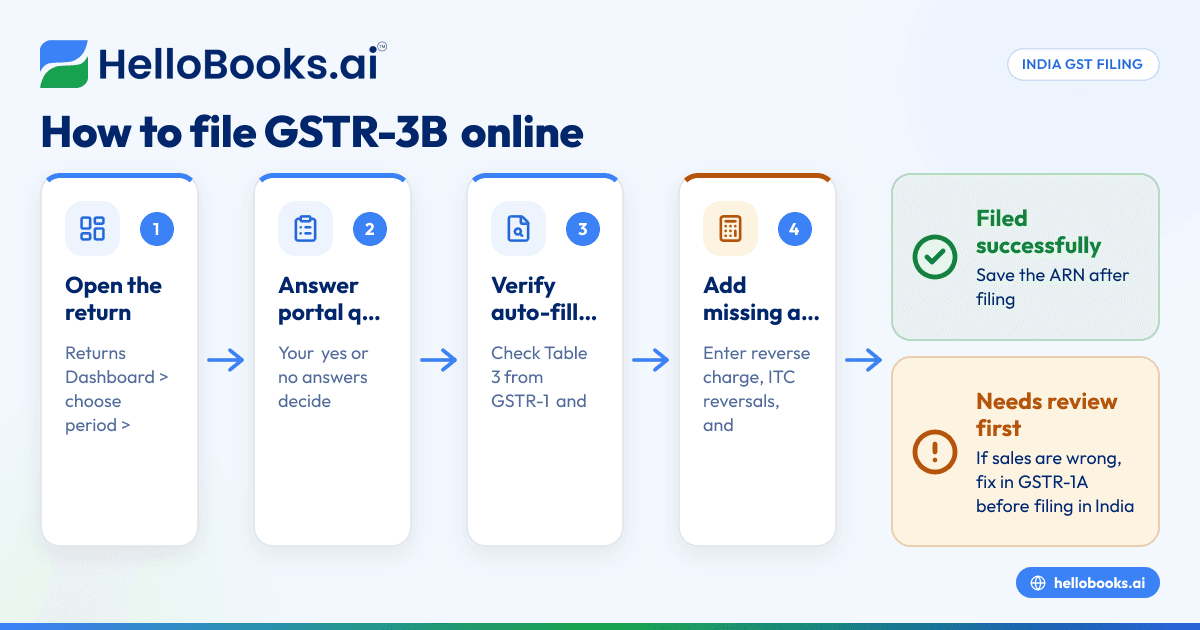
ପ୍ରଥମେ GST Portal ରେ login କରନ୍ତୁ, Returns Dashboard ରେ relevant financial year ଓ return period ବାଛନ୍ତୁ, ତାପରେ GSTR-3B ଖୋଲନ୍ତୁ। Screen flow ସମୟ ସହ ବଦଳିପାରେ, ତେଣୁ current navigation GSTN interface ଉପରେ ଯାଞ୍ଚ କରନ୍ତୁ।
ତାପରେ ଏହି କ୍ରମରେ କାମ କରନ୍ତୁ:
- Auto-populated figures ଦେଖନ୍ତୁ — GSTR-1 ରୁ ଆସିଥିବା outward supply figures ମେଳ ଖାଉଛି କି? ନାହିଁ ହେଲେ ପ୍ରଥମେ source data ର problem ଚିହ୍ନଟ କରନ୍ତୁ।
- Reverse charge ଯାଞ୍ଚ କରନ୍ତୁ — books ରେ ଥିବା liable inward supplies ଛାଡ଼ିଯାଇନି କି?
- GSTR-2B ବନାମ purchase register compare କରନ୍ତୁ — eligible ITC, ineligible ITC, blocked credit, personal use, exempt business use related reversal ନୋଟ୍ କରନ୍ତୁ।
- Nil/exempt/non-GST inward supplies ର declaration ଠିକ୍ କରନ୍ତୁ — ଅନେକେ ଏହାକୁ ଅବହେଳା କରନ୍ତି।
- Save କରି liability ପୁନର୍ଦେଖନ୍ତୁ — system computed values କିଛି ପରିବର୍ତ୍ତନ ଦେଖାଉଛି କି?
- Offset liability କରନ୍ତୁ — credit ledger ଓ cash ledger ର ସଠିକ୍ use କରନ୍ତୁ।
- Preview download କରନ୍ତୁ — file ପୂର୍ବରୁ PDF/summary ଦେଖନ୍ତୁ।
- Submit ଓ file କରନ୍ତୁ — authorised signatory DSC/EVC process portal ଯାହା ଦେଖାଏ ତାହା ଅନୁସରଣ କରନ୍ତୁ। EVC/DSC availability ଓ filing mode ସମ୍ବନ୍ଧର current rules GST Portal ର help section ରେ ପ୍ରକାଶ ହୁଏ।
ଏଠି ଗୋଟିଏ practical point: ଯଦି ଆପଣଙ୍କ invoice records ଆଗରୁ clean ଅଛି, ତେବେ GSTR-3B filing ସତରେ ସହଜ। ଯଦି sales, purchase, stock ଓ bank entries ମେଳ ଖାଉନି, portal ଫ୍ରି ହେଲେ ମଧ୍ୟ mental cost ବହୁତ ବଢ଼ିଯାଏ। ଯେମିତି ବ୍ୟବସାୟ inventory ଚଲାନ୍ତି, stock movement ଓ sales register ଗୋଟିଏ ସିଷ୍ଟମ୍ରେ ରଖିଲେ return mismatch କମିଯାଏ; inventory ସହ linked accounting ଏହିକାରଣରୁ useful।
ଯେଉଁଠି Odisha ସହିତ ଭାରତର ଛୋଟ ବ୍ୟବସାୟମାନେ ଅଧିକ ଭୁଲ୍ କରନ୍ତି
ପ୍ରଥମ ଭୁଲ୍ ହେଉଛି GSTR-1 ଓ GSTR-3B କୁ ଅଲଗା ଦୁଇଟି return ଭାବରେ ଦେଖିବା। ଆସଲେ ଦୁଇଟିର figures ଲଜିକ୍ ଦ୍ୱାରା ଯୋଡାଯାଇଛି। ଯଦି GSTR-1 ରେ wrong GSTIN, wrong invoice value, wrong state code କିମ୍ବା wrong tax head ଗଲା, GSTR-3B ବେଳେ ଅସୁବିଧା ଆସିବ।
ଦ୍ୱିତୀୟ ଭୁଲ୍ ହେଉଛି GSTR-2B ରେ ନଥିବା bill ଉପରେ ITC ଧରିବାକୁ ଚେଷ୍ଟା କରିବା। କେବେ କେବେ supplier filing delay କରିଥାନ୍ତି; କେବେ କେବେ invoice number mismatch ଥାଏ; କେବେ କେବେ supplier ଭୁଲ୍ GSTIN ରେ upload କରିଥାନ୍ତି। ଏହି issues ଧରିବା ପାଇଁ gst-return-filing-software କିମ୍ବା ai-bookkeeping ଭଳି workflow ଉପକାରୀ, ଯେତେକି data invoice stage ରୁ return stage ପର୍ଯ୍ୟନ୍ତ traceable ରହେ।
ତୃତୀୟ ଭୁଲ୍ reverse charge କୁ ignore କରିବା। ବିଶେଷକରି service expenses ରେ ଏହା ଚୁକିଯାଏ।
ଚତୁର୍ଥ ଭୁଲ୍ bank receipts ଓ sales register ର timing mismatch। ଧରନ୍ତୁ UPI ରେ ପଇସା ଆସିଲା, invoice ପରବର୍ତ୍ତୀ ଦିନ ବନିଲା, କିମ୍ବା advance receipt ର accounting ଠିକ୍ ହେଲା ନାହିଁ। ତେବେ tax period selection ଭୁଲ୍ ହୋଇଯାଇପାରେ।
ପଞ୍ଚମ ଭୁଲ୍ e-invoice ଓ e-way bill ର data କୁ books ସହ ମେଳାଇ ନଦେଖିବା। ଯେଉଁ business ଉପରେ e-invoicing applicability ଥାଏ, IRN ଓ signed QR data sales record ସହ match କରିବା ଜରୁରୀ। Transport-heavy trade ରେ e-way bill detail ମଧ୍ୟ audit trail ପାଇଁ useful। e-invoicing-software କିମ୍ବା e-way bill software ସହ invoice-linked flow ଏଠି manual re-entry କମାଇଦିଏ।
ଗୋଟିଏ ସତ୍ୟନିଷ୍ଠ ନମୁନା ହିସାବ, ଯାହା ପୁରାପୁରି illustrative ଏବଂ invented
ଧରନ୍ତୁ, କଟକରେ ଥିବା ଗୋଟିଏ trading business ପାଇଁ ଏହି ସଂଖ୍ୟାଗୁଡ଼ିକ ସମ୍ପୂର୍ଣ୍ଣ illustrative ଏବଂ invented: ମାସର taxable outward supplies ₹8,40,000, ତାରୁ Odisha ଭିତର sales ₹5,00,000 ଏବଂ Odisha ବାହାର interstate sales ₹3,40,000। Purchase bills ମଧ୍ୟରୁ GSTR-2B ରେ reflected eligible ITC ଧରାଯାଉ ₹62,000 illustrative, ଏବଂ reverse charge ରେ tax payable ଧରାଯାଉ ₹6,000 illustrative। ପୁନି ଧରନ୍ତୁ blocked/personal-use related ITC reversal ₹4,000 illustrative।
ଏହି invented illustration ରେ ଲଜିକ୍ ହେବ:
- outward tax liability books ଓ invoice split ରୁ ଆସିବ
- reverse charge liability ଅଲଗା ଭାବେ ଯୋଡାଯିବ
- ITC ରୁ କେବଳ eligible amount ନିଆଯିବ
- reversal କମାଇ ନେଟ୍ credit ଧରାଯିବ
- balance amount cash ledger ଦ୍ୱାରା set-off ହେବ
କିନ୍ତୁ ଏହି illustration ଇଚ୍ଛାକୃତ ଭାବରେ କିଛି ଜିନିଷ ଛାଡ଼ିଦେଉଛି: exempt turnover apportionment, Rule 42/43 style complexities, credit notes timing, prior-period adjustments, interest/late fee calculation, export treatment, valuation disputes, ଏବଂ sector-specific notification issues। ସେଇଥିପାଇଁ ଏହା କେବଳ flow ବୁଝାଇବା ପାଇଁ; real filing ପାଇଁ current law ଓ portal figures ଉପରେ ଭରସା କରନ୍ତୁ।
କେବେ free portal filing ପର୍ଯ୍ୟାପ୍ତ, ଆଉ କେବେ system ଦରକାର ପଡ଼େ
ଯଦି ଆପଣଙ୍କ monthly invoices କମ୍, ଗୋଟିଏ GSTIN ମାତ୍ର ଅଛି, sales mostly local, purchase bills ସୀମିତ, ଆଉ reverse charge କିମ୍ବା complex ITC issues ଅଧିକ ନାହିଁ, ତେବେ direct portal filing ଯଥେଷ୍ଟ ହୋଇପାରେ।
କିନ୍ତୁ ଏହି ପରିସ୍ଥିତିରେ system ବିନା କାମ କଠିନ ହୁଏ:
- ଅନେକ GSTIN କିମ୍ବା multiple state registrations
- interstate supply ବେଶି
- e-invoice applicability
- frequent e-way bill generation
- purchase bills ବହୁତ ଅଧିକ
- bank statement ରେ ହଜାର transaction
- TDS/TCS impact ଥିବା vendor/customer accounting
- Tally ରୁ migration କିମ୍ବା parallel books issue
ଏପରି କେସରେ HelloBooks ଭଳି setup ଉପକାରୀ ହୁଏ, କାରଣ invoice ବନାଇବାବେଳେ GSTIN, place of supply, CGST/SGST/IGST split ଠିକ୍ ରଖିପାରିବେ, purchase bill OCR ଦ୍ୱାରା data capture କରିପାରିବେ, GSTR-2A/2B reconciliation ରେ ITC tracking ଦେଖିପାରିବେ, ଏବଂ ସେହି books ରୁ GSTR-1 ଓ GSTR-3B direct file କରିପାରିବେ। ଯଦି ଆପଣ ପୂର୍ବରୁ Tally ବ୍ୟବହାର କରୁଛନ୍ତି, tally alternative କିମ୍ବା migration discussion ଦେଖି ନିଜ workflow ସହ ମେଳ ହେଉଛି କି ନାହିଁ ବୁଝିପାରିବେ। Pricing ଦେଖିବାକୁ pricing ଅଛି, ଆଉ walkthrough ପାଇଁ demo ନେଇପାରିବେ।
ଫାଇଲ୍ କରିବା ପୂର୍ବରୁ ଶେଷ ଯାଞ୍ଚ: numbers ନୁହେଁ, source ଠିକ୍ କି ନାହିଁ
ଶେଷରେ GSTR-3B ଠିକ୍ ହେବାର ଅର୍ଥ ସବୁ box ରେ କିଛି ନ କିଛି number ଥିବା ନୁହେଁ। ମୁଖ୍ୟ କଥା ହେଲା:
- sales register ବନାମ GSTR-1 ଠିକ୍ କି?
- purchase register ବନାମ GSTR-2B ଠିକ୍ କି?
- reverse charge ଛାଡ଼ିଯାଇନି କି?
- ineligible ITC କାଢ଼ାଯାଇଛି କି?
- cash ledger ରେ ପର୍ଯ୍ୟାପ୍ତ amount ଅଛି କି?
- authorised signatory ଓ filing method ready କି?
Official rates, due dates, threshold, late fee, interest, challan/payment rules, ଏବଂ return interface changes ବାବଦରେ current figures CBIC notifications, GST Portal advisories, ଓ GSTN help content ରେ ପ୍ରକାଶ ହୁଏ। କୌଣସି specific amount କିମ୍ବା deadline ଉପରେ କାମ କରିବା ପୂର୍ବରୁ ସେହି official source ଯାଞ୍ଚ କରନ୍ତୁ କିମ୍ବା tax practitioner ସହ confirm କରନ୍ତୁ.
ଯଦି ଆପଣ free filing କରୁଛନ୍ତି, ଏହା ମନେ ରଖନ୍ତୁ: GSTR-3B portal ରେ ଭରାଯାଏ, କିନ୍ତୁ ସଠିକ୍ return ଆପଣଙ୍କ books ରେ ବନେ। GSTIN validation, HSN check, invoice field check ଭଳି କାମ ପାଇଁ free India tools ମଧ୍ୟ useful ହୋଇପାରେ, ଯେପରି GSTIN validator, HSN code search, ଏବଂ GST invoice validator।