


Key takeaways
What this article covers, in order:
- Why this comes up / what goes wrong
- Step-by-step
- Example (fictional figures)
- Common mistakes
- Doing this in HelloBooks
- Frequently asked questions
To file a GST return, you need to submit your GSTR-1 and GSTR-3B returns on the GST portal by their respective due dates. GSTR-1 contains details of outward supplies (sales) made during the tax period, while GSTR-3B is a summary return of your tax liability and payment. This guide covers the step-by-step process for filing these returns, what information to provide, common mistakes to avoid, and a worked example with realistic figures.
Why this comes up / what goes wrong
Many small business owners in India keep their books in Excel, Tally, or bill books and find GST return filing confusing and time-consuming. They often struggle with gathering invoice details, calculating tax correctly, matching supplies with GSTINs, and meeting the filing deadlines. Missing or incorrect data can lead to penalties or rejection of returns. This situation arises because GST return filing requires accurate data entry, reconciliation, and understanding of the forms.
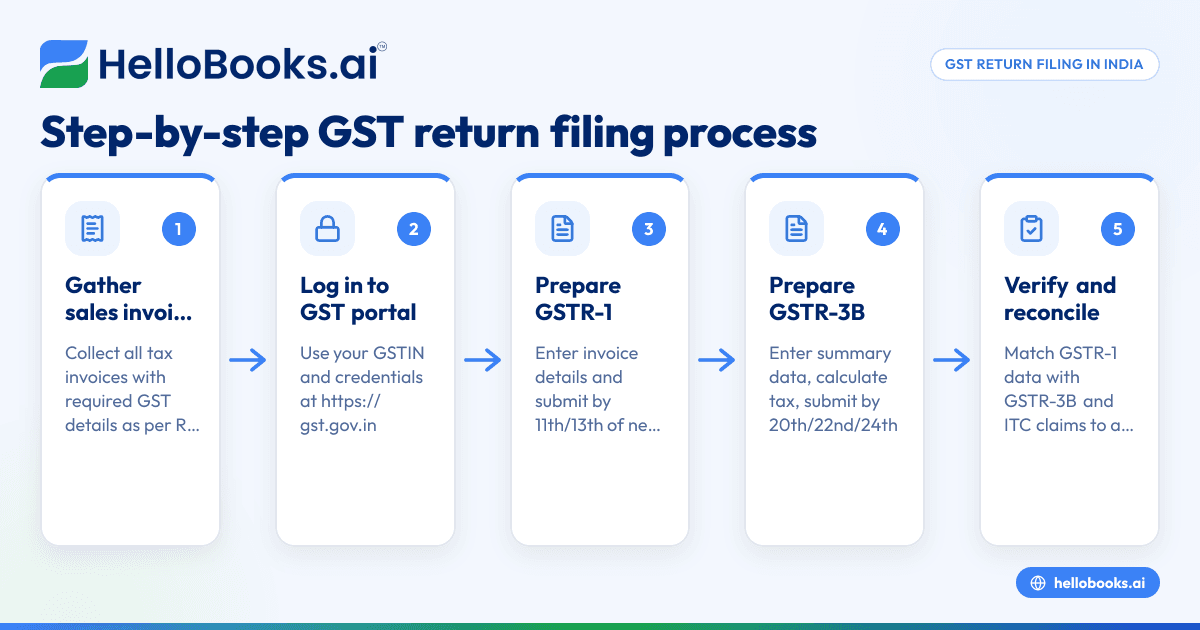
Step-by-step
- Gather your sales invoices for the tax period
- Collect all tax invoices issued during the month or quarter.
- Ensure each invoice contains the required GST particulars as per Rule 46: supplier and recipient details, GSTINs, HSN/SAC codes, tax rates, amounts, place of supply, and serial numbers unique for the financial year. Learn more about GST invoicing
- Log in to the GST portal (https://gst.gov.in) with your GSTIN and credentials
- Prepare GSTR-1 (Outward Supplies)
- Enter invoice details: invoice number, date, GSTIN of recipient, taxable value, tax rates (CGST, SGST or IGST), and tax amounts.
- For nil returns, select the option to file a nil return.
- Check that the total taxable value and tax amounts match your invoice records.
- Submit GSTR-1 by the 11th day of the month following the tax period for monthly filers or by the 13th day for QRMP quarterly filers. More on GSTR-1 filing
- Prepare GSTR-3B (Summary Return)
- Enter summary amounts of outward supplies, inward supplies liable to reverse charge, eligible ITC, and tax paid.
- Calculate total tax liability and enter the payment details.
- Submit GSTR-3B by the 20th day of the month following the tax period or by the 22nd/24th day for QRMP filers. More on GSTR-3B filing
- Verify and reconcile your returns
- Match your GSTR-1 data with GSTR-3B summary to avoid discrepancies.
- Cross-check with your purchase invoices and ITC claims.
- Pay any outstanding GST liability
- Use the payment challan on the GST portal for tax payment before filing GSTR-3B.
- File the returns and download the acknowledgment
- After submission, download the ARN (Acknowledgment Reference Number) for your records.
Example (fictional figures)
Assume a business with the following sales in March 2024:
- Taxable value of goods sold: ₹1,00,000
- GST rate assumed: 18% (CGST 9%, SGST 9%)
GSTR-1 Data Entry:
- Taxable value = ₹1,00,000
- CGST = ₹1,00,000 × 9% = ₹9,000
- SGST = ₹1,00,000 × 9% = ₹9,000
- Total GST = ₹9,000 + ₹9,000 = ₹18,000
GSTR-3B Summary:
- Outward taxable supplies = ₹1,00,000
- Total tax payable = ₹18,000
- ITC claimed (assumed) = ₹5,000
- Net tax payable = ₹18,000 - ₹5,000 = ₹13,000
Steps:
- Enter ₹1,00,000 as taxable value in GSTR-1 with CGST ₹9,000 and SGST ₹9,000.
- Enter ₹1,00,000 and ₹18,000 in GSTR-3B outward supplies and tax payable sections.
- Enter ITC claim of ₹5,000.
- Pay ₹13,000 as net GST liability.
- File both returns before their deadlines.
Common mistakes
- Incorrect or missing invoice details: Prevent by verifying each invoice against Rule 46 particulars before filing.
- Late filing: Avoid penalties by noting that GSTR-1 is due by the 11th and GSTR-3B by the 20th of the next month. QRMP filers have slightly different dates.
- Mismatch between GSTR-1 and GSTR-3B: Reconcile your invoices and summaries before filing.
- Not paying tax before filing GSTR-3B: Always pay any tax due before submitting the return.
- Filing nil returns unnecessarily: File nil returns only if no outward supplies were made.
Doing this in HelloBooks
HelloBooks simplifies GST return filing by building GSTR-1 and GSTR-3B directly from your recorded invoices, ensuring the figures match your actual sales. It supports direct filing to the GSTN without manual JSON export or upload. The GST invoicing feature creates compliant tax invoices with the correct CGST/SGST or IGST split and HSN/SAC codes derived from the customer's GSTIN, fulfilling Rule 46 requirements consistently. This reduces data entry errors and speeds up filing. Learn more about GST return filing (GSTR-1, GSTR-3B) and HelloBooks for India.
Frequently asked questions
What is the GST return filing date?
Monthly GSTR-1 must be filed by the 11th day of the following month and GSTR-3B by the 20th day. For QRMP filers, GSTR-1 is due on the 13th and GSTR-3B on the 22nd or 24th day depending on the state. More on due dates
How to file a nil GST return?
If you have no outward supplies or inward supplies liable to reverse charge during the tax period, you must still file a nil return by selecting the nil return option on the GST portal in both GSTR-1 and GSTR-3B forms.
How to fill GST return forms correctly?
Ensure all invoice details are complete and accurate, including GSTINs, HSN/SAC codes, tax rates, and amounts. Reconcile your sales and purchase data before entering summary figures in GSTR-3B.
Can GST return filing be done online?
Yes, filing GSTR-1 and GSTR-3B is done online on the GST portal or through software like HelloBooks that supports direct filing.
Is there a GST return filing solution for small businesses?
Yes, HelloBooks offers GST invoicing and direct GSTR-1 and GSTR-3B filing features suitable for small and growing businesses, reducing manual work and errors. See HelloBooks GST features
Key takeaways
- File GSTR-1 by the 11th and GSTR-3B by the 20th of the following month (QRMP dates differ).
- Enter accurate invoice details as per Rule 46 including GSTIN, HSN/SAC codes, and tax amounts.
- Reconcile GSTR-1 and GSTR-3B data to avoid mismatches and penalties.
- Pay any GST liability before filing GSTR-3B.
- Use software like HelloBooks for automated GST invoicing and direct return filing.
Start filing your GST returns today with HelloBooks. Start on the Free plan (200 transactions a year, GSTR-1 and 3B filing for one GSTIN).
This article is general information, not tax or legal advice. Rules change; confirm the current position on gst.gov.in or with your chartered accountant before acting.


