


Key takeaways
What this article covers, in order:
- Why this comes up / what goes wrong
- Step-by-step
- Example (fictional figures)
- Common mistakes
- Frequently asked questions
- Key takeaways
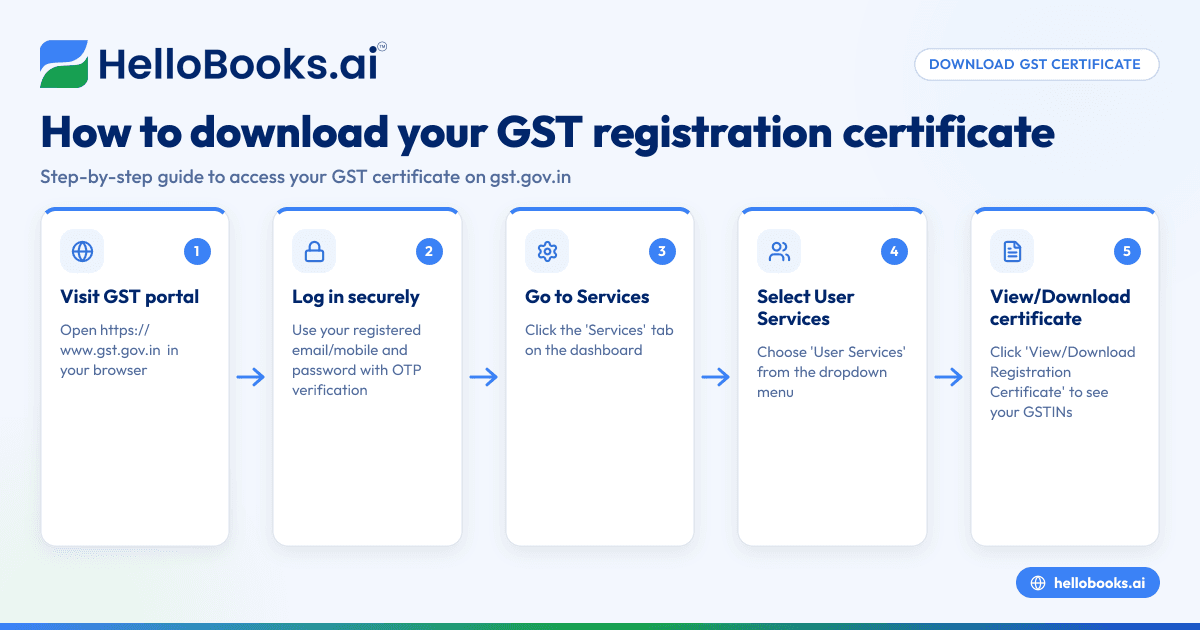
To download your GST registration certificate, start by logging into the official GST portal at https://www.gst.gov.in using your registered credentials. Then, navigate to the 'Services' menu, select 'User Services', and click on 'View/Download Registration Certificate'. Choose the GSTIN for which you want the certificate and download the PDF file. This certificate is proof of your GST registration and contains important details about your business.
Why this comes up / what goes wrong
Small business owners often need to download their GST registration certificate for various reasons such as loan applications, vendor verification, tax audits, or record keeping. Many get stuck because they are unsure where exactly to find the certificate on the GST portal or they attempt to download it before their registration is approved. Incorrect login credentials or selecting the wrong GSTIN when having multiple registrations can also cause confusion. This guide helps you avoid these issues by providing clear, step-by-step instructions.
Step-by-step
- Go to the GST portal: Open your browser and visit https://www.gst.gov.in.
- Log in: Enter your username (registered mobile number or email) and password, then complete any required OTP verification.
- Access Services: On the dashboard, click the 'Services' tab in the top menu.
- Select User Services: From the dropdown, click on 'User Services'.
- Click on View/Download Registration Certificate: This will show a list of GSTINs registered under your account.
- Select your GSTIN: If you have multiple GSTINs, pick the one for which you want the certificate.
- Download the certificate: Click the 'Download' button next to the GSTIN. The certificate will download as a PDF file.
- Verify details: Open the PDF and check that your business name, GSTIN, address, and registration date are correct.
Ensure you download the certificate only after your GST registration is approved. Your username and password must be the ones registered with the GST portal.
Example (fictional figures)
Rajesh owns Rajesh Textiles, a small business in Bengaluru. He registered for GST on 15/03/2023 with GSTIN 29ABCDE1234F1Z5. Rajesh wants to download his GST registration certificate.
Steps Rajesh follows:
- Visits https://www.gst.gov.in and logs in with his registered email and password.
- Clicks on 'Services' > 'User Services' > 'View/Download Registration Certificate'.
- Sees a list of GSTINs and selects 29ABCDE1234F1Z5.
- Clicks 'Download' to save the certificate as a PDF.
The certificate shows:
- Business name: Rajesh Textiles
- GSTIN: 29ABCDE1234F1Z5
- Registration date: 15/03/2023
- Address: 123 MG Road, Bengaluru, Karnataka
Rajesh checks each detail carefully. Since all details are correct, he saves the PDF securely for future reference.
Common mistakes
- Trying to download before registration approval: The certificate is only available after GST registration is approved. Check your registration status before attempting to download.
- Using incorrect login credentials: Always use the registered mobile number or email and password. If you forget your password, use the 'Forgot Password' option on the GST portal.
- Selecting the wrong GSTIN: If you have multiple registrations, verify you download the certificate for the correct GSTIN.
- Not verifying certificate details: Always check the business name, GSTIN, address, and registration date on the certificate.
- Not saving the certificate securely: After download, save the certificate PDF in a safe place for compliance and future use.
To maintain consistency in your GST compliance, use HelloBooks for GST invoicing. HelloBooks creates compliant tax invoices with the correct CGST/SGST or IGST split and HSN/SAC codes from your customer's GSTIN, fulfilling the Rule 46 particulars requirements. You can also file your GSTR-1 and GSTR-3B returns directly from invoices recorded in HelloBooks, ensuring your returns match your invoices without manual data entry. Learn more about GST invoicing and GSTR-1 and GSTR-3B direct filing.
Frequently asked questions
Can I download my GST registration certificate anytime?
Yes, once your GST registration is approved, you can log in anytime to the GST portal and download your certificate under 'User Services'.
What if I forget my GST portal password?
Use the 'Forgot Password' link on the GST portal login page to reset your password using your registered mobile number or email.
Can I download certificates for multiple GSTINs?
Yes, if you have multiple GST registrations, you can select each GSTIN individually under 'View/Download Registration Certificate' and download their certificates.
Is the GST registration certificate valid indefinitely?
The certificate remains valid as long as your GST registration is active and not cancelled or suspended.
What details are included on the GST registration certificate?
The certificate contains your business name, GSTIN, registration date, address, and other legal information as required under GST rules. For invoice requirements, see Rule 46 particulars here.
How does HelloBooks help with GST compliance?
HelloBooks automates GST invoicing with compliant tax invoices including the correct tax splits and HSN/SAC codes. It also supports direct filing of GSTR-1 and GSTR-3B returns from your recorded invoices, reducing manual effort and errors. Visit HelloBooks for India to explore.
Key takeaways
- Log in to the GST portal and navigate to 'Services' > 'User Services' > 'View/Download Registration Certificate'.
- Select the correct GSTIN and download the certificate in PDF format.
- The certificate is accessible only after your GST registration is approved.
- Verify all details on the certificate before saving.
- Use HelloBooks for consistent GST invoicing and simplified return filing.
Download your GST registration certificate today by following these clear steps. To manage your GST invoicing and filing efficiently, consider starting with HelloBooks' Free plan, which supports up to 200 transactions a year and includes GSTR-1 and GSTR-3B filing for one GSTIN at HelloBooks pricing.
This article is general information, not tax or legal advice. Rules change; confirm the current position on gst.gov.in or with your chartered accountant before acting.


