
Key takeaways
What this article covers, in order:
- Key takeaways
- Why choosing the right accounting software matters
- How to choose accounting software for small business: start with your needs
- Check country-specific compliance and tax support
- Prioritise ease of use over feature overload
- Evaluate automation where it matters most
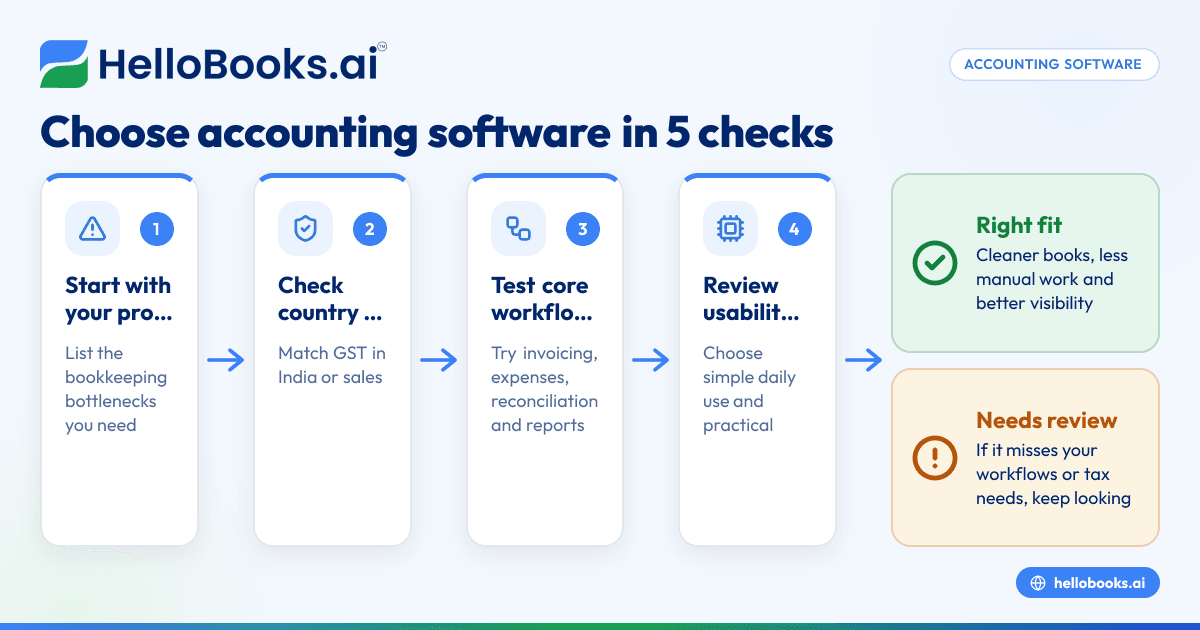
Choosing accounting software for a small business comes down to five things: fit, ease of use, compliance, automation and total cost over time. The right tool should reduce manual work, help you stay accurate and give you clear financial visibility without forcing you to rebuild your whole process.
Key takeaways
- Start with your current problems, not feature lists. Pick software that solves your biggest bookkeeping bottlenecks first.
- Make sure the software fits your country and tax needs, especially GST in India or sales tax in the United States.
- Check how well it handles core workflows like invoicing, bank reconciliation, expenses and financial reporting.
- Ease of setup matters. A simple system that your team will actually use is better than a complex one with unused features.
- Compare the full cost, including migration time, training and cleanup work, not just the subscription.
- Test the product with real transactions before you decide.
Why choosing the right accounting software matters
Many small businesses start with spreadsheets, basic billing tools or a legacy system that was set up years ago. That works for a while. Then the business grows. Invoice volume increases. Expense tracking becomes messy. Reconciliation takes longer. Month-end closes keep slipping.
At that point, accounting software stops being a nice-to-have. It becomes an operating tool.
Good software helps you record transactions correctly, track receivables and payables, prepare reports and stay on top of tax requirements. It should also reduce repetitive work. If your team still spends hours copying entries from bank statements, matching invoices manually or chasing missing expense proofs, your current process is costing more than it seems.
This is why the choice matters. The wrong software creates new work. The right one simplifies old work.
For many businesses, this means moving from disconnected tools to a single system or upgrading to modern accounting software for small business that can handle bookkeeping and compliance together.
How to choose accounting software for small business: start with your needs
Before comparing products, get clear on what your business actually needs. Most software decisions go wrong because people shop by brand, price or a long feature checklist. That usually leads to paying for features you do not use while still missing the ones that matter every week.
List the problems you want to solve
Start with the day-to-day pain points in your current process. Write them down in plain language.
Examples:
- Invoices are created in one tool and recorded in another
- Bank reconciliation takes too long every month
- Expense bills are scattered across email and WhatsApp
- GST data has to be cleaned before filing
- Reports are available late or are not reliable
- Too much work depends on one accountant or founder
This list gives you the basis for evaluation. If a tool does not solve these problems, it is probably not the right fit.
Identify your must-have workflows
Every small business should check whether the software can handle these basics well:
- Sales invoicing
- Purchase and expense recording
- Bank and cash reconciliation
- Customer and vendor tracking
- Tax handling and reporting
- Profit and loss, balance sheet and cash flow reports
Then add your business-specific needs. A services firm may care more about invoicing and collections. A trading business may care more about purchases, taxes and stock-related records. An accounting firm may need cleaner workflows across multiple clients.
If invoicing is central to your operation, review how the system handles recurring invoices, payment follow-up and document sharing. A dedicated invoice software workflow can save significant time when billing volume rises.
Check country-specific compliance and tax support
Accounting software must fit the rules where you operate. This is especially important if your business files indirect tax returns or issues tax invoices regularly.
For businesses in India
If you operate in India, check support for:
- GST-ready invoices
- HSN or SAC fields where needed
- Tax rates and tax treatment setup
- Input and output tax tracking
- GST reports needed for return preparation
- E-invoicing support if your business is covered by current rules
GST and e-invoicing rules can change over time. Always verify the latest requirements on the GST portal or with your tax adviser. This article is general information, not tax or legal advice.
For businesses that issue many invoices, software with built-in e-invoicing software and GST return filing software support can reduce manual preparation and errors.
Also look at whether the product is built for Indian workflows. That includes invoice formats, GST logic and reporting expectations. A tool designed as accounting software in India may be easier to use than a generic global product.
For businesses in the United States
If your business is based in the United States, focus on:
- Sales tax handling based on your state requirements
- 1099-related vendor record support, where relevant
- Standard financial reports for accountants and tax preparers
- Clean categorisation and audit trail for deductible expenses
US rules vary by state and business structure. Confirm tax treatment with your accountant. If you need a country-specific tool, compare options built as accounting software in the USA.
Prioritise ease of use over feature overload
Small businesses often buy software that looks powerful in a demo but feels heavy in daily use. That is a common mistake.
A founder, finance lead or junior accountant should be able to perform common tasks quickly. If basic actions take too many clicks, the team will avoid the system. Then records become incomplete, and you are back to spreadsheets.
Ask these usability questions
When you test software, check whether you can do the following without needing a manual:
- Create and send an invoice in a few minutes
- Record a purchase bill correctly
- Find unpaid invoices fast
- Match bank transactions with minimal effort
- Fix mistakes without breaking prior reports
- Pull reports for a month, quarter or year easily
The software should also have simple user permissions. You may want your sales team to raise invoices, your admin team to upload bills and your accountant to review entries. Good access control helps without making the setup confusing.
For businesses moving away from older desktop systems, usability is often a major reason to switch. If you are evaluating options beyond a legacy setup, you may compare modern tools with a Tally alternative or, for some businesses, a QuickBooks alternative.
Evaluate automation where it matters most
Automation is useful only when it removes repeat work and improves accuracy. It should not create hidden errors that you discover later.
Focus on practical automation
The most helpful accounting automations usually include:
- Invoice generation from saved templates
- Auto-categorisation suggestions for transactions
- Faster matching of bank entries
- Recurring entries for repeat expenses or bills
- Reminders for unpaid invoices
- Report generation with live data
For many businesses, bank matching is one of the biggest time sinks. If reconciliation is slow today, review tools with strong bank reconciliation software capability.
Expense capture is another area to assess. If bills come from many employees or channels, you need a cleaner way to collect and record them. Good expense management software support can reduce missing bills and duplicate claims.
Some businesses also want software that helps reduce data entry across bookkeeping tasks. This is where AI bookkeeping or broader AI accounting software can be useful, as long as the workflow still allows human review before final books are closed.
Watch for automation risks
Do not assume every auto-filled field is correct. During a trial, test edge cases:
- Partial payments
- Credit notes
- Duplicate expenses
- Tax-exempt or zero-rated items
- Bank entries with unclear descriptions
You want automation that speeds up review, not automation that hides mistakes.
Review reporting and visibility before you buy
A lot of business owners realise too late that their software records transactions but does not help them make decisions.
At minimum, you should be able to generate and understand:
- Profit and loss statement
- Balance sheet
- Cash flow view
- Accounts receivable ageing
- Accounts payable ageing
- Tax summaries
Reports should be easy to trust
Good reports depend on clean underlying data. But software design matters too. The system should make it easy to drill down from totals to transaction-level detail. If a number looks wrong, you should be able to see why.
This is important for three reasons.
First, you close books faster when issues are easier to trace.
Second, you can answer questions from founders, investors, lenders or auditors with less scrambling.
Third, your accountant spends less time cleaning your data later.
If you work with an external accountant or plan to bring one in, ask them what reports and exports they need. If you do not have one yet, this is a good time to find an accountant who can review your setup and tax process.
Consider migration, setup and support
The best software on paper can still fail if migration is messy. Many small businesses underestimate the effort required to move opening balances, customer and vendor lists, tax settings and historical transactions.
Ask what setup really involves
Before you commit, understand:
- What data can be imported
- What must be entered manually
- How opening balances are handled
- Whether historical invoices and bills can be brought in
- Who will clean the old data before import
- How long the transition usually takes
If your current books are inconsistent, no software will fix that automatically. You may need a cleanup first.
Check training and ongoing support
Support matters most in the first 60 to 90 days. Your team will have questions about setup, reports and exceptions. Review whether help is available through chat, email or guided onboarding, and how quickly issues are usually addressed.
Also check how easy it is to train new users. A growing business will not stay with the same finance process forever. Your software should support that growth without becoming harder to manage.
Compare total cost, not just subscription price
Price matters, but it should not be the only deciding factor.
Cheap software can become expensive if it creates extra work every month. A slightly higher-cost option may save money if it reduces bookkeeping effort, speeds up collections and improves compliance accuracy.
Include these costs in your comparison
When evaluating options, consider:
- Monthly or annual software cost
- Setup and migration time
- Internal training time
- Accountant cleanup time
- Extra tools needed for invoicing or expenses
- Cost of errors, delays or missed filings
A simple way to compare options is to estimate hours saved each month. If one tool saves your team or accountant several hours, that value should be part of the decision.
You should also think about switching costs later. If the software cannot keep up with your business after one or two years, you may have to migrate again. It is better to choose a tool that fits your next stage, not just your current size.
A practical 7-step checklist for choosing accounting software
If you want a simple process, use this checklist.
1. Define your top three problems
Pick the issues that cost you the most time or create the most risk. Keep the list short.
2. Write your must-have features
Separate essentials from nice-to-haves. For most businesses, essentials include invoicing, expenses, reconciliation, tax support and reporting.
3. Check country and tax fit
Confirm that the software supports the rules relevant to your business in India or the United States.
4. Test with real examples
Create sample invoices. Upload a few expenses. Reconcile a bank statement. Run month-end reports. Do not rely only on a sales demo.
5. Involve the actual users
Ask the founder, finance lead, accountant or operations person who will use it daily. Their input matters more than a generic feature list.
6. Evaluate migration effort
Understand what moving from spreadsheets, Tally or QuickBooks will involve before you commit.
7. Compare long-term value
Choose the tool that makes your books faster, cleaner and easier to manage over time.
Common mistakes small businesses make
Knowing what to avoid can help you make a better decision.
Choosing based on familiarity alone
A team may stay with an old system because they know where the buttons are. That is not the same as the system being efficient.
Buying for future complexity that may never come
Some businesses choose software built for much larger companies. That often leads to a steep learning curve and underused features.
Ignoring accountant input
Your accountant sees where errors, delays and tax issues usually happen. Ask for their view early.
Underestimating data cleanup
If your current records are messy, migration will take longer. Plan for that instead of assuming the new software will fix everything on day one.
Skipping a real trial
A polished demo is not enough. Test the software with your own workflows and document types.
What good accounting software should feel like
Once the right system is in place, your finance process should feel calmer.
Invoices should go out quickly. Expenses should be recorded with less chasing. Bank reconciliation should take less time. Reports should be available when needed. Your accountant should spend more time reviewing and advising, and less time correcting data entry.
That is the real goal. Not just software, but better financial control.
If you are evaluating modern options, HelloBooks can help small businesses automate bookkeeping, invoicing, GST workflows, expenses and reconciliation in one place. You can explore features, compare plans or test whether it fits your process.
If you want to see whether HelloBooks fits your business, you can book a demo or compare options on the pricing page.
Frequently asked questions
What is the most important factor when choosing accounting software for a small business?
The most important factor is fit for your actual workflow. The software should solve your current bookkeeping and reporting problems without adding complexity. Ease of use and tax compliance support should come right after that.
Should a small business choose software based on price alone?
No. Low price can look attractive, but it may cost more in manual work, errors and cleanup later. Compare the full value, including time saved and reduced compliance risk.
How do I know if I should move from spreadsheets to accounting software?
If you are spending too much time on manual entries, reconciliation, invoice tracking or tax preparation, it is time to consider a move. Spreadsheets can work early on, but they become risky as transaction volume grows.
Is Tally or QuickBooks always the best option for a small business?
Not always. Many businesses use them successfully, but the best option depends on your workflow, country requirements and ease-of-use needs. It is worth comparing them with newer tools if your current process feels too manual.


