
Key takeaways
What this article covers, in order:
- Before you start
- What are the invoice numbering rules under GST?
- How can AI invoice numbering help my business?
- Step 1: Set up your business profile and GST details in your AI accounting software
- Step 2: Define your invoice numbering format
- Step 3: Enable automated invoice numbering in the AI accounting software
How to Automate Your Invoice Numbering Under GST Using AI Accounting Software
This guide is for small business owners, finance leads, and accountants in India who want to simplify their invoice numbering under GST. By the end, you will know how to comply with invoice numbering rules under GST and automate this task using AI accounting software, saving you time and reducing errors.
Before you start
- Understand your business GST registration details, such as GSTIN and place of business.
- Have your invoice requirements clear: types of invoices issued, involved states, and invoice volumes.
- Access to your sales and billing data, either digital or recorded in spreadsheets or accounting tools.
- Basic familiarity with GST invoice rules, such as mandatory details and invoice formats.
What are the invoice numbering rules under GST?
Invoice numbering under GST must be continuous and unique for each financial year and each series you use. The number should be alpha-numeric if you wish, but it cannot have gaps or duplicates. Separate series for intra-state and inter-state supplies or different place-of-business registrations are common practices to keep records clean and auditable.
Continuous numbering helps you comply with GST regulations and eases audit processes. If you skip numbers or use duplicates, your books may be questioned by tax authorities, which can cause delays and penalties. Manually managing these sequences is tedious and error-prone for most small businesses.
How can AI invoice numbering help my business?
AI invoice numbering automates assigning unique invoice numbers aligned to GST rules without manual input. The software senses the invoice type, transaction location, and calendar year to generate a number that is sequential and GST compliant.
Using AI avoids human errors like duplicate numbers or missing sequences. It also handles multiple branches or business units by allocating series automatically. This integration saves your finance team hours and reduces filing mistakes.
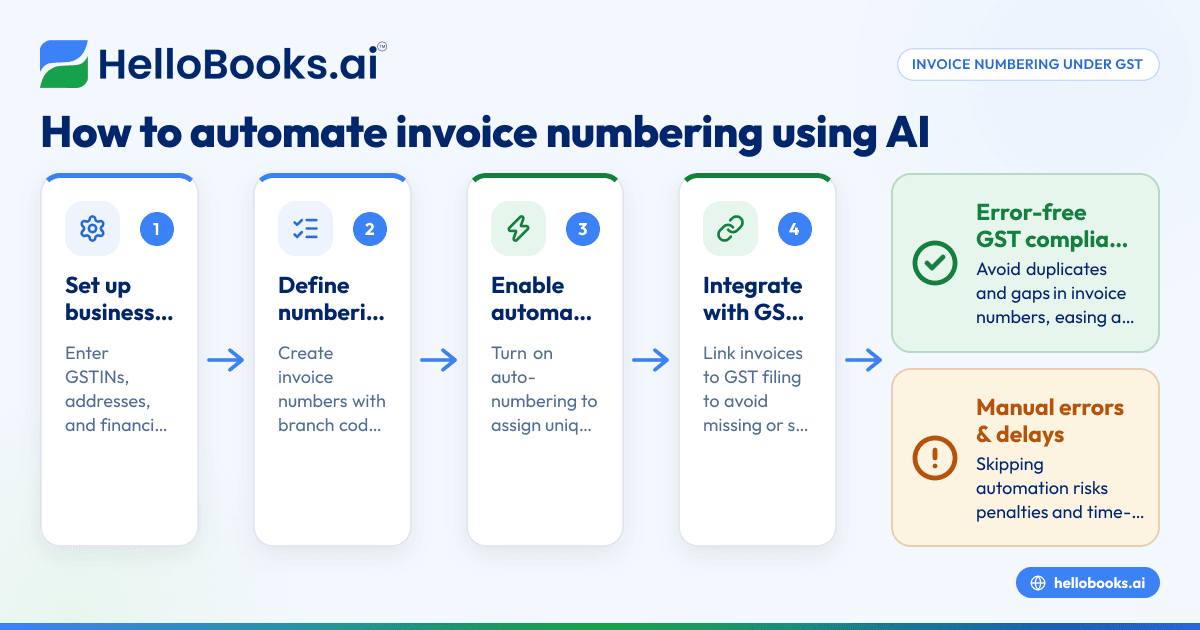
Step 1: Set up your business profile and GST details in your AI accounting software
First, enter all your GST registrations—including GSTINs for each branch—in the AI accounting software. You should include your business name, addresses, and the financial year start and end dates.
Why? The system uses these details to allocate invoice numbers uniquely for each GSTIN and financial year. For example, a Mumbai branch and a Pune branch will have separate invoice numbering series.
A common mistake is to use a single GSTIN profile for all branches. This causes duplicate invoice numbers which are invalid under GST.
Step 2: Define your invoice numbering format
You need to decide the structure of your invoice numbers, combining alphabets and numbers that suit your business. A common format includes:
- Branch code (e.g., "MUM" for Mumbai, "PUN" for Pune)
- Invoice type code (e.g., "B" for B2B, "C" for B2C)
- Financial year shorthand (e.g., "23-24" for FY 2023–24)
- Serial number with leading zeros (e.g., 0001, 0002)
Example: MUM-B-23-24-0001
This structure helps you identify the invoice at a glance and keeps them organised for GST audit.
The mistake is to skip specifying invoice type or financial year in your format, which makes tracking and verification by GST authorities complex later.
Step 3: Enable automated invoice numbering in the AI accounting software
Turn on the auto-invoice numbering feature. The software generates invoice numbers on raising each invoice, following your format and ensuring the sequence is continuous and unique per GSTIN and financial year.
The AI engine recognizes your invoice contexts—tax type, state, branch—and applies the correct numbering scheme instantly.
Manual entry of invoice numbers should be disabled to prevent duplication or skipped numbers. Many businesses overlook this and continue manual input, leading to compliance issues.
Step 4: Link invoice generation with your billing and GST returns workflow
Integrate the numbered invoices with your GST return filing software or modules. Once invoices are automatically numbered and saved, their data should flow into your GST returns preparation system.
This linkage ensures no invoice numbers are missing or unaccounted for during GST return filing. This step dramatically reduces discrepancies in your GSTR-1 and GSTR-3B forms.
Not integrating properly creates reconciliation headaches and may require manual corrections after GST filings, costing time and resources.
Worked example: Automating invoice numbering for a Mumbai-based SME
Suppose you run a mid-sized trading company in Mumbai registered under GST (GSTIN: 27ABCDE1234F2Z5). You issue B2B and B2C invoices daily, around 50 per day.
- In your AI accounting software, enter the Mumbai GSTIN and relevant business details.
- Choose an invoice numbering format: MUM-B-23-24-0001 for B2B, and MUM-C-23-24-0001 for B2C.
- Enable the automated invoice numbering feature tied to these formats.
- The system assigns a new invoice number as soon as you create an invoice, incrementing the serial number without gaps.
- All invoices link automatically to your GST return process, ready for GSTR-1 filing.
This system prevents errors common in manual numbering, such as repeating invoice numbers or losing track of series. It saves time and ensures GST compliance effortlessly.
What is the main benefit of using AI accounting software for invoice numbering under GST?
AI accounting software automates invoice numbering, guaranteeing unique, continuous sequences aligned with GST rules. It reduces manual errors and saves time, especially for businesses with high invoice volumes. Automation supports better recordkeeping and smoother GST return filing.
Using AI means you do not need to track numbering series manually or worry about compliance during audits. Your system handles complexity across multiple branches or invoice types transparently.
Why do businesses struggle with invoice numbering manually?
Manual invoice numbering is prone to mistakes like skipped numbers, duplicates, and disorganised formats—problems amplified as your business grows. It is hard to track unique series for each GSTIN or financial year without automation.
Such errors can attract scrutiny from GST authorities and require time-consuming corrections. Small finance teams often spend hours sequencing invoices instead of focusing on more strategic tasks.
Automating this with AI accounting software removes the burden from people, letting you focus on sales and growth.
By following these steps, Indian SMEs can ensure compliance with invoice numbering rules under GST and streamline their invoicing with minimal effort.
Now is a good time to explore how AI accounting software can assist you. You can book a demo with HelloBooks to see the automation in action or compare plans to find the right fit for your business needs.
Related reading
- AI accounting software
- How to Perform Accurate GST Return Filing in India Using AI Bookkeeping Software, Supported with Caveats
- How US Small Businesses Can Automate Sales Tax Filing with AI Accounting Software
Read next
This article covers one part of a bigger topic. For the complete picture, read our guide to supported with caveat.