


Key takeaways
What this article covers, in order:
- Why this comes up / what goes wrong
- Step-by-step
- Example (fictional figures)
- Common mistakes
- Doing this in HelloBooks
- Frequently asked questions
Automating bill payments helps small businesses save time, avoid late fees, and maintain better cash flow control. Many small business owners still manually track bills using spreadsheets, Tally, or bill books, which can cause errors and delays.
Why this comes up / what goes wrong
Small business owners often manage multiple recurring payments such as rent, utilities, supplier bills, and taxes. Without automation, they must manually track due dates and enter payment details for each bill. This manual process can lead to missed deadlines, duplicate payments, and difficulty reconciling accounts. Automating bill payments reduces manual effort, decreases errors, and improves financial management.
Step-by-step
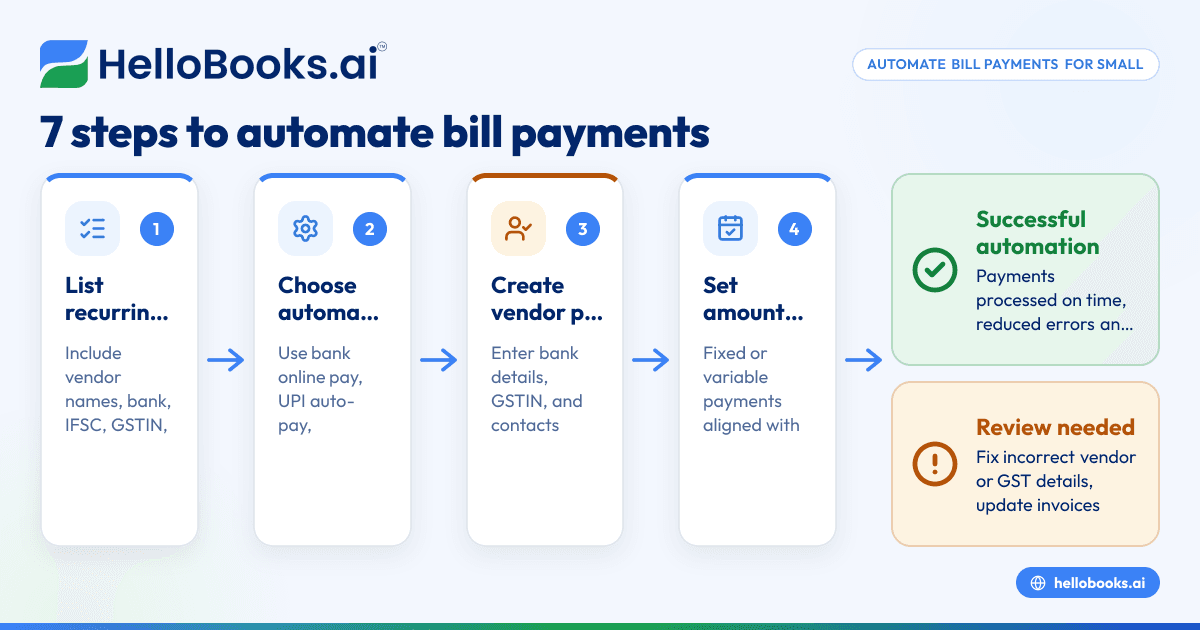
- List all recurring bills and their details. Include vendor names, bank account numbers, IFSC codes, payment terms, due dates, and GSTINs if applicable. Verify all vendor information is accurate.
- Choose a payment automation method. Use your bank’s online bill pay service, UPI auto-pay features, or accounting software that supports scheduling payments.
- Create vendor profiles in your chosen system. Enter bank details, GSTIN, and contact info carefully to avoid payment failures and ensure tax compliance.
- Input payment amounts and frequency. For fixed bills, enter the amount; for variable bills, link payments to invoice amounts. Align payment dates with due dates.
- Enable automatic payments or reminders. Decide whether payments are auto-debited or if you prefer alerts to approve payments manually.
- Test the setup with a small payment. Confirm payments go through correctly and vendors receive funds on time.
- Regularly reconcile payments. Match your bank statements with accounting records monthly to catch errors or missed payments.
- Update vendor details periodically. Confirm bank accounts and GSTINs are current to avoid failed payments and compliance issues.
Ensure all invoices comply with GST Rule 46, which requires details like GSTIN, HSN/SAC codes, tax rates, and amounts. See our GST invoicing page for more on compliant invoices.
Example (fictional figures)
A small business has two monthly bills:
- Electricity bill: ₹12,000 due on the 10th
- Rent: ₹50,000 due on the 5th
Steps:
- Enter vendor details for the electricity provider and landlord, including bank accounts and GSTIN.
- Schedule automatic payments on the 10th and 5th, respectively.
- Confirm payment amounts and dates.
On the 5th, rent is paid automatically:
₹50,000 × 1 month = ₹50,000
On the 10th, electricity bill is paid automatically:
₹12,000 × 1 month = ₹12,000
Total monthly payments:
₹50,000 + ₹12,000 = ₹62,000
This setup avoids manual transfers and late fees.
Common mistakes
- Incorrect vendor bank or GST details: Verify vendor bank accounts and GSTIN carefully before automation to prevent payment failures and compliance issues.
- Scheduling payments on due dates: Set payments 1-2 days before due dates to allow for processing delays.
- Ignoring GST invoice requirements: Use invoices that comply with Rule 46 to avoid disputes and ensure tax credit claims.
- Not reconciling payments regularly: Monthly reconciliation of bank statements with accounting records helps detect missed or duplicate payments.
- Overlooking e-invoicing rules: Businesses with turnover over ₹5 crore must issue e-invoices with IRN and QR codes from 1 August 2023 (Notification No. 10/2023-Central Tax).
- Failing to update vendor information: Regularly confirm vendor bank and GSTIN details to avoid failed payments and compliance issues.
Doing this in HelloBooks
HelloBooks creates GST-compliant tax invoices with the correct CGST/SGST or IGST split and HSN/SAC codes from the customer's GSTIN, ensuring all Rule 46 fields are filled consistently. For businesses exceeding the ₹5 crore e-invoicing threshold, HelloBooks generates the IRN and signed QR code automatically when saving a B2B invoice, saving time compared to manual portal uploads. Additionally, e-way bills can be created directly from the invoice, eliminating duplicate data entry for consignment details. Learn more about GST invoicing, e-invoicing, and e-way bills.
Frequently asked questions
Can I automate bill payments without accounting software?
Yes, you can use your bank’s online bill pay service or UPI auto-pay features to schedule payments. However, accounting software helps track invoices, payments, and GST compliance more efficiently.
What details must GST invoices include for automated payments?
Per Rule 46, invoices must show supplier and recipient names, addresses, GSTIN, invoice number, date, HSN/SAC codes, taxable value, tax rates, and amounts. Correct invoices avoid disputes and support tax filings.
Who must issue e-invoices with IRN and QR codes?
Businesses with aggregate turnover above ₹5 crore from 2017-18 onwards must issue e-invoices with IRN and QR codes for B2B supplies starting 1 August 2023 (Notification No. 10/2023-Central Tax).
How often should I reconcile payments when automating?
Monthly reconciliation of bank statements with accounting records is recommended to catch errors or missed payments early.
Where can I verify if my invoice meets GST rules?
Use the GST invoice validator to check if your invoice contains all required details as per Rule 46.
Key takeaways
- Automate bill payments by entering vendor profiles, payment amounts, and schedules in your bank or software.
- Verify vendor bank accounts and GSTINs carefully to avoid payment failures and compliance issues.
- Schedule payments a day or two before due dates to allow for processing time.
- Use GST-compliant invoices containing all Rule 46 particulars for smooth payment processing.
- Businesses with turnover over ₹5 crore must issue e-invoices with IRN and QR codes from 1 August 2023.
- Reconcile payments monthly to detect missed or duplicate transactions.
- HelloBooks creates GST-ready invoices, generates e-invoices with IRN and QR codes, and raises e-way bills from invoices.
Automating bill payments will save your business time and reduce errors. To see how HelloBooks can help you with GST invoicing and e-invoicing, book a 30-minute demo today.


