


Key takeaways
What this article covers, in order:
- Why this comes up / what goes wrong
- Step-by-step
- Example (fictional figures)
- Common mistakes
- Doing this in HelloBooks
- Frequently asked questions
GST registration online is the process where a business applies on the government GST portal to obtain a GSTIN (Goods and Services Tax Identification Number). This registration is mandatory for businesses exceeding certain turnover limits or engaged in inter-state supply. Once registered, a business can issue GST-compliant invoices and file returns.
Why this comes up / what goes wrong
Many small business owners search for "gst registration online" because they want to comply with GST law without confusion or delay. They may be unsure about the documents needed, how to fill the application, or how to avoid errors that cause rejection or delays. Some may be evaluating whether to register themselves or use software or services to simplify the process. Errors in registration can cause compliance issues and penalties later.
Step-by-step
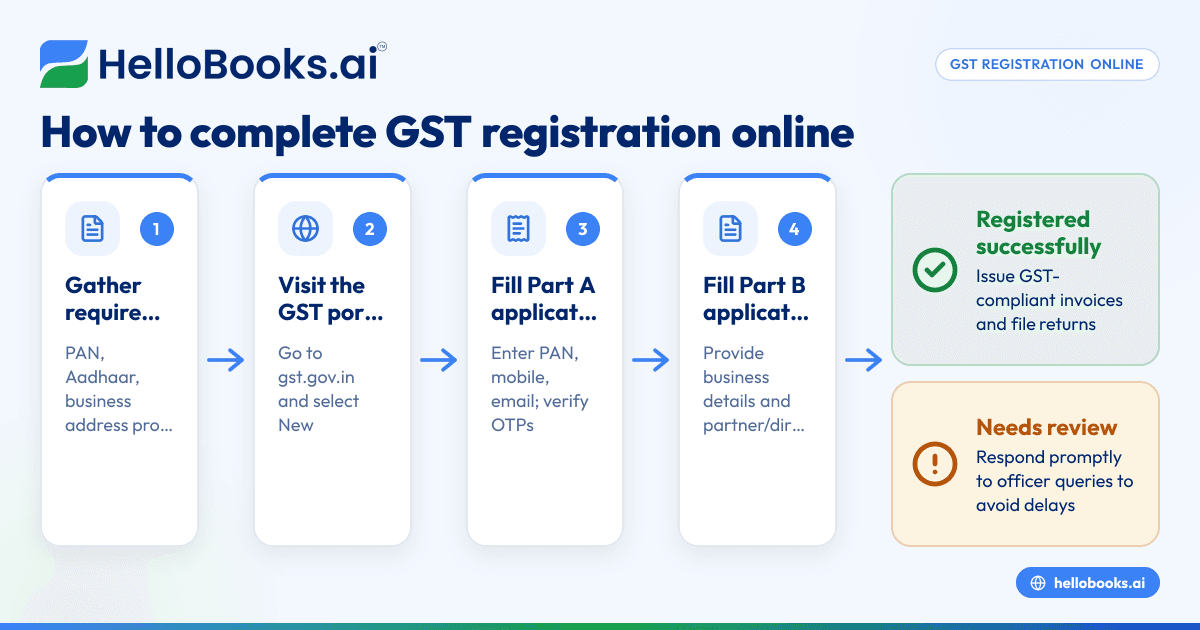
- Gather Required Documents: Prepare PAN card, Aadhaar card, proof of business address, bank account details, photographs, and digital signature if applicable. Check that all documents are clear and valid.
- Visit the GST Portal: Go to https://www.gst.gov.in and click on "Register Now" under the New Registration tab.
- Fill Part A of the Application: Enter your PAN, mobile number, and email address. You will receive OTPs on mobile and email to verify.
- Fill Part B of the Application: After verification, fill in business details such as legal name, trade name, constitution of business, address, and details of partners or directors.
- Upload Documents: Upload scanned copies of the documents gathered earlier.
- Verification and Submission: Verify all details carefully and submit the application using DSC or EVC.
- ARN Generation: After submission, you will receive an Application Reference Number (ARN) via SMS and email.
- Application Processing: The GST officer reviews your application. They may ask for additional information.
- GSTIN Allotment: On approval, you will receive your GSTIN and registration certificate.
Check that the GSTIN and business details are correctly reflected in your certificate.
Example (fictional figures)
Rajesh runs a small textile business in Mumbai. He decides to register for GST on 01/07/2023.
- He gathers his PAN card, Aadhaar, bank statement, and address proof.
- On 02/07/2023, he visits the GST portal and completes Part A using his PAN and mobile number.
- OTPs received and verified.
- He fills Part B with his business address in Mumbai and uploads the documents.
- He submits the application using his Aadhaar-based EVC.
- Receives ARN on 02/07/2023.
- After 5 days, the application is approved.
- Receives GSTIN: 27ABCDE1234F1Z5 and registration certificate.
This enables Rajesh to issue GST-compliant invoices and file returns.
Common mistakes
- Incomplete or incorrect documents: Ensure all documents are clear, valid, and match your business details exactly.
- Wrong PAN or mobile number entry: Double-check these as OTPs are sent here.
- Not using the correct category of business: Choose the right constitution type to avoid processing delays.
- Ignoring ARN after submission: Save the ARN for tracking application status.
- Delays in responding to GST officer queries: Respond promptly to avoid rejection.
- Not verifying GSTIN details after approval: Always confirm your GSTIN and business details are accurate.
Using software like HelloBooks can help you maintain GST compliance after registration by creating compliant invoices and filing returns accurately. See the GST invoicing and GSTR-1 and GSTR-3B direct filing features.
Doing this in HelloBooks
After registering your GSTIN, HelloBooks helps you create GST-compliant invoices with the correct CGST/SGST or IGST split and HSN/SAC codes automatically from your customer's GSTIN. This ensures all fields required by Rule 46 are correctly filled. You can also file your GSTR-1 and GSTR-3B returns directly from the invoices recorded in HelloBooks, eliminating manual data entry and ensuring accuracy. Learn more on HelloBooks for India.
Frequently asked questions
How long does GST registration online take?
The GST registration process typically takes 3 to 7 working days after submission and verification of documents, depending on the officer's review and any additional information required.
Is GST registration mandatory for all businesses?
GST registration is mandatory for businesses exceeding certain turnover thresholds or involved in inter-state supply. Smaller businesses may opt for composition schemes but still need registration. Confirm your eligibility on the official GST portal. NEEDS EXPERT REVIEW
Can I register multiple business locations under one GSTIN?
Yes, multiple business locations within the same state can be registered under one GSTIN as additional places of business. Separate GSTINs are required for different states.
What documents are required for GST registration online?
You need PAN card, Aadhaar card, proof of business address, bank account details, photographs of owners or directors, and digital signature if applicable.
Can I cancel or modify my GST registration online?
Yes, cancellation or amendment requests can be filed online through the GST portal if your business details change or if you cease operations.
How does HelloBooks help after GST registration?
HelloBooks automates GST invoicing with compliance to Rule 46 and allows direct filing of GSTR-1 and GSTR-3B returns from your recorded invoices, reducing errors and saving time.
Key takeaways
- GST registration online requires accurate documents and careful form filling on the GST portal.
- Save your ARN and track application status until GSTIN is allotted.
- Avoid common mistakes like incorrect PAN/mobile and incomplete documents to prevent delays.
- After registration, use HelloBooks for compliant GST invoicing and direct filing of returns.
- Verify your GSTIN details after approval to ensure correctness.
Start your GST registration online with confidence and manage GST compliance efficiently.
Ready to manage your GST invoicing and filing after registration? Start on the Free plan (200 transactions a year, GSTR-1 and 3B filing for one GSTIN).
This article is general information, not tax or legal advice. Rules change; confirm the current position on gst.gov.in or with your chartered accountant before acting.


