


Key takeaways
What this article covers, in order:
- Why this comes up / what goes wrong
- Step-by-step
- Example (fictional figures)
- Common mistakes
- Doing this in HelloBooks
- Frequently asked questions
Creating a GST bill online means generating a digital tax invoice that complies with Rule 46 of the CGST Rules. This invoice must include specific details such as your GSTIN, the buyer's GSTIN, HSN or SAC codes, tax rates, and amounts for CGST, SGST, or IGST. Small business owners often look for online solutions to simplify invoicing and GST compliance, reducing manual errors and saving time.
Why this comes up / what goes wrong
Many small and growing Indian businesses still maintain their books in Excel, Tally, or physical bill books. When they search for "gst bill online," they want a straightforward way to create GST-compliant invoices without manual calculations or missing details. Errors in GST bills can cause issues during return filing or ITC claims. Manual reconciliation between invoices and GST returns like GSTR-1 and GSTR-3B is time-consuming and prone to mistakes. Business owners want to know how to create GST bills online that are accurate, compliant, and easy to manage.
Step-by-step
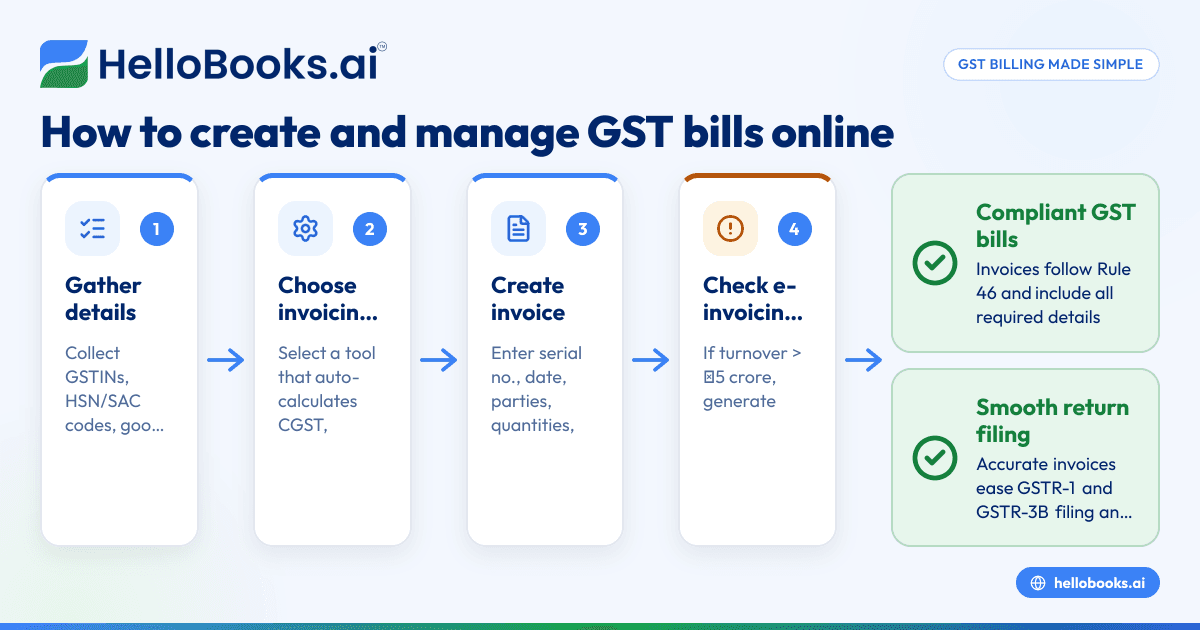
- Gather required details: Ensure you have your GSTIN, your customer's GSTIN (if registered), the description of goods or services, quantity, unit, HSN code for goods or SAC code for services, and the place of supply.
- Choose an online GST invoicing tool or software: Pick a solution that can generate GST-compliant invoices with correct CGST, SGST, or IGST splits and HSN/SAC codes.
- Create the invoice:
- Enter a unique consecutive serial number for the invoice, up to 16 characters.
- Fill in the date of issue.
- Add supplier and recipient details including names, addresses, and GSTINs.
- Specify the description, quantity, unit, and taxable value after any discount.
- Apply the correct GST rates and calculate tax amounts.
- Include place of supply and delivery address if different.
- Indicate if reverse charge applies.
- Check for e-invoicing applicability: If your aggregate turnover exceeds ₹5 crore in any financial year from 2017-18 onwards, you must generate an e-invoice with an IRN and signed QR code for B2B supplies.
- Generate and save the invoice: Use the software to produce the GST bill in PDF format, including all mandatory fields and the e-invoice IRN and QR if applicable.
- Send the invoice to your customer: Share the invoice via email or download for printing.
- Record the invoice for GST return filing: Ensure your sales invoices are recorded properly to build accurate GSTR-1 and GSTR-3B returns.
- File your GST returns on time: Monthly GSTR-1 is due by the 11th of the following month, and GSTR-3B by the 20th (or as per QRMP scheme dates).
Example (fictional figures)
A Mumbai-based business issues a GST bill online on 15/05/2024 for goods sold to a registered customer in Delhi.
- Invoice number: INV000123
- Date of issue: 15/05/2024
- Supplier GSTIN: 27ABCDE1234F1Z5 (Maharashtra)
- Recipient GSTIN: 07PQRST5678L1Z2 (Delhi)
- Description: Electronic gadgets
- Quantity: 10 units
- Unit price: ₹5,000
- Total value: ₹5,000 × 10 = ₹50,000
- Discount: ₹2,000
- Taxable value after discount: ₹50,000 - ₹2,000 = ₹48,000
- GST rate assumed: 18% (9% CGST + 9% IGST since inter-state)
Calculations:
₹48,000 × 9% = ₹4,320 (CGST)
₹48,000 × 9% = ₹4,320 (IGST)
Total GST = ₹4,320 + ₹4,320 = ₹8,640
Total invoice value = ₹48,000 + ₹8,640 = ₹56,640
The invoice includes the place of supply as Delhi, the delivery address if different, and the signature or digital signature of the authorised representative.
Common mistakes
- Missing mandatory fields: Omitting GSTINs, HSN/SAC codes, or invoice serial numbers leads to non-compliance. Use a checklist or software that enforces these fields.
- Incorrect tax rate application: Applying wrong GST rates or splitting CGST/SGST/IGST incorrectly causes filing errors. Verify rates based on goods or services and the place of supply.
- Not generating e-invoices when required: Businesses with turnover over ₹5 crore must generate e-invoices for B2B supplies. Missing this can attract penalties. Use software that automatically handles e-invoicing if you cross the threshold.
- Manual data entry errors: Typing mistakes in amounts or GSTINs cause reconciliation issues. Automate invoice creation and validation to reduce errors.
- Delays in filing returns: Late GSTR-1 or GSTR-3B filing can lead to fines. Track deadlines carefully and file on time.
- Mismatch between invoices and returns: If sales invoices are not properly recorded, GSTR-1 figures won’t match, leading to notices. Use integrated software to keep invoices and returns in sync.
Doing this in HelloBooks
HelloBooks offers GST invoicing that creates compliant tax invoices with the correct CGST/SGST or IGST split and HSN/SAC codes from the customer's GSTIN, ensuring all fields Rule 46 requires are filled consistently. For businesses exceeding the ₹5 crore e-invoicing threshold, HelloBooks generates the IRN and signed QR code automatically when you save a B2B invoice, saving time compared to manual portal uploads. It also builds GSTR-1 and GSTR-3B returns directly from recorded invoices, ensuring the return figures match your issued GST bills. Learn more about HelloBooks GST invoicing, e-invoicing, and GST return filing.
Frequently asked questions
What is a GST bill online?
A GST bill online is a digital tax invoice created using software or online tools that complies with GST rules, containing all mandatory details like GSTIN, HSN/SAC codes, tax rates, and amounts.
Do I need to generate an e-invoice for all GST bills?
No. E-invoicing with an IRN is mandatory only for registered persons whose aggregate turnover exceeds ₹5 crore in any financial year from 2017-18 onwards, and only for B2B supplies.
Can I file GSTR-1 and GSTR-3B directly from my invoicing software?
Yes, some software like HelloBooks builds your GSTR-1 and GSTR-3B returns directly from your recorded invoices and files them to the GSTN portal, reducing manual work and errors.
What are the deadlines for filing GSTR-1 and GSTR-3B?
Monthly GSTR-1 must be filed by the 11th day of the following month, and GSTR-3B by the 20th day. Under the QRMP scheme, these dates vary slightly, with GSTR-1 due on the 13th and GSTR-3B on the 22nd or 24th depending on the state.
How can I avoid errors in GST bills?
Use software that validates GSTINs, auto-calculates taxes, includes mandatory fields, and supports e-invoicing if applicable. Regularly reconcile invoices with your GST returns.
Is it necessary to include HSN or SAC codes on GST bills?
Yes, Rule 46 requires that tax invoices include the HSN code for goods or SAC code for services to specify the nature of supply.
Key takeaways
- A GST bill online must comply with Rule 46, including GSTINs, HSN/SAC codes, tax rates, and invoice serial numbers.
- Businesses with turnover over ₹5 crore must generate e-invoices with IRN and QR codes for B2B supplies.
- Accurate GST bills simplify GSTR-1 and GSTR-3B filing and reduce reconciliation issues.
- Common mistakes include missing mandatory fields, wrong tax rates, and late filing.
- HelloBooks automates GST invoicing, e-invoicing, and GST return filing to save time and ensure compliance.
To start creating GST bills online and filing returns efficiently, consider using HelloBooks. You can Start on the Free plan (200 transactions a year, GSTR-1 and 3B filing for one GSTIN).
This article is general information, not tax or legal advice. Rules change; confirm the current position on gst.gov.in or with your chartered accountant before acting.


