


Key takeaways
What this article covers, in order:
- Why this comes up / what goes wrong
- Step-by-step
- Example (fictional figures)
- Common mistakes
- Doing this in HelloBooks
- Frequently asked questions
A GST bill format is a tax invoice template that complies with Rule 46 of the CGST Rules, containing supplier and recipient details, GSTINs, HSN/SAC codes, tax rates, and amounts. This article provides a ready-to-use format, step-by-step instructions to prepare the bill, a worked example with Indian figures, common mistakes to avoid, and how HelloBooks can help with GST invoicing and filing.
Why this comes up / what goes wrong
Small business owners in India often search for a "gst bill format" because they need a compliant invoice template that meets GST law requirements. Many keep their books in Excel, Tally, or manual bill books and struggle with missing or incorrect information that leads to GST filing errors or rejection of input tax credit claims by customers. Common issues include incorrect GSTINs, missing HSN/SAC codes, wrong tax rates, or inconsistent invoice numbering. Having a ready-to-use, error-free GST bill format helps save time, ensures compliance, and simplifies GST return filing.
Step-by-step
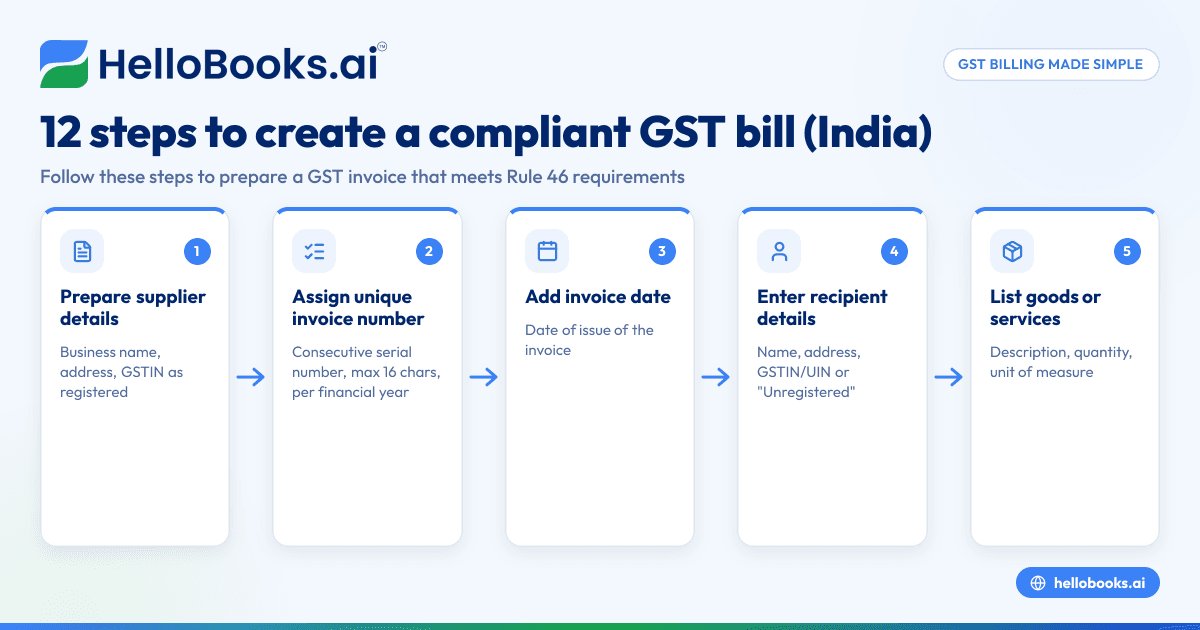
- Prepare supplier details: Include your business name, address, and GSTIN exactly as registered.
- Assign a unique invoice number: Use a consecutive serial number up to 16 characters (letters, digits, '-' or '/') unique for the financial year.
- Add invoice date: The date of issue of the invoice.
- Enter recipient details: Name, address, and GSTIN or UIN if registered; otherwise, mention "Unregistered".
- List goods or services: Provide a description, quantity, and unit of measure.
- Include HSN or SAC codes: Use the correct HSN code for goods or SAC code for services.
- Calculate values: Show total value, taxable value after any discount, and applicable GST rates (CGST, SGST/UTGST for intra-state; IGST for inter-state).
- Calculate tax amounts: Compute CGST and SGST/UTGST or IGST amounts separately.
- Mention place of supply: Include state name, especially for inter-state supplies.
- Add delivery address: If different from place of supply.
- Note reverse charge applicability: State if tax is payable on reverse charge basis.
- Sign the invoice: Signature or digital signature of the supplier or authorised representative.
Check each field carefully to ensure compliance with Rule 46 particulars. For detailed GST invoicing features, see GST invoicing.
Example (fictional figures)
Invoice details:
- Supplier: ABC Traders, Mumbai, GSTIN 27AAEPM1234C1Z5
- Invoice number: INV/2023/0001
- Invoice date: 15/04/2024
- Recipient: XYZ Enterprises, Pune, GSTIN 27AAEPX5678D1Z2
- Place of supply: Maharashtra
- Delivery address: Same as place of supply
| Item | Qty | Unit | Rate (₹) | Total (₹) | HSN Code | GST Rate (%) |
|---|---|---|---|---|---|---|
| LED TV | 2 | pcs | 25,000 | 50,000 | 8528 | 18 |
Calculations:
Taxable value = ₹50,000 (no discount)
CGST = ₹50,000 × 9% = ₹4,500
SGST = ₹50,000 × 9% = ₹4,500
Total invoice value = ₹50,000 + ₹4,500 + ₹4,500 = ₹59,000
The invoice will show supplier and recipient GSTIN, invoice number, date, place of supply (Maharashtra), item description with HSN code, quantity, rate, taxable value, CGST and SGST rates and amounts, and total value.
Common mistakes
- Incorrect GSTINs: Always verify GSTINs from the GST portal or your customer's documents to avoid ITC denial.
- Missing HSN/SAC codes: Use the correct HSN code for goods or SAC code for services as per GST schedules.
- Wrong tax rates: Confirm applicable GST rates for your goods or services; incorrect rates cause compliance issues.
- Non-unique invoice numbers: Maintain a unique, consecutive serial number for each invoice within a financial year.
- Incomplete place of supply details: Always mention the state name for inter-state supplies.
- Not signing the invoice: The invoice must have the supplier’s signature or digital signature to be valid.
Use the GST invoice validator to check your invoices before issuing.
Doing this in HelloBooks
HelloBooks offers GST invoicing that creates compliant tax invoices with the correct CGST/SGST or IGST split and HSN/SAC codes automatically filled from the customer's GSTIN. It supports e-invoicing for businesses over the ₹5 crore turnover threshold, generating the IRN and signed QR code at save time. HelloBooks builds GSTR-1 and GSTR-3B returns directly from your recorded invoices, ensuring your return figures match your issued invoices. Learn more about GST invoicing.
Frequently asked questions
What is the difference between a GST bill format and a GST invoice?
A GST bill format is a template or layout used to issue GST-compliant invoices. A GST invoice is the actual document issued to the buyer containing all required details as per Rule 46. The format ensures the invoice includes all mandatory particulars.
Can I use a simple GST bill format for all types of sales?
You can use a simple GST bill format for regular B2B or B2C sales, but it must include all mandatory details such as GSTINs, HSN/SAC codes, tax rates, and amounts. Complex transactions like exports or e-invoicing require additional fields.
Where can I download a GST invoice template?
You can download GST invoice templates in Excel or PDF from various government or accounting websites. HelloBooks also provides GST-ready invoice formats with automated tax calculation and compliance features.
Do I need to issue e-invoices for all GST bills?
Only businesses with aggregate turnover exceeding ₹5 crore in a financial year must issue e-invoices for B2B supplies from 1 August 2023. Others can issue regular GST invoices without IRN and QR codes.
What is the difference between a GST bill and a non-GST bill format?
A GST bill format includes GST details such as GSTIN, HSN/SAC codes, tax rates, and amounts, while a non-GST bill format does not include GST-related information and is used for unregistered businesses or exempt supplies.
How do I ensure my GST bill format is compliant?
Check that your invoice contains all particulars listed in Rule 46, including supplier and recipient GSTINs, invoice number, date, HSN/SAC codes, tax rates, tax amounts, place of supply, and signature. Use tools like the GST invoice validator and consider software like HelloBooks for compliance.
Key takeaways
- A GST bill format must comply with Rule 46, including supplier and recipient GSTINs, invoice number, date, HSN/SAC codes, tax rates, and amounts.
- Use a unique, consecutive invoice number and include place of supply details.
- Verify GSTINs, tax rates, and HSN/SAC codes carefully to avoid errors.
- Businesses with turnover over ₹5 crore must issue e-invoices with IRN and QR codes for B2B supplies.
- HelloBooks automates GST invoicing, e-invoicing, and GST return filing to ensure compliance.
- Validate invoices using the GST invoice validator tool before issuing.
Start creating compliant GST bills easily with HelloBooks. Start on the Free plan (200 transactions a year, GSTR-1 and 3B filing for one GSTIN).
This article is general information, not tax or legal advice. Rules change; confirm the current position on gst.gov.in or with your chartered accountant before acting.


