


Key takeaways
What this article covers, in order:
- Why this comes up / what goes wrong
- Step-by-step
- Example (fictional figures)
- Common mistakes
- Doing this in HelloBooks
- Frequently asked questions
Free billing software for PC enables small businesses in India to generate accurate GST-compliant invoices, manage tax calculations, and maintain financial records digitally without investing in costly software. Many small business owners look for free PC-based billing solutions to reduce manual errors, save time on data entry, and simplify GST compliance.
Why this comes up / what goes wrong
Small businesses often start billing using spreadsheets, Tally, or physical bill books. This manual process leads to duplicated work, calculation errors, and delays in GST return filing. Many owners search for free billing software for PC to automate invoicing and tax calculations without additional costs. However, many free tools lack full GST compliance, especially for e-invoicing mandates or proper CGST/SGST/IGST tax splits. Choosing the right free billing software requires balancing features, ease of use, and compliance with Indian GST rules.
Step-by-step
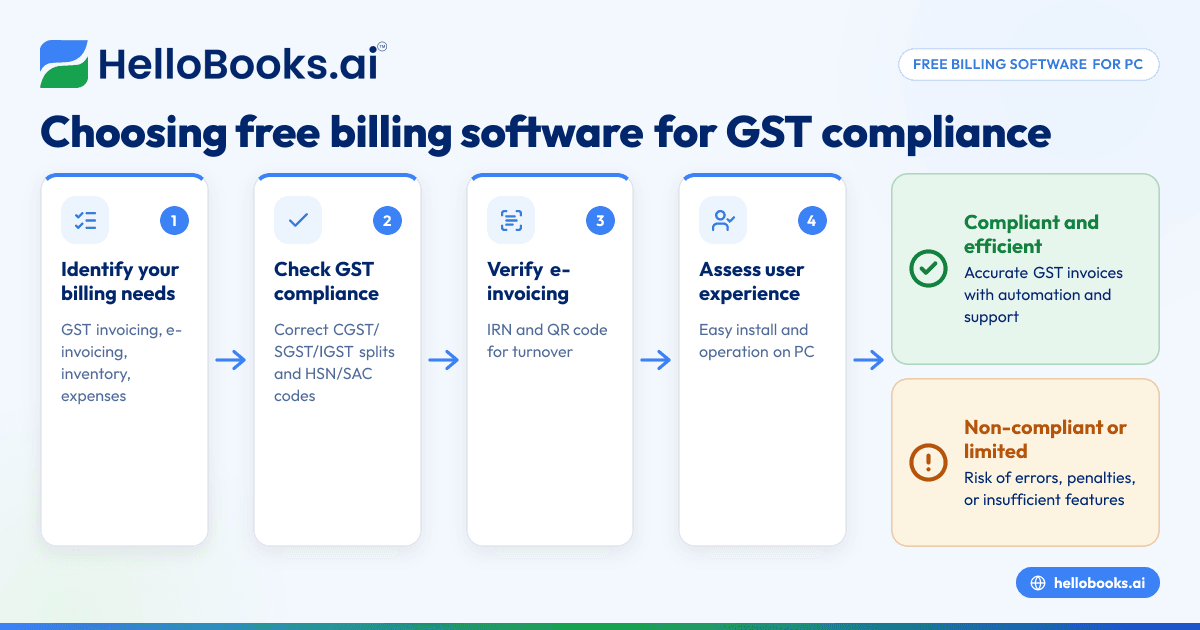
- Identify your billing needs: Determine if you require GST invoicing, e-invoicing, inventory tracking, or expense management.
- Check GST compliance: Confirm the software supports GST invoice formats with correct CGST/SGST/IGST splits and HSN/SAC codes as per Rule 46. See GST invoicing for details.
- Verify e-invoicing capability: If your turnover exceeds ₹5 crore, ensure the software can generate IRN and QR codes automatically, complying with the e-invoicing mandate effective from 1 August 2023 (Notification No. 10/2023-Central Tax). This saves time over manual portal uploads.
- Assess user experience: The software should be easy to install and operate on your PC without technical difficulties.
- Check data backup and export options: Ensure you can export invoices and reports in PDF or Excel formats for record-keeping and GST filing.
- Review transaction limits: Free billing software often limits invoices per year; confirm if this fits your business volume.
- Test customer support: Check if help is available via email, chat, or phone for troubleshooting.
Example (fictional figures)
Rajesh owns an electronics parts shop in Pune and needs free billing software for PC that handles GST invoicing and e-invoicing because his turnover crossed ₹5 crore last year.
- He creates a B2B invoice dated 15/06/2024 for ₹1,20,000 of parts.
- The taxable value after discount is ₹1,00,000.
- GST rate assumed is 18% (CGST 9% + SGST 9%).
Calculations:
₹1,00,000 × 9% = ₹9,000 (CGST)
₹1,00,000 × 9% = ₹9,000 (SGST)
₹1,00,000 + ₹9,000 + ₹9,000 = ₹1,18,000 (Total invoice value)
The software generates the invoice with the correct CGST/SGST split and HSN codes, then automatically obtains the IRN and QR code as required by the e-invoicing mandate.
Common mistakes
- Using non-GST-compliant invoice formats: Prevent this by choosing software that fills all Rule 46 fields correctly. Use the GST invoice validator to verify.
- Ignoring e-invoicing requirements: Businesses with turnover over ₹5 crore must generate IRN and QR codes; missing this leads to compliance penalties. Confirm e-invoicing support.
- Exceeding free transaction limits: Many free tools cap the number of invoices; monitor your usage to avoid unexpected charges.
- Manual data entry errors: Reduce errors by using software with OCR or auto-fill features.
- Not backing up data: Regularly export invoices and reports to secure your records.
- Choosing software without customer support: Select software that offers responsive support to resolve issues quickly.
Doing this in HelloBooks
HelloBooks offers GST invoicing that creates compliant tax invoices with the correct CGST/SGST or IGST split and HSN/SAC codes from your customer's GSTIN, ensuring Rule 46 fields are filled consistently. For businesses above the ₹5 crore e-invoicing threshold, HelloBooks automatically generates the IRN and signed QR code when saving a B2B invoice, saving time over manual portal uploads. Additionally, HelloBooks supports OCR for purchase bills, capturing supplier bills from photos or PDFs instead of manual entry. Learn more at HelloBooks for India.
Frequently asked questions
Is free billing software for PC safe to use for GST compliance?
Free billing software quality varies. Choose one that explicitly supports GST invoice formats with correct CGST/SGST/IGST splits and HSN/SAC codes. Verify compliance using the GST invoice validator.
Can I generate e-invoices using free billing software?
If your turnover exceeds ₹5 crore, e-invoicing is mandatory for B2B sales. Some free software supports automatic e-invoicing (IRN and QR code), but many do not. Check this feature before selecting.
What are the transaction limits in free billing software?
Free versions often limit invoices per year (commonly 200 transactions). If your business volume exceeds this, consider paid plans or multiple GSTINs.
Can I use free billing software offline on my PC?
Many free billing software options work offline, but some require internet for GST return filing or e-invoicing. Confirm connectivity needs before choosing.
How do I file GSTR-1 and GSTR-3B returns using free billing software?
Some free software exports GST reports compatible with the GST portal for return filing. Others integrate filing features. HelloBooks supports GSTR-1 and GSTR-3B filing for one GSTIN on its Free plan.
Key takeaways
- Free billing software for PC reduces manual billing errors and simplifies GST compliance.
- Ensure software supports GST invoicing with correct CGST/SGST/IGST splits and HSN/SAC codes.
- Businesses with turnover over ₹5 crore must use e-invoicing with IRN and QR codes.
- Watch for transaction limits, data backup options, and customer support in free software.
- HelloBooks provides free GST invoicing, e-invoicing, and OCR for purchase bills to streamline billing and compliance.
Start managing your billing efficiently today. Start on the Free plan (200 transactions a year, GSTR-1 and 3B filing for one GSTIN).


