
Key takeaways
What this article covers, in order:
- Key takeaways
- What is electronic invoicing in Australia?
- Why does electronic invoicing matter for small businesses?
- Is eInvoicing the same as emailing a PDF?
- How does eInvoicing work in Australia?
- What records do you need for GST?
Electronic invoicing in Australia means sending and receiving invoice data in a structured digital format that accounting systems can read automatically. For small businesses, that can mean fewer manual entry errors, cleaner GST records and a better chance of getting paid faster because the invoice arrives straight in the customer’s finance system.
Key takeaways
- Electronic invoicing in Australia usually refers to eInvoicing, where invoice data moves directly between business systems.
- eInvoicing is different from emailing a PDF. A PDF still often needs manual checking and data entry.
- Better invoice data can improve GST record-keeping and make BAS preparation easier.
- Faster delivery and fewer invoice errors can reduce payment delays and rework.
- Small businesses should check their current workflow, customer readiness and accounting software setup before switching.
- This article is general information only, not tax or legal advice.
What is electronic invoicing in Australia?
Electronic invoicing in Australia usually refers to sending invoices digitally in a format that software can process without someone retyping the details. In practice, many Australian businesses use the term broadly. They may mean emailed invoices, online invoice portals or formal eInvoicing.
That difference matters.
If you email a PDF from Sydney to a customer in Melbourne, the invoice is digital. But the receiving team may still need to open it, review it and enter the data into Xero, MYOB or another finance system.
With eInvoicing, the invoice data goes from one system to another in a structured format. That cuts down on manual handling. It also reduces common mistakes such as wrong invoice numbers, missing purchase order references or incorrect GST treatment copied during entry.
For a small business, the main benefit is not just “going paperless”. It is improving the invoice workflow from creation to payment and record-keeping.
Why does electronic invoicing matter for small businesses?
Electronic invoicing matters because invoicing is often where cash flow friction starts. A delayed invoice often becomes a delayed payment. A poorly formatted invoice can be rejected or queried. A missing GST detail can create work later when you prepare records for BAS lodgement.
Small businesses often feel these problems more than larger ones. A business in Brisbane with a lean finance team may have one person creating invoices, chasing payments and reconciling receipts. Every correction takes time away from running the business.
Electronic invoicing can help by making the process more consistent:
- Invoice data is created once.
- The customer receives clearer information.
- Accounts staff spend less time re-entering data.
- Fewer errors mean fewer back-and-forth emails.
- Payments can move sooner because approvals start sooner.
For service businesses, trades, agencies, wholesalers and growing multi-entity teams, these savings add up. Even if each invoice only saves a few minutes, that becomes meaningful across the month.
Is eInvoicing the same as emailing a PDF?
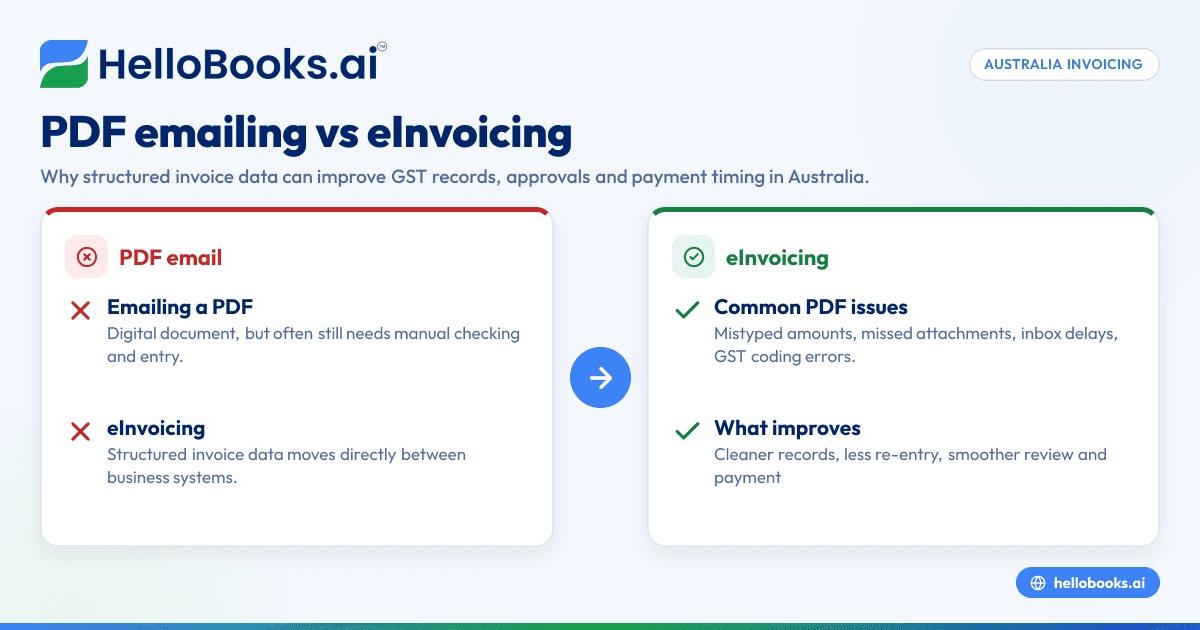
No. Emailing a PDF is digital invoicing, but eInvoicing sends structured invoice data directly between accounting systems, which reduces manual entry and errors. That makes approvals, record-keeping and payment processing smoother for many Australian businesses.
A PDF is still useful. It gives a visual invoice that people can read. Many small businesses rely on it every day. But it is still a document first, not data first.
That creates common problems:
- A customer mistypes the invoice amount.
- GST gets coded incorrectly during entry.
- Supplier names are entered differently each time.
- The invoice sits in an inbox waiting for someone to process it.
- Attachments are missed or filed in the wrong folder.
eInvoicing addresses these issues by sending machine-readable data. The customer’s software can pull in invoice fields automatically. Finance teams can then review and approve instead of typing from scratch.
This is especially useful when invoice volume grows. Ten invoices a month can be handled manually. Hundreds become much harder to control.
How does eInvoicing work in Australia?
At a high level, eInvoicing in Australia allows invoice data to move securely from the supplier’s software to the buyer’s software. The sender creates the invoice in their accounting platform or invoicing tool. The software packages the invoice details into a standard format. The receiver’s software then imports that data for review and processing.
For small businesses, the visible experience can feel simple:
- Create the invoice in your system.
- Select the customer with eInvoicing details.
- Send the invoice electronically.
- The customer receives it inside their accounting workflow.
- Both sides keep cleaner digital records.
The technical path matters less to most owners than the operational result. The invoice is less likely to get lost in an inbox. Key fields such as business details, dates, line items and GST amounts are carried through more cleanly.
This can also support stronger internal controls. A finance lead can set review steps before the invoice is sent. On the receiving side, staff can match invoices against purchase orders or approvals with less manual effort.
If your business is looking at digital invoicing tools, focus on usability first. The software should make sending, tracking and storing invoices easier, not more complex.
What records do you need for GST?
You need records that support the sale, the amount charged and the GST treatment. Good electronic invoicing helps by keeping invoice data consistent, searchable and easier to match to payments and business transactions when preparing BAS records.
Good GST records start with complete and accurate invoices. If you issue tax invoices, the information must support your accounting records and your GST reporting. Even with electronic invoicing, the basic principle does not change. You still need to keep records that explain what happened in the transaction.
For many businesses, the challenge is not creating the invoice. It is keeping the full audit trail organised.
That usually includes:
- The invoice itself
- Customer details
- Invoice date
- Description of goods or services
- Amount charged
- GST component where applicable
- Credit notes or adjustments
- Payment records
- Supporting contracts or purchase orders where relevant
When these records are scattered across inboxes, spreadsheets and PDF folders, BAS preparation becomes slower and riskier. Electronic invoicing can reduce that mess because more of the invoice data starts in a structured system.
If you already use invoice software, check whether your invoice records flow cleanly into your accounting ledger and reporting workflow. If not, invoicing may still be digital on the surface but manual underneath.
Electronic invoicing and GST record-keeping
GST compliance depends heavily on record quality. Electronic invoicing can improve that quality by reducing manual re-entry and standardising invoice data.
Here is where that helps most.
1. Cleaner source data
The invoice is often the original source document for revenue. If line items, dates and GST amounts are entered once and carried through properly, there is less room for mismatch later.
2. Easier transaction matching
When invoice data is structured, it is easier to match invoices to receipts in your accounting system. That can make month-end reviews more reliable and reduce suspense items.
3. Better support for BAS preparation
A cleaner sales ledger supports faster GST review before BAS lodgement with the ATO. You still need to review the data, but you spend less time fixing formatting and entry errors.
4. Stronger document retrieval
If the ATO or your adviser asks for support, searchable records are easier to pull than scanned PDFs buried in email chains.
For businesses managing many transactions, this is where tools like software that supports BAS preparation and structured invoice records can work well together.
Can electronic invoicing help you get paid faster?
Yes, often it can. Faster invoice delivery, fewer data errors and less back-and-forth with the customer can shorten the time between issuing the invoice and starting the approval process, which may improve payment timing.
That said, electronic invoicing is not a magic fix for every payment delay. Some late payments are caused by customer cash flow, internal approval rules or disputes over the work delivered.
Still, many payment delays begin much earlier than people think. They start when:
- The invoice goes to the wrong email address
- A PDF attachment is blocked or overlooked
- The purchase order number is missing
- The customer re-enters the invoice incorrectly
- The invoice sits unprocessed in a shared inbox
Electronic invoicing can remove several of those issues. It creates a more direct path into the customer’s payable workflow.
If your customers are larger organisations or government-related entities with formal accounts payable processes, structured invoice delivery can be especially valuable. Even smaller customers benefit when invoice details arrive clearly and consistently.
To improve payment speed, combine electronic invoicing with good invoicing discipline:
- Issue invoices promptly.
- Include the right references.
- Use clear payment terms.
- Follow up on overdue accounts.
- Reconcile receipts regularly.
A good bank reconciliation software setup also helps close the loop between invoices sent and payments received.
Where does AI fit into electronic invoicing?
AI can help classify invoice details, spot anomalies, extract data from documents and reduce repetitive finance work around invoice creation and review. In practice, AI in electronic invoicing is most useful when it saves time without making approvals or records harder to trust.
This is where many small businesses become interested in automation. They do not just want digital invoices. They want less admin around invoices.
AI can support electronic invoicing in practical ways, including ai electronic invoicing workflows that assist with data capture, checks and routing before a human approves the final record.
Data extraction and prefill
If some of your process still starts from supplier documents, AI can help extract details and prefill invoice fields. That reduces repetitive typing and standardises entry.
Error detection
AI can flag unusual invoice amounts, duplicate numbers, missing GST fields or inconsistent customer details before the invoice is sent.
Categorisation and workflow support
AI can suggest account coding, customer mapping or approval routing. That speeds up review while keeping a human in control.
Better visibility
AI tools can surface overdue invoices, approval bottlenecks or recurring disputes. That helps finance teams fix process issues, not just symptoms.
When evaluating AI accounting software or AI bookkeeping, look for clear controls. You want automation that improves accuracy and speed, with review points that fit your business.
When is electronic invoicing worth it for a small business?
Electronic invoicing is usually worth it when you send invoices regularly, deal with repeat customers or spend too much time correcting invoice data. The return is strongest when it reduces admin, improves records and shortens the path to payment.
It is often a good fit if your business has any of these signs:
- You send more invoices each month than your team can comfortably manage
- Customers often ask for corrections
- Payment delays are linked to invoice handling
- BAS preparation involves fixing invoice data
- Your records live across spreadsheets, PDFs and email threads
- Staff spend too much time on follow-up and reconciliation
It may be less urgent if your invoice volume is very low and your current process is accurate. But even then, moving to a cleaner workflow can help as the business grows.
For example, a small creative agency in Melbourne may only send 20 invoices a month today. That sounds manageable. But if each invoice triggers approval queries, manual reminders and payment matching, the hidden time cost is still real.
How to move to electronic invoicing without disrupting your team
A rushed rollout can create more confusion than value. The best approach is to simplify the process first, then add automation.
1. Map your current invoicing process
Write down how invoices are created, approved, sent, stored and reconciled. Note every manual step.
2. Find the friction points
Look for common issues such as duplicate entry, missing customer references, incorrect GST coding or slow approval steps.
3. Standardise your invoice data
Decide on consistent customer names, item descriptions, due date rules and GST handling. Clean setup matters before automation.
4. Review your software options
If you rely on spreadsheets or a patchy mix of tools, moving to accounting software for small business can make invoicing and records easier to manage in one workflow.
5. Start with a small group
Test electronic invoicing with a few regular customers first. Watch for formatting issues, approval delays or training gaps.
6. Train your team
Keep instructions simple. Focus on when to send, what to check and how to handle exceptions.
7. Measure the result
Track time to issue invoices, correction rates, days to payment and reconciliation effort. If the process is not improving these, adjust it.
What should you check before switching to electronic invoicing?
Check your customer requirements, your invoice data quality and whether your software can support a structured workflow. Start with a few regular customers, test the process end to end and measure whether it cuts manual work without weakening controls.
Before you switch, review how invoices move through your business today. Look at creation, approval, delivery, filing and payment matching. If those steps are inconsistent, moving faster may only move errors faster.
It helps to confirm:
- which customers can receive structured invoice data
- which fields they require on every invoice
- how GST is captured and reviewed
- where documents and approvals are stored
- how exceptions will be handled
A small pilot is usually safer than a full rollout. It gives your team time to fix setup issues before invoice volume increases.
Common mistakes to avoid
Small businesses often make similar errors when moving to electronic invoicing.
Treating PDFs as full automation
Sending a PDF by email is still only part of the job. If the rest of the workflow is manual, errors can remain high.
Ignoring customer requirements
Some customers need specific references, contacts or approval details. Electronic invoicing still needs complete invoice content.
Skipping internal controls
Automation should reduce effort, not remove oversight. Someone should still review unusual invoices and GST treatment.
Leaving reconciliation until month-end
Invoice accuracy matters most when payments are matched quickly. Waiting too long creates avoidable clean-up work.
Storing records in too many places
A split system of inboxes, desktop files and spreadsheets makes GST records harder to trust and retrieve.
If expense capture is also messy, expense management software can help tighten the broader record-keeping process around invoices and payments.
Can AI improve electronic invoicing without adding risk?
Yes, if AI supports data entry, checks and routing while your team keeps review control. The safest setup uses AI to reduce repetitive work, flag exceptions and improve visibility, not to make final decisions without oversight.
The key is to treat AI as an assistant, not a replacement for finance judgement. Good controls still matter. That includes reviewing unusual invoice values, checking GST treatment and confirming customer details.


