
Key takeaways
What this article covers, in order:
- Key takeaways
- What are electronic invoice requirements in United States?
- What information should an electronic invoice include?
- Is there a federal law that sets one e-invoice format?
- What records should you keep with electronic invoices?
- How do customer requirements affect electronic invoices?
Electronic invoice requirements in the United States are mostly practical, not one single nationwide legal format. Small businesses usually need invoices that are accurate, complete, easy to store, and acceptable to customers, auditors, and tax records. The right setup helps you bill faster, get paid sooner, and keep cleaner books.
Key takeaways
- There is no single federal e-invoice mandate for all small businesses in the United States.
- A good electronic invoice should clearly show seller details, buyer details, dates, line items, amounts due, and payment terms.
- Your customers may set extra requirements, especially larger companies, government buyers, and businesses with formal procurement systems.
- Clean invoice records support sales tax tracking, income reporting, dispute handling, and year-end bookkeeping.
- Automation can reduce manual entry, missed fields, duplicate invoices, and reconciliation errors.
- If you want less manual work, invoice software and AI bookkeeping can help standardize billing and records.
What are electronic invoice requirements in United States?
In the United States, electronic invoice requirements depend on who you sell to, how your customer wants to receive invoices, and what records you need to support your accounting and tax position. For most small businesses, an electronic invoice can be a digital invoice sent by email, shared through a customer portal, or created in billing software.
What matters most is not a special national invoice number issued by the government. What matters is that the invoice is complete, accurate, and stored in a way that supports your books and business records. If your customer accepts invoices by email and your internal records are reliable, that often meets the practical need.
That said, some businesses face stricter rules from customers. A manufacturer in Detroit may need a purchase order number on every invoice because its buyer’s ERP system rejects invoices without one. A marketing agency in Chicago may need project codes and billing contacts on every bill because enterprise clients route invoices through accounts payable workflows. A contractor in Houston may need job site details, milestone billing backup, and signed approvals before a customer will pay.
So, when people search for “electronic invoice requirements United States,” the answer is usually a mix of:
- Core invoice details every business should include.
- Recordkeeping standards that support accounting and taxes.
- Customer-specific submission rules.
- Internal controls that prevent billing errors.
What information should an electronic invoice include?
A complete electronic invoice should identify the seller, the customer, what was sold, when it was sold, how much is due, and when payment is due. It should also match your contract, quote, or purchase order so the customer can approve it quickly.
At a minimum, most small businesses should include:
- Your legal business name
- Business address
- Business contact details
- Customer name and billing address
- Invoice number
- Invoice date
- Due date
- Description of products or services
- Quantity, rate, and line totals
- Subtotal
- Discounts, if any
- Sales tax, if applicable
- Total amount due
- Payment terms
- Payment instructions
You may also need:
- Purchase order number
- Customer vendor number
- Project or job code
- Delivery date
- Service period
- Shipping charges
- Remit-to address
- Last four digits of a bank account reference if your customer requires it
- Notes on late fees if your contract allows them
These fields are not just for appearance. They reduce delays. If an invoice is missing a due date or a PO number, accounts payable teams often put it on hold. That creates extra email follow-up, slows cash flow, and increases collection effort.
Why these fields matter for clean records
Good invoices support more than payment collection. They also create the audit trail behind your revenue. When your bank deposits, contracts, and invoices line up, month-end close is easier. Your accountant can trace income faster. Disputes are easier to resolve. If you collect state sales tax, you also have better support for what was billed and when.
For service businesses, date ranges matter. “Consulting services” is weaker than “Operations consulting for 03/01/2026 to 03/31/2026.” For product businesses, SKU, quantity, and shipment details matter. The clearer the invoice, the easier it is to reconcile against orders, delivery records, and payments.
Is there a federal law that sets one e-invoice format?
No. In the United States, most small businesses do not follow one mandatory national e-invoice format. The practical standard is to issue invoices that your customer can receive and process, while keeping records that support your accounting and tax reporting.
That does not mean format never matters. Some customers require PDFs by email. Others want invoices uploaded through a supplier portal. Some larger buyers ask for data in structured formats that work with their procurement systems. If you sell to a government entity or a large company, review the contract and vendor onboarding instructions carefully.
Common invoice delivery methods
Most small businesses use one of these methods:
- PDF invoice by email Simple and common. Works well when invoice volume is manageable.
- Invoice link from billing software Useful for faster payment and a cleaner customer experience.
- Customer portal upload Common with larger companies, property managers, and formal purchasing teams.
- EDI or structured data submission More common in larger supply chains. Small businesses usually encounter this only when a customer requires it.
Your requirement is often driven by your customer’s payment process, not by a universal law.
What records should you keep with electronic invoices?
Keep the invoice itself and the supporting records that explain why it was issued. That means your quote, contract, statement of work, purchase order, delivery proof, time records, approval emails, and payment receipt can all matter.
Good recordkeeping helps in four areas:
1. Revenue accuracy
Invoices should match what you actually delivered. If you bill monthly retainers, milestone payments, subscriptions, or shipments, your records should show the basis for each charge.
2. Sales tax support
Sales tax rules vary by state and by what you sell. Your invoice should show any sales tax charged when applicable. This article is general information, not tax or legal advice. If you are unsure whether your sale is taxable, confirm with your tax advisor or accountant.
3. Dispute resolution
If a customer says an amount is wrong, you need to find the original support fast. A clean invoice trail can shorten disputes from weeks to hours.
4. Year-end reporting
Well-organized invoices help support your income records. They also make it easier to prepare for year-end close, financial statements, and information reporting such as 1099 processes where relevant.
How long should you retain invoice records?
Retention needs can depend on tax, accounting, contract, and industry needs. Many businesses keep invoice and accounting records for several years as part of normal document retention. The key is consistency. Use one retention policy, store records in one place, and make them easy to retrieve.
How do customer requirements affect electronic invoices?
Customer requirements often shape your real-world invoicing process more than any broad legal rule. A customer may reject a valid invoice simply because it does not follow their payable workflow.
Common customer requirements include:
- Specific invoice email address
- PDF only
- Purchase order number required
- Vendor ID required
- Separate invoice per location
- Backup documents attached
- Tax shown in a specific way
- Net payment terms listed exactly
- No duplicate invoice numbers
- Invoice submitted within a time limit after delivery
This is especially common in wholesale, manufacturing, logistics, construction, and business services. If you ignore these details, your invoice may sit unpaid even when the work is complete.
Build a customer invoice checklist
For each recurring customer, maintain a short checklist:
- Where the invoice must be sent
- Required fields
- Required attachments
- Billing frequency
- Payment terms
- Contact for invoice disputes
- Contact for remittance questions
This small step can reduce rework and improve days sales outstanding.
What does a compliant electronic invoice workflow look like?
A strong workflow creates accurate invoices, routes them properly, and stores them with support. It should also reduce manual edits after sending.
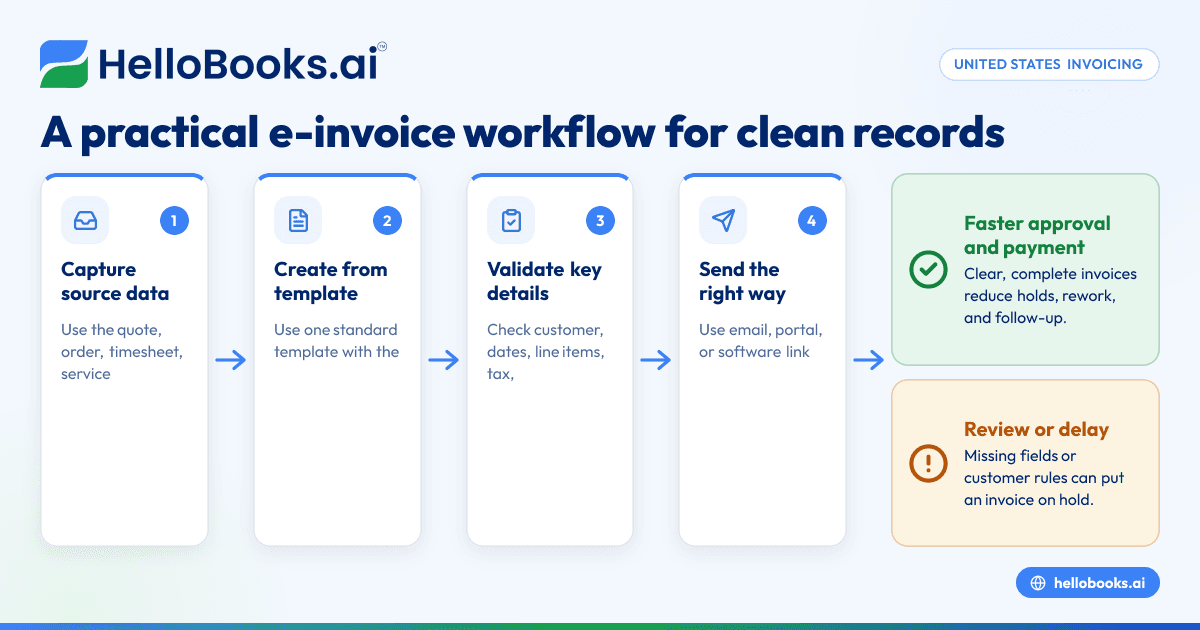
Here is a practical workflow for a small business:
1. Capture source data
Pull in the quote, order, timesheet, service log, or shipment record. Do not start from memory.
2. Create the invoice from a standard template
Use one template with required fields. This reduces inconsistency across team members.
3. Validate key details
Check customer name, invoice date, due date, line items, tax, and PO number. Confirm math before sending.
4. Send through the agreed channel
Email, portal, or software link should match the customer’s preference.
5. Store the final invoice and backup
Keep the sent copy and supporting records together.
6. Reconcile the payment
Match the payment to the invoice when funds arrive. If the customer short pays, record and follow up quickly.
If you still invoice from spreadsheets and email attachments, this process often breaks at step three or step five. Templates drift. Invoice numbers duplicate. Attachments go missing. Payment status is tracked in someone’s inbox instead of your books.
How can ai electronic invoice tools help small businesses?
AI tools can pull details from quotes, bills, or order records, suggest missing fields, and flag likely errors before an invoice is sent. That helps small businesses create faster, cleaner invoices with fewer manual corrections.
In practice, an ai electronic invoice workflow helps in a few useful ways. It can extract customer names, dates, line items, and totals from source documents. It can warn you if a purchase order number is missing. It can spot duplicate invoice numbers or unusual amount changes. It can also connect billing records more closely to reconciliation and reporting.
That matters when your business is growing. A ten-invoice month can be managed by memory. A two-hundred-invoice month cannot. Automation becomes less about convenience and more about control.
If your team spends hours each week chasing invoice edits, payment status, and customer document requests, using AI accounting software or accounting software in the USA can reduce repetitive work.
Do electronic invoices need customer consent?
Usually, what matters is whether your customer accepts electronic delivery in practice or under your contract terms. If a customer asks for invoices by email or through a portal, that is usually your operational answer.
Still, it is smart to set expectations early. Add billing terms to your proposal, contract, or onboarding email. Confirm where invoices should be sent. Confirm who approves them. Confirm what backup the customer needs. This avoids the common problem where the work was approved by one person, but the invoice is rejected by accounts payable later.
Simple ways to confirm acceptance
- Put billing and payment terms in your service agreement
- Ask for the correct AP email address
- Ask whether a PO is required
- Ask whether backup documents must be attached
- Save the customer’s written billing instructions
These are simple controls, but they prevent many avoidable delays.
What mistakes slow down payment and create messy records?
The most common invoicing problems are not technical. They are process problems.
Missing required fields
No PO number. No due date. No service date. No tax detail. These create avoidable back-and-forth.
Inconsistent invoice numbering
If invoice numbers are duplicated or skipped without explanation, finding records later becomes harder.
Weak item descriptions
“Monthly services” is vague. Customers and accountants both need more detail.
Sending invoices from personal inboxes
Invoices get buried, access is lost when staff change, and records scatter across mailboxes.
Manual re-entry into accounting
If you create the invoice in one place and retype it into your books later, errors multiply. Businesses often benefit from bank reconciliation software and expense management software alongside billing tools to keep records connected.
No follow-up process
An invoice sent is not the same as an invoice received, approved, and paid. Track each stage.
What should small businesses set up first?
Start with a standard invoice template, a naming system, and a recordkeeping process. Then add automation where you lose the most time.
A simple setup plan looks like this:
- Standardize invoice fields and terms
- Create one invoice numbering sequence
- Document customer-specific billing rules
- Save support documents in one folder structure
- Track sent, viewed, approved, and paid status
- Reconcile payments weekly
- Review aging reports every week
If you already use QuickBooks and still struggle with manual billing work, you may want to compare tools built for more automation, including a QuickBooks alternative or broader accounting software for small business.
Which electronic invoice features matter most?
The best feature list is not the longest list. It is the one that fixes your current bottlenecks.
For many small businesses, the most useful features are:
- Reusable invoice templates
- Automatic numbering
- Customer-specific fields
- Tax support
- Attachment support
- Invoice status tracking
- Payment reminders
- Searchable records
- Exportable reports
- Reconciliation support
If you bill recurring customers, saved invoice profiles are useful. If you bill projects, service dates and job codes matter more. If you work with larger buyers, portal-ready attachments and approval trails matter.
The right system should shorten the path from completed work to recorded cash. It should also leave a clean trail for your bookkeeper, accountant, or finance lead.
When should you move beyond spreadsheets?
Move beyond spreadsheets when invoice volume grows, customer requirements become stricter, or month-end close takes too long because billing records are scattered. That is usually the point where manual invoicing starts hurting cash flow.
You do not need enterprise software to solve this. You need consistency, visibility, and fewer handoffs. Electronic invoicing works best when billing, records, and reconciliation are connected in one process instead of spread across files, inboxes, and memory.
If you want to simplify invoicing and keep cleaner records, you can book a demo at book a demo or compare options on the pricing page.
Frequently asked questions
Do electronic invoices have to be in PDF format in the United States?
No. PDF is common, but it is not the only option. Many customers accept invoice links, portal uploads, or structured data formats if those fit their accounts payable process.
Does an electronic invoice need a signature?
Usually, no signature is required for a standard business invoice unless your contract or customer process asks for one. What matters more is that the invoice matches the agreed work, pricing, and approval trail.
Do I need to show sales tax on every invoice?
Only if sales tax applies to that sale under the relevant state and local rules. If you sell different products or services across states, review tax treatment carefully with your accountant.
Can I email invoices from a regular business email account?
Yes, many small businesses do. But you should still keep invoices organized, searchable, and linked to your accounting records so they are easy to find later.


