


Key takeaways
What this article covers, in order:
- Why this comes up / what goes wrong
- Step-by-step
- Example (fictional figures)
- Common mistakes
- Doing this in HelloBooks
- Frequently asked questions
An e way bill check scanner refers to the process or device used to scan the QR code printed on an e-way bill to verify its authenticity and details. The e-way bill contains a QR code that encodes the Invoice Reference Number (IRN) and other consignment information. Scanning this QR code helps business owners and transporters confirm that the e-way bill is valid, has been generated correctly, and matches the shipment details.
Why this comes up / what goes wrong
Small business owners often need to verify e-way bills when goods are transported to ensure compliance with GST rules. The e-way bill is mandatory for movement of goods above certain values or distances. However, manually checking the e-way bill details against invoices and consignments can be time-consuming and error-prone. Mistakes in e-way bill details can lead to penalties or transport delays. Therefore, having a reliable way to check e-way bills quickly using a scanner or mobile app that reads the QR code is important for smooth operations.
Step-by-step
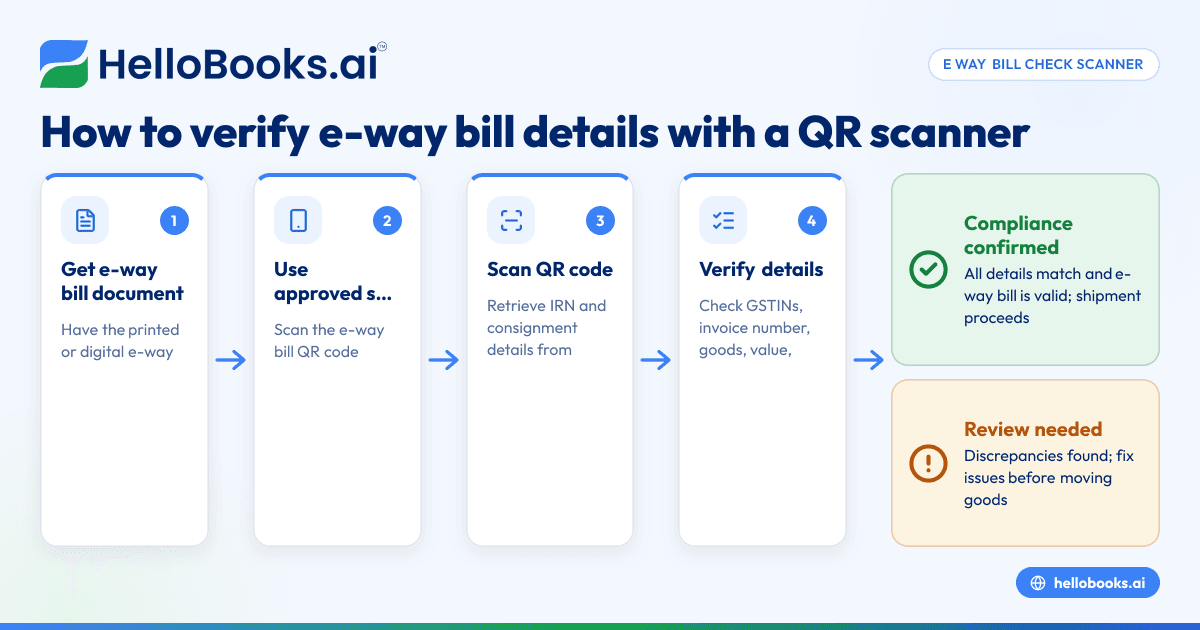
- Obtain the e-way bill document or its digital copy: The e-way bill will have a unique number and a QR code.
- Use an e-way bill check scanner app or device: Several government-approved mobile apps or QR code scanners can read the e-way bill QR code.
- Scan the QR code on the e-way bill: This retrieves the Invoice Reference Number (IRN) and other consignment details.
- Verify the details shown: Check that the supplier and recipient GSTIN, invoice number, goods description, quantity, value, and transport details match your records.
- Check the validity status: Confirm that the e-way bill is active and not cancelled or expired.
- If discrepancies are found, report or correct them: Contact the supplier or transporter to resolve any mismatches.
Example (fictional figures)
A Delhi-based business ships goods worth ₹1,20,000 to a customer in Mumbai on 12/05/2024. The e-way bill QR code is scanned using an official app.
- Invoice value = ₹1,20,000
- GSTIN of supplier = 07ABCDE1234F1Z5
- GSTIN of recipient = 27XYZDE5678G1Z2
- Invoice number = INV-2024-045
- Transport vehicle number = MH12AB1234
Steps:
- Scan QR code → IRN and consignment details appear.
- Verify supplier GSTIN = 07ABCDE1234F1Z5 (matches invoice)
- Verify recipient GSTIN = 27XYZDE5678G1Z2 (matches invoice)
- Verify invoice number = INV-2024-045 (matches invoice)
- Verify invoice value = ₹1,20,000 (matches invoice)
- Confirm transport vehicle number = MH12AB1234 (matches dispatch)
- Check e-way bill status = Active
Since all details match and the status is active, the shipment proceeds without issue.
Common mistakes
- Not scanning the QR code: Relying only on printed numbers can cause errors. Always scan to verify the IRN and details.
- Ignoring mismatches: If scanned details do not match the invoice or consignment, do not proceed until corrected.
- Using unofficial or outdated scanner apps: Only use government-approved or trusted apps to avoid incorrect data.
- Failing to check e-way bill validity: An expired or cancelled e-way bill can lead to penalties.
- Not verifying transport details: Vehicle number and transporter info must match the e-way bill.
- Overlooking recipient details for unregistered persons: For consignments over ₹50,000, recipient name and address must be included on the invoice and e-way bill as per Rule 46 [cgst-rule-46/rule46-unregistered-50k].
Doing this in HelloBooks
HelloBooks simplifies e-way bill management by raising the EWB directly from the invoice record, so consignment details are not typed twice. This ensures consistency and saves time. For businesses over the ₹5 crore e-invoicing threshold, HelloBooks automatically attaches the Invoice Reference Number (IRN) when generating e-invoices, which feeds into the e-way bill creation process. You can learn more about this at e-way bill and GST invoicing.
Frequently asked questions
What is an e way bill check scanner?
An e way bill check scanner is a tool or app that scans the QR code on an e-way bill to verify its authenticity and details like supplier, recipient, invoice number, and transport information.
Is scanning the e-way bill QR code mandatory?
While not explicitly mandatory, scanning the QR code is the most reliable way to verify the e-way bill's validity and details, helping avoid errors and penalties.
Can I use any QR code scanner to check the e-way bill?
It is best to use government-approved or official apps designed for e-way bill verification to ensure accurate and updated information.
What happens if the e-way bill details do not match the invoice?
You should not proceed with the goods movement until the discrepancy is resolved with the supplier or transporter to avoid compliance issues.
How does HelloBooks help with e-way bill checking?
HelloBooks generates e-way bills directly from invoices, attaching IRNs for e-invoiced documents, reducing manual entry and errors. It ensures the consignment details are consistent and compliant.
Where can I find more tools to validate GST invoices?
You can use the GST invoice validator to check invoice details for GST compliance.
Key takeaways
- An e way bill check scanner scans the QR code on the e-way bill to verify its authenticity and details.
- Scanning helps confirm supplier, recipient, invoice, and transport details match the shipment.
- Use official apps to avoid errors and ensure compliance.
- HelloBooks raises e-way bills from invoices with IRN attached, saving time and reducing mistakes.
- Always resolve mismatches before transporting goods to avoid penalties.
To see how HelloBooks can simplify your e-way bill and GST invoicing process, Book a 30-minute demo today.


