
Key takeaways
What this article covers, in order:
- Key takeaways
- What e-invoicing means under GST in India
- Who should pay attention to e-invoicing rules in India
- The standard e-invoice format in India
- Mandatory fields small businesses should get right
- Common validation errors in e-invoicing
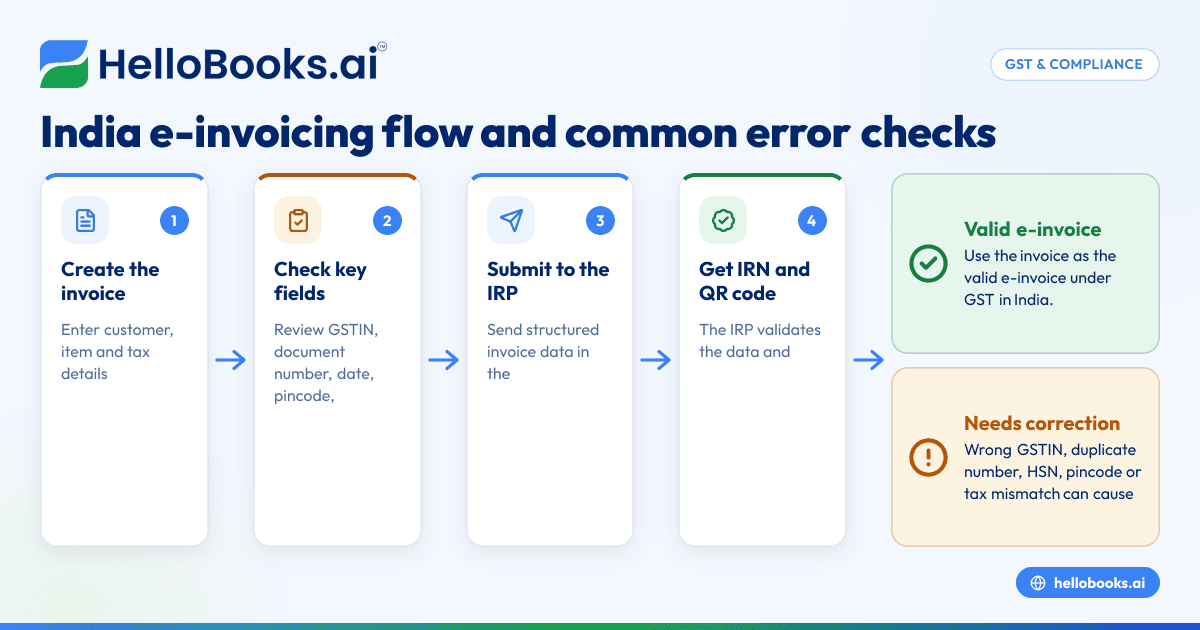
E-invoicing rules in India require eligible businesses to report invoice details to the Invoice Registration Portal (IRP) and get an Invoice Reference Number (IRN) before using the invoice as a valid e-invoice under GST. For small businesses, the practical challenge is not the concept but getting the format, mandatory fields and validation checks right so invoices do not fail at the last minute.
Key takeaways
- E-invoicing in India is a GST system where invoice data is reported electronically to the IRP for IRN generation.
- It does not mean creating invoices only on a government portal. You can prepare invoices in your software and then report them.
- Mandatory fields matter. Wrong GSTIN, document number, pincode, HSN or tax values can trigger validation errors.
- E-invoicing rules in India are country-specific and can change over time, so always check the latest GST notifications and advisories.
- A clean item master, customer master and tax setup reduce most e-invoicing failures.
- Good e-invoicing software can help small businesses avoid duplicate work and reduce rejections.
What e-invoicing means under GST in India
Under GST, e-invoicing means certain registered businesses in India must upload invoice details in a prescribed schema to the IRP. The IRP validates the data and returns an IRN and a signed QR code. That invoice then becomes the valid e-invoice for GST purposes.
This system applies only in India and only where the notified GST rules and turnover thresholds make it applicable. Thresholds have changed over time through government notifications. Because of that, businesses should always verify the latest applicability before changing their process.
A common misunderstanding is that e-invoicing means making invoices on a GST portal. That is not how it works. In practice, businesses usually create invoices in their billing or accounting system, convert the data into the required format and send it to the IRP for validation and IRN generation.
For a small business in Mumbai, Pune or Bengaluru, this affects day-to-day billing in a few direct ways:
- invoice data must be accurate before final issue
- document numbering must be controlled
- GST treatment must match the supply
- customer GSTIN and address details must be correct
- changes after IRN generation need proper handling
If your team still works in spreadsheets or manually updates Tally after billing, e-invoicing can expose data quality issues quickly. The process becomes much smoother when invoicing, GST setup and books are connected in one accounting software in India.
Who should pay attention to e-invoicing rules in India
Even if your business is not currently covered by the latest threshold, it is still worth understanding the rules. Many businesses grow into the requirement with little warning. Others deal with customers who expect GST-ready invoice formats and cleaner compliance processes.
You should pay close attention if you are:
- a manufacturer selling to distributors across states
- a wholesaler issuing many B2B invoices every day
- a service company billing GST-registered clients
- a business with multiple branches using different billing systems
- an accounts team managing invoicing and GST separately
For example, a Pune-based industrial supplier may issue 150 B2B invoices a day. If the customer GSTIN, HSN code or tax split is wrong, the invoice may fail validation or create downstream GST mismatches. Fixing these one by one after dispatch creates delays in payment and confusion for customers.
The standard e-invoice format in India
The e-invoice format is based on a standard schema prescribed for GST reporting. Your software should capture invoice data in structured fields so it can be sent to the IRP in the required format.
From a business user’s point of view, you do not need to memorise the entire schema. You do need to know what kinds of fields must exist and how clean the data must be.
Broadly, the format includes these sections:
Supplier details
This section captures details of the seller issuing the invoice. It usually includes:
- legal name
- trade name, where applicable
- GSTIN
- address
- place
- pincode
- state code
Recipient details
This section captures the customer or buyer details. It usually includes:
- legal name
- GSTIN for B2B transactions, where applicable
- address
- place
- pincode
- state code
- place of supply
Document details
This section identifies the invoice itself. It generally includes:
- document type
- document number
- document date
Document numbering must be unique and controlled. Duplicate invoice numbers are one of the most common practical problems.
Item details
This is where many small businesses make mistakes. Each line item may require fields such as:
- serial number
- product or service description
- HSN code
- quantity
- unit
- unit price
- gross amount
- discount, if any
- taxable value
- GST rate
- IGST, CGST and SGST or cess, as applicable
Value and tax summary
This section typically includes:
- total taxable value
- total invoice value
- tax amounts by type
- round-off amount, if applicable
Transport and dispatch details
Where relevant, dispatch, shipping and transporter details may also be included. This becomes important for businesses that also manage e-way bill-related workflows.
Mandatory fields small businesses should get right
Not every field creates equal risk. In real operations, a handful of fields cause most IRN generation errors and GST follow-up work.
1. GSTIN of supplier and recipient
The supplier GSTIN must be valid and active. The recipient GSTIN, for B2B invoices, must also be valid and correctly entered. One wrong character is enough to fail validation or create return mismatches later.
This often happens when sales teams copy GSTINs from old emails or WhatsApp messages. A customer master should be reviewed regularly.
2. Invoice number and date
Invoice number must follow your document series and should not be duplicated. The date should be in the accepted format and should align with your billing period and reporting timeline.
If two branches issue the same number series without control, duplicates can arise. That becomes a process problem, not just a technical one.
3. Document type
The correct document type matters. Invoice, credit note and debit note are not interchangeable. If your staff uses the wrong type, validation may fail or the transaction may be reported incorrectly.
4. Customer name and address details
Name, address, state and pincode should be complete and sensible. State code and place of supply should align with the transaction type and tax treatment.
For example, if the customer is in Karnataka but the place of supply is incorrectly set to Maharashtra, the system may calculate the wrong tax split.
5. HSN code and item description
HSN codes should match the goods or services being billed. Vague item descriptions like “material” or “job work” may create internal confusion, even where the system accepts the line.
A clean item master is one of the simplest ways to reduce errors.
6. Taxable value and GST amounts
Taxable value should match the line calculation after discount. GST values must be mathematically consistent with the rate and the place of supply.
Even small differences due to manual rounding can trigger validation issues or create customer disputes.
7. Total invoice value
The total invoice value should reconcile with line items, discounts, taxes and round-off. If the final total does not tie back to the item-level data, validation may fail.
Common validation errors in e-invoicing
Most e-invoicing errors are not “system” issues. They usually come from bad masters, wrong tax logic or inconsistent document control.
Here are the errors small businesses commonly run into.
Invalid GSTIN
This can happen when:
- the GSTIN is entered incorrectly
- the GSTIN is inactive
- the GSTIN and state code do not match
A frequent example is using a head office GSTIN for a branch transaction without checking the actual billing registration.
Duplicate IRN or duplicate invoice reference
If the same supplier GSTIN, financial year, document type and document number combination is reported again, the system may reject it as a duplicate.
This usually happens when teams retry failed uploads without checking whether the first submission actually succeeded.
Invoice date outside allowed logic
If the date is incorrect, in the future, too old for the system rule in force, or inconsistent with your reporting process, validation may fail. Date-related checks can change, so always verify the current rule.
Invalid HSN code
Wrong or incomplete HSN codes can cause errors. This is common when businesses keep legacy item masters and never standardise them.
Tax mismatch
This is one of the biggest categories. It includes:
- IGST used where CGST and SGST should apply
- CGST and SGST used for an inter-state supply
- line tax values not matching the rate
- invoice total not matching line calculations
These mistakes often come from manual invoice preparation in Excel.
Invalid pincode or state code
Pincode must be valid and should align with the state details entered. Inconsistencies can trigger rejection.
Missing mandatory field
Even one blank mandatory field can stop IRN generation. Common examples include missing document type, customer GSTIN, place of supply or item-level tax details.
How to avoid e-invoicing errors before they happen
The best way to manage e-invoicing is to reduce errors before the invoice reaches the IRP. Fixing them later wastes time for sales, accounts and dispatch teams.
Clean up masters first
Start with these three masters:
- customer master
- item master
- tax master
Review active customer GSTINs, state names, addresses and pincodes. Standardise HSN codes, unit names, tax rates and item descriptions. Remove duplicate customer records.
Control invoice numbering
Create one clear numbering policy for each GST registration and document type. If you have multiple teams or locations, do not let them invent their own numbering logic.
This is especially important for businesses operating from more than one city.
Map tax rules properly
Your tax setup should reflect actual business scenarios, such as:
- intra-state B2B supply
- inter-state B2B supply
- exports, where applicable
- credit notes and debit notes
If your team manually edits taxes on every invoice, errors are almost guaranteed.
Validate before final submission
Before reporting an invoice for IRN generation, review:
- GSTIN
- document number
- date
- place of supply
- HSN
- taxable value
- GST amount
- total value
Modern invoice software and GST return filing software workflows can reduce manual rechecks by carrying the same clean data across billing and GST tasks.
Train the sales and billing team
E-invoicing is not only an accounts responsibility. Sales coordinators, dispatch staff and branch admins often enter customer and order details first. If they capture poor data, the accounts team inherits the problem.
A one-page checklist helps more than a long policy document.
A simple process small businesses can follow
If your current process is messy, keep it simple. Use this practical workflow.
Step 1: Create the invoice in your billing or accounting system
Enter customer, item and tax details carefully. Avoid free-text workarounds unless absolutely necessary.
Step 2: Validate master data
Check GSTIN, state, pincode, HSN and rate logic before final save.
Step 3: Submit the invoice data to the IRP
Your software or process should send the structured data in the prescribed format.
Step 4: Receive IRN and signed QR code
Once validated, the IRP returns the IRN and QR code. The invoice can then be treated as the valid e-invoice under the GST process.
Step 5: Share the final invoice with the customer
Send the invoice with the required details in the final version. Many businesses share it by email and WhatsApp for speed.
Step 6: Keep books and GST records aligned
Do not issue the invoice in one tool and post it later by hand if you can avoid it. That creates reconciliation problems at month-end. Using AI bookkeeping or connected AI accounting software can help reduce duplicate entry and missed postings.
Practical issues small businesses face
Multiple systems and duplicate entry
A common setup is billing in one tool, accounts in Tally and GST working papers in Excel. This leads to version confusion. The invoice accepted by the IRP may not match the invoice posted in books.
If this sounds familiar, it may be time to review whether a Tally alternative or accounting software for small business setup would simplify operations.
Manual corrections after invoice generation
Once an invoice is generated and shared, teams often discover wrong customer GSTIN, branch address or tax treatment. These issues are painful because they affect accounting, GST reporting and customer payment processing.
Data privacy and access control
Invoices can include personal data such as names, phone numbers and addresses. Businesses should handle such data carefully and limit access based on role. In India, data handling should also be viewed in light of the DPDP Act 2023 where personal data is involved.
Final checklist for e-invoicing compliance readiness
Before you scale billing, ask these questions:
- Are customer GSTIN and address records clean?
- Are HSN codes mapped for all active items?
- Is invoice numbering unique and controlled?
- Does the tax setup correctly handle intra-state and inter-state supplies?
- Does your team know when to use invoice, credit note or debit note?
- Do books, invoices and GST data stay in sync?
If the answer to several of these is no, start with process discipline before looking for a technical fix. Software helps, but only if your masters and workflow are sensible.
This article is general information, not tax or legal advice. For transaction-specific treatment or current applicability under GST notifications, check with your tax adviser.
If you want to simplify e-invoicing, invoicing, reconciliation and GST workflows in one place, you can book a demo or compare plans on the pricing page.
Frequently asked questions
Is e-invoicing the same as making invoices on the GST portal?
No. In India, e-invoicing usually means creating the invoice in your software and reporting the required data to the IRP for IRN generation. The government portal is not necessarily where you draft the invoice.
What is the most common reason an e-invoice gets rejected?
Wrong GSTIN, duplicate document number, invalid HSN, tax mismatch and missing mandatory fields are common reasons. In small businesses, most rejections come from poor master data or manual tax edits.
Can I edit an invoice after IRN generation?
If a material field is wrong, you should follow the proper correction process under GST rather than casually editing the invoice in your books. The exact handling depends on the nature of the error and the current GST process in force.
Do I need separate software for e-invoicing and bookkeeping?
Not always. Many businesses prefer one system that handles invoicing, books, GST and reconciliation together. That reduces duplicate data entry and month-end mismatches.


