


Key takeaways
What this article covers, in order:
- Why this comes up / what goes wrong
- Step-by-step
- Example (fictional figures)
- Common mistakes
- Doing this in HelloBooks
- Frequently asked questions
An e invoice scanner helps small businesses and accountants quickly capture invoice details from GST-compliant e-invoices, reducing manual data entry and errors. It reads key fields like supplier and recipient GSTIN, invoice number, date, HSN/SAC codes, tax amounts, and the IRN with QR code embedded in the invoice.
Why this comes up / what goes wrong
Small business owners often struggle with the volume and complexity of GST invoices. When invoices are received as PDFs or printed copies, manually entering all details into spreadsheets or accounting software is time-consuming and prone to mistakes. This slows down reconciliation, GST filing, and compliance with Rule 46 requirements, which mandate specific invoice particulars. An e invoice scanner automates data capture, ensuring accuracy and saving time.
Step-by-step
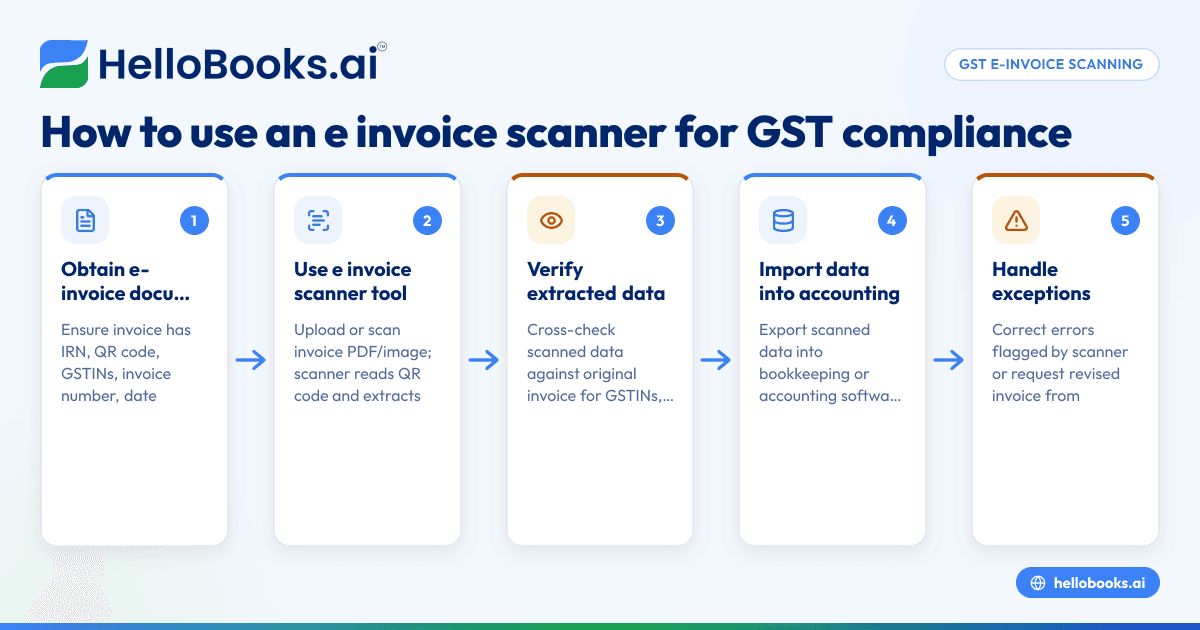
- Obtain the e-invoice document: Ensure you have the GST e-invoice in PDF or digital format containing the IRN and QR code as per Rule 46. Check that the invoice includes supplier and recipient GSTIN, invoice number, date, HSN/SAC codes, taxable value, tax rates, and amounts.
- Use the e invoice scanner tool or software: Upload or scan the invoice PDF or image in the scanner application. The scanner reads the QR code and extracts invoice data automatically.
- Verify extracted data: Cross-check the scanned data against the physical or original invoice to confirm accuracy, especially GSTINs, invoice number, taxable value, and tax amounts.
- Import data into your accounting system: Export the scanned invoice data into your bookkeeping spreadsheet or software for reconciliation and GST filing.
- Handle exceptions: If the scanner flags errors or missing fields, correct them manually or request a revised invoice from the supplier.
- Use the data for GST compliance: Use the scanned invoice details for GSTR-1 and GSTR-3B filing, ITC claims, and reconciliation with GSTR-2B.
Example (fictional figures)
A Delhi-based supplier issues an e-invoice on 05/06/2024 to a Mumbai buyer for goods worth ₹1,20,000 with 18% GST (CGST 9% + SGST 9%).
- Taxable value = ₹1,20,000
- CGST = ₹1,20,000 × 9% = ₹10,800
- SGST = ₹1,20,000 × 9% = ₹10,800
- Total tax = ₹10,800 + ₹10,800 = ₹21,600
- Invoice total = ₹1,20,000 + ₹21,600 = ₹1,41,600
The e invoice scanner reads the QR code and extracts:
- Supplier GSTIN and address
- Recipient GSTIN and address
- Invoice number and date (05/06/2024)
- HSN code for goods
- Taxable value ₹1,20,000
- CGST ₹10,800
- SGST ₹10,800
- IRN embedded in QR
This data is then imported into the buyer’s accounting system for reconciliation and GST return filing.
Common mistakes
- Not verifying scanned data: Always cross-check scanned invoice details against the original to avoid errors in GSTIN, tax amounts, or invoice numbers.
- Using outdated or non-compliant invoices: Ensure the invoice is an e-invoice with IRN and QR code as required by Rule 46 and the e-invoicing threshold rules.
- Ignoring recipient details for unregistered buyers: For invoices above ₹50,000 to unregistered recipients, ensure the invoice includes recipient name, address, and state code.
- Failing to update software: Use updated e invoice scanner tools that comply with the latest GST rules and e-invoicing portal requirements.
- Not linking e-invoices to e-way bills: When goods movement requires an e-way bill, generate it from the e-invoice record to avoid retyping consignment details.
For validating your invoice details, you can use tools like the GST invoice validator.
Doing this in HelloBooks
HelloBooks helps by creating GST-compliant tax invoices with the correct CGST/SGST or IGST split and HSN/SAC codes from the customer's GSTIN, ensuring Rule 46 fields are filled consistently. For businesses over the ₹5 crore e-invoicing threshold, HelloBooks generates the IRN and signed QR code on saving a B2B invoice, saving time compared to manual JSON upload to the government portal. It also raises e-way bills directly from the invoice, avoiding duplicate data entry of consignment details. Learn more about GST invoicing and e-invoicing (IRN and QR) with HelloBooks.
Frequently asked questions
What is an e invoice scanner?
An e invoice scanner is a tool that reads GST e-invoices, extracting data such as GSTINs, invoice numbers, dates, taxable values, tax amounts, and the IRN with QR code. It reduces manual entry and errors in accounting.
Who must use e-invoicing in India?
Registered persons with aggregate turnover exceeding ₹5 crore in any financial year from 2017-18 onwards must issue e-invoices for B2B supplies from 1 August 2023. Entities exempt from e-invoicing declare this on the portal and their invoices.
Can I use an e invoice scanner for all invoices?
E invoice scanners work best with GST-compliant e-invoices containing IRN and QR codes. For non-e-invoices or B2C invoices without IRN, manual entry or other tools may be needed.
How does an e invoice scanner help with GST filing?
By extracting accurate invoice data automatically, it simplifies reconciliation with GSTR-2B and supports accurate GSTR-1 and GSTR-3B filing.
What if the scanned invoice data is incorrect?
Verify against the original invoice and contact the supplier for corrections. Most e invoice scanners allow manual edits before importing data.
How do I link e-invoices to e-way bills?
If the invoice requires an e-way bill, generating it from the e-invoice record ensures the IRN and consignment details are consistent and avoids duplicate data entry.
Key takeaways
- An e invoice scanner reads GST e-invoices and extracts key data automatically.
- It reduces manual entry, errors, and speeds up GST reconciliation and filing.
- Verify scanned data carefully to ensure GSTINs, taxable values, and tax amounts are correct.
- Use updated tools compliant with Rule 46 and the e-invoicing threshold of ₹5 crore.
- Linking e-invoices to e-way bills avoids retyping consignment details.
- HelloBooks supports GST invoicing, e-invoicing with IRN and QR, and e-way bill generation from invoices.
Start managing your GST e-invoices efficiently with HelloBooks. Start on the Free plan (200 transactions a year, GSTR-1 and 3B filing for one GSTIN).


