
Key takeaways
What this article covers, in order:
- Key takeaways
- What is e-invoice generation in India?
- Who needs e-invoice generation?
- Why small businesses should care about e-invoice generation
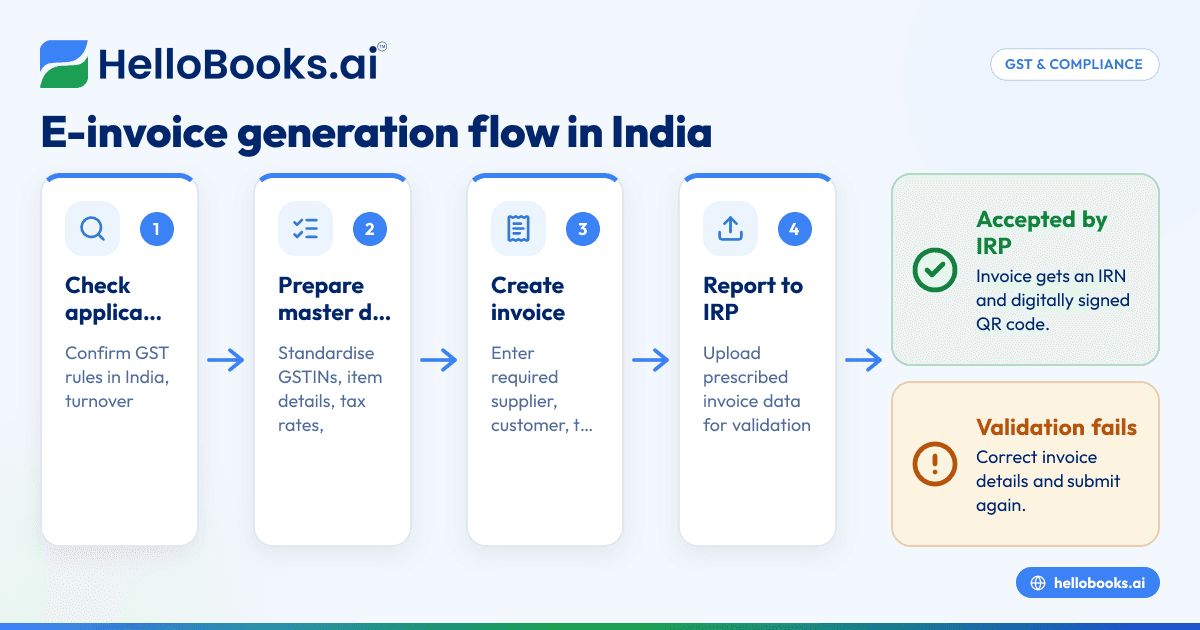
- Step-by-step process for e-invoice generation in India
- Information you should keep ready before generating e-invoices
E-invoice generation in India is the process of creating a GST invoice in your accounting or billing system and reporting its key details to the government’s Invoice Registration Portal (IRP) to receive an Invoice Reference Number (IRN) and QR code. For eligible businesses, this is not just a billing format change. It affects how you raise invoices, share them with customers, and keep GST records clean.
Key takeaways
- E-invoicing in India means reporting B2B invoice data to the IRP for IRN generation and a signed QR code.
- It does not mean making invoices only in PDF or sending invoices by email.
- The process usually has five parts: create invoice, upload data, generate IRN, add QR code, and share the final invoice.
- Small businesses should standardise item names, GSTINs, tax rates, and document series before starting.
- E-invoicing reduces manual GST errors and can make return preparation and reconciliation easier.
- Compliance rules can change over time, so always check the latest GST notifications and speak to your tax adviser for case-specific advice.
What is e-invoice generation in India?
In India, e-invoice generation means creating a tax invoice in the prescribed GST data format and getting it registered with the Invoice Registration Portal. Once the invoice is accepted by the IRP, it gets a unique IRN and a digitally signed QR code.
This is mainly relevant for GST-registered businesses that fall within the notified e-invoicing rules. The requirement depends on turnover thresholds and government notifications issued from time to time. Because these rules can change, it is important to verify whether your business is currently covered.
A common misunderstanding is that an e-invoice is simply a digital invoice. Under GST in India, that is not enough. A PDF invoice made in Excel, Tally, or a custom billing tool is not treated as a GST e-invoice unless the invoice data is reported to the IRP and an IRN is generated where applicable.
For a small business in Mumbai, Pune, or Coimbatore, this matters in day-to-day work. Your sales team may create invoices. Your accounts team may check GST rates. Your customer may want the QR code and IRN on the invoice before processing payment. If your process is manual, delays and mistakes can quickly pile up.
Who needs e-invoice generation?
E-invoicing applies only to certain taxpayers and transaction types. It is generally used for B2B invoices and other notified documents under GST. It is not the same as consumer billing for every sale.
Whether your business must generate e-invoices depends on current GST rules in India, especially turnover-based applicability. The government has revised thresholds in phases over time. Because of that, you should rely on the latest official notification or confirm with your accountant.
In practice, if you run a manufacturing unit in Bengaluru, a distributor in Ahmedabad, or a services company in Gurgaon and your turnover falls within the notified limit, you should review your invoicing process immediately.
Transactions commonly considered in e-invoicing workflows
These may include, depending on applicable GST rules and your business setup:
- B2B tax invoices
- Debit notes
- Credit notes
- Exports, where notified
- Certain supplies to SEZ units or developers, where relevant
The exact applicability can vary by document type and taxpayer category. This is general information, not tax or legal advice.
Why small businesses should care about e-invoice generation
Many small businesses first approach e-invoicing as a compliance task. That is fair. But the real impact is operational.
If your invoice process is scattered across Excel files, WhatsApp approvals, and late accounting entries, e-invoicing forces more discipline. You need the right GSTIN, HSN or SAC details where applicable, tax rates, place of supply, and invoice numbering. That sounds like extra work. In reality, it helps you avoid downstream issues.
The business benefits
1. Fewer invoice errors
When invoice data is standardised, your team spends less time fixing GST mistakes later. Wrong customer GSTINs, duplicate invoice numbers, and incorrect tax calculations become easier to catch.
2. Better GST reconciliation
Clean invoice data can support smoother reconciliation with returns and customer records. This reduces back-and-forth with accountants near filing dates.
3. Faster customer acceptance
Many larger buyers expect valid GST invoices with the required details in place. If your invoice is incomplete, payment processing can slow down.
4. Less manual work
A system that combines billing with e-invoicing software can reduce repetitive data entry. That matters if your team is still copying invoice data from one sheet to another.
5. Better reporting
Once invoices are structured properly, sales and tax reports become more reliable. This helps management see cash flow trends clearly.
Step-by-step process for e-invoice generation in India
The exact screens differ by software, but the workflow is broadly similar for most businesses.
Step 1: Check whether e-invoicing applies to your business
Start with applicability. Confirm whether your GST registration and turnover place you within the current e-invoicing rules in India.
Ask these questions:
- Is your business registered under GST?
- Does your turnover meet the notified threshold?
- Are you issuing document types that fall under e-invoicing rules?
- Are your customers mainly B2B, export, or SEZ customers where e-invoicing may be relevant?
Do not skip this step. Many teams waste time implementing a full process before confirming scope.
Step 2: Prepare your invoice master data
Before generating your first e-invoice, clean up your records.
Focus on:
- Customer legal name
- Customer GSTIN
- Billing and shipping address
- State code
- Item descriptions
- HSN or SAC details, where required
- GST rates
- Unit of measurement
- Invoice number series
- Place of supply
For example, if one customer appears in your books as “ABC Pvt Ltd”, “A.B.C. Private Limited”, and “ABC Bangalore”, reconciliation becomes messy. Standardisation reduces errors.
Step 3: Create the invoice in your billing or accounting system
Generate the invoice in your software first. The invoice should contain all required commercial and tax details.
Typical invoice fields include:
- Supplier name and GSTIN
- Invoice number and date
- Recipient name and GSTIN
- Place of supply
- Item details
- Taxable value
- CGST, SGST, IGST, cess, if applicable
- Total invoice value
- Shipping details, where relevant
This is where using proper invoice software or accounting software in India helps. You want a system that reduces manual typing and keeps data consistent.
Step 4: Upload invoice data to the Invoice Registration Portal
Once the invoice is created, its prescribed data is reported to the IRP. This can happen through supported software, an API-based workflow, or another approved method depending on your setup.
The IRP checks the invoice data format and key validations. If accepted, it generates:
- IRN
- Digitally signed invoice data
- QR code
If the data fails validation, you must correct the invoice details and try again.
Step 5: Receive and store the IRN and QR code
After successful registration, store the IRN and QR code in your records. Your final invoice should reflect the required e-invoice details.
This is important for audit readiness, customer communication, and internal controls. Do not depend only on email threads or ad hoc downloads.
Step 6: Share the final invoice with the customer
Send the invoice to the customer with the required details, including the IRN and QR code where applicable.
Many Indian businesses now share invoices over:
- Customer procurement portals
- WhatsApp for quick communication
- Printed copy, if operationally required
If your customer is a larger enterprise, they may check invoice validity before booking the bill. A clean and complete invoice can reduce payment delays.
Step 7: Reconcile invoice records with GST reporting and books
Once invoices are generated, your accounts team should reconcile:
- Sales register
- E-invoice records
- GST return data
- Customer ledger
- Bank receipts
This is where automation becomes valuable. A system with bank reconciliation software and GST return filing software can reduce the monthly rush.
Information you should keep ready before generating e-invoices
Small businesses often struggle not with the portal itself, but with poor input data.
Keep these ready:
Business details
- Legal business name
- GSTIN
- Registered address
- State code
Customer details
- Customer name as per GST records
- GSTIN
- Billing address
- Shipping address, if different
- State and place of supply
Invoice details
- Invoice number
- Invoice date
- Document type
- Reference details, if any
Item details
- Product or service description
- Quantity
- Unit
- Taxable value
- Tax rate
- HSN or SAC, where required
Payment and logistics details
- Transport details, if relevant
- Dispatch details
- Payment terms
If your team keeps this scattered across Excel, WhatsApp chats, and old invoices, e-invoice generation will feel harder than it needs to be.
Common errors during e-invoice generation
Most problems are basic data problems. They are preventable.
Wrong GSTIN
A wrong customer GSTIN can cause rejection or downstream reconciliation issues. Always validate customer records before invoicing.
Duplicate invoice number
If your invoice series is not controlled properly, duplicate numbers can occur. This is common in businesses with multiple branches or separate billing teams.
Incorrect tax treatment
Wrong GST rate, place of supply, or intra-state versus inter-state treatment can create serious compliance issues. Review tax logic carefully.
Mismatch in totals
If taxable value, tax amount, and invoice total do not line up, the invoice may fail validation or create confusion later.
Poor item descriptions
Vague item names like “service charges” or “material” make review difficult. Use clear line items.
Last-minute process
If your team generates invoices at day-end without checks, errors slip through. Build a review step before IRP submission.
Best practices for small businesses in India
You do not need a large finance team to run e-invoicing well. You need a clean process.
Standardise your chart and masters
Keep one customer master and one item master. Avoid local variations made by different staff members.
Use one invoice series policy
Decide how invoice numbers will be assigned across locations and teams. Document the rule and follow it strictly.
Train sales and accounts together
Sales teams often collect customer details. Accounts teams depend on that data. Train both teams on GST-critical fields.
Avoid retyping data
Every time data is copied manually, the risk of error rises. Use AI accounting software or AI bookkeeping tools where they genuinely reduce repetition.
Review failed invoices quickly
Create a daily process to check failed or rejected invoice submissions. Do not let them pile up until month-end.
Link invoicing with bookkeeping
Your e-invoice process should not sit outside your books. It should feed sales entries, receivables, and tax records automatically where possible. For many businesses looking beyond legacy tools, that is where a Tally alternative becomes worth considering.
Manual vs software-based e-invoice generation
Small businesses often start with partial manual workflows. That may work at low volume. It becomes risky as invoice count grows.
Manual process
A manual setup usually means:
- Create invoice in Excel or existing software
- Enter or upload data separately
- Download IRN and QR code
- Update final invoice manually
- Re-enter data into books
This can work for a very small number of invoices. It is slow and error-prone.
Software-based process
A better setup connects invoicing, e-invoice generation, and bookkeeping in one workflow.
Benefits include:
- Faster invoice generation
- Less duplicate data entry
- Better audit trail
- Easier reconciliation
- Cleaner GST data
If your business is growing and still runs on spreadsheets, a modern accounting software for small business setup can save hours every month.
How to choose the right e-invoicing setup
Not every business needs a complex system. Choose based on volume and team structure.
For very small teams
If you raise a small number of B2B invoices, focus on simplicity:
- Easy invoice creation
- Clean customer masters
- Reliable IRN generation
- Basic sales and GST reports
For growing businesses
If you have multiple products, branches, or cities, look for:
- Centralised controls
- Multi-user workflows
- Faster reconciliation
- Expense and payment visibility
- GST-friendly reporting
A tool that also supports expense management software features can help when you want cleaner month-end books, not just compliant sales invoices.
Operational questions to ask
- Can the system reduce manual data entry?
- Can non-accountants create invoices correctly?
- Are failed invoice cases easy to identify?
- Can sales, GST, and bookkeeping stay in sync?
- Will this process still work when invoice volume doubles?
E-invoice generation and data hygiene
E-invoicing is not only a tax workflow. It is also a data quality discipline.
When invoice records include customer names, phone numbers, addresses, and contact details, businesses should handle personal data responsibly. In India, that means being mindful of the Digital Personal Data Protection Act, 2023 where personal data is involved. Keep access limited, avoid unnecessary sharing, and store records in an organised system.
This is especially important for businesses that casually exchange invoices and customer details over email and WhatsApp groups. Convenience should not override control.
Final thoughts
E-invoice generation in India is easiest when you treat it as a business process, not just a compliance task. Clean masters, clear invoice rules, and a connected system can reduce errors, speed up billing, and make GST work less stressful.
If you want a simpler way to handle invoicing, bookkeeping, reconciliation, and GST workflows in one place, you can book a demo or review plans on pricing.
Frequently asked questions
Is e-invoice generation mandatory for all businesses in India?
No. E-invoicing in India applies only to specified GST-registered businesses and notified transaction types based on current rules. Check the latest government notification or confirm with your accountant before changing your workflow.
Is a PDF invoice the same as a GST e-invoice?
No. A PDF alone is not a GST e-invoice. Where e-invoicing applies, the invoice data must be reported to the IRP and receive an IRN and QR code.
Can I generate e-invoices from my existing accounting system?
Often, yes. Many businesses create invoices in their billing or accounting software and then use an integrated workflow for IRN generation. The exact method depends on your current setup and whether your software supports it.
What happens if invoice details are wrong?
Incorrect details can lead to validation errors, rejection, or later reconciliation problems. Common issues include wrong GSTIN, duplicate invoice numbers, incorrect tax treatment, and mismatched totals.
Does e-invoicing also file my GST return?
Not by itself. E-invoice generation helps structure and report invoice data, but GST return filing is a separate compliance step. A connected accounting workflow can make return preparation easier, but you should still review filings carefully.
How can a small business make e-invoice generation easier?
Start with clean customer and item masters, one invoice numbering policy, and a system that reduces re-entry. If your team is still using spreadsheets and manual follow-ups, moving to a more automated process usually saves time and reduces mistakes.


