


Key takeaways
What this article covers, in order:
- Key takeaways
- What is the dunning process in the United States?
- Why do small businesses need a formal payment reminder workflow?
- How does a dunning process work?
- What should a small business include in a dunning workflow?
- What does an automated dunning process look like?
A dunning process is the set of steps a business uses to remind customers about overdue invoices and collect payment. In the United States, a good dunning process is clear, consistent, polite, and documented so your team can speed up collections without harming customer relationships.
Key takeaways
- The dunning process starts before an invoice becomes overdue, not after.
- Small businesses in the United States can automate reminders by due date, amount, customer type, and escalation level.
- A strong workflow tracks every touchpoint across email, phone, and internal follow-up notes.
- Clear aging reports help you focus on the highest-risk invoices first.
- Automation reduces manual work, but your team still needs rules for exceptions, disputes, and high-value accounts.
- This article is general information, not legal or tax advice.
What is the dunning process in the United States?
The dunning process in the United States is a structured workflow for collecting unpaid invoices. It usually includes invoice delivery, due date reminders, overdue notices, escalation steps, and final collection actions.
For most small businesses, the goal is simple. Get paid faster without turning every late invoice into a conflict.
A practical dunning process often covers:
- Sending invoices promptly.
- Confirming the customer received the invoice.
- Sending reminders before the due date.
- Sending overdue notices after the due date.
- Escalating based on days overdue.
- Recording every communication attempt.
- Resolving disputes or billing errors quickly.
- Deciding when to pause service or hand off to collections.
This matters because late payments create pressure across the business. A company in Chicago may have strong sales and still struggle with payroll timing if accounts receivable keep slipping by 15 or 30 days. A business in Houston may be profitable on paper but short on cash because customers pay inconsistently.
That is why the best dunning process united states workflows connect collections to daily operations. They are not just about sending one more reminder email. They are about knowing who owes you money, why it is late, what happens next, and who on your team owns the follow-up.
Why do small businesses need a formal payment reminder workflow?
Many small businesses start with an informal process. Someone checks open invoices in a spreadsheet, sends a few emails, and makes a phone call when things look serious.
That may work when you have 10 customers. It usually breaks when you have 100.
A formal workflow gives you consistency. Customers receive reminders at the right time. Your team does not forget high-value invoices. Managers can see whether collections are improving or getting worse.
It also reduces awkward customer interactions. When reminders follow a standard schedule, they feel routine rather than personal. That helps preserve relationships.
A documented process is especially useful if you:
- Send recurring invoices.
- Offer payment terms like net 15 or net 30.
- Serve larger business customers with approval delays.
- Manage partial payments.
- Handle frequent invoice disputes.
- Have more than one person involved in billing or collections.
When your billing process is scattered across inboxes and spreadsheets, overdue invoices are harder to spot. Software can help centralize invoices, reminders, and collections notes. If you are reviewing tools, look at invoice software and accounting software in the USA that support better receivables visibility.
How does a dunning process work?
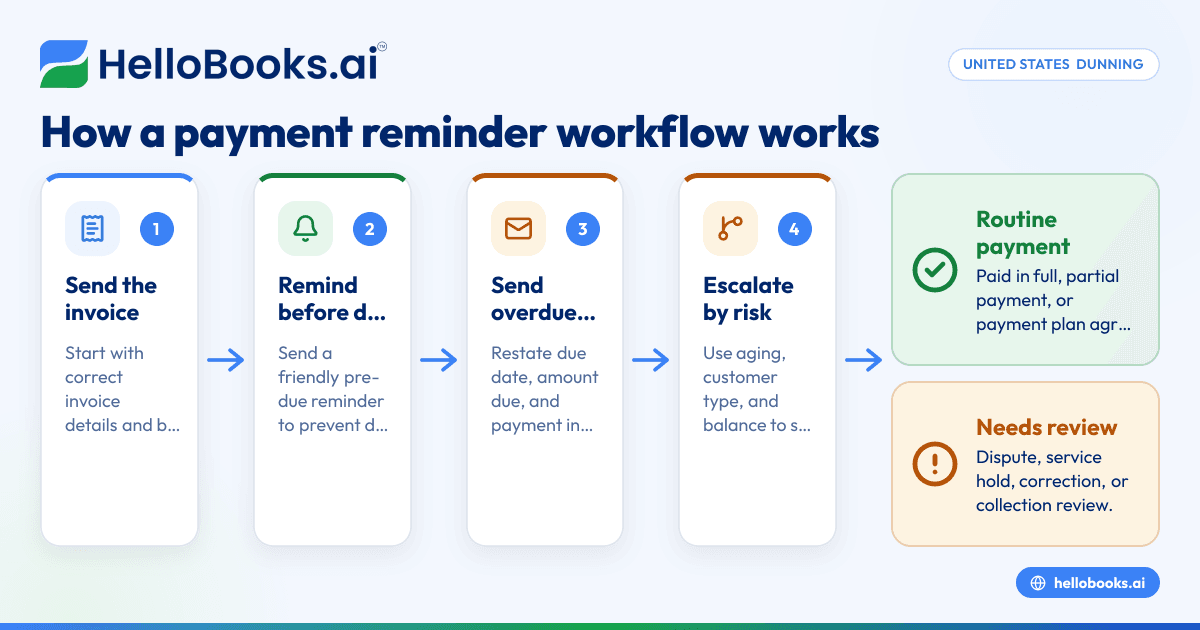
A dunning process works by sending scheduled reminders before and after an invoice due date, then escalating based on how late the payment is. The workflow should log every action, assign next steps, and help your team separate simple delays from real collection risk.
A typical workflow has several stages.
1. Invoice sent
The process starts with a correct invoice. It should include the invoice date, due date, amount due, payment instructions, and a clear contact for billing questions.
Errors at this stage create avoidable delays. If the customer says they never received the invoice or the purchase order number is missing, your collection clock effectively resets.
2. Pre-due reminder
Many businesses send a friendly reminder a few days before the due date. This helps customers who batch payments weekly or need time for internal approval.
This step is especially useful for larger invoices. A simple note can prevent an invoice from becoming overdue in the first place.
3. First overdue notice
Once the due date passes, send a short, polite reminder. Keep the tone professional. Assume the delay may be administrative, not intentional.
The message should restate:
- Invoice number
- Original due date
- Amount due
- Payment link or instructions
- Contact for dispute resolution
4. Escalation
If payment still does not arrive, reminders become more direct. You may add a second email, a phone call, or a task for account management.
At this stage, segmentation matters. A customer with a long payment history may deserve a different approach than a new account that is already 45 days late.
5. Resolution or next action
Every overdue invoice should end in one of several outcomes:
- Paid in full
- Partial payment received
- Payment plan agreed
- Dispute raised
- Credit memo or invoice correction issued
- Service hold considered
- External collection review
Without a defined end state, teams keep chasing the same invoice without clarity.
What should a small business include in a dunning workflow?
A small business dunning workflow should include trigger dates, message templates, escalation rules, account ownership, and reporting. It should also cover exceptions like disputes, short pays, duplicate billing, and strategic customers who need manual review.
Below are the building blocks that matter most.
Reminder timing
Set clear intervals. For example:
- Reminder before due date.
- Notice on or just after due date.
- Follow-up at later aging points.
- Manager review for older balances.
The exact cadence depends on your customer base and terms. The key is consistency.
Communication channels
Most businesses in the United States use email first. Phone follow-up still matters for larger balances, long-overdue invoices, or accounts with poor email responsiveness.
Track both channels in one place if possible.
Message templates
Templates save time and improve consistency. But they should not sound robotic. Your first reminder should be courteous. Your later reminders can be firmer while staying professional.
Escalation rules
Define when an invoice moves from billing to finance leadership or sales. Also define when to stop sending routine reminders and switch to manual handling.
Dispute handling
Many invoices are not late because the customer refuses to pay. They are late because of pricing errors, missing documents, or service questions.
Your process should include a way to flag disputed invoices and pause inappropriate reminders while the issue is being reviewed.
Reporting
At minimum, track:
- Total accounts receivable
- Current vs overdue balances
- Aging buckets
- Collection activity by invoice
- Promise-to-pay dates
- Dispute volume
- Days sales outstanding trends
If cash application and matching are taking too much time, bank reconciliation software can also help your team confirm incoming payments faster.
What does an automated dunning process look like?
An automated dunning process sends the right reminder at the right time based on rules you set. It reduces manual chasing, keeps records clean, and helps teams prioritize exceptions instead of repeating the same email work every week.
Automation does not mean you remove human judgment. It means your system handles routine follow-up while your team handles the cases that need thought.
A simple automated workflow may look like this:
- Invoice is created and sent.
- System schedules a reminder three days before due date.
- If unpaid, system sends an overdue notice one day after due date.
- If still unpaid, system triggers another reminder based on aging.
- High-value invoices are assigned to a team member for phone follow-up.
- Disputed invoices are excluded from normal reminder sequences.
- All emails, notes, and status changes are logged against the invoice.
This is where an ai dunning process can be useful. AI can help identify which invoices are likely to go late, suggest follow-up priority, and reduce repetitive bookkeeping work around receivables tracking. It should support your process, not replace your policies.
For small businesses, automation works best when it connects invoicing, payment records, and accounting entries. That is one reason many teams move away from spreadsheets toward AI bookkeeping or AI accounting software that can keep receivables data more current.
How can you automate payment reminders without annoying customers?
Automate by using clear timing, polite language, accurate invoice data, and sensible escalation limits. Customers get frustrated by duplicate notices, wrong balances, and reminders sent during active disputes more than by automation itself.
To keep reminders effective, follow a few rules.
Start with accurate invoice data
If the amount is wrong, automation will only scale the problem. Make sure your invoice details, customer contacts, and terms are current.
Match tone to stage
Your pre-due reminder should be friendly. Your first overdue notice should be neutral and direct. Your later notices can be firmer, but should still avoid emotional language.
Suppress reminders when needed
If a payment is in progress, a dispute is open, or the customer has a documented payment plan, stop the standard sequence.
Avoid over-sending
More reminders do not always mean faster payment. Too many messages can train customers to ignore you.
Keep a human option visible
Each message should tell the customer who to contact if there is an issue. That reduces friction and helps resolve legitimate problems quickly.
If you send reminders by email, basic compliance practices still matter. Keep messages accurate, identify your business clearly, and avoid misleading subject lines. Commercial email practices in the United States are commonly evaluated under CAN-SPAM requirements.
How should you segment customers in a dunning process?
Segment customers by balance size, payment history, contract importance, and dispute risk. That helps you apply stronger follow-up where needed while giving stable, high-trust accounts a more measured experience.
Not every invoice deserves the same workflow.
By invoice amount
A $250 invoice does not need the same attention as a $25,000 invoice. Set escalation thresholds so larger balances get reviewed sooner.
By customer history
A long-term customer that usually pays within a few days may only need one reminder. A customer with repeated 45-day delays may need earlier phone contact.
By account type
Some customers require purchase order matching, department approval, or portal submission. Build that into your process instead of treating the delay as random.
By risk level
If you see repeated broken promises, short pays, or unresolved credits, flag the account for closer monitoring.
This is one place where an ai dunning process can add value. It can surface patterns your team may miss, such as which customers often pay only after a second reminder or which invoice types create disputes most often.
A practical 30-day dunning workflow for small businesses
A 30-day workflow gives structure to your collection efforts without overcomplicating them. Adjust the timing to your terms and customer behavior.
Before the due date
Step 1: Send the invoice promptly.
Do this as soon as goods are delivered or services are completed.
Step 2: Confirm delivery if needed.
For larger invoices, confirm the invoice reached the right billing contact.
Step 3: Send a reminder shortly before due date.
Keep it short and friendly.
Days 1-7 overdue
Step 4: Send the first overdue reminder.
Restate the balance, due date, and payment method.
Step 5: Check for obvious issues.
Look for bounced emails, missing purchase order data, or unapplied payments.
Days 8-15 overdue
Step 6: Send a second reminder.
Use firmer language and ask for a payment date.
Step 7: Call the customer if the balance is material.
Phone follow-up often uncovers simple approval delays.
Days 16-30 overdue
Step 8: Escalate internally.
Assign the invoice to a finance lead or owner.
Step 9: Pause future work only if your contract and business policy allow it.
Apply this carefully and consistently.
Step 10: Decide on next action.
Move to a payment plan, dispute resolution, or formal collection review.
The exact dates vary by business. What matters is that everyone on your team knows the playbook.
Which metrics should you track to improve collections?
Track invoice aging, days sales outstanding, reminder response rates, disputed invoices, and promise-to-pay performance. Good metrics show whether your process is speeding up cash collection or just creating more activity without better outcomes.
Use these metrics regularly.
Aging by bucket
See how much is current, 1-30 days overdue, 31-60 days overdue, and older. This tells you where risk is building.
Days sales outstanding
This gives a broader view of how fast your business converts sales into cash.
Collection effectiveness by stage
Measure which reminders actually lead to payment. If most customers pay after the first overdue notice, your later sequence may be too heavy.
Promise-to-pay kept rate
Track how often customers pay when they say they will. This helps identify risky accounts.
Dispute rate
A high dispute rate may mean your invoicing process needs work, not just your collections process.
Team workload
Look at how many invoices require manual intervention. If that number is high, more automation or cleaner invoicing may help.
If your team still manages expenses, invoices, and matching in separate tools, expense management software and accounting software for small business can help reduce back-office friction.
Common mistakes in the dunning process united states businesses should avoid
The most common mistake is treating collections as an afterthought. But there are several others that quietly slow cash flow.
Sending the first reminder too late
If you wait until an invoice is badly overdue, you lose time and visibility.
Using one message for every account
Different customers have different payment patterns. A one-size-fits-all approach leads to poor results.
Ignoring disputes
If a customer has a real billing issue, repeated reminders will not solve it. Route the issue quickly.
Failing to record contact attempts
When notes live in personal inboxes, no one has the full picture. That leads to duplicate work and missed escalations.
Chasing every invoice manually
Manual follow-up burns time. Reserve human effort for high-value or high-risk cases.
Not reviewing the root cause
Sometimes collections problems are really invoicing problems. Late invoices, unclear terms, and poor billing data create delays that no reminder sequence can fully fix.
Where does software fit into the process?
Software should give you one place to create invoices, track due dates, send reminders, log follow-ups, and review aging. The best setup reduces routine work while making exceptions easier to spot and resolve.
For a small business, this usually means moving away from spreadsheets and disconnected reminders. If you are comparing options, a QuickBooks alternative may be worth exploring if you want a simpler workflow with more automation around invoicing and books.
Read next
This article covers one part of a bigger topic. For the complete picture, read our guide to duncan united states.


