


Key takeaways
What this article covers, in order:
- Why this comes up / what goes wrong
- Step-by-step
- Example (fictional figures)
- Common mistakes
- Doing this in HelloBooks
- Frequently asked questions
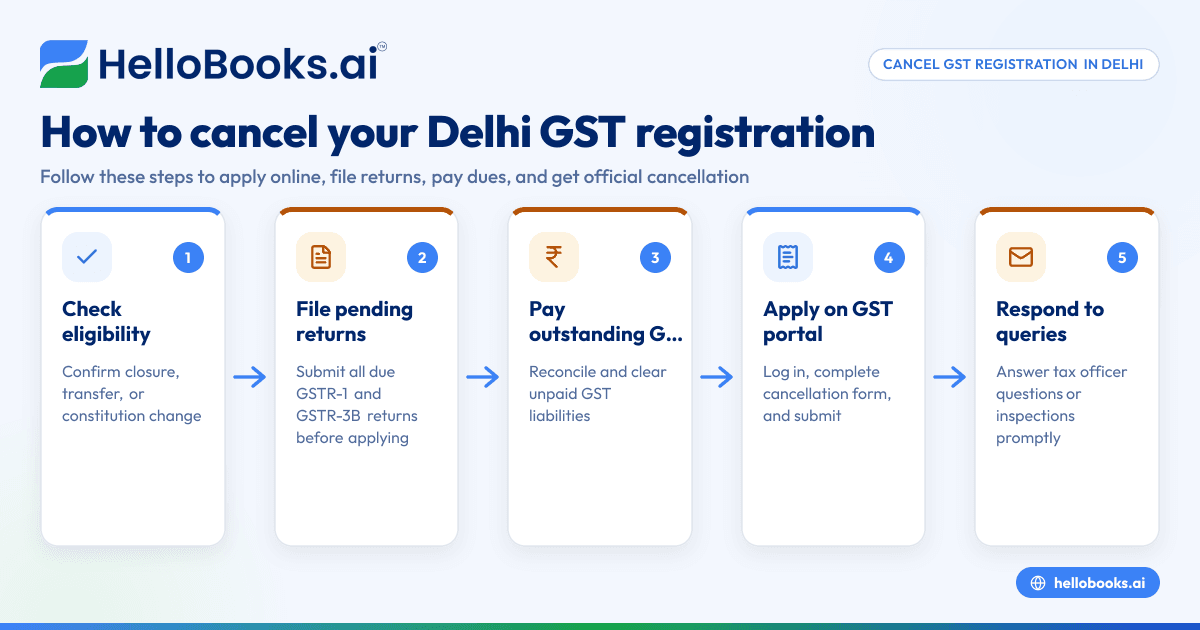
To cancel your GST registration in Delhi, you need to apply online through the GST portal by submitting a cancellation application with valid reasons such as business closure, discontinuance, or change in business constitution. Before applying, ensure all pending GSTR-1 and GSTR-3B returns are filed and any outstanding GST dues are cleared. This article covers why cancellation is needed, the detailed steps involved, a worked example with figures, common mistakes to avoid, and how HelloBooks can assist with GST invoicing and filing.
Why this comes up / what goes wrong
Small businesses in Delhi, including wholesalers, retailers, and local service providers, often seek GST registration cancellation when they close their business, transfer it, or no longer meet GST requirements. For example, a retailer in Karol Bagh might shut shop or a distributor in Dwarka may relocate outside Delhi's GST jurisdiction. Sometimes businesses register mistakenly or their turnover falls below the threshold. Without cancellation, the business remains liable to file returns and pay taxes, leading to compliance burden and possible penalties.
Step-by-step
- Check eligibility for cancellation: Confirm your Delhi business qualifies for cancellation due to closure, discontinuance, transfer, or change in constitution.
- File all pending returns: File all outstanding GSTR-1 and GSTR-3B returns up to the date of application to avoid rejection. Monthly GSTR-1 returns are due by the 11th of the following month and GSTR-3B by the 20th source, source.
- Calculate and pay outstanding GST dues: Reconcile your books and pay any unpaid GST liabilities to prevent delays.
- Log in to the GST portal: Access the portal using your GSTIN and password.
- Go to 'Cancellation of Registration': Under 'Services' > 'Registration', select 'Application for Cancellation'.
- Complete the cancellation form: Enter the reason for cancellation, date of cancellation, and upload supporting documents if required.
- Submit the application: Verify details and submit. An ARN (Application Reference Number) will be generated.
- Respond to tax officer queries: The officer may seek clarifications or conduct inspections before approving cancellation.
- Receive cancellation order: On approval, you will get an official order confirming cancellation of your Delhi GST registration.
Keep your books updated and reconcile invoices to ensure data matches your GSTR-1 and GSTR-3B filings. Using HelloBooks for India can simplify this process.
Example (fictional figures)
A Delhi wholesaler, "Delhi Distributors," decides to close business on 15/04/2024 and cancel GST registration.
- Total sales until closure: ₹15,00,000
- GST collected (assumed 18%): ₹15,00,000 × 18% = ₹2,70,000
- GST paid on purchases: ₹2,10,000
- Net GST payable: ₹2,70,000 - ₹2,10,000 = ₹60,000
Steps:
- File GSTR-1 for April 2024 by 11/05/2024 and GSTR-3B by 20/05/2024.
- Pay pending GST of ₹60,000 before cancellation.
- Submit cancellation application on GST portal with closure date 15/04/2024.
- Await cancellation order from tax officer.
Common mistakes
- Not filing all pending returns: Cancellation requests are rejected if returns are pending. Prevent this by filing all due GSTR-1 and GSTR-3B returns on time.
- Ignoring outstanding GST dues: Unpaid taxes cause delays or penalties. Always reconcile and pay dues before applying.
- Submitting incorrect or incomplete application: Missing or wrong details can lead to rejection. Double-check all entries, including dates and reason.
- Not responding to tax officer queries: Ignoring notices may result in denial. Respond promptly with required documents.
- Continuing business after applying for cancellation: This can cause legal complications. Cease operations as per the cancellation date.
Using GST invoicing software helps maintain accurate records to avoid these errors.
Doing this in HelloBooks
HelloBooks assists Delhi businesses with GST invoicing by creating compliant tax invoices that include the correct CGST/SGST or IGST split and HSN/SAC codes from your customer's GSTIN, ensuring compliance with Rule 46 particulars source. It also supports direct filing of GSTR-1 and GSTR-3B returns built from your recorded invoices, so your returns match your sales accurately. This reduces errors and simplifies compliance during cancellation and ongoing operations. Learn more about HelloBooks GST invoicing and GSTR-1 and GSTR-3B filing.
Frequently asked questions
Can I cancel GST registration if my Delhi business is not operational but not closed?
Yes, cancellation can be applied if the business is not operational. However, all pending returns must be filed and dues paid. If you plan to restart later, consider suspending operations instead of cancellation.
How long does GST cancellation take in Delhi?
Typically, cancellation takes 7 to 30 days after application, depending on whether the tax officer raises queries or conducts inspections.
What happens if I miss filing returns before cancellation?
The GST portal will reject your cancellation application if there are pending returns. Ensure all due GSTR-1 and GSTR-3B returns are filed before applying.
Is there any fee for GST cancellation?
No fee is charged for GST registration cancellation, but all outstanding GST liabilities must be cleared.
Do I need to cancel GST registration separately for multiple GSTINs?
Yes, cancellation must be applied for each GSTIN separately, including any Delhi-based branches or additional registrations.
Key takeaways
- Cancel Delhi GST registration online on the GST portal with valid reasons such as closure or change in business.
- File all pending GSTR-1 and GSTR-3B returns and pay outstanding GST dues before applying.
- Submit a complete and accurate cancellation application and respond promptly to tax officer queries.
- Avoid common mistakes like pending returns, unpaid dues, or incorrect applications to prevent delays.
- HelloBooks supports GST invoicing and direct filing to help maintain accurate compliance.
To start managing your GST compliance efficiently, Start on the Free plan (200 transactions a year, GSTR-1 and 3B filing for one GSTIN).
This article is general information, not tax or legal advice. Rules change; confirm the current position on gst.gov.in or with your chartered accountant before acting.


