


Key takeaways
What this article covers, in order:
- Why this comes up / what goes wrong
- Step-by-step
- Example (fictional figures)
- Common mistakes
- Frequently asked questions
- Key takeaways
Daycare businesses require software that handles both accounting and operational tasks such as attendance tracking and parent communication. QuickBooks is widely used for accounting purposes, including invoicing and payroll, but it does not cover all the specific needs of a daycare centre. Choosing the right software involves understanding which features are essential for your business and how QuickBooks fits into that picture.
Why this comes up / what goes wrong
Small daycare owners often begin by managing finances and operations manually or with basic tools like spreadsheets or simple accounting software. As the business grows, managing invoices, payments, staff payroll, GST compliance, and daily operations becomes more complex. Owners search for "daycare software QuickBooks" to find out if QuickBooks alone can meet their needs or if they should invest in specialised daycare management software.
Common issues include missing features such as child enrolment tracking, attendance management, staff scheduling, and parent communication portals. QuickBooks handles accounting tasks well but does not support these daycare-specific functions, leading to fragmented systems and duplicated work.
Step-by-step
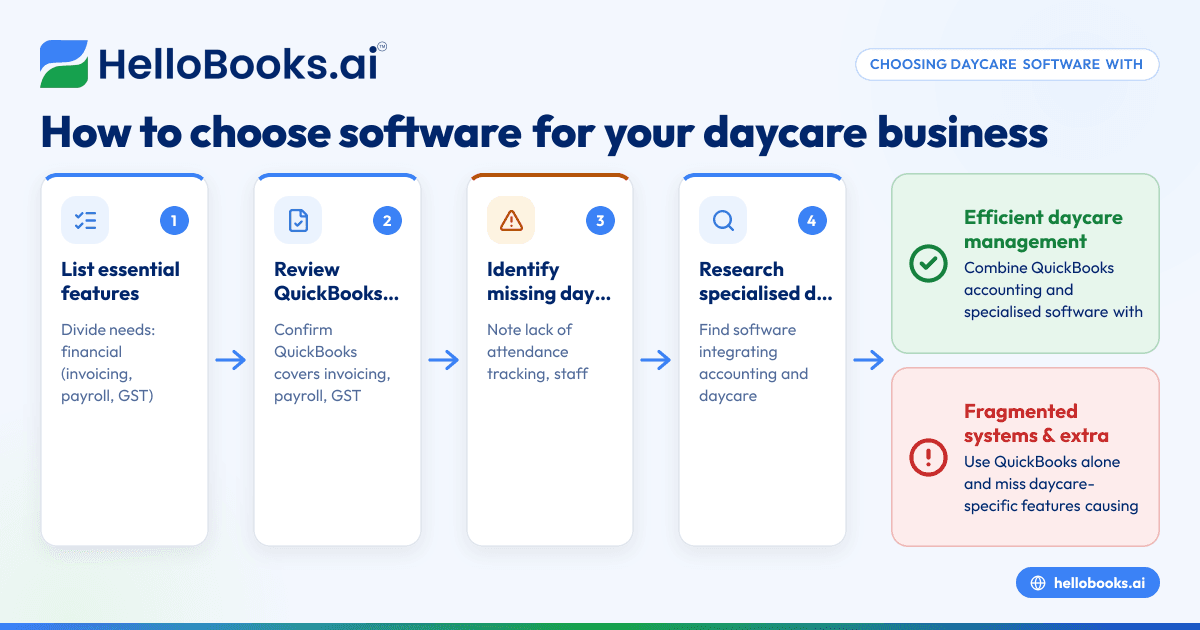
- List your daycare’s essential features: Divide your needs into financial (invoicing, payroll, GST compliance) and operational (attendance, child profiles, parent communication).
- Review QuickBooks features: Confirm that QuickBooks covers your accounting needs, including GST-compliant invoicing, expense tracking, payroll, and basic financial reporting. Note that GST reconciliation may require additional tools.
- Identify missing daycare features in QuickBooks: These typically include child attendance tracking, staff scheduling, parent notifications, and daily activity reports.
- Research specialised daycare software: Look for software that integrates accounting with daycare management or can export data compatible with QuickBooks.
- Check integration capabilities: Ensure the daycare software can export financial data in formats that QuickBooks can import, reducing duplicate data entry.
- Consider usability and support: The software should be easy for you and your staff to use, with reliable customer support.
- Evaluate pricing and scalability: Choose software that fits your budget and can scale as your daycare grows.
- Test with free trials: Use trial versions to assess how well the software meets your operational and accounting needs.
For accounting tasks, also consider AI bookkeeping solutions and GST invoicing tools to reduce manual data entry and errors. Learn more about GST invoicing here.
Example (fictional figures)
Assume a daycare business in Pune invoicing parents and managing payroll monthly.
- Monthly fees collected from 25 children: 25 × ₹6,000 = ₹1,50,000
- Monthly salary for 4 staff: 4 × ₹15,000 = ₹60,000
- Other monthly expenses (rent, utilities): ₹25,000
Calculate total monthly expenses:
₹60,000 + ₹25,000 = ₹85,000
Calculate net income before tax:
₹1,50,000 - ₹85,000 = ₹65,000
GST on fees (assumed 5%):
₹1,50,000 × 5% = ₹7,500
Total amount charged including GST:
₹1,50,000 + ₹7,500 = ₹1,57,500
Using QuickBooks, the owner can create GST-compliant invoices for ₹1,57,500, track payments, and record expenses. However, tracking attendance or sending reminders to parents would require separate software or manual processes.
Common mistakes
- Choosing software only for accounting: This ignores daycare operational needs. Prevent this by listing all features you require before deciding.
- Ignoring integration capabilities: Not verifying if daycare software exports data to QuickBooks causes duplicate data entry. Prevent this by confirming integration options.
- Overlooking GST compliance: Some daycare software may not support GST invoicing or filing. Prevent this by confirming GST features or using dedicated GST invoicing tools.
- Underestimating staff training needs: Complex software without proper training leads to errors. Prevent this by choosing user-friendly software and providing training.
- Not testing software before purchase: Leads to surprises about missing features or usability issues. Prevent this by using free trials.
- Ignoring data backup and security: Losing data disrupts your business. Prevent this by ensuring the software offers secure backup options.
Frequently asked questions
Can QuickBooks be used as daycare software?
QuickBooks is excellent for accounting tasks such as invoicing, payroll, and GST compliance but lacks daycare-specific features like attendance tracking and parent communication. You may need to combine QuickBooks with specialised daycare software.
What features should daycare software have besides accounting?
Look for child enrolment and attendance management, staff scheduling, parent communication portals, daily activity reports, and billing automation.
How can I manage GST invoicing for my daycare?
Use software that supports GST invoicing compliant with Indian tax laws. QuickBooks supports GST invoicing, but you can also explore dedicated GST invoicing tools to simplify filing and reconciliation. Learn more about GST invoicing here.
Is integration between daycare software and QuickBooks important?
Yes, integration reduces manual data entry and errors. Check if the daycare software can export financial data in a format compatible with QuickBooks or your accounting system.
What are the alternatives to QuickBooks for small Indian businesses?
Besides QuickBooks, you can explore AI bookkeeping software tailored for Indian GST compliance and small business needs. See options for AI bookkeeping and HelloBooks for India.
Key takeaways
- QuickBooks handles daycare accounting but lacks specialised daycare management features.
- List all your financial and operational needs before choosing software.
- Check integration between daycare software and QuickBooks to avoid duplicate work.
- Confirm GST invoicing and compliance support in your software.
- Use free trials to test software usability and features.
- Provide staff training and ensure data security in your software choice.
Choosing the right software for your daycare business means balancing accounting capabilities with operational needs. To explore software plans suitable for Indian small businesses, visit Compare plans for India.


