


Key takeaways
What this article covers, in order:
- Key takeaways
- What is cloud accounting software in the United States?
- When should you move from spreadsheets or desktop books?
- What problems do spreadsheets and desktop books cause?
- Is cloud accounting better for a small business in the United States?
- How does ai cloud accounting help?
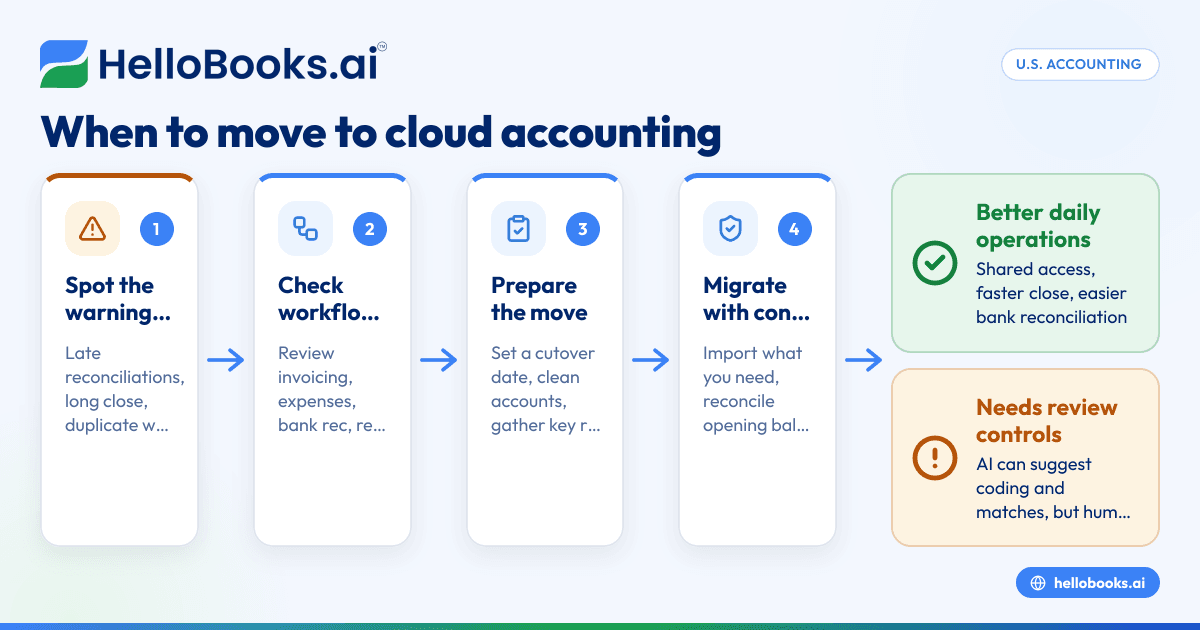
Cloud accounting software in the United States is accounting software you access through a browser, with your books stored and updated online instead of on one desktop computer. For many small businesses, the right time to move is when spreadsheets or desktop books start causing delays, duplicate work, missed reconciliations, or weak visibility into cash flow.
Key takeaways
- Cloud accounting software gives U.S. businesses shared access, faster close cycles, and easier bank reconciliation.
- Spreadsheets and desktop books often break down when transaction volume, team size, or reporting needs increase.
- The best time to switch is before errors, late reporting, and cleanup work become expensive.
- A good migration starts with clean chart of accounts, opening balances, and a clear cutover date.
- AI features can reduce coding, matching, and follow-up work, but you still need review controls.
- If you want modern accounting software in the USA, focus on workflow fit, not just feature lists.
What is cloud accounting software in the United States?
Cloud accounting software is a system that stores your accounting data online and lets authorized users log in from anywhere. In the United States, that usually means your owner, bookkeeper, controller, and outside accountant can work in the same books without passing files around.
That sounds simple, but the real difference is operational. Desktop accounting often depends on one machine, one copied file, or one person who knows where everything lives. Cloud systems make everyday work easier to share, review, and track.
For a business in Chicago, Houston, or Detroit, this matters when several people touch the same financial process. Sales may send invoices. Operations may approve bills. Finance may reconcile bank activity. The owner may want a dashboard before making payroll or placing a large inventory order.
The phrase cloud accounting software united states often brings up broad product comparisons. A better way to think about it is this: does your current setup help you close the books quickly, understand cash, and stay organized as the business grows?
If the answer is no, the problem may not be your accountant. It may be your system.
When should you move from spreadsheets or desktop books?
Move when your current process slows down basic accounting work or increases risk. If monthly close drags on, reconciliations stack up, or only one person can update the books safely, you are already paying the cost of waiting.
The most common trigger is volume. A spreadsheet can work for a very small business with few transactions. But once you have daily card charges, recurring software bills, customer invoices, refunds, payroll entries, and bank deposits, manual tracking gets fragile.
Desktop books can last longer than spreadsheets, but they hit limits too. File locking, backup issues, version conflicts, and remote access workarounds often become normal. Teams then build side spreadsheets to compensate. That creates two systems instead of one.
Signs your current setup is holding you back
Here are clear signs it may be time to switch:
- You reconcile late or not at all. If bank and card accounts are behind, your reports are not trustworthy.
- You rely on one person for everything. If one employee is the only person who understands the process, the business carries key-person risk.
- Your month-end close takes too long. A long close delays decisions on hiring, purchasing, and pricing.
- You duplicate work across tools. Teams often invoice in one place, track expenses in another, and summarize everything in spreadsheets.
- You cannot see cash clearly. Owners need an up-to-date picture of receivables, payables, and bank balances.
- Your accountant spends time cleaning data instead of advising you. Cleanup is expensive. Structure is cheaper.
- You need better documentation. Buyers, lenders, and larger customers often expect clean financial records and stronger controls.
For many businesses, the tipping point comes before a major event. That might be a fundraising process, a loan application, a new location, or a larger customer asking for better reporting.
What problems do spreadsheets and desktop books cause?
They save money at first, but they often create hidden costs later: broken formulas, version confusion, delayed reconciliations, and weak audit trails. The bigger the business gets, the more those small issues turn into reporting errors and wasted time.
Spreadsheets are flexible, which is why businesses love them. But flexibility also means fewer guardrails. A formula can be overwritten. A row can be deleted. A copy can be emailed with the wrong version number. None of those problems are rare.
Desktop books solve some of that structure problem, but they can create access problems. If your team works across locations or from home, desktop access can become a daily headache. Backups may be inconsistent. File copies may drift apart. Outside accountants may receive data late.
The hidden cost of "good enough"
Many owners delay change because the current setup still works. That is fair. Migration takes time. Training takes effort. But "working" is not the same as "supporting growth."
Think about the cost of these common situations:
- The owner waits three weeks for month-end numbers.
- A missed bank reconciliation hides duplicate charges.
- An employee spends six hours each week classifying expenses.
- A customer payment is not applied correctly, so collections follow-up starts late.
- Year-end tax prep becomes a cleanup project.
Those costs are real, even if they do not appear on one invoice.
This is where AI bookkeeping starts to matter. AI does not replace accounting judgment. But it can reduce repetitive work like transaction categorization, document capture, and matching suggestions.
Is cloud accounting better for a small business in the United States?
Yes, if you need shared access, faster updates, and less manual work. For many U.S. small businesses, cloud accounting is easier to maintain than spreadsheets or desktop files, especially when invoices, expenses, and reconciliations happen every week.
That short answer covers most businesses, but not every case. If you run a very small company with few transactions and one person handling the books, spreadsheets may still be enough for now. The issue is not whether cloud is modern. The issue is whether your process is dependable.
Where cloud tools help most
Cloud accounting is usually strongest in these areas:
- Bank reconciliation: Transactions flow in faster, and matching is easier to review.
- Expense capture: Receipts and bills can be collected in one place.
- Invoicing: Teams can create and track invoices without waiting for a desktop file.
- Approvals and visibility: Managers can review activity without asking for exports.
- Collaboration: Your bookkeeper and accountant can work from the same data.
If your business already uses payment tools, ecommerce platforms, or online banks, cloud accounting fits the way your operations already run. You do not need to rebuild your finance process around a local file.
For businesses evaluating platforms, accounting software for small business should support daily work first. Reports matter, but workflow matters more.
How does ai cloud accounting help?
It helps by suggesting categorizations, matching transactions, capturing bill data, and flagging exceptions for review. That can reduce manual entry and speed up close, but a human still needs to approve important accounting decisions.
The phrase ai cloud accounting matters because many buyers now expect some level of automation. But it is important to separate useful AI from marketing language.
What AI can do well
In practical terms, AI is most useful when it handles repeatable tasks such as:
- Reading bill or receipt details from uploaded documents.
- Suggesting account categories based on prior behavior.
- Matching bank entries to invoices or expenses.
- Highlighting unusual transactions for review.
- Reducing coding work on routine entries.
These features help finance teams spend less time on data entry and more time reviewing exceptions.
What AI does not remove
AI does not remove the need for accounting controls. Someone still needs to:
- Review account mapping.
- Check unusual vendor payments.
- Confirm period cutoffs.
- Approve write-offs or reclasses.
- Verify that reports make business sense.
That is why the best systems combine automation with clear approval workflows.
If your team is comparing options, AI accounting software should be judged on whether it reduces real accounting work, not whether it uses the newest label.
What should you look for before switching?
Look for fit across your real workflow: invoicing, expenses, bank reconciliation, reporting, user access, and month-end review. A system that looks strong in demos but adds steps to daily work will not solve the problem.
Before you compare products, write down how your business actually operates today. That includes who sends invoices, who approves bills, who reconciles bank activity, and who uses reports. This sounds basic, but it prevents buying software for an imagined process.
Core capabilities to evaluate
For most U.S. small businesses, these areas matter most:
1. Bank feeds and reconciliation
Reconciliation is the heartbeat of clean books. Look for strong matching workflows and clear exception handling. If this part is weak, the rest of the system will feel weak too. This is why many buyers start with bank reconciliation software as a lens.
2. Invoicing and collections
If you bill customers regularly, your accounting system should help you create, send, and track invoices without extra spreadsheets. Good invoice software can reduce delays and improve follow-up.
3. Expense capture and controls
Receipts, vendor bills, and reimbursements should not live in email chains and folders. Better expense management software gives finance one clean workflow.
4. Access and collaboration
Check roles, permissions, and how easily your outside accountant can review records.
5. Reporting
Make sure the standard reports answer the questions you ask every month. Profit and loss, balance sheet, receivables aging, payables aging, and cash flow are the starting point.
Questions to ask during evaluation
Ask each vendor:
- How long does a typical migration take?
- What data can be imported?
- How are opening balances handled?
- What controls exist for approvals and edits?
- How does the system support monthly close?
A practical evaluation beats a flashy demo every time.
How do you move from spreadsheets or desktop books without a mess?
Pick a cutover date, clean your chart of accounts, import only what you need, and reconcile opening balances carefully. A simple migration plan prevents most problems and makes the first month much easier to trust.
A messy migration usually starts with rushing. Businesses try to move years of inconsistent data, keep old habits, and learn a new system at the same time. That is where errors multiply.
A practical migration plan
1. Choose your cutover date
Many businesses switch at the start of a month or quarter. That keeps reporting cleaner.
2. Clean the chart of accounts
Remove unused accounts. Merge duplicates. Rename unclear accounts. If your chart is messy now, a new system will not fix it by itself.
3. Decide what historical data to bring
You may not need every old detail imported. Sometimes opening balances plus current-year transactions are enough.
4. Gather source documents
Collect recent bank statements, unpaid invoices, unpaid bills, loan balances, and fixed asset details if needed.
5. Import master data
Bring in customers, vendors, products, and opening balances carefully.
6. Reconcile opening balances
This is the control point that matters most. Confirm bank balances, credit card balances, receivables, payables, and equity.
7. Run parallel checks
For the first period, compare key reports from the old and new systems. Small differences should be explained early.
8. Train the team on the new workflow
Do not just train on buttons. Train on responsibilities, deadlines, and review steps.
Common migration mistakes
Avoid these traps:
- Importing bad legacy data without cleanup.
- Leaving rules and approvals undefined.
- Giving everyone full access.
- Skipping bank reconciliation after go-live.
- Assuming the accountant will fix structure later.
If your current stack feels limited, some businesses start their search as a QuickBooks alternative. Others are moving off older desktop workflows and want cleaner cloud processes from the start.
What changes after you move?
The biggest change is not where the data lives. It is how quickly your team can complete routine accounting work and trust the result. Close becomes more regular. Collaboration gets easier. Errors surface earlier.
Operational improvements you should expect
After a well-run move, many businesses see these improvements:
- Fewer manual entries from bank and card activity.
- Faster invoice creation and status tracking.
- Cleaner month-end reconciliation.
- Better visibility into overdue receivables.
- Less dependency on one employee.
That does not mean everything becomes automatic overnight. The first one or two close cycles may still feel slower as the team learns the system. That is normal.
Better control for growth
As your business grows, financial operations become part of sales, hiring, and procurement decisions. Larger customers may ask for cleaner reporting. Lenders may want more confidence in your financials. Buyers may expect stronger operating discipline and organized records.
In that environment, cloud accounting is not just a software upgrade. It becomes part of how the business manages risk and makes decisions.
This article is general information, not tax or legal advice. If your migration affects tax reporting, 1099 processes, revenue timing, or state sales tax workflows, review your setup with a qualified accountant. If you need one, you can find an accountant.
Why many businesses switch before growth forces it
The best time to move is often before the pain becomes severe. Once a business is behind on reconciliations or carrying major cleanup issues, migration gets harder. Finance teams then spend energy fixing history instead of building a better process.
A proactive move gives you time to:
- Set naming conventions.
- Clarify approval steps.
- Clean customer and vendor records.
- Build monthly close discipline.
- Train your team gradually.
That is a better position than switching under pressure during tax season, after a financing request, or in the middle of a staffing change.
If you are evaluating cloud options and want software built to reduce manual accounting work, HelloBooks offers AI accounting software with workflows for invoicing, expenses, reconciliation, and reporting.
If you want to see whether HelloBooks fits your workflow, book a demo at book a demo or compare options on the pricing page.
Frequently asked questions
Is cloud accounting software safe for a small business?
Cloud software can be safe when access, permissions, and review controls are set up correctly. In practice, many small businesses are safer with managed cloud access than with emailed spreadsheets and local desktop files. Your internal process still matters.
Can I move to cloud accounting in the middle of the year?
Yes, many businesses switch midyear. The key is to set a clear cutover date and reconcile opening balances carefully. A midyear move can work well if your books are reasonably current.
Read next
This article covers one part of a bigger topic. For the complete picture, read our guide to united states.


