


Key takeaways
What this article covers, in order:
- Key takeaways
- Why small businesses in the United States outgrow spreadsheets
- What is cloud accounting software united states businesses actually need?
- What does ai cloud accounting actually change?
- Which features matter most for a U.S. small business?
- How do you move from spreadsheets to cloud accounting software?
Cloud accounting software in the United States lets small businesses manage books, invoices, expenses, bank activity, and reports online instead of in disconnected spreadsheets. It gives owners and finance teams faster visibility, cleaner records, and fewer manual steps, especially as transaction volume grows.
Key takeaways
- Cloud accounting software gives small businesses one shared system for bookkeeping, invoicing, reconciliation, and reporting.
- Moving beyond spreadsheets reduces version-control problems, formula errors, and delayed month-end closes.
- The best setup for a U.S. business supports bank matching, sales tracking, expense capture, and clean records for tax time and 1099 workflows.
- AI features can speed up categorization and reconciliation, but you still need review controls and approval rules.
- A smooth migration starts with chart of accounts cleanup, opening balances, bank connections, and a simple close checklist.
- If you already use spreadsheets or legacy tools, modern accounting software in the USA can shorten routine finance work.
Why small businesses in the United States outgrow spreadsheets
Spreadsheets work at the start. They are familiar, flexible, and cheap to launch. But they become risky once your business adds more customers, more vendors, more accounts, or more people touching the books.
Most small businesses hit the same problems. One file lives on someone’s laptop. Another copy gets emailed around. A formula breaks. A tab gets deleted. No one is fully sure which version is correct.
That creates real business issues. Cash flow becomes harder to read. Month-end takes longer. Owners wait too long to see margins, overdue invoices, or unusual expenses. Accountants spend time fixing records instead of analyzing them.
For a business in Chicago, Houston, or Detroit, the pain usually shows up in a few places:
- Manual invoice tracking
- Delayed bank reconciliation
- Missing receipts
- Duplicate expense entries
- Weak audit trails
- Slow reporting for lenders or management
Cloud accounting software solves these problems by putting the books in one live system. Your team can log in from anywhere with proper user access. Transactions can be matched faster. Reports update from current data. Approvals and supporting documents stay attached to the entries.
That matters if you bill customers every week, process card payments through Stripe, or need cleaner books before meeting your CPA.
What is cloud accounting software united states businesses actually need?
Cloud accounting software in the United States is online financial software built to help businesses record income, expenses, invoices, payments, and reconciliations in one shared system. It should support U.S. workflows like sales tracking, 1099-ready vendor records, and clean reporting for tax prep.
The important word is not just “cloud.” It is “usable.” Many businesses already store spreadsheets online. That does not make them reliable accounting systems.
A practical cloud setup should help with daily finance tasks, not just store data. For small businesses, that usually means:
- Creating and sending invoices
- Recording bills and expenses
- Importing bank transactions
- Matching deposits and withdrawals
- Tracking who owes you money
- Tracking what you owe vendors
- Producing profit and loss, balance sheet, and cash flow reports
- Keeping attachments and notes with transactions
- Allowing an owner, bookkeeper, and accountant to work from the same data
If you are evaluating options, think about your current bottleneck. Some teams need better invoicing. Others need faster close. Others need fewer manual reconciliations. Start there.
A business using spreadsheets plus email plus bank downloads often has no clear system of record. That is the gap cloud software fills.
What does ai cloud accounting actually change?
It reduces repetitive bookkeeping work by helping categorize transactions, match bank activity, and surface exceptions faster. Good ai cloud accounting does not replace review. It gives your team a cleaner starting point and helps them spend more time checking unusual items instead of typing routine ones.
Under that short answer, the key point is control. AI is useful when it speeds up common patterns without hiding the accounting logic.
For example, if your company pays the same internet bill every month, software may learn the vendor and category. If customer deposits from the same source follow a clear pattern, it may suggest matches. If an expense looks unusual for that vendor or amount, it may flag it for review.
This is where AI bookkeeping becomes practical for a small business. It can help with:
- Suggested categorizations
- Faster transaction matching
- Duplicate detection
- Receipt and document association
- Exception tracking
But AI should not be treated like autopilot. You still need:
- A reviewed chart of accounts
- User permissions
- Approval rules for bills and payments
- Monthly reconciliation checks
- A documented close process
For owners, the real benefit is not “fancy automation.” It is better focus. Your bookkeeper or finance lead can spend less time on repetitive coding and more time on items that affect cash flow, margins, and reporting accuracy.
Which features matter most for a U.S. small business?
The right features depend on your workflow, but several capabilities matter for almost every small business in the United States.
1. Bank feeds and reconciliation
This is often the biggest time saver. Your software should pull in transactions and help you match them to invoices, expenses, or transfers. Clean reconciliation is what makes reports trustworthy.
If reconciliation is your main pain point, look closely at bank reconciliation software capabilities.
2. Invoicing and collections
You should be able to create, send, and track invoices without switching tools. It helps when payment status is visible and customer balances are easy to review. For service businesses and agencies, this is often the center of the workflow.
If billing is still manual, invoice software can be a useful next step.
3. Expense capture and controls
Receipts, employee reimbursements, and vendor spend need structure. The best systems make it easier to attach documents, track expenses by category, and reduce lost receipts. That matters for bookkeeping accuracy and tax preparation.
4. Reporting that an owner can read
A report is only useful if people understand it. You should be able to pull:
- Profit and loss
- Balance sheet
- Cash flow summary
- Accounts receivable aging
- Accounts payable aging
- Expense breakdowns
5. Access for your accountant
Your accountant should not need ten files emailed at month-end. Shared access makes review easier and cuts cleanup time. If you still need outside help, you can also find an accountant.
6. A clear audit trail
When a transaction changes, you should know who changed it and when. That is important for internal controls, buyer diligence, lender requests, and general discipline.
How do you move from spreadsheets to cloud accounting software?
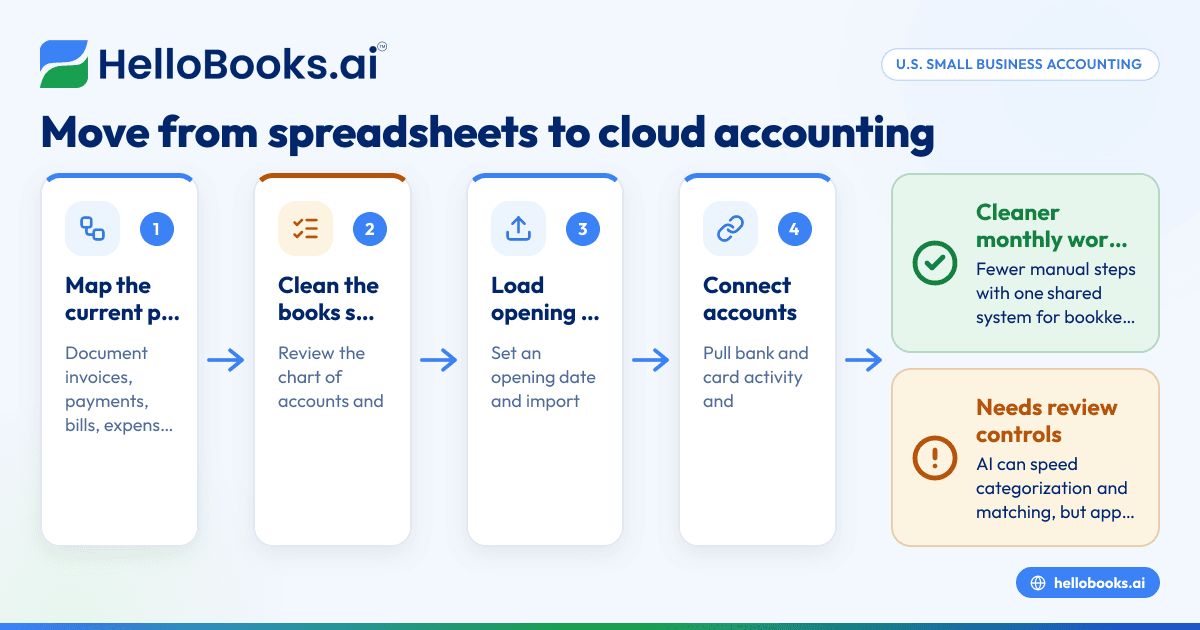
Start with clean opening data, not a perfect historical rebuild. Most small businesses should move in stages: clean the chart of accounts, load opening balances, connect banks, test reports, and then run the new process for current transactions.
Here is a practical migration plan.
Step 1: Map your current process
Write down how money moves through your business today.
List:
- How you send invoices
- How you receive payments
- How bills are approved
- How expenses are captured
- How bank accounts are reconciled
- Which reports the owner reviews
This keeps the project grounded. You are not buying software for its own sake. You are replacing specific manual work.
Step 2: Clean the chart of accounts
Many spreadsheet-based books are too messy to migrate directly. Accounts are duplicated. Names are inconsistent. Personal and business expenses may be mixed. Fix the structure before moving data.
Keep it simple. A smaller, cleaner chart is easier to manage than a long list of nearly identical categories.
Step 3: Set an opening date
Choose a cutover date, often the start of a month or quarter. Then decide how much history you really need in the new system. Many small businesses move summary balances and then keep old files for reference.
Step 4: Import customers, vendors, and balances
Bring in your basic lists first. Then add open invoices, unpaid bills, and opening bank and credit card balances. Check totals carefully.
Step 5: Connect bank and card accounts
This is where the cloud setup starts saving time. Pull recent transactions and confirm matching logic. Review transfers, loan payments, and card settlements closely.
Step 6: Test reports
Before going live, review:
- Profit and loss
- Balance sheet
- Accounts receivable aging
- Accounts payable aging
If these reports do not make sense, stop and fix the setup before entering more activity.
Step 7: Run a simple month-end checklist
Your close process does not need to be complex. It does need to be consistent.
A basic checklist might include:
- Reconcile all bank and card accounts
- Review uncategorized transactions
- Check open receivables
- Review unpaid bills
- Confirm major recurring expenses
- Lock the period after review
This general information is not tax or legal advice. Ask your accountant or tax advisor about filing treatment, deductions, and recordkeeping rules for your business.
What should you watch for during implementation?
Most software projects fail for boring reasons, not dramatic ones. The system is fine, but the process is weak.
Common mistakes
Importing messy data
If your old spreadsheet is full of duplicates, missing descriptions, or unclear account names, the new software will inherit the same problems.
Giving everyone full access
Small businesses often skip permissions because the team is small. That creates avoidable risk. Access should match job responsibilities.
Over-customizing too early
Start with standard workflows. You can refine later. Too much customization in week one makes training harder.
Ignoring owner reporting needs
The owner usually wants a short list of numbers. Revenue, margins, cash, receivables, and payables. Build around those first.
Failing to define who reviews what
Automation needs ownership. Someone still needs to review exceptions, reconcile accounts, and close the month.
Can cloud accounting software help with compliance and buyer expectations?
Yes, but only if your records are clean and your process is consistent. Software can centralize documentation, user activity, and transaction support, which helps when customers, lenders, or diligence teams ask for financial information.
In the United States, many small businesses face growing requests for organized records. A larger customer may ask about your controls. A lender may want timely statements. A buyer may want a clear trail for revenue and expenses. Some procurement teams also expect stronger data handling and internal controls, especially if they ask about security practices like SOC 2 readiness.
Cloud systems help by keeping:
- Transactions in one place
- Supporting files attached
- Approval history visible
- Reports current
- User actions traceable
This also helps with practical tax-season tasks. For example, vendor records are easier to review when preparing for 1099 workflows. Sales records are easier to inspect when working through state sales tax reporting with your accountant. The software does not remove your obligations, but it makes the records easier to manage.
If your current process is “search email, download statements, fix the spreadsheet, then send files to the CPA,” a cloud system is a major step forward.
How do you choose the right system for your business size?
Pick software that fits your current complexity and your next stage of growth. A five-person consulting firm, a retail seller, and a light manufacturer will not need the exact same setup.
Ask these questions before you choose:
How many transactions do you handle each month?
A business with 100 transactions has different needs from one with 5,000. Volume affects how much automation matters.
Who will use the system?
Owner only? Bookkeeper plus owner? Finance lead plus outside accountant? Multi-user access matters more than many small teams expect.
How many bank and card accounts do you have?
More accounts mean more reconciliation work. This often drives the return on software investment.
Do you need invoicing inside the same system?
Some businesses use separate billing tools. Others want one workflow from invoice to payment to accounting entry.
Are your books cash basis, accrual basis, or both for reporting?
Your reporting needs affect setup and review. Ask your accountant what will matter most for management and tax prep.
What will break first if you keep using spreadsheets?
That answer usually points to the feature you need most.
For many small businesses, the sweet spot is modern AI accounting software that handles daily bookkeeping well without forcing enterprise-level complexity. If you are comparing options, it can also help to review software positioned as accounting software for small business.
A practical example: when the switch starts paying off
Imagine a small distributor in Houston. The owner sends invoices from one tool, tracks expenses in a spreadsheet, downloads bank data weekly, and asks a bookkeeper to clean everything up at month-end.
At first, that feels manageable. Then sales grow. More customer payments come in. Refunds happen. Card fees hit different days. The owner wants margin by month. The bookkeeper spends hours matching deposits and chasing receipts.
With cloud accounting software, the team can bring invoicing, expenses, and reconciliation into one process. Bank activity comes in automatically. Common matches are faster. Open invoices are visible. Reports update from current records instead of last month’s spreadsheet.
The benefit is not just saved time. It is better decisions. The owner can spot slow-paying customers earlier. The finance team can close the month faster. The accountant gets cleaner books to review.
That is usually when businesses realize the old method was costing more than it seemed.
When is the right time to move?
The right time is usually earlier than you think. If bookkeeping depends on one person, month-end feels stressful, or reports are always late, you are already paying the price of an outdated process.
Good triggers include:
- You have more than one bank or card account
- You invoice customers regularly
- You need monthly financials
- You want cleaner records for your CPA
- Your business is adding locations, products, or staff
- Spreadsheet errors keep resurfacing
You do not need a massive finance team to justify the move. Many small businesses benefit as soon as basic transaction volume becomes too high for manual review in a spreadsheet.
If you are exploring alternatives to older tools or want a simpler online setup, a QuickBooks alternative may also be worth reviewing depending on your workflow.
If you want to see how HelloBooks can help you move beyond spreadsheets and simplify day-to-day bookkeeping, you can book a demo or compare options on our pricing page.
Frequently asked questions
Is cloud accounting software safe for a small business?
Cloud software can be safer than scattered spreadsheets and emailed files because access is centralized and activity is easier to track. The real key is using strong passwords, limiting user permissions, and following a consistent review process.
Read next
This article covers one part of a bigger topic. For the complete picture, read our guide to united states.


