
Key takeaways
What this article covers, in order:
- First, a word about the guilt
- What not to do
- Step 1: Gather everything before you touch the books
- Step 2: Confirm your starting line
- Step 3: Get transactions into the books
- Step 4: Prioritize by risk
If you're months behind on bank reconciliation, the way out is to lock down one trustworthy starting balance, then reconcile one month at a time from the oldest to the newest, without skipping ahead. Gather every statement first, do the accounts that matter most first, and set aside a few short sessions instead of one heroic weekend. Most small businesses can get six months current in about two weeks of part-time work.
First, a word about the guilt
Falling behind is incredibly common. A busy season hits, the person who did the books leaves, a new baby arrives, and suddenly it's Oct 2026 and the last reconciliation was Mar 31, 2026. You're not uniquely disorganized. You just need a plan that doesn't depend on willpower.
Let's use an example. Lena runs a dog grooming salon in Tampa. (She's illustrative, not a customer.) She has one checking account, one business credit card, and a savings account she rarely touches. Her last clean reconciliation was for March 2026. She's six months behind: April 2026 through September 2026.
What not to do
Before the plan, three tempting shortcuts that make things worse:
- Don't jump straight to the current month. If you reconcile September 2026 without fixing April 2026 through August 2026, any error from those months is baked into the September 2026 starting point. You'll end up forcing the numbers.
- Don't "adjust to match." Posting one big entry to make your books equal today's bank balance hides every error in six months of history. Your expense totals will be wrong, and you won't know which ones.
- Don't do it all in one sitting. Six months in one weekend almost guarantees fatigue mistakes by Sunday afternoon.
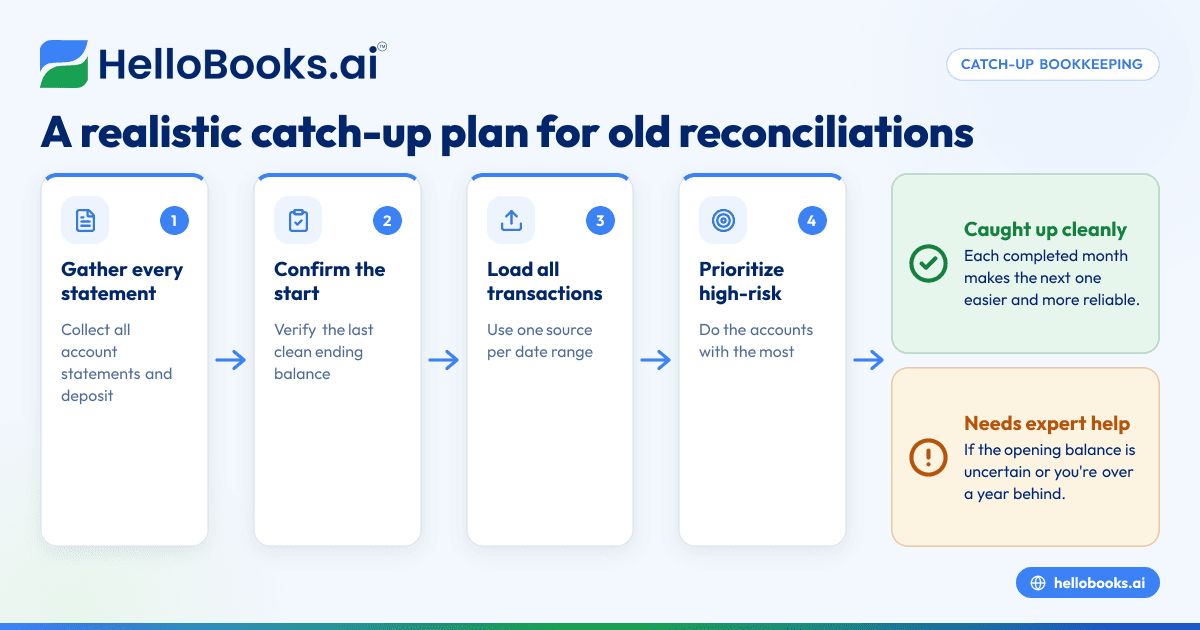
Step 1: Gather everything before you touch the books
Download every statement from your last reconciled month through the most recent one, for every account. For Lena, that's:
- Checking: April 2026 through September 2026 (6 statements)
- Credit card: 6 statements, each with its own closing date
- Savings: 6 statements
Save them in one folder, named by account and date. Also collect anything that explains deposits: payment processor reports, invoice lists, deposit slips.
Step 2: Confirm your starting line
Open the March 2026 reconciliation. Does its ending book balance still match what your books show for Mar 31, 2026 today? If someone edited a transaction from March 2026 or earlier, the starting point has moved, and you need to fix that before anything else.
If you've never reconciled, pick a clean starting date (often the start of your fiscal year or the date you opened the account) and use the bank statement balance on that date as your verified opening balance. If that date is more than a year back, or the opening balance itself is uncertain, this is a good moment to bring in a bookkeeper or CPA to set it properly.
Step 3: Get transactions into the books
For each account, you need every transaction from the start date forward. Your options:
- Bank feed. Connect the account. How far back a feed can pull history depends on your bank, so check what actually arrived.
- CSV import. Download a CSV from your bank for any period the feed didn't cover.
- Manual entry. Only for small gaps.
The golden rule here: one source per date range. If the feed brought in June 2026 onward, import CSVs only for April 2026 and May 2026. Overlapping ranges create duplicates, and duplicates are the biggest time sink in catch-up work.
Step 4: Prioritize by risk
Not every account deserves the same urgency. Lena's order:
- Checking: it's where most money moves and where errors cost the most.
- Credit card: lots of small charges, lots of chances for missed fees and personal charges.
- Savings: a handful of transfers and some interest; quick to finish.
Step 5: Reconcile oldest first, one month at a time
Take April 2026 checking. Categorize its transactions, match deposits to invoices, list outstanding checks and deposits in transit, record fees and interest, and reconcile to the April 2026 statement. Save the report. Only then move to May 2026.
Each finished month makes the next one easier, because its outstanding checks and deposits in transit carry forward and clear in a predictable way.
A two-week schedule that actually works
Here's the plan Lena could follow, with sessions of about 60 to 90 minutes:
| Session | Task | Output |
|---|---|---|
| 1 | Download all statements; confirm March 2026 ending balance | Folder of 18 statements; verified start |
| 2 | Connect accounts; import CSVs for any gaps; remove duplicates | All transactions in the books |
| 3 | Checking: April 2026 and May 2026 | Two reconciliations saved |
| 4 | Checking: June 2026 and July 2026 | Two reconciliations saved |
| 5 | Checking: August 2026 and September 2026 | Checking current |
| 6 | Credit card: first three statements | Three reconciliations saved |
| 7 | Credit card: last three statements | Card current |
| 8 | Savings: all six months | Savings current |
| 9 | Review P&L by month for oddities; fix miscategorized items | Clean monthly P&L |
| 10 | Set up the ongoing routine | Recurring calendar slot |
Ten sessions, two weeks if you do one every weekday. It's not glamorous, but it's finite, and you'll see progress every day.
How to handle the mess you'll find
Unknown transactions. You'll find charges you can't place. Search your email for the amount, check the vendor's name online, ask anyone else with card access. If you still can't identify one, park it in a clearly named "ask my accountant" account rather than guessing.
Old outstanding checks. A check from March 2026 that still hasn't cleared is worth a call to the payee. Don't just delete it.
Payment processor deposits. These are usually net of fees. Use the processor's payout reports to split each deposit into gross sales and fees.
Owner transactions. Personal purchases on the business card, or money you put in from personal savings, should be recorded as owner draws or owner contributions, not as business expenses or income.
A difference you can't close. If one month refuses to reconcile after a real search, note the amount, move on, and come back with fresh eyes. Often a later month reveals the error, such as a check that cleared for a different amount than recorded.
When to call in help
Do it yourself if you're under about six months behind, with a few hundred transactions and simple accounts. Get a bookkeeper if:
- You're more than a year behind.
- You've never reconciled and the opening balances are uncertain.
- There are loans, payroll, inventory or multiple entities mixed in.
- A lender or investor needs clean books by a deadline.
A bookkeeper can do catch-up work much faster because they've seen every kind of mess before. You can still keep the ongoing routine yourself afterward.
Staying current once you're caught up
Getting caught up is half the job. Book a recurring 30 to 45 minute slot within the first week of each month, and a short weekly review if you're busy. Clean books make tax time easier; your CPA handles the filing, and they'll be glad you did this before year-end rather than during it.
How HelloBooks helps
HelloBooks lets you connect most US banks and credit cards, and import CSV statements for any period a bank feed doesn't cover, so you can get a full history into one place. Catch-up work suits the reconcile screen well: for each month, it lines the statement up against your ledger with an AI match suggestion on every line, including a confidence score and the reason, and you work through only the exceptions left over. When a month is done and signed off, you can lock it before moving on, and reopening it later is logged, so a fix in August 2026 can't quietly change April 2026. Each month also gives you a reconciliation report (opening balance, cleared items, outstanding items, closing balance) to export as PDF or CSV for your bookkeeper or CPA. Starter ($14.99/month) adds AI auto-categorization, which helps a lot when you have months of uncategorized transactions to work through. A note on volume: the Free plan covers up to 200 transactions per year and 1 live bank feed, which suits a light business, but a six-month catch-up across three accounts will usually need Starter (3 bank connections) or Pro (unlimited). The free plan limits page spells this out, and US pricing compares the plans. You can invite your bookkeeper or CPA into the same books if you'd like help with the catch-up. For more on how the automation side works, see automated bookkeeping.
FAQs
Can I just reconcile the current month and skip the old ones?
You can, but any errors in the skipped months will carry into your starting balance, and your monthly P&L for those months stays unreliable. Reconciling oldest first is slower to start and much faster overall.
How long does catch-up reconciliation take?
It depends on volume. A small business with a few hundred transactions across two or three accounts can often catch up six months in eight to ten focused sessions.
What if my bank only lets me download recent statements?
Most banks provide older statements on request, sometimes for a small fee. Ask before you start so you're not stuck halfway through.
Should I hire a bookkeeper for catch-up work?
If you're more than a year behind, have uncertain opening balances, or need clean books by a deadline, it's usually worth it. For a few months of simple accounts, you can do it yourself.
What do I do with transactions I can't identify?
Record them to a clearly labeled holding account, like "ask my accountant," with a note. Don't guess a category, and don't delete them.
Start with session one this week. By the time you're on session five, you'll wonder why you waited.
Start free, no credit card. Try HelloBooks Free