
Key takeaways
What this article covers, in order:
- Key takeaways
- Why Indian businesses are looking for a QuickBooks alternative
- What “best” means for a small business in India
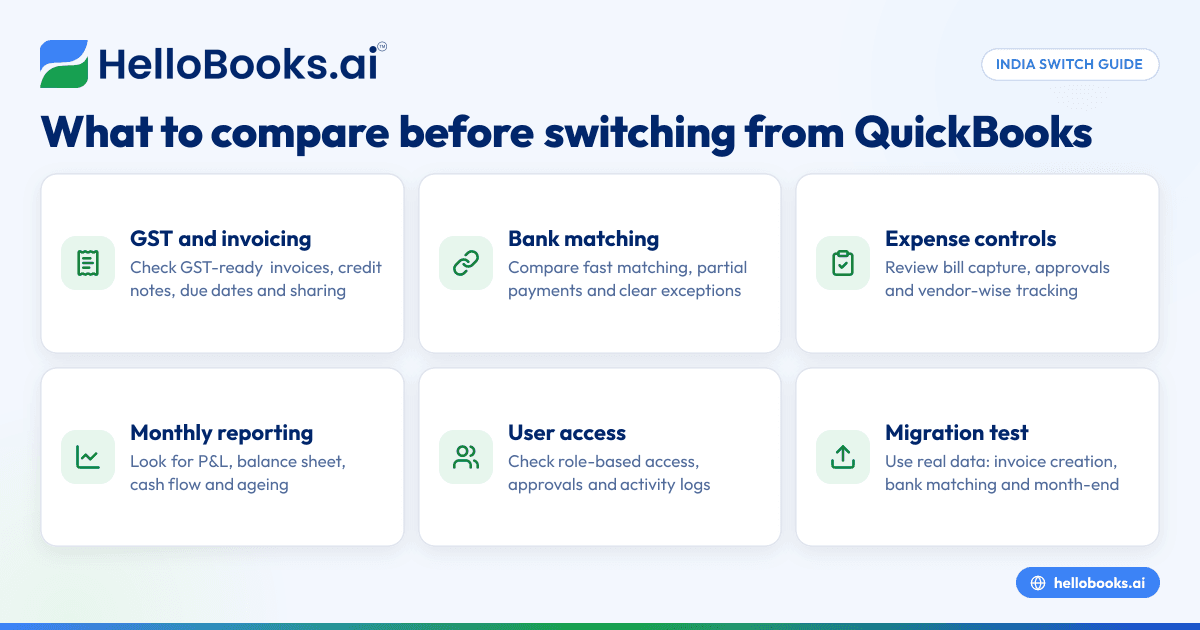
- Features to compare before you switch
- Questions to ask during a software demo
- A practical switching checklist for Indian small businesses
If you run a small business in India, the best QuickBooks alternative is one that fits Indian workflows first. That means GST-ready invoicing, easy bank reconciliation, strong audit trails, and a simple way to move off spreadsheets or older systems without breaking your monthly close.
Many Indian businesses do not need “more software”. They need fewer manual steps. When you compare options, focus on daily work like billing, collections, expenses, reconciliation and GST, not just a long feature list.
Key takeaways
- The best QuickBooks alternative in India should support Indian business needs such as GST, e-invoicing where applicable, and INR-based reporting.
- Do not compare software only on price or dashboard design. Compare billing, bank reconciliation, reporting, user access and migration effort.
- A good switch reduces manual entry, spreadsheet clean-up and month-end delays for founders, finance teams and accountants.
- If your team uses WhatsApp, UPI, Razorpay, Excel and Tally today, pick software that fits that reality instead of forcing new habits overnight.
- Before switching, test three things with real data: invoice creation, bank matching and month-end reporting.
- If you need help deciding, look at an AI accounting software setup that is built for small businesses in India.
Why Indian businesses are looking for a QuickBooks alternative
The search for a quickbooks alternative india usually starts with friction. The business is growing, but the finance process is not. A founder in Bengaluru still approves expenses on WhatsApp. A sales team in Mumbai sends invoices from one tool. Payments come through UPI and Razorpay. The accountant then updates books manually in Excel, Tally or another system at the end of the week.
That setup works for a while. Then volume rises.
You may have 400 invoices a month instead of 40. More vendors. More bank entries. More GST checks. More follow-ups with your CA or in-house finance person. At that point, the issue is not only software preference. It is operational drag.
Here is what usually pushes Indian small businesses to switch:
- Too much manual data entry
- Delayed bank reconciliation
- Invoice and payment records living in different places
- GST-related work taking too much time
- Reports arriving too late for decision-making
- Difficulty giving access to founders, accountants and operations teams without losing control
For many businesses, QuickBooks alternatives are attractive because they promise simpler workflows. But the right choice depends on your business model. A services firm in Pune, a D2C seller in Jaipur and a distributor in Coimbatore will not use accounting software in the same way.
What “best” means for a small business in India
The best software is not the one with the most buttons. It is the one your team will actually use correctly every week.
For Indian small businesses, “best” usually means five things.
1. It works for Indian compliance and reporting
If you bill customers in India, GST matters. If your business falls under e-invoicing rules, that matters too. If you need proper invoice records, tax summaries and supporting books for your accountant, the software should make that easier, not harder.
This is general information, not tax or legal advice. GST and e-invoicing rules can change, so confirm current applicability with your accountant.
2. It reduces bookkeeping effort
Most businesses do not switch software because they love migration projects. They switch because work is taking too long. Good software should reduce repetitive tasks like categorising expenses, matching bank entries and chasing missing records. That is where AI bookkeeping can make a real difference.
3. It is easy for non-accountants
In many small businesses, finance work is shared. Founders approve payments. Sales teams raise invoices. Admin teams upload bills. External accountants review books. The software should be simple enough for each role to do its part without confusion.
4. It gives you clear books every month
The goal is not just entering transactions. The goal is closing the month with confidence. You should be able to see receivables, payables, cash position, expenses and profitability without hunting through multiple spreadsheets.
5. It can grow with the business
What works at ₹10 lakh monthly revenue may fail at ₹1 crore. The right tool should support higher transaction volume, more users, better controls and cleaner reporting as you scale.
Features to compare before you switch
A side-by-side comparison is the fastest way to avoid a bad decision. Below are the features that matter most for Indian small businesses.
GST-ready invoicing
Start with invoicing. If invoice creation is clunky, your whole process slows down.
Look for:
- GST-compliant invoice fields
- Easy customer and item setup
- Credit notes and debit notes where needed
- Recurring invoices for retainers or subscriptions
- Payment terms and due date tracking
- Simple export and sharing options
If invoicing is a major pain point today, compare tools that include invoice software built into the accounting workflow.
E-invoicing support where applicable
Not every business needs e-invoicing. But if your turnover and transaction profile require it, you should not treat this as an add-on after the switch.
Compare:
- Whether e-invoicing is supported
- How invoice reference details are stored
- How easily your team can generate compliant records
- Whether the process is simple enough for daily operations
If this applies to your business in India, review e-invoicing software features before choosing a platform.
Bank reconciliation and payment matching
This is one of the biggest hidden costs in small business finance. A founder often thinks invoicing is the main problem. The finance team knows reconciliation is where time disappears.
Look for:
- Fast matching of bank entries to invoices and expenses
- Support for common payment patterns in India
- Easy handling of transfers, charges and partial payments
- Clear exceptions for unmatched items
- Audit trail for who changed what
If your team spends hours every week matching statements, prioritise strong bank reconciliation software capability.
Expense capture and controls
Vendor bills, team reimbursements and card expenses are usually spread across email, WhatsApp and shared drives. That creates delays and missed entries.
Compare:
- Bill and receipt capture
- Expense categorisation
- Approval workflows
- Vendor-wise tracking
- Reimbursement visibility
- Better records for month-end and tax review
For teams struggling with scattered receipts, expense management software can significantly reduce clean-up work.
Reporting for founders and finance leads
Many small businesses have accounting data, but not decision-ready reporting. Software should help you answer simple questions quickly.
For example:
- Who are our top overdue customers?
- What did we spend on marketing last month?
- Are margins improving?
- Which bank accounts need attention?
- Are vendor dues rising?
Compare the quality of:
- Profit and loss reports
- Balance sheet
- Cash flow visibility
- Accounts receivable ageing
- Accounts payable ageing
- GST summaries
- Download and sharing options
A report is only useful if it is easy to understand and available on time.
Multi-user access and controls
As your team grows, access matters. You do not want everyone seeing everything. But you also do not want the books locked with one person.
Look for:
- Role-based access
- Founder view vs accountant view
- Approval rights
- User activity logs
- Safe collaboration with external accountants
This becomes especially important if your data includes personal information. Businesses handling customer or employee personal data should also think carefully about data governance under the DPDP Act 2023.
Questions to ask during a software demo
A polished demo can hide weak workflows. Ask specific questions based on your real process.
Ask about your monthly close
Say: “Show me how we close the books for April.”
This reveals more than a generic dashboard tour.
Watch how the tool handles:
- Sales invoices
- Vendor bills
- Bank matching
- Adjustments
- Final reports
If the answer is vague, month-end may stay manual.
Ask about migration from your current setup
Many Indian businesses are switching from Tally, Excel or a mixed process. Others want a QuickBooks alternative because their current workflow feels fragmented.
Ask:
- What data can be imported?
- What needs manual clean-up before import?
- How are opening balances handled?
- Can customer, vendor and invoice history be brought in?
- How long does a typical migration take?
Migration is rarely perfect. But a good process should be clear and predictable.
Ask what daily users need to learn
A founder may only open reports. An operations person may create invoices. An accountant may review ledgers and reconciliations.
Ask:
- What training does each role need?
- What are the most common user mistakes?
- How are mistakes corrected?
- Can the team start with one workflow and expand later?
This helps you judge adoption risk.
A practical switching checklist for Indian small businesses
Before you move, do a small readiness check. This saves time and prevents opening balance confusion later.
Step 1: Clean your master data
Review customers, vendors, items and chart of accounts. Remove duplicates. Standardise names. Fix obvious errors. If “ABC Traders”, “A.B.C. Traders” and “ABC Trdrs” all exist, reports will stay messy after migration too.
Step 2: Reconcile key balances
Try to reconcile major bank accounts and customer/vendor balances up to a recent date, such as 31/03/2026 or 30/06/2026. You do not need perfect history forever, but you do need a reliable starting point.
Step 3: List your current workflows
Document how you currently handle:
- Sales invoices
- Receipts
- Vendor bills
- Team expenses
- GST working papers
- Month-end reports
This helps you compare software against reality, not assumptions.
Step 4: Decide who owns the switch
One person should own the project internally. In a small business, this may be the founder, finance lead or accountant. Without a clear owner, migration tends to drift.
Step 5: Test with real transactions
Do not rely on sample data. Upload actual invoices, vendor bills and bank entries from one recent month. Then see how quickly your team can complete the workflow.
Common mistakes businesses make while comparing alternatives
A switch can fail even when the software is good. Usually the issue is the evaluation process.
Choosing for edge cases, not everyday work
Businesses often focus on one rare feature and ignore the daily workload. But your team lives in invoices, expenses, bank entries and reports. Optimise for the 90% case.
Ignoring accountant usability
Founders may like modern dashboards. Accountants care about ledger clarity, adjustments, exports and audit trails. You need both. If required, involve your CA or finance consultant early, or find an accountant who can help evaluate your setup.
Underestimating data quality problems
Bad data does not disappear when you buy better software. If your old system has duplicate contacts, missing GST details or unreconciled balances, plan for clean-up.
Treating migration as an IT task only
This is an operations project. Sales, admin, finance and leadership are all affected. If teams do not understand the new flow, they fall back to WhatsApp, Excel and manual fixes.
Comparing too many tools at once
A long shortlist creates confusion. Pick the top two or three options. Then test them deeply on real workflows. That gives you better answers than a ten-tab spreadsheet comparison.
When a modern accounting tool is a better fit than legacy software
Many Indian businesses still run on a combination of Tally, spreadsheets and manual follow-up. That is familiar, but familiarity is not efficiency.
A modern accounting software in India setup can be a better fit when:
- Your books lag by more than a week
- Reconciliation is mostly manual
- You want founders to see reports without asking someone to compile them
- Sales and finance teams need shared visibility
- GST-related workflows feel scattered
- You are adding branches, products or new team members
Some businesses also start by looking for a Tally alternative because they want simpler collaboration, cleaner workflows and less dependency on one operator.
The right system should not make accounting “look modern” while keeping the work manual underneath. It should remove repeated effort and make controls stronger.
How HelloBooks fits this decision
If you are comparing options for quickbooks alternative india, HelloBooks is designed around the work Indian small businesses actually do. That includes invoicing, automated bookkeeping, GST workflows, bank reconciliation, expense management and financial reporting in one place.
For businesses that want less manual effort and more visibility, HelloBooks brings together accounting software for small business with practical workflows instead of disconnected tools. The aim is simple: close books faster, keep records cleaner, and spend less time chasing data across spreadsheets, email and chat.
You should still evaluate any tool against your exact needs. But if your current process involves too much entry, matching and follow-up, HelloBooks is worth shortlisting.
If you want to see whether HelloBooks fits your team, you can book a demo or compare options on the pricing page.
Frequently asked questions
What is the best QuickBooks alternative in India for small businesses?
The best alternative depends on your workflow, not just your size. For most Indian small businesses, the right choice supports GST, easy invoicing, bank reconciliation, expense tracking and clear monthly reports. A tool that reduces manual work is usually a better fit than one with a long but rarely used feature list.
What should I compare before moving from QuickBooks to another tool in India?
Compare invoicing, GST support, e-invoicing if applicable, bank reconciliation, expense management, reporting, user access and migration effort. Also test how easily your accountant can review books and exports. A quick demo is not enough; use real sample transactions.
Is GST support necessary when choosing accounting software in India?
Yes, for most Indian businesses it is a key requirement. Your software should make GST-ready invoicing and reporting easier and reduce manual work during return preparation. If your business has specific compliance needs, confirm the latest rules with your accountant.
How long does it take to switch accounting software?
It depends on data quality and how much history you want to migrate. A simple business with clean customer, vendor and bank records can move faster than one with years of unreconciled entries. Most delays come from cleaning master data and confirming opening balances.
Should I move from Tally or spreadsheets at the same time as QuickBooks?
If your process is split across multiple tools, it can make sense to consolidate during the switch. But only do this with a clear migration plan and defined ownership. The goal is fewer manual handoffs, not a bigger project than your team can handle.
Can small businesses in tier-2 and tier-3 cities use modern accounting software easily?
Yes, if the software is simple and the workflows match how the business already works. Many businesses outside major metros still manage invoices, payments and records across WhatsApp, Excel and bank statements. Good software should simplify that process, not demand a complete operating reset.