


Key takeaways
What this article covers, in order:
- Why this comes up / what goes wrong
- Step-by-step
- Example (fictional figures)
- Common mistakes
- Doing this in HelloBooks
- Frequently asked questions
Designers running small businesses in India need invoice programs that handle GST compliance accurately and efficiently. Their invoices must include the correct tax rates, HSN or SAC codes, and if applicable, generate e-invoices with IRN and QR codes. Without this, designers risk errors in tax filings, delayed payments, and compliance issues.
Why this comes up / what goes wrong
Many designers start by creating invoices in spreadsheets or basic word processors, which lack GST-specific fields and validation. They struggle with correctly applying CGST, SGST, or IGST depending on the client’s location, and often miss including mandatory details like HSN/SAC codes or recipient GSTIN. If their turnover crosses ₹5 crore, they must generate e-invoices with IRN and QR codes as per Notification No. 10/2023-Central Tax, effective 1 August 2023 [einvoice-threshold-5cr/einv-5cr-from-2023-08-01]. Manual compliance leads to errors, time-consuming corrections, and potential penalties.
Step-by-step
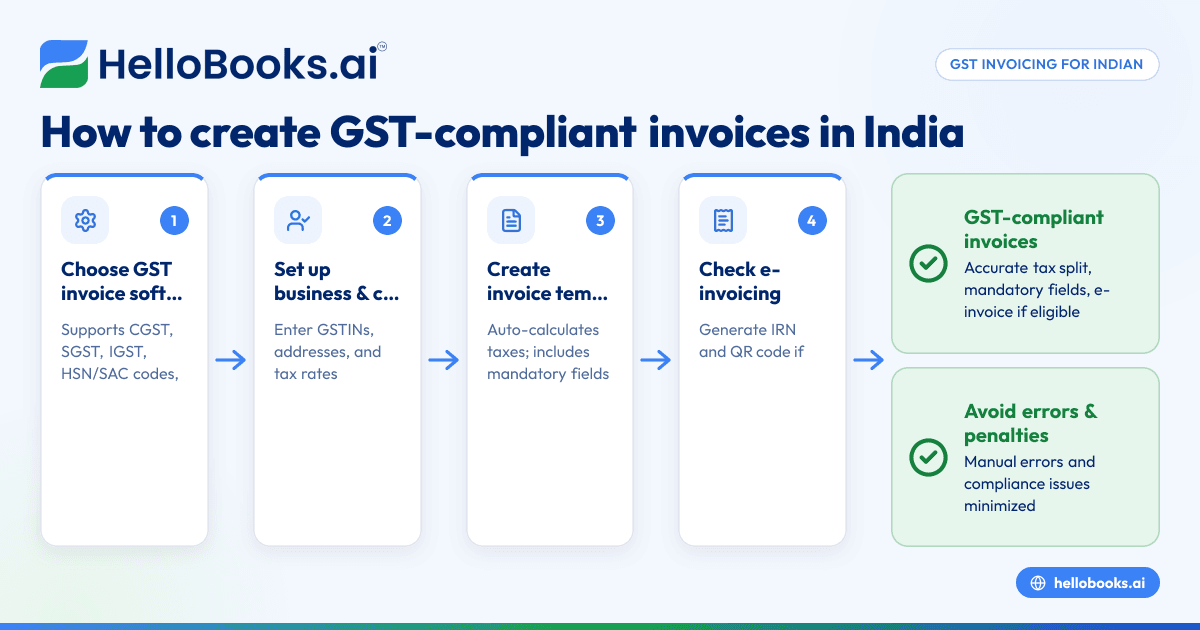
- Choose an invoice program with GST invoicing features: Ensure it creates tax invoices with fields for CGST, SGST, IGST, HSN/SAC codes, and recipient GSTIN as required by Rule 46 [cgst-rule-46/rule46-particulars].
- Set up your business and client details: Enter your GSTIN, address, and default tax rates. Add client GSTINs and addresses accurately to determine the correct tax split.
- Create your invoice template: Use a customizable template that automatically calculates taxes and includes all mandatory fields like invoice number, date, description, quantity, taxable value, and tax amounts.
- Check for e-invoicing eligibility: If your aggregate turnover exceeds ₹5 crore, the program should generate an IRN and embed a signed QR code on the invoice [cgst-rule-46/rule46-qr-irn].
- Generate and send invoices: Export invoices as GST-compliant PDFs and send them to clients via email.
- Track payment status and history: Use the program’s dashboard to monitor which invoices are paid or pending.
- Prepare GST returns: The software should help prepare GSTR-1 and GSTR-3B returns using invoice data.
For more details on GST invoicing features, see GST invoicing.
Example (fictional figures)
Designer A issues a service invoice on 15/05/2024 to a client in Karnataka for ₹1,00,000 with an assumed GST rate of 18% (9% CGST + 9% SGST).
Taxable value = ₹1,00,000
CGST = ₹1,00,000 × 9% = ₹9,000
SGST = ₹1,00,000 × 9% = ₹9,000
Total invoice value = ₹1,00,000 + ₹9,000 + ₹9,000 = ₹1,18,000
If the client is in a different state, IGST applies:
IGST = ₹1,00,000 × 18% = ₹18,000
Total invoice value = ₹1,00,000 + ₹18,000 = ₹1,18,000
This invoice must include:
- Supplier and recipient GSTIN
- Invoice number and date
- Description of services with SAC code
- Taxable value
- Tax rate and amount (CGST/SGST or IGST)
- Place of supply
If Designer A’s turnover exceeds ₹5 crore, the invoice will also have an IRN and signed QR code.
Common mistakes
- Missing or incorrect GSTIN details: Always verify client GSTINs and addresses to apply correct tax rates and comply with Rule 46. Use a GST invoice validator tool to check GST invoice validator.
- Not including HSN/SAC codes: These are mandatory for GST invoices. Check the correct codes for your services and include them to avoid rejection.
- Wrong tax split for inter-state supplies: Use IGST for supplies to other states and CGST+SGST for intra-state. Confirm place of supply before invoicing.
- Ignoring e-invoicing requirements: If turnover crosses ₹5 crore, generate IRN and QR codes as mandated. Missing this causes compliance issues.
- Manual data entry errors: Use OCR or automated invoice software to reduce mistakes and save time.
Doing this in HelloBooks
HelloBooks creates GST-compliant invoices with the correct CGST/SGST or IGST split and automatically fills HSN/SAC codes from the customer's GSTIN, ensuring all Rule 46 fields are consistent. For businesses with turnover over ₹5 crore, HelloBooks generates e-invoices with IRN and signed QR codes at save time, avoiding manual JSON uploads. It also captures supplier bills via OCR from photos or PDFs, reducing manual entry. Learn more about HelloBooks GST invoicing at HelloBooks for India.
Frequently asked questions
What makes an invoice GST-compliant for designers?
A GST-compliant invoice must include your and the recipient’s GSTIN, invoice number, date, HSN or SAC codes, taxable value, tax rates and amounts (CGST/SGST or IGST), place of supply, and other details as per Rule 46 [cgst-rule-46/rule46-particulars].
When is e-invoicing mandatory for designers?
E-invoicing is mandatory if your aggregate turnover exceeds ₹5 crore in any financial year from 2017-18 onwards, effective 1 August 2023 [einvoice-threshold-5cr/einv-5cr-from-2023-08-01]. It applies to B2B invoices.
How do I ensure correct tax calculation for inter-state clients?
Check the client’s state and GSTIN. For clients in the same state, apply CGST and SGST. For clients in different states, apply IGST. This ensures correct tax split and compliance.
Can I use Excel or Tally for GST invoicing?
While possible, these tools require manual entry and lack automated GST validation and e-invoicing features. Using dedicated GST invoicing software reduces errors and saves time.
How does HelloBooks help with GST compliance?
HelloBooks automates GST invoicing with tax calculations, HSN/SAC code filling, e-invoicing for eligible businesses, and OCR for bills. It simplifies compliance and reporting.
Where can I check if my invoice meets GST rules?
Use the GST invoice validator to verify invoice details before sending.
Key takeaways
- Choose an invoice program that supports GST invoicing with CGST/SGST/IGST splits and HSN/SAC codes.
- Verify client GSTIN and place of supply to apply correct tax rates.
- Generate e-invoices with IRN and QR codes if turnover exceeds ₹5 crore.
- Avoid manual errors by using OCR and automated invoice software.
- Use tools like GST invoice validators to ensure compliance.
- HelloBooks provides these features to streamline invoicing and GST compliance.
Start managing your invoices with GST compliance today. Start on the Free plan (200 transactions a year, GSTR-1 and 3B filing for one GSTIN).
This article is general information, not tax or legal advice. Rules change; confirm the current position on gst.gov.in or with your chartered accountant before acting.


