
Key takeaways
What this article covers, in order:
- Key takeaways
- What makes AI bookkeeping software useful for a US small business?
- What should you automate first?
- How does AI help with invoicing?
- What features matter most for businesses in the United States?
- Where do small businesses usually waste the most bookkeeping time?
The best AI bookkeeping software for a small business in the United States removes repetitive work first. Start with the tasks that drain time every week: transaction categorization, bank reconciliation, invoice follow-up, expense capture, and month-end reporting.
If you choose well, AI should not replace judgment. It should speed up clean data entry, surface exceptions, and help you close the books faster with fewer manual touches.
Key takeaways
- The best ai bookkeeping software for small business united states should automate high-volume, repeatable tasks before anything else.
- Start with bank feeds, transaction coding, reconciliation, expense capture, and invoice reminders to get fast returns.
- Good software should keep humans in control by flagging exceptions, not hiding them.
- US small businesses should look for support for sales tax workflows, 1099-related vendor records, and clear audit trails.
- The right setup matters as much as the software. Bad rules create bad books.
- If your team still relies on spreadsheets or too much manual QuickBooks cleanup, AI can reduce month-end effort meaningfully.
What makes AI bookkeeping software useful for a US small business?
AI bookkeeping software uses pattern recognition and rules to handle routine accounting work. In practice, that means an ai-powered system can suggest categories, match bank transactions, read receipts, draft invoices, and flag unusual entries before you post them.
For a small business in Chicago, Houston, or Detroit, the biggest problem is rarely a lack of reports. The problem is getting clean data into the system on time. Owners and finance leads often spend hours each week chasing receipts, checking Stripe payouts, matching deposits, and fixing coding mistakes later.
That is why the best tool is not the one with the longest feature list. It is the one that reduces manual bookkeeping in the places where your team loses the most time.
If you are comparing options, focus on whether the product works as practical AI bookkeeping, not just whether it says “AI” on the homepage.
What should you automate first?
Automate the work that happens often, follows a pattern, and still needs review. That usually means transaction entry, reconciliation, expense capture, invoicing, and routine reports.
After that, automate approval flows and exceptions. Do not start with rare edge cases. Start with the tasks your team repeats every day or every week.
1. Transaction categorization
This is usually the fastest win. Most small businesses have recurring vendors, recurring payment processors, and repeated expense types. An ai tool can learn from past coding patterns and suggest categories for bank and card transactions.
Examples:
- Monthly software subscriptions
- Fuel purchases for a field service company
- Merchant fees from Stripe
- Office supply purchases
- Freight or shipping charges
- Rent and utilities
Why automate this first:
- It reduces data entry volume immediately
- It improves consistency across bookkeepers
- It speeds up month-end review
- It lets your accountant focus on exceptions
What to check before turning it on:
- Your chart of accounts is clean
- Similar expense accounts are not duplicated
- A human reviews suggestions early on
- Rules do not override judgment on unusual transactions
2. Bank reconciliation
Reconciliation is one of the biggest time drains in bookkeeping. A strong system should pull bank activity, suggest matches, identify likely duplicates, and group transactions that belong together.
For example, if your business receives daily card settlements and processor fees are netted out, reconciliation gets messy fast. Good software helps match payouts to invoices, deposits, and fees without forcing your team to rebuild everything by hand.
This is where bank reconciliation software matters. Reconciliation should be fast, visible, and exception-based.
Automate these parts first:
- Import bank and card transactions automatically.
- Match common deposits and withdrawals to known records.
- Group processor settlements where needed.
- Flag unmatched items for review.
- Keep a clear record of who approved final matches.
Do not automate away the review step. The goal is faster reconciliation, not blind reconciliation.
3. Receipt and expense capture
Expense paperwork slows down every growing business. Employees forget to submit receipts. Owners use personal cards by mistake. Finance teams spend hours reading merchant names and keying data.
An expense workflow automated with ai can read receipt details, propose vendor names, amounts, and dates, and route items for approval. That cuts down on email back-and-forth and reduces missing documentation.
This matters even more if your business has sales staff, field technicians, or frequent travel. A business with ten employees can create a surprising amount of cleanup at month-end.
Look for these basics:
- Receipt data capture from images or uploads
- Suggested expense categories
- Duplicate detection
- Approval trails
- Easy review before posting
If this is a pain point for your team, expense management software can remove a lot of low-value admin work.
How does AI help with invoicing?
AI helps by drafting invoices faster, reusing customer details, spotting missing fields, and sending reminders on time. It reduces manual follow-up and helps your team bill more consistently.
For service businesses, invoicing delays often create cash flow problems. The work is done, but the invoice goes out late. Or it goes out with the wrong customer reference, which delays payment again.
An ai software workflow can help by:
- Pulling repeated customer information into new invoices
- Reusing standard descriptions for recurring work
- Flagging missing dates, line items, or payment terms
- Sending scheduled reminders for overdue invoices
- Helping track paid, partially paid, and overdue balances
This is especially useful for agencies, consultants, contractors, and B2B service firms that send many similar invoices each month.
You do not need a complicated setup to benefit. Even simple invoice software can make a meaningful difference if your current process still depends on spreadsheets and inbox reminders.
What features matter most for businesses in the United States?
US small businesses should look for clean bank syncing, sales tax support, good reporting, audit trails, and organized vendor records for 1099 work. The software should save time without making compliance messier.
Beyond automation, US businesses need software that fits how bookkeeping really works here. That means thinking about taxes, records, and reporting from the start.
Sales tax support
Sales tax is not the same for every business. Rules vary by state and by what you sell. Even if your bookkeeping software does not replace tax advice, it should help you keep taxable and non-taxable sales organized.
Look for:
- Clear tax treatment on invoices
- Reports that support review
- Consistent sales records by customer and location
- Fewer manual workarounds at filing time
This is general information, not tax or legal advice. If sales tax treatment is unclear, confirm it with your accountant.
Vendor records and 1099 readiness
Many small businesses pay contractors, freelancers, and service vendors throughout the year. Good bookkeeping depends on keeping vendor details organized from the start.
Your system should make it easy to:
- Keep vendor names consistent
- Track payments by vendor
- Separate reimbursable items where needed
- Store records needed for year-end review
Even if your tax preparer handles filing, clean records reduce year-end stress.
Audit trails and controls
AI should not create a black box. It should show what happened, what was suggested, and what was approved. That matters for internal review, outside accountants, and buyers who expect cleaner controls as your company grows.
For many small businesses, this becomes important before a financing process, a due diligence request, or a larger customer review.
Where do small businesses usually waste the most bookkeeping time?
Most wasted time sits in rework. Teams enter data manually, fix coding errors later, chase receipts, and reconcile transactions after the month has already drifted behind.
Here are the usual bottlenecks:
Spreadsheet-based bookkeeping
Spreadsheets feel flexible, but they create hidden costs:
- No live bank matching
- Inconsistent account names
- Version confusion
- Weak approval trails
- Manual report building
This works for a while. Then volume grows, and month-end turns into a cleanup project.
QuickBooks cleanup instead of ongoing bookkeeping
A lot of teams are not really doing monthly bookkeeping. They are catching up in batches. That means transactions pile up, uncategorized items grow, and the accountant has to clean everything up under deadline.
If that sounds familiar, it may be time to look at accounting software in the USA that is more automation-first.
Payment processor complexity
If you accept online payments, processor deposits can create confusion. Gross sales, fees, refunds, chargebacks, and payout timing rarely line up neatly without a system.
This is one of the best use cases for ai automation. The software should reduce manual matching and make exceptions obvious.
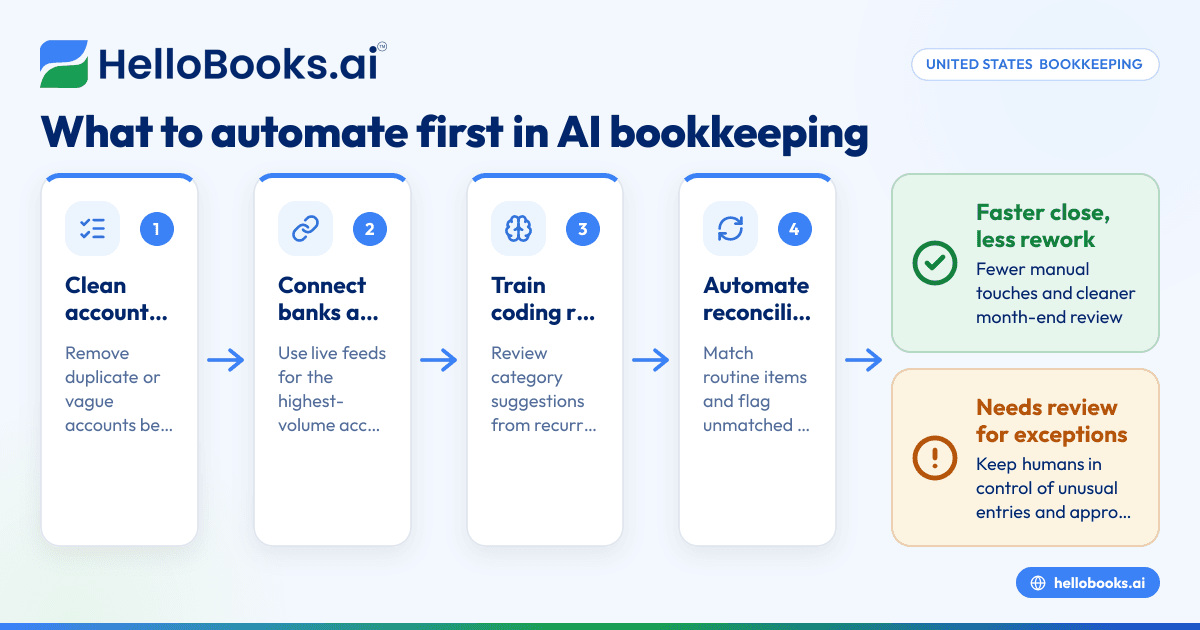
A practical order for automation
If you want quick wins, do not launch every feature at once. Roll out automation in a sequence that improves accuracy without overwhelming the team.
Step 1: Clean your chart of accounts
Before any automation, remove duplicate or vague accounts. If your expense structure is messy, AI suggestions will be messy too.
Good examples:
- Advertising
- Software subscriptions
- Office supplies
- Merchant fees
- Travel
- Meals
Bad examples:
- Miscellaneous 1
- Expenses old
- Admin stuff
Step 2: Connect banks and cards
Live financial data is the foundation. Without bank and card feeds, AI cannot do much useful work. Start with the accounts that hold most transaction volume.
Step 3: Train transaction rules and review suggestions
Let the software suggest coding based on recurring merchants and historical patterns. Review closely in the first few weeks. This is where your team teaches the system.
Step 4: Turn on reconciliation workflows
Once coding improves, use automated matching for routine transactions. Keep exception review manual until you trust the process.
Step 5: Add receipt capture and expense approvals
This closes one of the biggest documentation gaps. It also reduces the end-of-month scramble for missing receipts.
Step 6: Automate invoicing and reminders
If cash flow matters, do this early. Faster invoices and steady reminders help reduce delays in collections.
Step 7: Standardize reports
Only after the underlying data is cleaner should you automate reporting. Otherwise, you just create faster bad reports.
How do you evaluate the best AI bookkeeping software?
Choose software that saves time on your real workflow, not software with the most features. Test it on one month of your own data and see whether it reduces review time, cleanup, and follow-up.
Here is a practical evaluation checklist.
1. Does it reduce manual entry?
Ask whether it can:
- Suggest categories accurately
- Read receipts well
- Create reusable invoice workflows
- Reduce duplicate data entry across tasks
2. Does it make reconciliation easier?
This is a core test. If bank matching still feels manual, the AI is not helping much.
3. Does it keep humans in control?
The system should suggest, flag, and learn. It should not silently post confusing entries that no one can explain later.
4. Does it support your accountant?
Your accountant should be able to review clean books, not untangle a hidden AI process. If needed, you can also find an accountant to help set up better workflows.
5. Does it fit your current stack?
Most US small businesses already use tools like QuickBooks and Stripe. The question is not whether your team can switch someday. The question is whether your current month-end pain gets better now.
If you are comparing systems broadly, it helps to look at accounting software for small business with bookkeeping automation as a core strength, not an add-on.
Common mistakes when adding AI to bookkeeping
AI can save time, but poor setup can create bigger cleanup work later.
Automating bad processes
If your invoices are inconsistent, your chart of accounts is messy, and receipts arrive late, AI will not fix the root problem by itself. Clean the process first.
Expecting zero review
No bookkeeping system should run on autopilot. Review still matters, especially for unusual transactions, owner spending, sales tax treatment, and month-end adjustments.
Ignoring exceptions
The best software makes exceptions visible. If your team skips that review, errors will pile up quietly.
Rolling out too much at once
Start with one or two workflows. Measure time saved. Then expand. This is how small businesses get value faster and avoid team resistance.
When is it time to move from basic tools to AI bookkeeping?
Usually, the shift makes sense when transaction volume rises, close times slip, or bookkeeping depends too much on one person. If your team is always catching up, automation is overdue.
Typical signs include:
- Books are closed late every month
- Reconciliation takes several days
- Receipts are missing often
- Invoices go out late
- Reports are delayed or unreliable
- Your accountant spends too much time fixing basic coding
If that is where you are, a modern AI accounting software setup can help you move from manual catch-up to consistent monthly control.
For businesses that have outgrown their current system, some also compare options as a QuickBooks alternative, especially when they want more automation and less cleanup.
If you want to see how HelloBooks can help automate bookkeeping, invoicing, expenses, and reconciliation for your US business, you can book a demo or compare options on the pricing page.
Frequently asked questions
Is AI bookkeeping software safe to use for a small business?
It can be, if you use strong permissions, approval workflows, and regular review. The main risk is not AI itself. The main risk is posting bad data without oversight.
Can AI bookkeeping replace my bookkeeper or accountant?
Usually, no. It reduces manual work and speeds up routine tasks. Your bookkeeper or accountant still matters for reviews, adjustments, tax treatment, and judgment calls.
What is the first bookkeeping process most small businesses should automate?
For most businesses, start with transaction categorization and bank reconciliation. Those two areas usually create the fastest time savings and improve the rest of the close process.
Does AI bookkeeping help with sales tax and 1099 work?
It can help organize records, invoices, vendor data, and transaction histories. That makes review easier at filing time. You should still confirm tax treatment and filing details with a qualified professional.
Is AI bookkeeping only useful for larger businesses?
No. Small businesses often benefit the most because they have lean teams and limited finance bandwidth. Even modest automation can free up hours each month.
How do I know if my business is ready for AI bookkeeping?
You are ready if bookkeeping is repetitive, delayed, and too manual. If your team spends too much time on data entry and reconciliation, AI can likely improve the process.