
Key takeaways
What this article covers, in order:
- Key takeaways
- Why contractors need specialized AI bookkeeping software
- How does AI software benefit contractors?
- What features should contractors look for in bookkeeping software?
- How does AI invoicing work for contractors?
- What compliance requirements does contractor bookkeeping software address?
Best AI Bookkeeping Software for Contractors in the United States: Streamlining Your Accounting and Invoicing
Contractors in the United States often juggle complex accounting tasks alongside their core work. The best AI bookkeeping software can automate invoicing, track expenses, and simplify tax compliance, saving time and reducing errors. This guide explores top software options designed specifically for contractors.
Key takeaways
- AI bookkeeping software helps contractors automate data entry, invoicing, and bank reconciliation.
- Using specialized software reduces the time spent on manual record-keeping and minimizes errors.
- Good contractor software supports tracking job costs and managing payments from clients across US states.
- Integration with popular tools like QuickBooks and Stripe streamlines workflows for contractors.
- Compliance features assist with managing 1099 forms and sales tax requirements.
- Choosing the right software depends on your business size, industry niche, and preferred financial tools.
Why contractors need specialized AI bookkeeping software
Contractors operate in a unique financial environment. They handle multiple projects, track job-specific expenses, invoice clients promptly, and manage varying state tax requirements. Manual bookkeeping and generic accounting software often fall short because they lack automation for these specific needs.
For example, a general ledger from basic accounting software may not easily differentiate costs by individual projects. This makes it challenging to accurately measure profitability per job. A contractor working on remodeling different homes in Houston and Detroit must track materials, labor, and permits separately while complying with local sales tax and regulatory requirements.
AI software tailored for contractors can scan receipts, automate invoice generation, and reconcile bank transactions using industry-specific language and accounts. It also helps track outstanding payments and generates reports on profitability per job, giving you clear insight into your financial health and cash flow.
How does AI software benefit contractors?
AI software automates tedious tasks like data entry, categorizes transactions intelligently, and flags discrepancies early. This increases accuracy and lets contractors focus on their core business rather than bookkeeping chores. Many platforms also include features for expense management and compliance tracking.
For instance, AI algorithms can recognize vendor names and match expenses to the correct project or expense category automatically. This reduces errors that often creep in with manual data entry, such as misclassifying a roofing supplier invoice as an office expense.
Additionally, built-in AI can learn from your business patterns to forecast cash flow and suggest cost-saving measures. Say you habitually pay subcontractors on varying terms — AI can alert you about upcoming payments to avoid cash crunches. For contractors working in cities with complex sales tax laws, these tools calculate and prepare relevant state and local tax filings seamlessly.
A worked example:
Imagine you operate a small contracting business in Chicago that handles five active projects. Your AI-powered bookkeeping software scans bank feeds daily, automatically categorizes expenses by project, and generates weekly cash flow forecasts based on historical payments. Soon, you receive an automated alert about a pending bill due to a Michigan-based subcontractor. You prepare and schedule the payment through your integrated payment platform, avoiding late fees and project delays.
What features should contractors look for in bookkeeping software?
When selecting software for contractors, look for:
- Automated invoicing and payment reminders: Ensures timely cash inflows. Your software should allow customized templates and recurring billing for maintenance contracts or repeat clients.
- Expense tracking linked to projects: Helps monitor job profitability by tracking materials, labor, and other costs per job site.
- Bank reconciliation automation: Matches bank transactions with invoices and expenses automatically, minimizing manual review.
- Integration with tax software and 1099 management: Simplifies year-end filing for subcontractor payments, reducing errors and compliance risk.
- Support for state sales taxes: Crucial for businesses servicing multiple states like Illinois, Texas, or Michigan. The software must calculate local rates accurately and track taxable vs. exempt sales.
- Mobile access and cloud storage: For flexible access from job sites or offices, enabling field staff to capture expenses or submit invoices instantly.
Common pitfalls contractors face without these features
Many contractors struggle with late client payments or missing receipts. Without automated reminders, invoices might be overlooked, impacting cash flow. Manual reconciliation of dozens of bank transactions per month is tedious and error-prone. Failure to track expenses to specific jobs can obscure profit margins, leading to inaccurate pricing or underestimated costs on future bids.
How does AI invoicing work for contractors?
AI invoicing uses machine learning to create and send digital invoices automatically after service completion. The software extracts data from contracts, work orders, or completion reports, ensuring details are precise and compliant with US standards.
For example, a contractor in Houston installing HVAC systems uses AI invoicing to generate invoices tied directly to job milestones. Once a phase of work completes, the AI matches services rendered with the contract’s line items and client details, then sends a professional invoice via email or as an e-invoice compliant with IRS guidelines.
Automation reduces delays in billing and minimizes human errors such as incorrect client information or missing line items. Many platforms offer integration with payment gateways like Stripe, enabling clients to pay immediately online, improving the cash flow cycle for contractors.
What compliance requirements does contractor bookkeeping software address?
Contractors must manage multiple compliance aspects:
- 1099 Forms: If you pay subcontractors $600 or more in a calendar year, you must report these payments to the IRS using Form 1099-NEC. Accurate bookkeeping simplifies this process.
- State Sales Tax: Unlike product sales, services may be taxed differently in each state. Software must apply correct tax rates depending on where the service was performed and track taxable vs. non-taxable services.
- Federal Tax Reporting: Full, categorized income and expense records ease your annual income tax return preparation with the IRS and help maximize deductions.
While software can automate these processes, contractors should consult tax advisors to ensure compliance, especially with complex state rules or multi-state operations. Incorrect tax calculations or missed filings can lead to penalties.
Steps to implement AI bookkeeping software for your contracting business
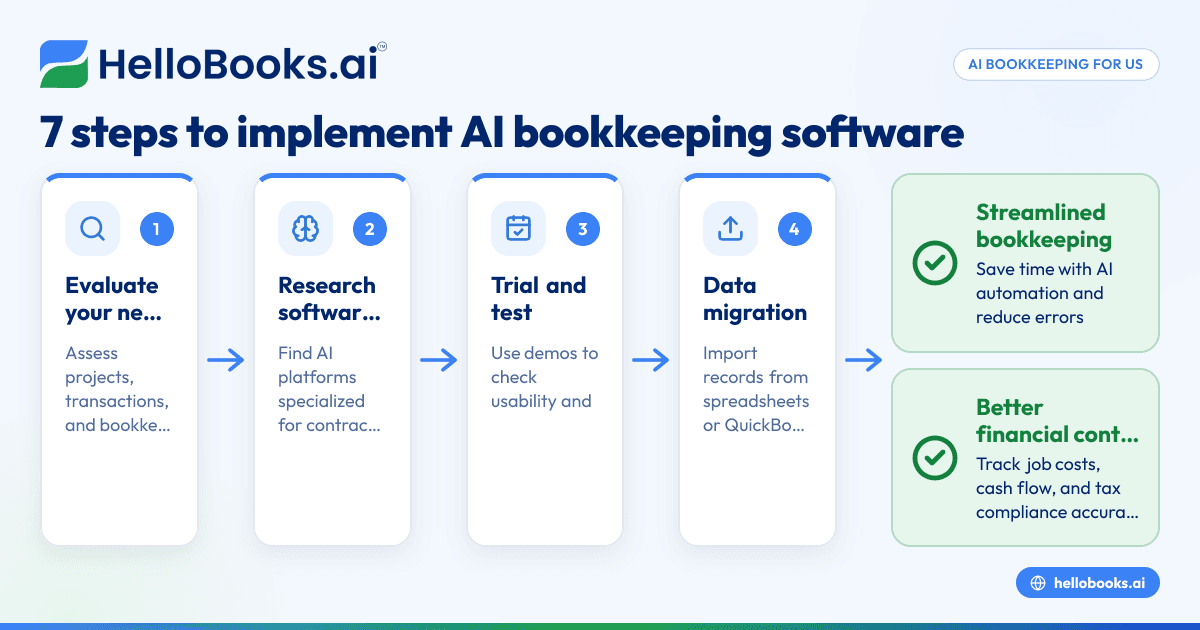
- Evaluate your needs: Assess how many projects you manage, the volume of transactions, and your current pain points in bookkeeping.
- Research software options: Look for platforms that specialize in AI automation tailored for contractors, offering essential features like job cost tracking and 1099 management.
- Trial and test: Use demo or trial versions to evaluate usability and feature suitability. Check how well the software handles multi-state sales tax calculations if relevant.
- Data migration: Import existing records from spreadsheets, QuickBooks, or other tools to get started quickly. Ensure your historical data is categorized correctly during import.
- Train your team: Provide training for yourself and your staff on key features such as expense entry, invoicing, and report generation.
- Set up automation rules: Customize invoice schedules, bank reconciliation matching rules, and compliance alerts to fit your workflow.
- Monitor and optimize: Regularly review reports on cash flow, job profitability, and pending invoices. Adjust automation settings to improve accuracy and efficiency.
Example: Migrating from spreadsheets to AI bookkeeping
Many contractors still rely on Excel for expense tracking. When moving to AI bookkeeping, export your spreadsheets as CSV files. Most platforms can import these files easily. During import, map spreadsheet columns such as date, description, and amount to corresponding fields in the software. This preserves continuity and saves time.
How can contractors integrate AI bookkeeping with existing tools?
Most AI bookkeeping platforms support integration with popular accounting software like QuickBooks or invoicing tools such as Stripe. This interoperability enables contractors to maintain their current workflows while benefiting from enhanced automation in data entry and reporting.
To connect systems, contractors typically use API integrations or built-in connectors. For example, syncing bank feeds from QuickBooks with AI bookkeeping software helps reconcile transactions automatically. Integrating with Stripe allows invoice payments to update your records in real-time.
Such integration reduces duplicate data entry and manual errors. If your business uses specialized ERP systems for manufacturing or large projects, you can often connect these with AI bookkeeping software as well, keeping all financial data in sync.
What challenges do contractors face without AI bookkeeping software?
Without dedicated AI tools, contractors spend excessive hours entering data, chasing late payments, and manually reconciling bank statements. This inefficiency can lead to cash flow issues and errors in tax filings. Scalability becomes difficult as project volume grows, impacting profitability.
Traditional accounting methods may also overlook job-specific cost tracking, leading to inaccurate profit margin calculations. Contractors might submit invoices with errors or miss timely tax filing obligations, risking penalties.
Moreover, manual bookkeeping increases the chance of lost receipts or misfiled documents, complicating audits or tax preparation.
Why choose HelloBooks.ai as a contractor’s bookkeeping solution?
HelloBooks.ai offers automated bookkeeping and invoicing tailored for small to mid-size contractors in the US. Its AI-driven system reduces manual data entry and performs timely bank reconciliations. With expense management and integrated tax compliance features, contractors can easily manage 1099 forms and sales tax filings.
The software supports smooth integration with QuickBooks and Stripe, ensuring a unified finance ecosystem. Its cloud-based platform and mobile-friendly design keep your accounting accessible and up to date wherever you work — whether on-site in Chicago or in your Houston office.
Contractors can also benefit from built-in cash flow forecasts and customizable invoice templates, boosting financial control and professionalism.
Take the next step to simplify your bookkeeping and invoice management by booking a demo or comparing plans on the pricing page.
Frequently asked questions
What makes AI bookkeeping software different for contractors?
AI bookkeeping software automates specific tasks such as job cost tracking, invoice creation, and bank reconciliation with smart algorithms. It is designed to handle contractor workflows and compliance, unlike generic accounting tools that require more manual effort.
Can AI bookkeeping software handle 1099 forms?
Yes, many contractor-focused AI bookkeeping tools automate tracking payments to subcontractors and prepare 1099 forms at year-end, simplifying compliance with IRS regulations.
Is it difficult to switch from QuickBooks or spreadsheets to AI bookkeeping software?
Most AI software supports data import from QuickBooks and spreadsheets. Switching generally involves a straightforward migration and setup process, with vendor support available to help.
Will AI bookkeeping software help me manage sales tax in multiple states?
Yes, leading AI bookkeeping solutions calculate and track sales tax obligations based on your project locations, which is critical for contractors working across states like Texas, Illinois, and Michigan.
How secure is cloud-based AI bookkeeping software?
Reputable AI bookkeeping providers implement strong data encryption and comply with security standards to protect your financial data. It’s important to verify these safeguards when selecting software.
Can I customize invoicing templates and payment terms?
Most contractor-focused AI bookkeeping software lets users customize invoice layouts, payment terms, and reminders to match business needs and client expectations.
If you want to streamline your accounting and invoicing with AI tailored to contractors, consider exploring HelloBooks.ai’s features. See how automation can accelerate your finance workflows by booking a demo or check out the plans suitable for your business on the pricing page.
Read next
This article covers one part of a bigger topic. For the complete picture, read our guide to software for contractors.