
Key takeaways
What this article covers, in order:
- Key takeaways
- What makes accounting software “best” for small businesses in India?
- Why small businesses in India outgrow spreadsheets and manual bookkeeping
- Features to look for in the best accounting software for small businesses in India
- How to compare accounting software options in India
- Best accounting software for small businesses in India: what type of business needs what
The best accounting software for small businesses in India helps you record sales and expenses, reconcile bank transactions, manage GST, and see clear reports without heavy manual work. The right choice depends on your business size, GST needs, team workflow, and whether you want simple bookkeeping or a more automated system.
Key takeaways
- The best accounting software for small businesses in India should save time on bookkeeping, GST work, and bank reconciliation.
- Small businesses should compare software on ease of use, GST features, invoicing, reporting, and automation.
- A good system should reduce spreadsheet work and make month-end closing faster and cleaner.
- Businesses moving from Tally or spreadsheets should plan migration, chart of accounts cleanup, and opening balances.
- India-specific needs matter, especially GST compliance, e-invoicing readiness, and multi-user access.
- The best option is the one your team can actually use consistently every week.
What makes accounting software “best” for small businesses in India?
The best accounting software for small businesses in India is not always the one with the most features. It is the one that helps your team complete routine accounting work quickly and accurately.
For most small businesses, that means five things. It should be easy to learn. It should support GST workflows. It should handle invoicing and collections. It should help with bank reconciliation. It should give simple, reliable reports.
Many Indian businesses still manage accounts in spreadsheets or older desktop systems. That usually creates three common problems. Data entry takes too long. Errors show up late. Owners do not get real-time numbers.
Good software solves these problems by turning everyday accounting into a standard process. You record transactions in one place. You connect sales, purchases, expenses, and bank entries. You review exceptions instead of typing everything manually.
If your business is growing, the “best” software also needs to work for the next stage. That may mean multi-user access, approval workflows, cleaner audit trails, and better visibility for founders or finance leads.
If you are evaluating options, look first at the daily work your team does. Start with the tasks that consume the most time every week. In many small businesses, those tasks are invoicing, GST-ready bookkeeping, expense tracking, and bank matching. That is why many businesses now look for accounting software in India built around local compliance and practical day-to-day workflows.
Why small businesses in India outgrow spreadsheets and manual bookkeeping
Spreadsheets are flexible, but they are hard to control as transaction volume rises. One file version mistake can create hours of rework. A small formula error can distort reports without anyone noticing.
Manual bookkeeping also slows down collections and compliance. If invoices are created in one tool, expenses in another, and bank statements reviewed separately, your accounting becomes fragmented. You spend more time compiling data than understanding it.
This is especially painful at month-end. Teams rush to update ledgers, classify transactions, and reconcile balances. GST figures may need rechecking. Expense records may be incomplete. The result is delayed closing and less confidence in the numbers.
For accountants and business owners, the real cost is not only time. It is decision delay. When books are late, you cannot easily answer basic questions. How much cash is available? Which customers are overdue? Are margins improving? What are the GST liabilities this month?
A proper system gives you one source of truth. It also creates repeatable workflows. Sales entries, purchase bills, expenses, and receipts flow into reports more consistently. That means fewer surprises during return preparation or management review.
Features to look for in the best accounting software for small businesses in India
Not every business needs every feature. But most small businesses in India should evaluate software against the following areas.
1. Easy bookkeeping and transaction recording
The system should make it easy to create ledgers, record vouchers, and organise transactions. A clean interface matters. If the software is hard to use, your team will avoid it.
Look for simple workflows for sales, purchases, credit notes, debit notes, receipts, and payments. You should also be able to maintain customer and vendor records without duplication.
Businesses that want less manual work often explore AI bookkeeping tools that help categorise transactions and reduce repetitive entry.
2. GST support
For Indian businesses, GST capability is essential. The software should support GST-compliant invoicing, tax classification, and reports needed for review. It should also help you organise sales and purchase data in a way that makes return filing easier.
If your team spends too much time preparing data for returns, software with stronger GST workflows can make a big difference. Some businesses also prefer systems that work well alongside GST return filing software.
This is general information, not tax or legal advice. GST treatment and filing requirements can change, so confirm current rules for your business and turnover.
3. Invoicing and collections
A strong invoicing module helps you create professional invoices quickly and track outstanding receivables. This is important for service businesses, distributors, agencies, consultants, and wholesalers.
Look for recurring invoices, payment tracking, customer statements, and reminders. If invoicing is a major workflow in your business, dedicated invoice software features can improve cash flow and reduce missed follow-ups.
4. Bank reconciliation
Bank reconciliation is one of the biggest pain points for small businesses. Manual matching takes time and often gets postponed until month-end.
Good software should make it easier to compare books with bank transactions and identify unmatched items. Businesses with high transaction volumes should strongly prioritise bank reconciliation software capabilities because this alone can save many hours every month.
5. Expense tracking
You should be able to record expenses quickly, attach supporting details where needed, and classify spending properly. This is useful for businesses with frequent vendor payments, employee reimbursements, or operating expenses across teams.
Expense workflows become more important as your business grows. If this is currently handled through email, WhatsApp, and spreadsheets, expense management software features are worth considering.
6. Reports and visibility
At a minimum, you should get a profit and loss statement, balance sheet, trial balance, receivables ageing, payables ageing, and GST-related summaries. Reports should be easy to generate and easy to understand.
Owners should not need accounting expertise to read basic performance numbers. The software should help finance teams close books faster and give management timely insight.
How to compare accounting software options in India
Once you know your needs, compare software using a practical checklist. Avoid choosing only on brand familiarity. Focus on fit.
Start with your current pain points
List the jobs that take the most time today. For example:
- Creating and sharing invoices
- Recording expenses from multiple sources
- Reconciling bank entries
- Preparing GST data
- Chasing receivables
- Generating monthly reports
The best software should directly improve these tasks.
Review India-specific requirements
Ask whether the software supports GST workflows your business actually needs. If e-invoicing applies to your business based on current Indian rules, make sure the system can support that process. Businesses that need this may also evaluate e-invoicing software.
Also check whether your accountant can easily review the data. This matters if bookkeeping is done internally but final review happens outside.
Check ease of use for your team
A feature-rich system is not useful if your staff cannot adopt it. Ask who will use the software daily. This may include founders, finance executives, sales admins, or external accountants.
Test common tasks. Create a sales invoice. Record a payment. Enter a purchase bill. Run a receivables report. Reconcile sample bank entries. These tests reveal far more than a feature list.
Evaluate automation carefully
Automation should reduce work, not create confusion. Look for software that helps with transaction categorisation, matching, reminders, and recurring entries. Businesses that want a more modern workflow often compare AI accounting software with older manual systems.
Consider migration effort
If you are moving from Tally, spreadsheets, or another tool, migration matters. Importing masters, opening balances, unpaid invoices, and vendor data should be manageable.
If you are comparing against legacy tools, it may help to assess a Tally alternative based on your reporting, cloud access, and automation needs.
Best accounting software for small businesses in India: what type of business needs what
There is no single perfect setup for every company. The best choice depends on your business model.
Service businesses
Agencies, consultancies, and professional services firms usually care most about invoicing, expense control, and receivables. They often need simple books, but they need fast billing and accurate profitability reporting.
For these businesses, ease of use and invoice tracking matter more than complex inventory features.
Trading and wholesale businesses
These businesses often handle many purchase and sales entries. They usually need stronger tax classification, customer and vendor management, and better reconciliation.
Receivables and payables ageing become critical. Clean reporting helps avoid cash flow issues.
Small manufacturing businesses
Manufacturers may need more detailed tracking around purchases, expenses, and output reporting. Their accounting software should still keep routine bookkeeping simple. But it should also help structure costs cleanly for review.
Startups and fast-growing businesses
Startups often outgrow spreadsheets quickly because transaction volume rises across sales, payroll-related accounting, subscriptions, expenses, and bank accounts. They need systems that support collaboration and give founders visibility without waiting for month-end.
For these businesses, cloud access, reporting speed, and automation are usually top priorities. Many founders start by looking for accounting software for small business that removes manual work without making finance processes too complex.
Common mistakes to avoid when choosing accounting software
Small businesses often make the same buying mistakes. Avoiding them can save months of frustration.
Choosing based only on habit
Many businesses continue with old systems simply because the team is used to them. Familiarity is useful, but it should not block improvement. If your current system causes delays every month, habit is expensive.
Ignoring bank reconciliation
Some businesses focus only on invoicing and GST. Then they discover that reconciliation is still manual and messy. A system that cannot simplify matching often creates month-end bottlenecks.
Buying too much complexity
A very large feature set can slow adoption. If your team needs simple bookkeeping and GST-ready records, do not choose a tool that feels built for a much larger company.
Not planning migration properly
Poor migration leads to duplicate ledgers, wrong opening balances, and confusion in reports. Clean your data before moving. Archive what you do not need. Define a clear go-live date.
Forgetting accountant access
Your internal team may use the software daily, but your accountant still needs a smooth review process. If you need outside help, you can also find an accountant to support setup or review.
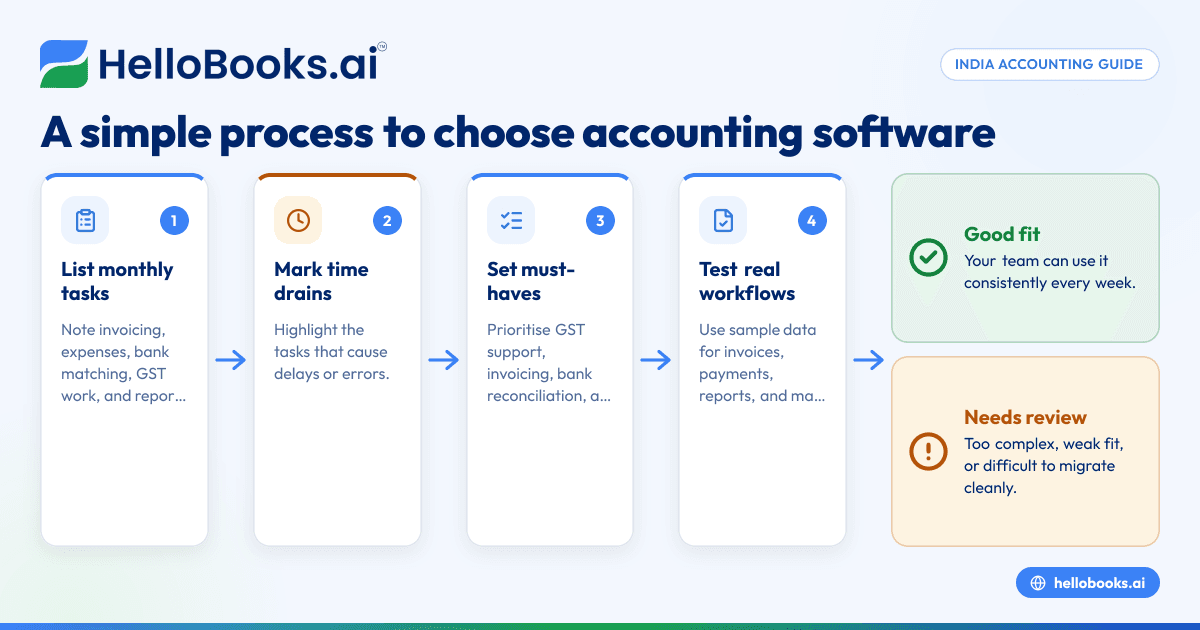
A simple 7-step process to choose the right software
Use this process to make a practical decision.
1. List your monthly accounting tasks
Write down everything your team does in a month. Include invoicing, collections, purchases, expenses, bank matching, GST work, and reporting.
2. Mark the biggest time drains
Circle the tasks that create delays or errors. These are the workflows your software must improve first.
3. Define must-have features
Separate essential features from nice-to-have features. For most Indian small businesses, must-haves include GST support, invoicing, bank reconciliation, and reports.
4. Identify who will use the system
Note whether the users are founders, admins, finance staff, or external accountants. This affects ease-of-use requirements and permission needs.
5. Test real scenarios
Do not rely only on demos. Test actual workflows with sample data. Create invoices, record payments, run reports, and check reconciliation screens.
6. Estimate setup and migration effort
Review what needs to be imported and cleaned up. This includes customer lists, supplier lists, opening balances, unpaid invoices, and chart of accounts.
7. Choose the software your team will use consistently
The best accounting software for small businesses in India is the one that fits your process and gets used every week. Consistent use matters more than feature overload.
Where HelloBooks can help
If your team wants simpler bookkeeping, faster invoicing, easier GST workflows, and cleaner reconciliation, HelloBooks is worth considering. It is designed for small businesses and accounting firms that want to reduce manual accounting work and move beyond spreadsheets or older tools.
Businesses comparing modern cloud tools with older systems may also look at a QuickBooks alternative or other India-focused options, depending on their workflow and location. If you want a system that combines bookkeeping, invoicing, GST support, expenses, reconciliation, and reports in one place, HelloBooks can be a practical choice.
Final thoughts
The best accounting software for small businesses in India should make routine finance work easier, not harder. Focus on your actual workflows, choose software your team can adopt quickly, and prioritise GST, invoicing, reconciliation, and reporting over long feature lists.
If you want to see how HelloBooks can simplify your bookkeeping and accounting workflows, you can book a demo or compare options on the pricing page.
Frequently asked questions
What is the best accounting software for small businesses in India?
The best accounting software for small businesses in India is the one that matches your daily workflow and reduces manual work. For most businesses, that means easy bookkeeping, GST support, invoicing, bank reconciliation, and clear reports.
Is GST support necessary in accounting software for Indian small businesses?
Yes, for most Indian businesses, GST support is an important requirement. It helps keep sales and purchase records organised for tax reporting and reduces manual preparation work.
Should I switch from spreadsheets to accounting software?
If your business has regular invoices, expenses, bank transactions, or GST work, yes. Spreadsheets become harder to control as transaction volume grows, and accounting software usually improves accuracy and reporting speed.
What should I check before moving from Tally or another system?
Check data migration, opening balances, customer and vendor masters, unpaid invoices, and chart of accounts structure. It is also important to test key reports after migration before your full go-live.
Is cloud accounting software good for small businesses in India?
For many small businesses, yes. Cloud software can make collaboration easier, improve access to current reports, and reduce dependency on one device or one person maintaining files.
How do I know if my business needs more automation?
If your team spends too much time on repetitive data entry, bank matching, invoice follow-ups, or month-end clean-up, you likely need more automation. The right software should reduce these manual tasks without making the process harder to understand.


