
Key takeaways
What this article covers, in order:
- Key takeaways
- Why bank reconciliation matters for Indian businesses
- What are the bank reconciliation steps in India?
- How do you reconcile UPI receipts properly?
- How should you reconcile Razorpay settlements?
- A simple monthly bank reconciliation workflow
Bank reconciliation is the process of matching your bank statement with your books so every receipt, payment, fee and transfer is recorded correctly. In India, that often means matching bank credits, UPI collections, cheque deposits and Razorpay settlement payouts, then fixing missing entries, duplicates and bank charges before you close the month.
Key takeaways
- The core of bank reconciliation steps India is simple: compare bank entries with your ledger, identify differences and clear them with evidence.
- UPI receipts and Razorpay settlements often create timing gaps because customer payments and final bank credits do not always happen on the same date.
- Good reconciliation needs clean references, such as invoice numbers, customer names, UTRs and settlement IDs.
- Do bank reconciliation weekly if you have daily collections, and always before GST working and month-end reporting.
- Separate unmatched items into clear buckets: missing in books, missing in bank, bank charges, payment gateway fees, refunds and duplicates.
- Software with bank reconciliation software features can reduce manual matching and speed up monthly close.
Why bank reconciliation matters for Indian businesses
If you run a business in Mumbai, Bengaluru, Pune or a smaller city, your money flow probably comes from multiple channels. Customers may pay by bank transfer, UPI, QR code, payment link or a gateway such as Razorpay. Suppliers may be paid by UPI, IMPS, NEFT or cheque. Staff may also spend using reimbursements and petty cash.
That creates one common problem. Your bank account shows movement every day, but your books may not.
When your books do not match the bank, you can face several issues:
- wrong cash balance
- missed customer receipts
- duplicate expense entries
- unrecorded bank charges
- incorrect outstanding invoices
- delays in month-end close
- confusion during GST working
Reconciliation fixes this. It turns your bank statement into a checked and usable record.
For many small businesses, this work still happens in spreadsheets or after exporting data from Tally. That works for a while, but it becomes slow once transaction volume grows. If your team is already spending hours on this every week, it may be time to look at AI bookkeeping tools that reduce manual matching.
What are the bank reconciliation steps in India?
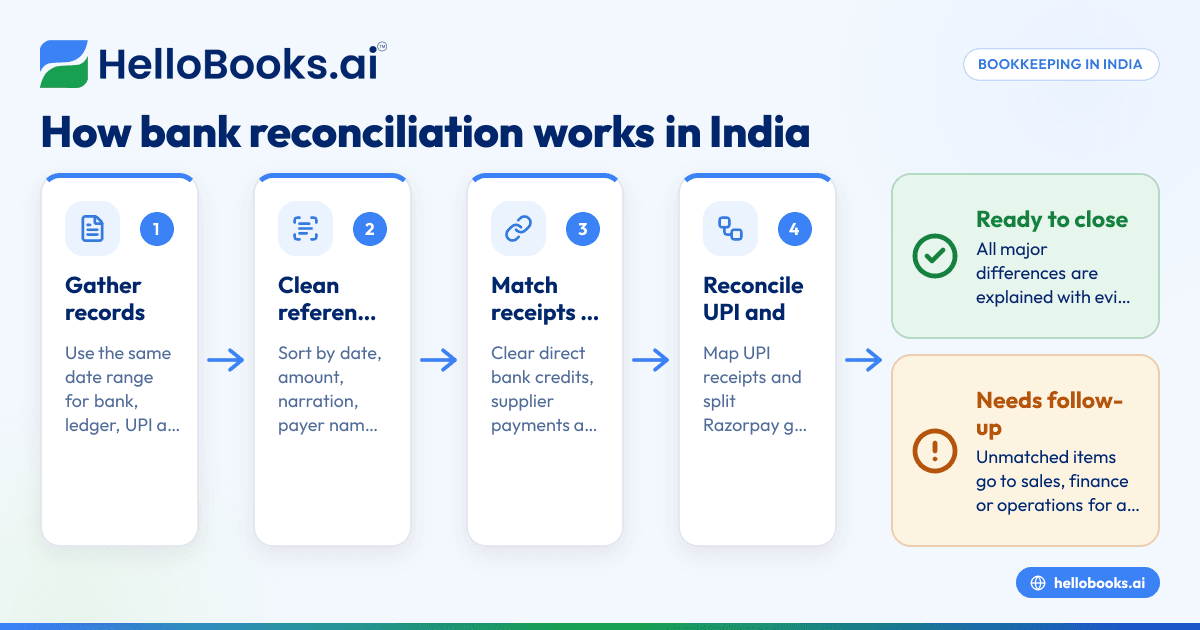
The main steps are: collect your bank statement and book entries, match receipts and payments line by line, mark timing differences, record fees and charges, investigate unmatched entries and close only after every difference is explained.
That short answer sounds easy, but Indian payment flows add complexity. UPI collections can arrive one by one. Payment gateways may settle many customer payments as one net payout. Refunds and gateway fees may be adjusted before the bank credit appears. So the process needs structure.
Step 1: Gather the right records first
Start with the same date range for all records. If you are reconciling April, use 01/04/YYYY to 30/04/YYYY for everything.
Collect:
- bank statement for the account
- cash book or bank ledger from your accounting system
- sales register or invoice list
- UPI collection records
- Razorpay settlement report
- list of refunds, chargebacks or reversals
- expense claims and reimbursement records
Do not begin matching before your source data is complete. Missing exports create false differences.
Step 2: Clean the bank data
Bank narration is often messy. Before matching, sort and standardise what you can.
Useful fields include:
- date
- amount
- debit or credit
- narration
- payer or beneficiary name
- cheque number if any
- UTR or reference number
If you work in spreadsheets, create separate columns for reference numbers and channel type. For example, mark entries as UPI, NEFT, IMPS, cheque, card or gateway settlement. This makes filtering much easier.
Step 3: Match direct customer receipts
Now match simple receipts first. These are direct bank credits that clearly belong to one invoice or one customer.
Examples:
- ₹48,500 received from a customer against Invoice 204
- ₹12,000 received by UPI from a retail buyer
- ₹2,15,000 received by NEFT from a distributor in Pune
For each credit, check:
- does the amount match an open invoice
- does the customer name or reference match
- is the date reasonable
- has the receipt already been recorded once
Clear the easy items first. This reduces noise before you move to complex settlements.
Step 4: Match supplier payments and expenses
Next, match bank debits with expense and supplier entries.
Look for:
- rent, salary and utility payments
- vendor payments by UPI or bank transfer
- loan EMI or bank charges
- card fees, cheque bounce charges or SMS fees
- staff reimbursements
This is also where duplicate posting often appears. A team may record an expense from a bill and then again from the bank feed. If both entries exist, one needs correction.
How do you reconcile UPI receipts properly?
Match each UPI credit to the correct sale or debtor entry using amount, date, payer name and reference. If many small UPI receipts hit one bank account daily, group them by date and channel, then clear exceptions separately.
UPI is convenient for collections, but reconciliation gets harder when customer references are weak. A buyer may send ₹3,250 without invoice details. Another may split one bill into two payments. Some receipts may be advance payments, not invoice settlements.
A practical UPI reconciliation method
Use this process:
- Export or collect all UPI credits for the period.
- Match exact amounts against unpaid invoices.
- Check payer names and timestamps for close matches.
- Separate advances from invoice receipts.
- Mark unknown credits as suspense only temporarily.
- Follow up with sales or customer support for missing references.
If you have a store, clinic, agency or distributor network with many daily UPI transactions, make sure the collection team captures the customer name or invoice number at the time of payment. A small process change can save hours later.
Common UPI issues to watch
1. Same amount, multiple customers
If three customers each paid ₹5,000 on the same day, amount alone is not enough. Use time, payer name and internal sales records.
2. Partial payments
A customer may pay ₹10,000 against a ₹25,000 invoice. Do not close the whole invoice by mistake.
3. Advances
Some UPI receipts are booking advances. Record them as advances until the invoice is issued.
4. Refunds and reversals
If you refund a customer, ensure the debit in bank is linked to the original receipt and sales adjustment.
How should you reconcile Razorpay settlements?
Do not match only the final bank credit. Reconcile the full chain: customer payments received, gateway fees, refunds, reversals and the final Razorpay settlement payout into your bank.
This is where many businesses make mistakes. A payment gateway settlement is usually a net amount. Your bank may receive ₹96,820, but the gross customer collections could be ₹1,00,000. The difference may be fees, taxes on fees, refunds or timing differences across settlement cycles.
The right way to match Razorpay payouts
Use the settlement report, not just the bank statement.
Follow these steps:
- Pull the Razorpay settlement report for the same date range.
- Identify each settlement ID and payout date.
- Sum the gross collections included in that settlement.
- Identify gateway fees, refunds or adjustments.
- Match the net settlement amount to the bank credit.
- Post the fee and adjustment entries separately in your books.
Example
Say your books show customer payments of ₹1,20,000 collected online over two days. Razorpay settles ₹1,17,200 to your bank on 14/04/YYYY. The remaining ₹2,800 may include gateway fees and adjusted refunds.
Your reconciliation should not simply mark ₹1,17,200 as sales. Instead, split it correctly:
- Gross customer receipts: ₹1,20,000
- Gateway fees and charges: ₹2,800
- Net bank settlement: ₹1,17,200
That keeps both revenue and expenses accurate.
Where teams usually go wrong
- booking only net settlement as sales
- ignoring fee deductions
- missing refunds adjusted in settlements
- reconciling by settlement date only
- not preserving settlement IDs in records
If your business depends heavily on payment links or online collections, this is a strong use case for AI accounting software or accounting software in India that can handle settlement-based matching more cleanly.
A simple monthly bank reconciliation workflow
A practical monthly workflow is: prepare data, clear exact matches, reconcile UPI and gateway settlements, record charges, investigate exceptions and lock the period only after all major differences are explained.
Here is a process most small businesses can follow.
Week 1: Import and review
- get the latest bank statement
- import or update ledger entries
- check opening balance against the last closed month
Week 2: Clear exact matches
- match direct customer receipts
- match regular supplier payments
- clear routine expenses and standing instructions
Week 3: Handle UPI and Razorpay
- map UPI receipts to invoices or advances
- reconcile Razorpay settlement reports
- record gateway fees, reversals and refunds
Week 4: Review exceptions
Create an exception list with these columns:
- date
- amount
- bank narration
- book reference
- issue type
- owner
- action needed
Assign each item to sales, finance or operations. Reconciliation slows down when exceptions sit without ownership.
What causes bank differences during reconciliation?
Most differences come from timing, missing entries, bank charges, wrong amounts, duplicate postings, uncleared cheques and net settlements from payment gateways.
Let us break that down.
Timing differences
A cheque issued on 29/04/YYYY may be presented in May. A customer transfer may be recorded by your team one day before it hits the bank. These are normal timing differences.
Missing book entries
Bank charges, interest, refund debits and auto-debits are often missing in books. Add them once verified.
Missing bank entries
Sometimes your team records a receipt or payment, but the bank entry is not there yet. Check whether it was only initiated, not completed.
Duplicate entries
This is common when data comes from more than one source. For example, a sales invoice is marked paid manually and then the bank credit is also posted as a new receipt.
Wrong ledger classification
A transfer between two accounts may be booked as income. A loan EMI may be booked fully as expense. Even if the bank balance matches, the accounting can still be wrong.
Best practices to make reconciliation faster
1. Use one naming method for customers and vendors
If one customer appears under three names, matching gets harder. Keep master data clean.
2. Capture invoice references at collection time
This matters a lot for UPI and bank transfers. Ask the team to request invoice numbers on payment.
3. Reconcile weekly, not only at month-end
A month of unresolved bank entries is hard to untangle. A week is manageable.
4. Keep a separate ledger for gateway fees and charges
This avoids hiding fees inside sales or miscellaneous expenses.
5. Review suspense items every week
Suspense is a temporary holding area, not a permanent solution.
6. Document your rules
Write down how you treat advances, partial payments, settlement fees, reversals and internal transfers. This keeps the process consistent across staff changes.
Can ai bank reconciliation help Indian SMEs?
Yes. ai bank reconciliation can speed up matching by identifying likely pairs across bank entries, invoices, UPI receipts and settlements, while still leaving final review and approval with your finance team.
The biggest benefit is time. Instead of checking every line manually, your team reviews suggested matches and focuses on exceptions. This is useful when you process many low-value receipts, gateway settlements or repeat vendor payments.
In practice, good automation can help with:
- exact amount matching
- one-to-many and many-to-one matching
- repeated bank charges
- settlement-based grouping
- exception lists for manual review
For Indian SMEs, the value is highest when reconciliation is frequent and transaction volume is rising. If your current process depends on spreadsheets, screenshots and WhatsApp messages to confirm payments, a proper accounting software for small business setup can reduce back-and-forth and improve month-end speed.
A bank reconciliation checklist for month-end
Use this before you close the month:
- opening balance matches last month’s closing balance
- all bank statement lines are imported or available
- direct receipts are matched to invoices or advances
- supplier payments are matched to bills or expenses
- UPI credits are classified correctly
- Razorpay settlements are reconciled gross to net
- bank charges, interest and auto-debits are posted
- duplicates are identified and corrected
- suspense items are reviewed and explained
- unreconciled items are assigned for action
If you are using software, keep an audit trail of who matched, edited or approved entries. That is useful for internal review and financial reporting. If reconciliation involves tax treatment or filing implications, remember this article is general information, not tax or legal advice.
When to move beyond spreadsheets
Spreadsheets are flexible, but they become fragile when:
- multiple people update the same file
- payment volume grows quickly
- UPI and gateway receipts increase
- month-end close takes too long
- errors keep reappearing
- reporting depends on manual clean-up
At that stage, businesses usually want one place for bookkeeping, invoicing, expenses and reconciliation. If that sounds familiar, invoice software and expense management software in the same workflow can reduce reconciliation errors before they start.
HelloBooks is built for this kind of daily finance work. If you want to reduce manual matching, manage collections and keep books cleaner through the month, you can explore pricing or book a demo.
Frequently asked questions
How often should I do bank reconciliation?
If your business receives daily payments, do it weekly. If volumes are low, at least do it before month-end close. Waiting too long increases unmatched items and delays reporting.
Should I match Razorpay by payout amount only?
No. Match the gross customer collections, fees, refunds and the final net payout together. If you record only the payout amount, sales and fee expenses can be wrong.
What should I do with unmatched UPI credits?
Check the amount, payer name, time and sales records first. If still unclear, keep the item in suspense temporarily and get confirmation from sales or the customer. Do not leave old suspense items unresolved for months.
Are bank charges part of reconciliation?
Yes. Bank charges, SMS charges, cheque bounce charges, interest and auto-debits often appear first in the bank statement. They must be posted correctly in books during reconciliation.
Can I do bank reconciliation in Tally or do I need new software?
You can reconcile in Tally if your process is simple and volumes are manageable. But if you handle many UPI receipts, gateway settlements and exceptions, a modern Tally alternative may save time and reduce manual work.
Does bank reconciliation affect GST work?
Indirectly, yes. Clean bank and sales records make it easier to verify receipts, expenses and monthly figures used for returns. Reconciliation itself is not the same as filing, but it supports accurate records and smoother work with GST return filing software.