


Key takeaways
What this article covers, in order:
- Why this comes up / what goes wrong
- Step-by-step
- Example (fictional figures)
- Common mistakes
- Doing this in HelloBooks
- Frequently asked questions
AI-powered e-invoice compliance is the process where AI-enabled software helps businesses create and manage e-invoices that meet government GST requirements automatically. This includes generating the Invoice Reference Number (IRN) and embedding a signed QR code on invoices without manual uploading to the government portal.
Why this comes up / what goes wrong
Many Indian small businesses face challenges with e-invoice compliance because the process requires generating an IRN and QR code for all B2B invoices above the ₹5 crore turnover threshold. Manual entry and portal uploads are time-consuming and error-prone. Mistakes in invoice data, delays in IRN generation, or missing the QR code can lead to compliance issues and penalties. Business owners who keep records in spreadsheets, Tally, or bill books often struggle to keep pace with the technical requirements.
Step-by-step
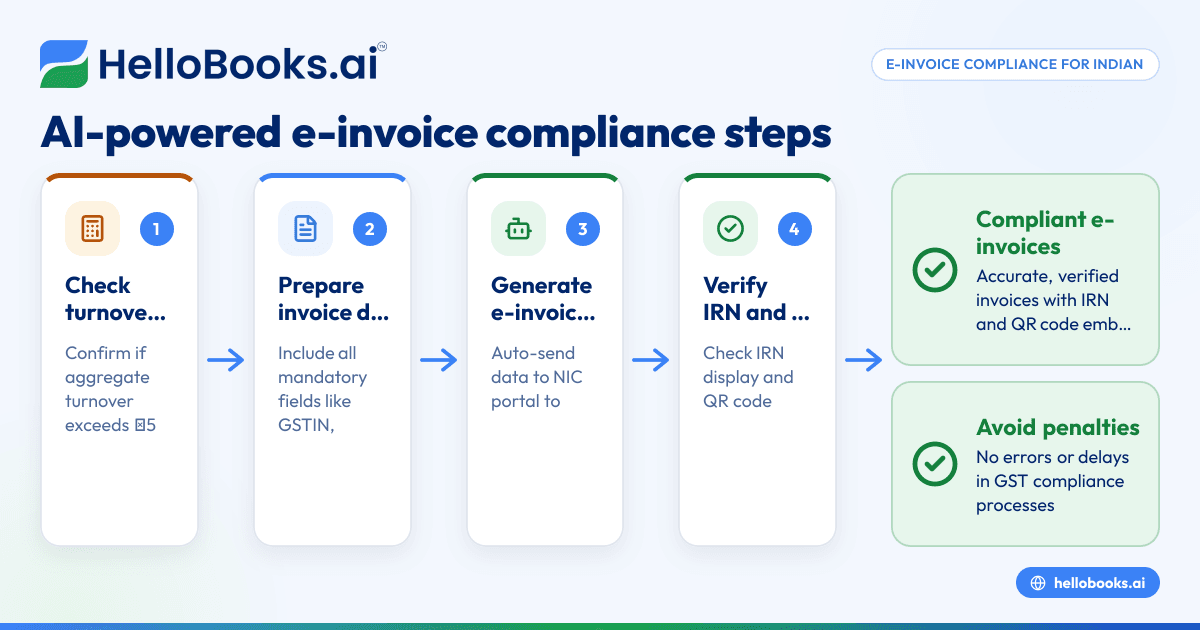
- Check your turnover threshold: Confirm if your aggregate turnover across all GSTINs for any financial year since 2017-18 exceeded ₹5 crore. If yes, you must issue e-invoices with IRN for B2B supplies from 1 August 2023 (Notification No. 10/2023-Central Tax).
- Prepare invoice data accurately: Ensure your invoice includes all mandatory fields such as GSTIN, HSN/SAC codes, invoice value, and buyer details. Errors here cause IRN rejections.
- Generate the e-invoice with AI-powered software: Use software that automatically formats your invoice data and sends it to the NIC portal to obtain the IRN and signed QR code. This saves manual JSON file uploads.
- Verify the IRN and QR code: The software should display the IRN and embed the signed QR code on the invoice PDF and printout as per CGST Rule 46.
- Handle NIC rejections: If the NIC portal rejects the e-invoice due to errors, correct the data as indicated by the error code and retry submission.
- Manage cancellations within the permitted window: Cancel e-invoices as allowed by NIC rules directly from your software interface.
- Use the e-invoice data for downstream GST compliance: The e-invoice record should feed into your e-way bill generation and GSTR-1 filing processes.
For more details on preparing compliant invoices, see our section on GST invoicing.
Example (fictional figures)
On 15/09/2023, ABC Traders with a turnover over ₹5 crore issues a B2B invoice for goods sold worth ₹1,00,000 (assumed GST rate 18%). The AI software generates the e-invoice as follows:
Taxable value = ₹1,00,000
CGST @ 9% = ₹1,00,000 × 9% = ₹9,000
SGST @ 9% = ₹1,00,000 × 9% = ₹9,000
Total GST = ₹9,000 + ₹9,000 = ₹18,000
Invoice total = ₹1,00,000 + ₹18,000 = ₹1,18,000
The software sends this invoice data to NIC and receives an IRN and signed QR code instantly. These are embedded on the invoice PDF, which ABC Traders shares with the buyer.
Common mistakes
- Ignoring the turnover threshold: Not verifying if turnover exceeds ₹5 crore leads to non-compliance. Always check your aggregate turnover.
- Incorrect invoice data: Missing or wrong GSTIN, HSN codes, or invoice amounts cause IRN rejections. Double-check all invoice fields.
- Manual portal uploads: Uploading JSON files manually increases errors and delays. Use AI-powered software to automate submission.
- Not embedding QR code: The e-invoice must carry a QR code with the IRN as per CGST rules. Ensure your software includes it on PDFs.
- Delaying cancellations: Cancel e-invoices within NIC's permitted window using your software to avoid penalties.
Refer to our GST invoice validator tool to pre-check invoice data before submission.
Doing this in HelloBooks
HelloBooks supports e-invoicing (IRN and signed QR) for businesses over the ₹5 crore threshold. When you save a B2B invoice above this limit, HelloBooks automatically generates the IRN and signed QR on the NIC portal. Both are embedded on the printed and shared PDF invoice. NIC rejections appear with error codes so you can fix and retry from the same screen. You can also cancel e-invoices within the NIC-permitted window directly in HelloBooks. The e-invoice data feeds into e-way bills and GSTR-1 filing, streamlining your GST compliance. Learn more at e-invoicing (IRN and QR).
Frequently asked questions
What is AI-powered e-invoice compliance?
It is the use of AI-enabled software to automate the creation, validation, and submission of e-invoices with IRN and QR codes as mandated by GST rules, reducing manual effort and errors.
Who must comply with e-invoice rules?
Any registered person whose aggregate turnover exceeded ₹5 crore in any financial year from 2017-18 onwards must issue e-invoices for B2B supplies starting 1 August 2023 (Notification No. 10/2023-Central Tax).
How does the IRN and QR code help?
The IRN is a unique Invoice Reference Number generated by the NIC portal that authenticates the invoice, while the QR code embeds this IRN for quick verification by tax authorities and buyers as per CGST Rule 46.
Can I cancel an e-invoice after generation?
Yes, cancellations are allowed within a NIC-permitted window. AI-powered software like HelloBooks lets you cancel e-invoices from the same interface used for generation.
Do I need to manually upload JSON files to the government portal?
If you use AI-powered software, it automatically sends the invoice data to the NIC portal and obtains the IRN and QR code, saving you from manual JSON uploads.
Where can I validate my GST invoice before submission?
You can use online tools like the GST invoice validator to check your invoice data for errors before submitting for e-invoicing.
Key takeaways
- Businesses with turnover over ₹5 crore must issue e-invoices with IRN and QR from 1 August 2023.
- AI-powered software automates e-invoice creation, IRN generation, and QR embedding, reducing errors.
- Accurate invoice data is essential to avoid NIC rejections.
- E-invoice data integrates with e-way bills and GSTR-1 filing for smoother GST compliance.
- HelloBooks supports automatic IRN and QR generation, NIC rejection handling, and cancellations.
- Use GST invoice validators to pre-check invoices and ensure compliance.
Start managing your GST compliance efficiently by using HelloBooks. You can Start on the Free plan (200 transactions a year, GSTR-1 and 3B filing for one GSTIN).
This article is general information, not tax or legal advice. Rules change; confirm the current position on gst.gov.in or with your chartered accountant before acting.


