
Key takeaways
What this article covers, in order:
- Key takeaways
- What is AI bookkeeping for small business?
- Why Indian small businesses are moving to AI bookkeeping
- What AI bookkeeping software should actually do
- How to choose the right AI bookkeeping setup in India
- Features that matter most for Indian SMEs
AI bookkeeping for small business means using software to capture transactions, categorise entries, match bank payments, create invoices and keep books updated with less manual work. In India, the right setup is not just about automation. It also needs to fit GST, Indian banking workflows, approval habits and the way your team already works in Tally, spreadsheets or WhatsApp.
Key takeaways
- The best AI bookkeeping setup saves time on data entry, reconciliation and month-end closing.
- For Indian businesses, GST support, bank matching and invoice workflows matter more than flashy dashboards.
- You should choose software based on your transaction volume, team process and compliance needs.
- AI should help your accountant work faster, not replace financial review and judgement.
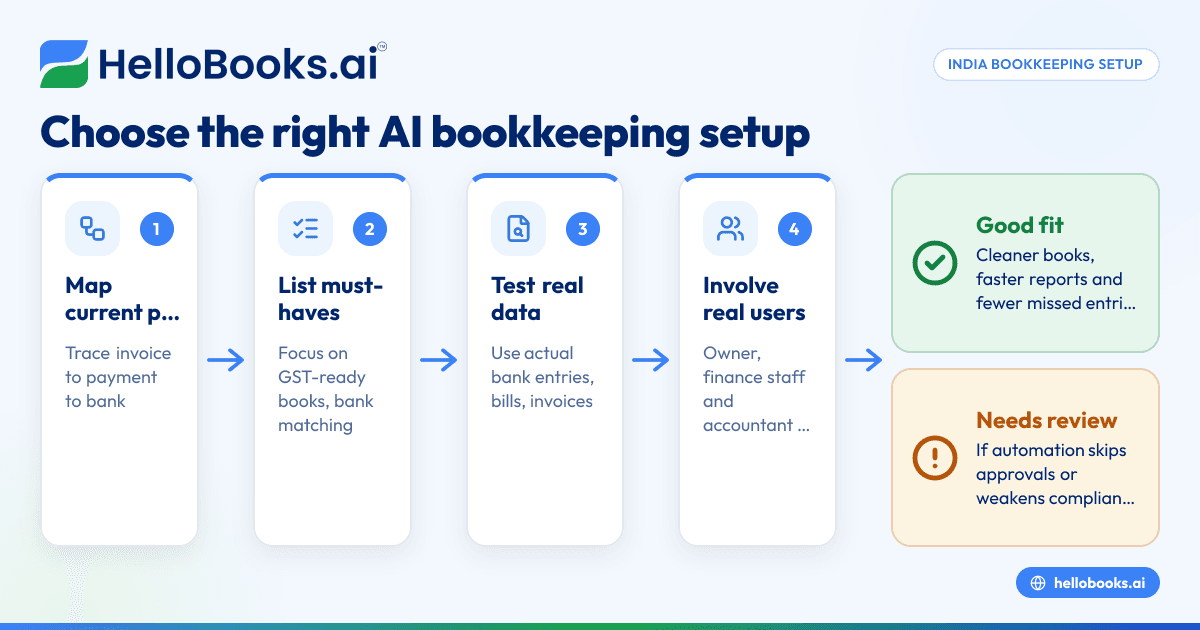
- A good setup gives you cleaner books, faster reports and fewer missed entries.
- Before you switch, map your current process from invoice to payment to bank reconciliation.
What is AI bookkeeping for small business?
AI bookkeeping for small business is software that automates repetitive accounting work. It pulls financial data from invoices, bank statements and expense records, suggests ledger entries, matches receipts to payments and keeps your books more current.
For a small business in India, this usually means reducing manual work in spreadsheets or Tally exports. Instead of entering every sales invoice, vendor bill or bank transaction by hand, the system helps classify and reconcile them faster.
That does not mean finance becomes fully automatic. You still need review, approvals and accounting judgement. For example, a payment could be an advance, a refund or a capital expense. AI can suggest the likely treatment, but your finance lead or accountant should confirm it.
The practical benefit is simple. Your team spends less time on repetitive posting and more time checking exceptions, following up with customers and understanding cash flow.
Why Indian small businesses are moving to AI bookkeeping
Many Indian businesses do not have a bookkeeping problem because they lack effort. They have a process problem. Data sits in too many places.
Sales may come from WhatsApp, IndiaMART or a field sales team. Payments may come through UPI, bank transfer or Razorpay. Expenses may arrive as PDF bills, email attachments and paper invoices. Then someone has to update the books, match the collections and prepare GST numbers.
This is where AI bookkeeping becomes useful. It helps bring those records into one workflow and reduces repeated manual entry.
Common pain points in Indian businesses
Small and growing businesses often face the same issues:
- Invoices are created in one place and recorded in another.
- Bank statements are checked manually at month-end.
- UPI collections are hard to match when references are unclear.
- Vendor bills are stored in email or WhatsApp and get missed.
- GST data needs clean records, but the source entries are inconsistent.
- Owners wait too long for accurate profit and cash flow numbers.
A Mumbai distributor, a Pune agency and a Bengaluru services firm may look different on the surface. But their back-office pain is often the same. Too much effort goes into collecting data. Not enough goes into using it.
What AI bookkeeping software should actually do
When evaluating software, focus on the accounting jobs that take time every week. Good software should reduce those tasks without making your process harder.
1. Capture and organise transaction data
The first job is pulling financial records into one system. That includes:
- Sales invoices
- Vendor bills
- Bank transactions
- Expense receipts
- Credit notes
- Payment records
If your current workflow relies on shared drives, email folders and Excel trackers, this alone can save hours every week.
2. Suggest categorisation
AI tools can suggest account heads based on past entries, vendor names, invoice patterns and transaction descriptions. This helps with routine items such as rent, courier charges, software subscriptions and travel expenses.
The key word is suggest. Your team should be able to review, correct and build rules over time.
3. Reconcile bank and payment transactions
Reconciliation is where many small businesses lose time. A good system should help match invoices, receipts and bank entries quickly. It should also highlight unmatched items and possible duplicates.
If this is a major pain area, look closely at bank reconciliation software features before choosing a setup.
4. Support invoicing and collections
Bookkeeping starts getting easier when invoicing and accounting stay connected. If invoices are created outside the books, errors increase. A system with invoice software can reduce double entry and improve follow-up on outstanding payments.
5. Help with GST-ready records
Even if you work with an external accountant or CA, your books need to stay clean through the month. That makes GST reporting easier and reduces last-minute corrections. If GST filing is part of your workflow, GST return filing software can matter depending on your volume and process.
This article is general information, not tax or legal advice. GST treatment and filing obligations depend on your business and transaction type.
How to choose the right AI bookkeeping setup in India
The right setup depends less on company size and more on complexity. A ₹30 lakh service business and a ₹3 crore trading business can need very different workflows.
Start with your current process
Before comparing tools, write down how your books are updated today.
Use these questions:
- Where do sales invoices get created?
- How are collections recorded?
- Where do vendor bills arrive?
- Who enters expenses?
- How often are bank accounts reconciled?
- Who reviews GST data?
- How are month-end reports prepared?
This exercise shows where delays and errors actually happen. Without it, you may buy software that automates the wrong task.
Choose based on transaction patterns, not only headcount
A business with five people may still process hundreds of transactions a week. Another with twenty people may have simple monthly billing.
Look at:
- Number of bank transactions
- Number of customer invoices
- Number of vendor bills
- Number of expense claims
- GST complexity
- Number of entities or branches
If you operate in multiple cities, such as Bengaluru and Jaipur, you may also need better control over branch expenses and approvals.
Check how it handles Indian business realities
This is where many buying decisions go wrong. A generic accounting tool may look polished but fail on day-to-day Indian workflows.
Look for support for:
- GST-compliant sales and purchase records
- E-invoicing needs, if applicable to your business
- UPI and bank payment matching
- Indian invoice formats
- Multi-user access for owners, finance staff and accountants
- Audit trail and approval visibility
- Clean export and reporting
If you need invoicing under Indian GST workflows, e-invoicing software may also be relevant depending on your turnover and compliance needs.
Make sure it is easy for non-accountants
In many small businesses, the owner, admin manager or operations executive enters part of the data. If the product assumes a fully trained accounting team, adoption will suffer.
The best setup is one your team will actually use every day.
Features that matter most for Indian SMEs
Some features sound impressive in demos but add little day-to-day value. Others quietly save hours every month.
Smart bank reconciliation
This is often the biggest win. A good system should identify likely matches, learn from repeated patterns and keep unmatched items visible.
For example, if a customer pays three invoices in one transfer, the software should help your team map that correctly. If a vendor refund appears unexpectedly, it should flag it for review rather than post it blindly.
Expense capture and control
Small businesses often struggle with employee expenses, especially when proofs come over WhatsApp or email. A structured expense management software workflow can reduce missed claims and poor recordkeeping.
This matters even more when teams travel across cities or work from multiple branches.
Useful reporting, not just attractive dashboards
You need reports that answer real questions:
- What is outstanding from customers?
- Which expenses increased this month?
- Are bank balances matching the books?
- What is the GST impact of current entries?
- Which vendors are overdue?
The right AI accounting software should make these answers easier to get without forcing manual compilation every month.
A clean migration path from spreadsheets, Tally or QuickBooks
Many businesses want automation but fear migration. That concern is reasonable. Historical data, opening balances and ledger structures can get messy.
If you are currently on Tally, you may want to compare a Tally alternative. If your process still depends on QuickBooks history, a QuickBooks alternative comparison may help. The key is not just feature matching. It is preserving control during the move.
Red flags to watch before you buy
Choosing the wrong bookkeeping setup creates more work, not less. Watch for these red flags.
It automates entry but not review
If the software posts transactions quickly but gives poor visibility into exceptions, your team may lose trust in the books. Review workflows matter as much as automation.
It looks strong for accountants but weak for business users
A small business usually needs both. Owners want quick visibility. Finance staff need control. External accountants need clean records. If only one group can use the software comfortably, adoption will stall.
It does not fit your compliance workflow
This is especially important in India. Your books, invoice process and GST records must stay aligned. A mismatch creates month-end stress.
If you are evaluating accounting software in India, check whether the product supports your actual process, not just broad accounting labels.
It has no clear onboarding plan
The first 30 to 60 days matter. Ask how opening balances, masters, invoices, bank data and pending reconciliations will be handled. If the setup plan is vague, delays are likely.
A simple way to evaluate options
You do not need a long software committee process. Use a practical scorecard.
Step 1: List your must-haves
Separate essentials from nice-to-haves.
Must-haves might include:
- Bank reconciliation
- GST-ready books
- Invoice creation
- Expense tracking
- Multi-user access
- Accountant-friendly reports
Step 2: Test with your real data
Do not rely only on a generic demo. Ask to see how the software handles:
- One month of bank transactions
- Five to ten vendor bills
- A few customer invoices
- Partial payments
- One reversal or refund
- Typical expense claims
This is where strengths and weaknesses become obvious.
Step 3: Involve the actual users
The owner should review reporting. The finance executive should test entry and reconciliation. Your accountant should check ledgers, exports and closing logic.
If needed, you can also find an accountant who is comfortable working with modern bookkeeping systems.
Step 4: Compare effort saved, not just features
The best software is not the one with the longest feature list. It is the one that removes the most weekly effort with the least friction.
That is why many businesses now look for accounting software for small business that combines bookkeeping, invoicing and reporting in one place.
What a good setup looks like in practice
A strong AI bookkeeping setup usually follows a simple pattern.
Daily
- Sales invoices are created and shared from one system.
- Vendor bills and expenses are captured as they arrive.
- Bank and payment entries start flowing into the books.
- Routine categorisation is suggested automatically.
Weekly
- The finance team reviews unmatched receipts and payments.
- Expense claims are approved and posted.
- Outstanding receivables are followed up.
- Exceptions are cleaned before they become month-end problems.
Monthly
- Bank reconciliation is largely complete.
- Reports are available faster.
- GST preparation is easier because the books are cleaner.
- The owner gets a clearer view of profit, cash and dues.
That is the goal. Not perfect automation. Better control with less manual effort.
Where HelloBooks fits
If you want one system for bookkeeping, invoicing, GST workflows, bank reconciliation, expenses and reports, HelloBooks is built for this use case. It is designed for Indian businesses that want less manual accounting work and more timely numbers.
If you are comparing options, you can look at HelloBooks as accounting software in India or explore it as AI bookkeeping. The practical test is simple: can your team close faster, reconcile with less effort and get cleaner books every month?
If you want to reduce bookkeeping effort without adding complexity, book a demo at book a demo or compare options on the pricing page.
Frequently asked questions
Is AI bookkeeping suitable for a very small business in India?
Yes, if you spend too much time on invoices, expenses and bank matching. Even a small business benefits when records are cleaner and reports are available faster. The value depends more on transaction volume than team size.
Can AI bookkeeping replace my accountant or CA?
No. It helps automate routine work and improves record quality. Your accountant or CA still matters for review, tax treatment, adjustments and compliance decisions.
Is AI bookkeeping useful if I already use Tally?
Yes, especially if your team still does manual entry, delayed reconciliations or spreadsheet-based tracking around Tally. Many businesses keep accounting habits from older systems and need a more connected workflow. That is often where modern automation helps most.
What should I check before moving from spreadsheets to bookkeeping software?
Check your opening balances, customer and vendor masters, pending invoices and bank reconciliation status. Also decide who will own approvals and monthly review. A clean migration starts with a clear process.
Does AI bookkeeping help with GST in India?
It can help indirectly by keeping sales, purchases and bank-linked records more accurate through the month. That reduces clean-up work before filing. But you should still review GST treatment carefully because tax positions vary by transaction.
How long does it take to see benefits after switching?
Many businesses see early benefits within the first month if invoicing and bank reconciliation move into one workflow. The biggest gains usually appear after a full month-end cycle. That is when missed entries, delays and reporting gaps become easier to reduce.


