
Key takeaways
What this article covers, in order:
- Key takeaways
- What is AI bookkeeping for small business in India?
- Why small businesses in India are moving to AI bookkeeping
- Core benefits of AI bookkeeping for Indian small businesses
- Who should adopt AI bookkeeping first?
- How to set up AI bookkeeping for your business in India
AI bookkeeping for small business in India means using software to capture transactions, organise books, reconcile bank entries, generate invoices, track GST and prepare reports with much less manual work. For Indian SMEs that still depend on spreadsheets, Tally exports and WhatsApp approvals, it can reduce data entry, speed up month-end closing and improve accuracy.
Key takeaways
- AI bookkeeping helps small businesses in India automate routine accounting work such as data capture, categorisation and bank reconciliation.
- It is most useful for businesses with growing transaction volume, multiple payment channels, GST compliance work and limited finance bandwidth.
- A good setup starts with clean masters, clear approval rules, correct GST treatment and a disciplined bank reconciliation process.
- AI does not remove the need for review. Owners and accountants still need to check exceptions, tax treatment and final reports.
- Common mistakes include poor chart of accounts design, duplicate entries, missing supporting documents and treating automation as “set and forget”.
- The best results come when bookkeeping, invoicing, expenses and reporting are handled in one connected workflow.
What is AI bookkeeping for small business in India?
AI bookkeeping uses software to automate the repetitive parts of maintaining books of accounts. This includes reading invoices, extracting key fields, suggesting ledger categories, matching bank transactions, flagging exceptions and preparing reports.
For a small business in India, this usually sits between daily operations and final accounting review. Sales may come from GST invoices, UPI collections, Razorpay settlements or bank transfers. Expenses may come through vendor bills, employee reimbursements and card statements. AI helps bring these into one system faster.
This does not mean the software “thinks like a CA” in every case. It means the system can learn patterns, apply rules and reduce manual effort. Human review still matters, especially for GST treatment, unusual entries and month-end adjustments.
For example, a trading business in Mumbai may receive 200 customer payments in a month across bank transfer, UPI and payment gateway settlements. A manual process often means downloading statements, copying rows into Excel and matching invoices one by one. With AI bookkeeping, much of that matching can happen automatically, with only unmatched items needing attention.
Why small businesses in India are moving to AI bookkeeping
Manual bookkeeping breaks as the business grows
In the early stage, many founders manage books in spreadsheets or with help from an external accountant. That works when transaction volume is low. It becomes painful when the business starts issuing more invoices, hiring employees, handling GST every month and collecting payments through several channels.
The first signs are easy to recognise:
- Bank reconciliation gets delayed
- GST working takes too long
- Founders chase missing bills on WhatsApp
- Reports are available weeks late
- The team is unsure which receivables are actually overdue
At that point, the problem is not only time. It is also visibility. If books are updated late, decisions are based on old numbers.
Indian businesses have more data sources than before
A typical small business in India now deals with:
- GST invoices
- e-invoicing in applicable cases
- UPI receipts
- bank transfers
- payment gateway settlements
- vendor bills shared on email or WhatsApp
- employee expenses
- Tally data from past years
Each source creates records that need to be captured and matched. Manual accounting turns this into a daily burden.
Using AI accounting software helps reduce that burden by connecting transaction capture, categorisation and reconciliation into one workflow.
Core benefits of AI bookkeeping for Indian small businesses
1. Less manual data entry
This is the most obvious benefit. Instead of entering every invoice, bill or payment line by line, the software can capture details from documents and transactions automatically.
That saves time for:
- founders who still do books themselves
- finance executives handling daily entries
- accountants reviewing books at month-end
A Pune-based services business issuing 300 invoices a month can save many hours just by automating invoice creation, payment tracking and ledger posting.
2. Faster bank reconciliation
Bank reconciliation is where many small businesses lose time. Statements come in one format. books are updated in another. Payment references are incomplete. Gateway settlements are grouped. UPI narration is inconsistent.
Good bank reconciliation software can match many transactions automatically based on amount, date, customer and reference patterns. That means the team only reviews exceptions.
Faster reconciliation gives a clearer view of:
- cash balance
- pending collections
- duplicate payments
- unreconciled expenses
- month-end closing status
3. Better GST readiness
AI bookkeeping does not replace professional tax advice, but it helps keep records clean for GST work. If invoices, vendor bills and ledger classifications are captured correctly, return preparation becomes easier.
This is especially useful when the business has:
- frequent inward and outward invoices
- multiple GST rates
- B2B and B2C sales
- credit notes and debit notes
- interstate transactions
If your process includes e-invoices, using e-invoicing software along with bookkeeping can reduce duplication and errors.
4. Stronger control over expenses
Expense leakage is common in growing businesses. Bills are lost. Reimbursements are claimed twice. Small subscriptions go unnoticed. Vendor payments are made without complete support.
With expense management software, businesses can collect bills, track approvals and maintain a proper trail. This is useful not just for compliance but also for cost control.
5. Timely reports for decisions
Good bookkeeping is not only about compliance. It is also about running the business better. If books are updated regularly, owners can see:
- profit by month
- receivables ageing
- payables ageing
- expense trends
- cash flow position
That helps answer practical questions. Can you hire this quarter? Which customers are paying late? Which expense categories are growing faster than revenue?
For many small firms, moving from delayed spreadsheets to accounting software for small business is the difference between reacting late and acting on time.
Who should adopt AI bookkeeping first?
AI bookkeeping is especially useful for businesses that fit one or more of these cases:
Transaction volume is rising
If your team is handling dozens or hundreds of entries every week, manual bookkeeping will soon become a bottleneck.
You sell through multiple payment channels
If collections come via UPI, bank transfer, payment links and gateways, reconciliation complexity increases quickly.
GST work is becoming painful
If every return cycle turns into a scramble for invoices, missing bills and ledger checks, your process needs automation.
You still depend on spreadsheets or partial Tally workflows
Many businesses use Tally for final accounting but still manage invoices, expenses and reconciliations outside it. That creates duplication. If you are reviewing options, a Tally alternative may be worth considering.
Your founder or CA is doing too much manual review
If key people are spending hours on data cleanup, it is usually a process problem, not just a staffing problem.
How to set up AI bookkeeping for your business in India
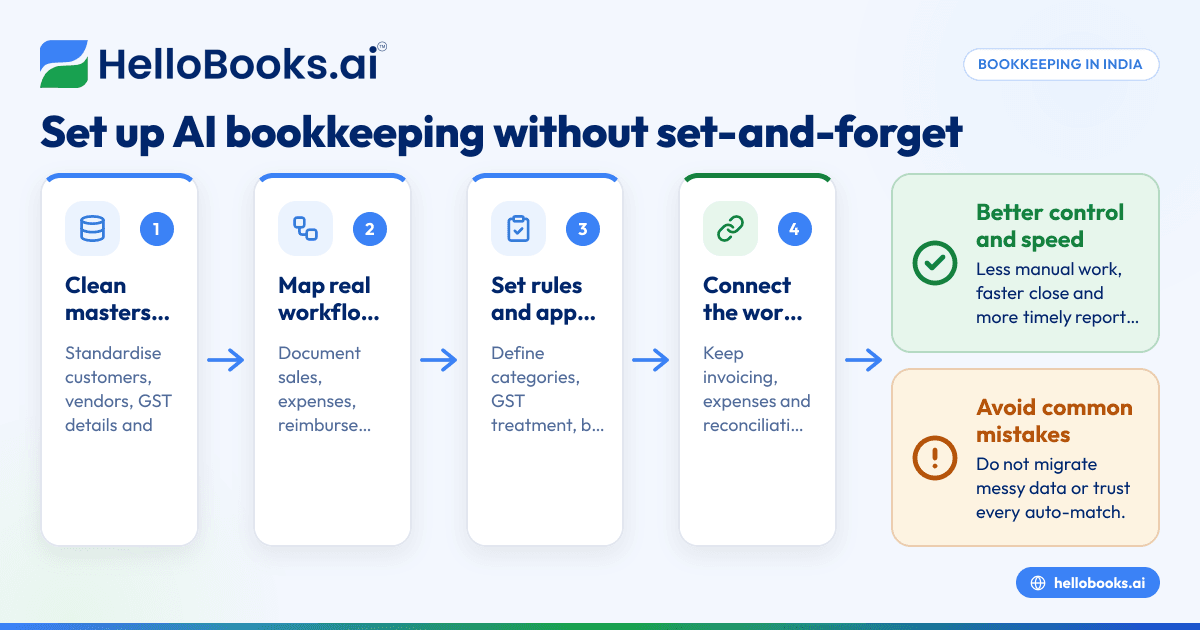
A successful setup is more about process than software. Follow these steps.
1. Clean up your masters before migration
Start with the basics:
- customer list
- vendor list
- chart of accounts
- GST details
- opening balances
- unpaid invoices and bills
Remove duplicates. Standardise names. Confirm GSTINs where relevant. Make sure ledger names are not inconsistent across teams.
If your old data comes from spreadsheets, Tally or another system, clean data first and migrate second.
2. Map your real workflows
Document how transactions actually happen in your business.
For example:
- Sales team creates a quotation.
- Finance issues invoice.
- Customer pays by bank transfer or UPI.
- Finance matches payment.
- GST records are reviewed.
- Reports are generated monthly.
Do the same for purchases, expenses and reimbursements. This step matters because software should match the business process, not create confusion.
3. Set rules for categorisation and approvals
Decide in advance:
- which expense heads to use
- which GST treatment applies to common transactions
- who approves bills and reimbursements
- how credit notes are recorded
- how advances are adjusted
Without these rules, automation may speed up inconsistency instead of solving it.
4. Connect invoicing, expenses and reconciliation
The biggest gains come when the process is connected end to end. If invoices are created in one place, expenses in another and reconciliations in Excel, errors remain.
Using invoice software with bookkeeping helps keep sales records and collections in sync. The same is true for expenses and vendor payments.
5. Define a monthly review checklist
AI can automate entry and matching, but final review should still be structured. Create a checklist for every month:
- Review bank reconciliation.
- Check unmatched receipts and payments.
- Verify major expense categories.
- Review GST-related entries.
- Confirm receivables and payables ageing.
- Lock the period after review.
This article is general information, not tax or legal advice. For GST positions, filing treatment or complex adjustments, consult your accountant.
6. Train the team on exceptions, not just screens
Most software rollouts fail because teams are taught where to click, not what to check. Train users on:
- how to spot duplicate entries
- how to handle missing invoices
- how to review GST classification
- when to escalate unusual transactions
If personal data is part of invoices, employee records or expense documents, handle it carefully and align your internal practices with the DPDP Act 2023 where applicable.
Common mistakes to avoid
Treating AI as fully automatic
AI bookkeeping can reduce manual work. It cannot remove judgement. If the team assumes every suggested category or match is correct, mistakes can flow into reports.
Always review exceptions and high-value entries.
Migrating bad data into a new system
If customer names are duplicated, ledgers are messy and opening balances are wrong, a new system will not fix the problem by itself. It will only make the mess move faster.
Clean your data before go-live.
Ignoring GST edge cases
Not every transaction can be auto-classified safely. Credit notes, reverse charge situations, mixed supplies or unusual vendor documents may need human review. Be cautious when the tax treatment is not obvious.
If GST is a major pain point, businesses often benefit from software designed to support bookkeeping and GST return filing software together.
Not reconciling payment gateway settlements properly
Many businesses record gross sales and then struggle to account for settlement deductions, fees and timing differences. This is common with online collections and marketplace models.
Make sure your process captures:
- invoice amount
- gateway fee
- tax on fee where applicable
- net settlement
- settlement date
Keeping too many ledgers
A very detailed chart of accounts may look “professional” but often becomes hard to maintain. Small businesses need enough detail for decision-making, not hundreds of rarely used heads.
Keep your structure simple and consistent.
No owner-level reporting rhythm
Even with great software, books create value only when someone reviews them. Founders should have a clear monthly rhythm to review revenue, costs, receivables, cash and tax-ready records.
How to choose the right AI bookkeeping software in India
Look for India-specific workflows
Your software should fit Indian business reality. That includes GST, e-invoicing where relevant, Indian invoice formats, INR reporting and practical bank reconciliation for common payment methods.
This is why many firms prefer accounting software in India over a generic global tool.
Prioritise ease of use
A small business does not need a heavy implementation. The software should be simple enough for daily users and strong enough for accountants. If the team avoids using it, automation benefits disappear.
Check whether it reduces duplicate work
Ask a simple question: will the same transaction be entered twice anywhere? If yes, the process is still broken.
Make sure reports are easy to understand
The right software should help you answer everyday business questions quickly. You should not need to export everything into Excel just to understand collections or expenses.
Think beyond bookkeeping alone
As your business grows, you may need invoicing, expenses, reconciliation and reporting in one place. That is where connected systems are more helpful than isolated tools.
If you are replacing older desktop-heavy workflows or fragmented systems, compare whether a QuickBooks alternative or more modern bookkeeping setup better matches your process.
What a practical rollout looks like for a small business
A realistic rollout for a small business in Bengaluru or Surat usually happens in phases.
Phase 1: Get current-month entries right
Focus first on current invoices, expenses and bank feeds. Do not try to perfect years of old data before starting.
Phase 2: Clean receivables and payables
Once the live process works, reconcile customer dues and vendor balances. This improves trust in the numbers.
Phase 3: Tighten month-end close
Build a repeatable close process. Aim to close books in days, not weeks.
Phase 4: Use reports for decisions
Once the books are reliable, use dashboards and reports to improve pricing, collections and cash planning.
For businesses that need help during setup or review, it can also help to find an accountant who understands digital workflows and Indian compliance needs.
If you want to see how HelloBooks can help automate bookkeeping, invoicing, reconciliation and GST-ready workflows for your business, you can book a demo or compare options on the pricing page.
Frequently asked questions
Is AI bookkeeping suitable for very small businesses in India?
Yes, especially if the business has recurring invoices, regular expenses and more than one payment channel. Even a small team can save time if manual entry and reconciliation are taking hours every week.
Can AI bookkeeping replace an accountant?
No. It can automate routine work and improve accuracy, but an accountant still matters for review, adjustments, tax treatment and compliance decisions. Think of it as a productivity tool, not a full replacement.
Does AI bookkeeping help with GST in India?
It can help keep records cleaner and more organised for GST work. That makes return preparation easier, but the business should still review tax treatment carefully and consult a professional where needed.
How long does it take to set up AI bookkeeping?
For a small business with clean data and simple workflows, basic setup can be quick. The real time depends on data quality, number of users, opening balances and how many approval and GST rules need to be configured.
What is the biggest mistake businesses make during adoption?
The biggest mistake is assuming the software will fix poor bookkeeping habits by itself. Bad masters, missing bills, weak approvals and irregular review will still create bad outputs.
Should I move from Tally or continue using it with manual processes?
That depends on how much work still happens outside Tally. If invoicing, expenses and reconciliation are mostly manual or spread across tools, moving to a connected system can reduce duplicate work and improve visibility.


