
Key takeaways
What this article covers, in order:
- Key takeaways
- Why construction bookkeeping is harder than regular small business bookkeeping
- What makes draws, vendor bills, and job expenses easy to mix up?
- How does AI bookkeeping help construction businesses?
- How should you record owner draws in a construction business?
- What is the best way to reconcile vendor bills and payments?
AI bookkeeping for construction small business owners in the United States means using software to capture transactions, match bank activity, organize vendor bills, and track job costs with less manual work. For contractors, the biggest value is speed and accuracy around owner draws, subcontractor bills, materials, and expenses tied to each job.
Key takeaways
- Construction bookkeeping gets messy when draws, vendor bills, and job expenses are spread across bank feeds, cards, and email.
- AI bookkeeping helps by categorizing transactions faster, flagging mismatches, and making reconciliation easier to review.
- Owner draws are not job expenses. They need to be recorded correctly to avoid distorting profit.
- Vendor bills should be matched to payments and, when possible, tied to the right job, project, or cost code.
- Clean books help with cash flow, lender requests, insurance audits, and year-end tax prep.
- The best setup is simple: consistent chart of accounts, job tracking rules, and weekly reconciliation habits.
Why construction bookkeeping is harder than regular small business bookkeeping
A construction business has moving parts that many other businesses do not. You may buy materials in Houston for one job, pay a subcontractor in Chicago for another, and use the same company card for fuel, supplies, and equipment repairs in the same week.
That creates a bookkeeping problem. Each transaction needs two answers. First, what was it? Second, which job does it belong to?
If that does not happen quickly, your books become hard to trust. Job profitability becomes unclear. Cash flow gets tighter. You may still know money is coming in, but you cannot easily see which jobs are actually making money.
This is where AI bookkeeping can help. Instead of typing every detail by hand, the system can pull in transactions, suggest categories, and help you review exceptions faster. That does not remove the need for oversight. It reduces the repetitive work that slows your team down.
For construction companies, the goal is not only neat books. The goal is usable books. You need records that help you answer practical questions:
- Did we already pay this vendor bill?
- Was this materials charge for Job A or Job B?
- Is this payment an owner draw or a true business expense?
- Why does the bank balance not match the books?
- Which projects are running over budget?
What makes draws, vendor bills, and job expenses easy to mix up?
They often happen close together and through the same accounts. A contractor might transfer $4,000 from the business checking account to a personal account, pay a $2,300 lumber invoice, and charge $680 in jobsite supplies on the company card on the same day.
If the books are updated late, those transactions can be mislabeled. A draw may get posted as job materials. A vendor payment may be booked without the bill. A fuel charge may land in a generic expense account with no project tag.
That causes three common problems:
- Profit looks wrong.
- Job costs are incomplete.
- Reconciliation takes longer than it should.
A strong system fixes the workflow, not just the final report. Good accounting software in the USA should help you capture source data, review suggested matches, and keep a clean link between bank activity and job records.
Why owner draws cause so much confusion
Owner draws are common in small construction businesses, especially owner-operated firms. The mistake is treating them like business expenses. They are not the cost of running a job. They are distributions or withdrawals by the owner.
If draws are posted to materials, labor, or subcontractor expense accounts, your reports become misleading. A job may look less profitable than it really was. Your overhead may also appear inflated.
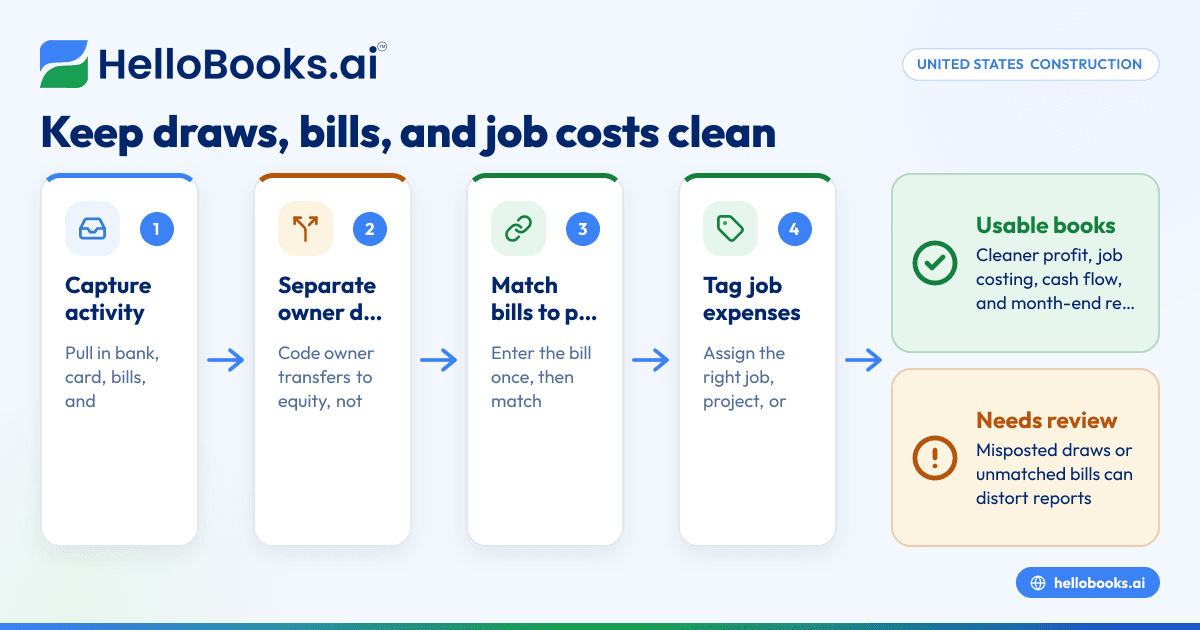
The fix is straightforward. Create a clear owner draw or owner distribution account in equity, then use it consistently. Do not bury these transactions in expense categories.
Why vendor bills get duplicated or missed
Construction businesses often receive bills from suppliers through email, paper statements, and text message photos. Some get paid by ACH, some by card, and some by check. When the bill and the payment are entered in different places or at different times, duplication happens.
One common example is this: the bill is entered manually, then the bank transaction is later coded as an expense instead of being matched to the open bill. Now the books show the same cost twice.
An ai-powered workflow can reduce that risk by surfacing likely matches and asking for review before posting final entries.
How does AI bookkeeping help construction businesses?
AI bookkeeping helps construction businesses by pulling transactions into one place, suggesting categories, and matching bills to payments faster. It is most useful when you review exceptions weekly and keep job names, vendor names, and accounts consistent.
Under the hood, the software is looking for patterns. If one supplier is usually coded to materials and tagged to framing jobs, future transactions from that vendor become easier to classify. If a transfer regularly goes to the owner’s personal account, the system can suggest a draw instead of an expense.
That kind of ai automation is useful in construction because transaction volume grows fast even in a small company. You may only have a handful of office staff, but dozens of purchases can hit the books every week.
The biggest benefits usually show up in five areas:
1. Faster transaction capture
Bank and card activity flows in quickly. You spend less time downloading statements and keying data by hand.
2. Better categorization suggestions
An ai tool can recommend likely accounts based on past coding. You still approve the result, but the first draft is done for you.
3. Bill-to-payment matching
This is especially helpful when timing differs. A supplier bill may be entered days before payment clears. Matching helps prevent duplicate expenses.
4. Cleaner job costing
When rules are set well, the system can help assign transactions to jobs or prompt you when job details are missing.
5. Easier month-end reconciliation
Instead of starting from a pile of uncategorized transactions, you review a shorter list of exceptions and mismatches.
If you are comparing systems, look for AI accounting software that supports day-to-day bookkeeping speed without making review harder.
How should you record owner draws in a construction business?
Record owner draws to an equity account, not an expense account. They reduce owner equity and should not be assigned to a job. If a transfer benefits the owner personally, keep it out of profit and loss reports.
Here is the practical rule. Ask whether the payment helped complete a project or operate the business. If the answer is no, it is likely not a business expense.
A simple way to handle draws
Use this process:
- Create one dedicated account for owner draws or owner distributions.
- Code transfers to the owner’s personal account to that equity account.
- Do not tag draws to jobs, customers, or projects.
- Review any unclear transfer before closing the month.
- Separate owner reimbursements from draws when the owner paid a real business expense personally.
That last point matters. If the owner used a personal card to buy job materials, reimbursement may be a business expense. It should be recorded based on the actual receipt and job, not treated as a draw.
This is general information, not tax or legal advice. Tax treatment depends on the business entity and your facts, so ask your CPA or tax advisor before changing how you book owner payments.
Red flags that a draw was booked incorrectly
Watch for these signs:
- The profit and loss report includes “owner draw” under expenses.
- A transfer to a personal account was coded to supplies or subcontractors.
- A draw was tagged to a customer or job.
- Equity accounts have no activity even though the owner takes money out regularly.
When those show up, your construction reports are likely distorted.
What is the best way to reconcile vendor bills and payments?
Enter the bill once, then match the payment to that open bill when cash leaves the bank. Do not code the bank transaction as a new expense if the bill already exists. That is the simplest way to avoid duplicates.
This process matters for every construction business that buys on terms. If your drywall supplier sends a bill on 04/05/2026 and you pay it on 04/20/2026, the cost should still be tied to the original bill record.
A five-step workflow for vendor bill reconciliation
- Capture the bill
- Save the bill from email or scan the paper copy.
- Enter the vendor, date, amount, and due date.
- Assign the right expense account and, if needed, the job.
- Review line detail
- Split materials, equipment rental, and freight if that detail matters for job costing.
- Add memo notes only when they help future review.
- Record payment through the bank
- Let the bank feed bring in the payment.
- Match it to the open bill instead of creating a fresh expense.
- Resolve partial payments
- If you pay only part of the bill, apply the payment correctly and leave the remaining balance open.
- Check the aging report
- Review unpaid bills weekly.
- Investigate old balances that should already be cleared.
This is where bank reconciliation software can save time. The objective is not just to check the bank. It is to prove that each payment connects to a real obligation and lands in the right period.
Common vendor bill mistakes in construction
Construction firms often make the same errors:
- Entering the same supplier invoice twice
- Paying from a card but leaving the bill open
- Coding every supplier payment to one generic “job materials” account
- Forgetting to assign the job
- Posting deposits or retainage-related entries without clear support
An ai software workflow can catch unusual duplicates and prompt review when the amount, vendor, and date look similar to an existing bill.
How should job expenses be tracked so job profitability is accurate?
Track job expenses at the transaction level, as close to the original purchase as possible. Assign each bill, card charge, or reimbursement to the right job before month-end. If you wait too long, details get lost and costs land in overhead.
Construction businesses usually need more than basic expense categories. “Materials” is not enough if you want to understand what happened on a specific project. You need some combination of:
- Job or project name
- Customer
- Cost category
- Vendor
- Date
- Memo or document support
The right level of detail depends on your size. A small remodeling contractor in Detroit may only need project and cost type. A larger specialty contractor may want cost codes for labor, materials, permits, rentals, and change-order work.
Build a chart of accounts that is simple enough to use
Too much detail creates its own problem. If your team has 75 expense accounts and no clear rules, coding gets slower and less accurate.
A better setup is:
- A lean chart of accounts
- Separate job or project tracking
- Consistent naming conventions
- Clear rules for materials, subcontractors, equipment, and overhead
Your software should make this easy. If you are looking for accounting software for small business, prioritize review workflows and job tagging over flashy dashboards.
Use weekly reviews instead of monthly guesswork
Weekly bookkeeping is the sweet spot for most construction firms. It is frequent enough to remember what each charge was for, but not so frequent that it interrupts operations.
In a weekly review, check:
- Uncategorized bank and card transactions
- New vendor bills
- Job assignments that are missing
- Open bills that should be paid
- Transfers that may be draws
- Duplicate-looking charges
When this is automated with ai, you spend less time searching and more time approving.
A practical month-end checklist for construction bookkeeping
Month-end should not feel like a rescue project. A short checklist keeps your books clean and your reports usable.
1. Reconcile bank and credit card accounts
Make sure cleared balances agree with statements. Investigate deposits in transit, duplicate transactions, and uncategorized transfers.
2. Review owner transactions
Scan transfers, card charges, and reimbursements involving the owner. Confirm that true draws are in equity and business costs are supported.
3. Match vendor bills to payments
Clear old open bills. Fix payments posted directly to expense when a bill already exists.
4. Review job costing
Look for expenses with no job tag. Confirm that large purchases were assigned correctly.
5. Check unusual balances
Negative expense accounts, old payable balances, and sudden swings in materials costs often point to coding issues.
6. Lock the period after review
Once the month is correct, avoid casual edits. If changes are needed later, document why.
For companies still juggling spreadsheets and disconnected tools, expense management software and invoice software can reduce the back-and-forth that causes missing records.
What should you look for in bookkeeping software for a construction company?
Look for software that handles bank feeds, bills, expenses, and reconciliation in one workflow. For construction, it should also support clear job tracking, easy reviews, and simple correction of coding mistakes.
Not every bookkeeping system is a good fit for a contractor. Construction accounting depends on good operational habits, but the software still matters.
Here is what to prioritize:
Strong transaction review
You need one place to review suggested categorizations, owner transfers, and unmatched payments.
Bill capture and matching
Bills should be easy to enter and easy to match when paid.
Job and project visibility
You should be able to see job-related costs without building custom spreadsheets every month.
Audit trail
When someone changes a category or reassigns a job, you should be able to follow that change.
Ease of use for a small team
The best system is one your office manager or bookkeeper will actually keep current.
If you are replacing a tool that feels too manual or too complex, a QuickBooks alternative may be worth reviewing if job expense cleanup and reconciliation are your biggest pain points.
When is it time to move away from spreadsheets?
It is time when month-end takes too long, job profitability is unclear, or you keep finding duplicate and missing transactions. Spreadsheets work for a while, but they break when transaction volume grows and more than one person touches the books.
Most construction businesses do not switch systems because they love software. They switch because the old process stops answering basic business questions.
If your team is doing any of the following, the current system is likely costing you money:
- Reconciling from printed statements
- Tracking vendor bills in email folders
- Recording owner draws from memory
- Updating job costs only at quarter-end
- Rebuilding reports by hand for lenders or tax preparers