
Key takeaways
What this article covers, in order:
- Key takeaways
- Why categorization errors matter before month-end
- What does AI bookkeeping cleanup actually do?
- Which categorization errors show up most often?
- How can you fix errors before month-end without spending hours?
- What should you automate, and what should you review by hand?
AI bookkeeping cleanup for small business means reviewing and fixing transaction categories before you close the month. In the United States, that usually means catching wrong expense accounts, duplicate entries, uncategorized bank activity, and missing receipts early enough to keep reports, sales tax records, and contractor payments accurate.
Key takeaways
- Month-end cleanup is faster when you fix categorization errors every week, not all at once.
- Common errors include personal charges, duplicate feeds, wrong vendor rules, and income posted to the wrong account.
- An ai-powered workflow can flag unusual transactions, suggest categories, and surface exceptions for review.
- Clean books support better cash flow decisions, cleaner P&L reports, and fewer surprises at tax time.
- The best process combines automation with human review for unusual or high-dollar transactions.
Why categorization errors matter before month-end
Categorization errors seem small until they start stacking up. One restaurant supply purchase coded as office expense may not change much. Ten similar mistakes across a month will distort your margins. A customer refund coded as income can make revenue look stronger than it really is. A loan deposit booked as sales can create even more confusion.
For a small business in Chicago, Houston, or Detroit, this matters because month-end numbers are not just for your accountant. Owners use them to decide hiring, pricing, inventory purchases, and whether cash is tight. If the books are wrong, decisions are wrong too.
Bad categorization also creates follow-on problems:
- Your profit and loss statement becomes less useful.
- Budget vs. actual comparisons stop meaning much.
- Sales tax reports can become harder to support.
- Year-end 1099 reviews take longer if vendor payments are mixed into the wrong accounts.
- Your CPA or bookkeeper spends more time cleaning up the file instead of helping with strategy.
This is why ai bookkeeping for small business is not only about saving time. It is also about improving the quality of the numbers you rely on each month.
If your team still works from bank exports and spreadsheets, it helps to move to AI bookkeeping tools that can spot patterns and exceptions faster than a manual review alone.
What does AI bookkeeping cleanup actually do?
It reviews transactions, suggests likely categories, flags unusual postings, and helps you correct errors before closing the month. It does not replace judgment. It reduces repetitive review work so you can focus on exceptions, approvals, and the transactions that need a real decision.
Under the hood, bookkeeping cleanup usually involves several tasks. An ai tool can support each one, but you still set the rules and approve the outcome.
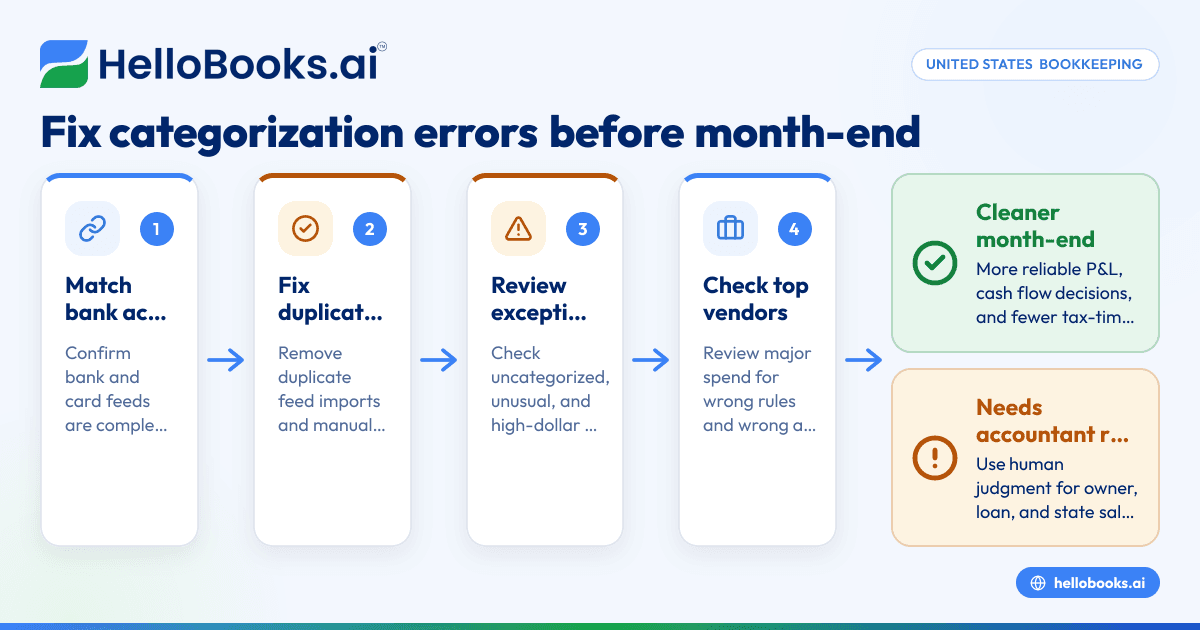
1. Match bank and card transactions
The first step is making sure all activity from your bank and credit cards appears in the books. Missing transactions create holes. Duplicate feed imports create fake expenses. Cleanup starts with confirming completeness.
2. Suggest categories based on history
Many expenses repeat every month. Rent, software subscriptions, shipping charges, fuel, merchant fees, and payroll taxes often follow clear patterns. Good systems use past coding, vendor names, and memo details to suggest likely categories.
3. Flag transactions that look unusual
A large charge from a known vendor may be normal. A small charge from a new vendor may need review. So might a transfer coded as expense or a payment to an owner from the operating account. This is where ai automation helps by surfacing exceptions instead of making you scan every line one by one.
4. Keep supporting records connected
Cleanup is easier when receipts, bills, and notes stay attached to each transaction. That way, if someone asks later why a charge was coded to repairs and maintenance instead of cost of goods sold, the support is already there.
Which categorization errors show up most often?
The most common issues are duplicate transactions, vendor rule mistakes, transfers booked as income or expenses, personal spending mixed into business accounts, and recurring charges posted to the wrong account. Fix these first because they affect reports quickly and are usually the easiest to spot.
Below are the errors that appear most often in small business books.
Duplicates from bank feeds or manual entry
This happens when a transaction comes in through the bank feed and someone also enters it by hand. It is common with card charges, loan payments, and transfers between accounts.
What to look for:
- Same date and amount posted twice
- A bank feed transaction and a manual journal or expense for the same item
- Duplicate deposits from payment processors
Rules that are too broad
Rules save time, but broad rules create repeat mistakes. If every charge from a large retailer gets coded to office supplies, you may end up misclassifying tools, breakroom items, electronics, or even resale inventory.
What to look for:
- One vendor always mapped to one account, regardless of transaction type
- New subscriptions assigned to an old software account without review
- Shipping or merchant fees bundled into income
Transfers and loan activity posted incorrectly
Transfers should usually move between accounts, not hit revenue or expense. Loan proceeds are not sales. Principal payments are not ordinary operating expenses in the same way interest is.
What to look for:
- Credit card payments categorized as expense
- Owner contributions categorized as income
- Loan deposits coded as sales
Personal and business activity mixed together
Small business owners often swipe the wrong card or reimburse themselves later. If those entries are not handled carefully, the books become hard to trust.
What to look for:
- Grocery, fuel, travel, or online retail charges with no business purpose
- Owner spending posted as business expense without notes
- Reimbursements recorded twice
Income posted to the wrong line
If deposits are grouped incorrectly, revenue by product, service line, or location becomes unreliable. That makes pricing and margin decisions harder.
What to look for:
- Customer payments posted to miscellaneous income
- Processor payouts recorded as full revenue without fee separation
- Refunds netted against the wrong month
How can you fix errors before month-end without spending hours?
Set a weekly review rhythm, use category rules carefully, and focus human review on exceptions. Let an ai software workflow handle recurring matches and suggestions, then review uncategorized, unusual, and high-dollar transactions before you close the month.
A simple month-end cleanup system works better than a heroic last-day push. Use this process.
Step 1: Review feeds every week
Do not wait until the last day of the month. Open your books weekly and clear the newest bank and card activity. This keeps the backlog small and helps you remember what each transaction was for.
A weekly review should cover:
- New uncategorized expenses
- New deposits
- Transfer matches
- Receipt attachment gaps
- Any transaction over your internal review threshold
For many small businesses, weekly review takes under an hour if the process is tight.
Step 2: Fix duplicates first
Duplicates distort reports fast. Remove them before you change categories, or you may fix the wrong line and leave the duplicate behind.
A practical check:
- Sort by date and amount
- Scan for same-dollar entries on the same day
- Compare bank feed lines against manually entered expenses
- Confirm whether one is a match candidate instead of a true duplicate
Step 3: Review uncategorized and “ask my accountant” buckets
Uncategorized activity is a warning sign. So is any catch-all account used too often. If too much sits there, month-end reporting will be weak.
Create a simple rule:
- No uncategorized expenses at month-end
- No large balances left in suspense-type accounts without notes
- No unknown vendors without follow-up
Step 4: Check the top 10 vendors by spend
You do not need to review every line with equal effort. Start with the vendors that affect the numbers most. This quickly catches misclassifications that move gross margin or overhead.
For example:
- A manufacturer in Detroit may want to separate raw materials, equipment repairs, freight, and shop supplies.
- A services firm in Houston may want cleaner splits between software, subcontractors, travel, and advertising.
Step 5: Review owner, loan, and transfer accounts
These accounts create many false errors in small business books. They also confuse tax preparation if left messy.
Check whether:
- Credit card payments were matched properly
- Owner draws were not coded as wages or ordinary expense
- Loan payments were split correctly between principal and interest based on your loan records
This is general information, not tax or legal advice. If you are unsure how to classify a payment, ask your accountant.
Step 6: Compare this month against last month
A quick trend review catches mistakes that line-by-line work can miss. If utilities doubled, ask why. If software expense dropped to zero, maybe the charge was coded elsewhere. If sales jumped but cash did not, look at receivables and deposit coding.
Use a short checklist:
- Compare major expense categories month over month
- Review gross margin
- Review deposits by income account
- Check unusual negatives in expense accounts
- Check unusual positives in refund or contra accounts
What should you automate, and what should you review by hand?
Automate recurring vendor categorization, bank matching, and exception alerts. Review unusual transactions, mixed-purpose spend, tax-sensitive items, and anything high-dollar by hand. The goal is not zero touch. The goal is fewer routine clicks and better attention on the entries that can actually skew your reports.
Here is a practical split between automation and review.
Good candidates to automate
Some tasks are repetitive and consistent enough to be automated with ai.
These often include:
- Recurring subscriptions
- Rent and utilities
- Merchant processing fees
- Regular fuel or shipping charges
- Bank transfer matching
- Duplicate detection
- Reminder workflows for missing receipts
Items that still need human judgment
Some transactions need context. No workflow should guess without review.
Examples:
- Mixed business and personal charges
- One-time legal or consulting fees
- New vendors with unclear purpose
- Asset purchases versus repairs
- Customer refunds and chargebacks
- Owner transactions
- State sales tax entries and adjustments
This is why strong cleanup combines smart suggestions with approval controls.
A practical month-end cleanup checklist for small businesses
Use this checklist in the last few business days of the month, or on the first business day after month-end closes.
Bank and cash
- Confirm all bank and card feeds are current.
- Match transfers between accounts.
- Remove duplicates.
- Investigate stale unmatched items.
Expenses
- Clear uncategorized transactions.
- Review top vendors by spend.
- Check recurring rules for mistakes.
- Attach receipts where missing.
- Scan for personal charges.
Income
- Review large deposits.
- Separate processor fees from sales.
- Confirm refunds and credits are posted correctly.
- Make sure non-income deposits are not sitting in revenue.
Liability and tax-sensitive accounts
- Review credit card payments.
- Review loan activity.
- Review payroll-related balances if applicable.
- Review state sales tax liability balances against your records.
Final reporting review
- Compare this month to last month.
- Scan the P&L for unusual swings.
- Scan the balance sheet for odd balances.
- Ask one question for every surprising number: “What created this change?”
How to choose software for AI bookkeeping cleanup
Look for strong bank matching, easy transaction review, clear audit history, and fast correction workflows. You want software that reduces manual coding without hiding the details. Good cleanup tools should make it easy to see why a category was suggested and easy to override it.
When comparing options, ask these questions.
Can your team review exceptions quickly?
If every suggestion takes too many clicks, the promise of speed disappears. Review queues should be simple. Flags should be obvious. Supporting details should be visible without digging.
Does it help prevent repeat mistakes?
A good system does more than clean up the current month. It helps you improve rules and learn from corrections. Over time, that reduces the same vendor mistakes and duplicate issues.
Is it built for small business workflows?
Small businesses need clear bookkeeping, not enterprise complexity. If you are evaluating accounting software for small business, focus on speed, visibility, and ease of review. Fancy features matter less than a clean month-end process.
Can it support the rest of your finance workflow?
Cleanup works best when it is connected to invoicing, expenses, and bank matching. If you are reviewing accounting software in the USA, it helps to choose a system that fits your day-to-day workflow instead of creating more exports and imports.
For businesses that need stronger control over feeds and transaction matching, bank reconciliation software can also shorten month-end review time. If receipt collection and employee spend are part of the problem, expense management software can reduce categorization errors before they happen.
Where HelloBooks fits
HelloBooks can help if your month-end is slowed down by repetitive coding, duplicate review, and messy bank matching. It is designed to reduce manual bookkeeping work and make review faster, especially for teams that want cleaner books without living in spreadsheets all month.
The real value is not just automation. It is having a workflow where recurring items are handled consistently, exceptions are visible, and corrections are easier to make before reports go out. If you are looking for AI accounting software or a QuickBooks alternative, keep the focus on one outcome: a faster, more reliable close.
If month-end cleanup is still taking too long, book a demo at book a demo or compare plans at pricing.
Frequently asked questions
Is AI bookkeeping accurate enough for month-end cleanup?
It can be very helpful for recurring transactions and exception spotting. But it should not be treated as fully hands-off. High-dollar, unusual, and tax-sensitive items still need review by someone who understands the business.
How often should a small business clean up transaction categories?
Weekly is the best rhythm for most small businesses. It keeps the backlog manageable and improves accuracy because the details are still fresh. Month-end then becomes a review process, not a rescue project.
Can AI bookkeeping help with sales tax and 1099 preparation?
It can help indirectly by keeping vendor payments and expense categories cleaner throughout the year. That makes supporting records easier to review later. You should still confirm tax treatment and filing requirements with your accountant.
What is the first thing to fix when the books look messy?
Start with duplicates, uncategorized items, and transfers. Those issues create fast distortions in both the profit and loss statement and the balance sheet. Once those are fixed, review your top vendors and major income accounts.
Does switching software solve categorization errors by itself?
No. Better software can reduce manual work and catch more mistakes, but your chart of accounts, review process, and approval habits still matter. The best results come from pairing software with a simple weekly cleanup routine.