


Key takeaways
What this article covers, in order:
- Why this comes up / what goes wrong
- Step-by-step
- Example (fictional figures)
- Common mistakes
- Frequently asked questions
- Key takeaways
Accounting system payments refer to the methods and processes you use to record payments in your accounting system or software. These payments include cash, cheque, bank transfers, UPI, and others. Properly managing payments ensures your books are accurate, your cash flow is clear, and your GST compliance is maintained.
Why this comes up / what goes wrong
Small business owners search for "accounting system payments" when they want to improve how they record and track payments. Many use spreadsheets, Tally, or manual bill books, which can lead to errors like missing payments, duplicate entries, or difficulty reconciling payments with bank statements. These problems cause confusion in cash flow management and GST filings.
Common issues include:
- Payments not linked to invoices or bills, making it hard to know which invoices are paid.
- Delays in entering payments, causing inaccurate cash flow reports.
- Incorrect payment amounts or dates entered.
- Not updating payment status such as pending, cleared, or bounced.
- Difficulty reconciling payments against bank statements.
- GST compliance issues due to mismatched payment and invoicing records.
Understanding how to manage payments in your accounting system helps avoid these problems and keeps your financial records accurate.
Step-by-step
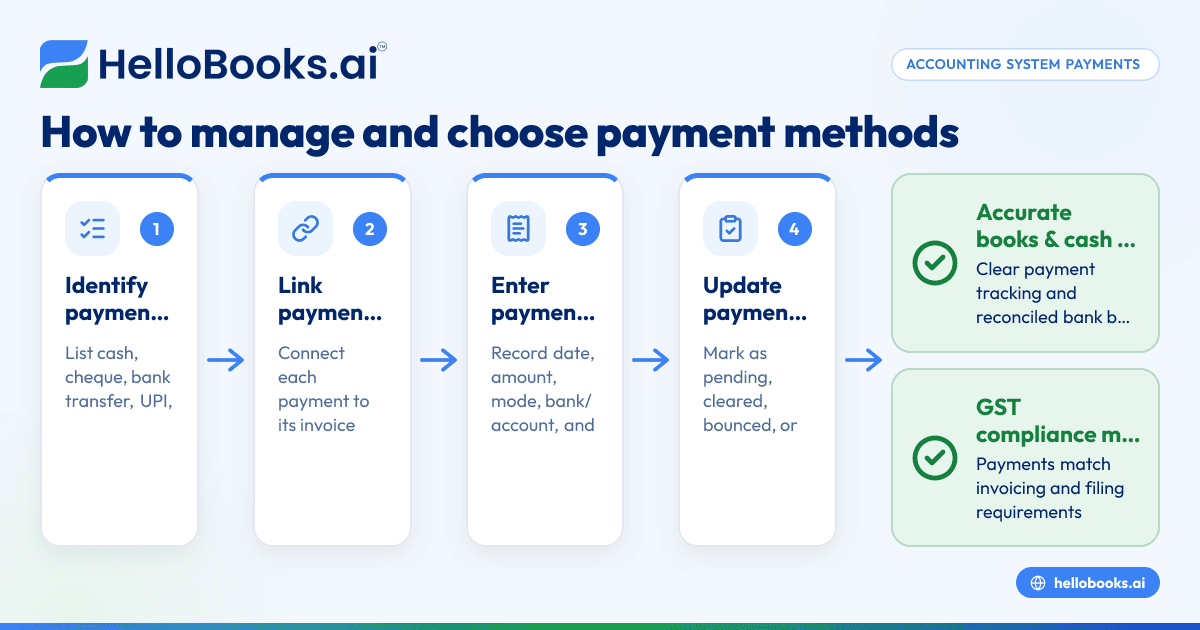
- Identify payment methods your business uses: List all payment types like cash, cheque, bank transfer, UPI, or others. Confirm your accounting system supports these methods.
- Link payments to invoices or bills: Always connect each payment entry to the corresponding invoice or bill. This helps track which invoices are paid and which are outstanding.
- Enter payment details accurately: For every payment, record the date, amount, payment mode, bank or account details, and reference numbers such as cheque number or transaction ID.
- Update payment status: Mark payments as pending, cleared, bounced, or any other relevant status to monitor your receivables and payables.
- Reconcile payments regularly: Match recorded payments with your bank statements or payment confirmations. This helps catch missing or duplicate entries and ensures your books are correct.
- Maintain GST compliance: Ensure that payments recorded align with your GST invoicing and filing requirements. Payments affect when you can claim input tax credit (ITC) or report output tax liabilities. For more details, see GST invoicing.
- Use reports to review payments: Generate payment reports to analyse outstanding amounts, payment delays, and cash flow trends.
For more on invoicing and compliance, see e-invoicing (IRN and QR).
Example (fictional figures)
On 15/03/2024, XYZ Enterprises received a payment of ₹1,50,000 from a customer against invoice INV-202 dated 01/03/2024.
- Invoice amount = ₹1,50,000
- Payment received = ₹1,50,000
- Payment date = 15/03/2024
Steps:
- Record the payment linked to invoice INV-202.
- Enter payment date: 15/03/2024.
- Enter payment mode: Bank Transfer.
- Reference number: TXN78901.
Reconciliation:
- Bank statement shows ₹1,50,000 credited on 15/03/2024.
- Match payment entry with bank statement: ₹1,50,000 = ₹1,50,000
- Mark payment as cleared.
Result:
- Invoice INV-202 status changes to paid.
- Bank balance updated correctly.
This clear linking and reconciliation ensure accurate books and cash flow.
Common mistakes
- Not linking payments to invoices or bills: Leads to confusion about outstanding amounts. Prevent this by always linking payments to their respective documents.
- Entering incorrect payment amounts or dates: Causes reconciliation errors. Double-check entries before saving.
- Delaying payment entry: Results in inaccurate cash flow reports. Record payments immediately upon receipt or payment.
- Ignoring payment status updates: Can overstate receivables or payables. Update statuses like cleared or bounced promptly.
- Neglecting GST impact of payments: Payments affect ITC claims and tax liabilities. Ensure your payment records match your invoicing and filing schedules. For guidance, see GST invoicing.
- Failing to reconcile regularly: Missing reconciliation can hide errors. Reconcile monthly to keep books accurate.
Frequently asked questions
What payment methods should I record in my accounting system?
Record all payment methods your business uses, including cash, cheque, bank transfers, and UPI. Your system should allow entering details specific to each method for clarity.
How often should I reconcile payments?
Reconciliation should be done at least monthly or whenever you receive your bank statement. Regular reconciliation prevents errors and ensures your books match bank records.
Can I record partial payments?
Yes, your accounting system should allow partial payments against invoices or bills. This helps track outstanding balances accurately.
How do payments affect GST filings?
Payments impact when you can claim input tax credit or report output tax liabilities. Make sure your payment records align with your GST invoicing and filing schedule. For details, see GST invoicing.
Is it necessary to update payment status?
Yes, updating payment status like cleared, pending, or bounced helps monitor cash flow and outstanding amounts effectively.
Can I automate payment recording?
Some accounting software supports bank statement upload and automatic reconciliation to reduce manual entry. Check if the software you choose offers these features.
Key takeaways
- Always link payments to invoices or bills for clear tracking.
- Enter payment details accurately and promptly.
- Update payment statuses to reflect true cash flow.
- Reconcile payments regularly with bank statements.
- Maintain GST compliance by aligning payments with invoicing and filing.
- Use reports to monitor payment trends and outstanding amounts.
Start managing your accounting system payments effectively to save time and reduce errors. To explore software options, consider starting on the Free plan (200 transactions a year, GSTR-1 and 3B filing for one GSTIN) at HelloBooks pricing.


