
Key takeaways
What this article covers, in order:
- Key takeaways
- Why sales tax tracking matters for ecommerce books in the United States
- What should you record for each ecommerce sale?
- How do Stripe payouts cause bookkeeping errors?
- What is the best way to track sales tax from checkout to bank deposit?
- A simple chart of accounts for ecommerce sales tax tracking
Sales tax tracking for ecommerce in the United States means recording the tax you collect separately from revenue, then matching it across Stripe payouts, invoices, refunds, and bank deposits. If you do not track each step clearly, your books can overstate income, understate liabilities, and make filing harder than it should be.
Key takeaways
- Sales tax collected from customers is usually a liability, not revenue.
- Stripe payouts rarely match daily sales because fees, refunds, and tax affect the deposit amount.
- Accurate books need a clear flow from order to invoice to payout to bank reconciliation.
- Refunds and chargebacks can change both revenue and sales tax balances.
- Small businesses should review sales tax payable by state on a regular schedule.
- Good AI bookkeeping tools reduce manual matching and cleanup work.
Why sales tax tracking matters for ecommerce books in the United States
For many ecommerce businesses, the hard part is not collecting sales tax. The hard part is recording it correctly after the sale.
A customer places an order on your website. Stripe processes the payment. You issue an invoice or sales receipt. Stripe deducts fees and sends a net payout to your bank. If you only book the bank deposit, your records will be wrong.
This is where sales tax tracking ecommerce United States becomes an accounting problem, not just a tax problem. Your books need to answer simple questions at any time:
- How much product revenue did you actually earn?
- How much sales tax did you collect for state and local jurisdictions?
- How much did Stripe keep in processing fees?
- How much was refunded?
- What amount is still owed as sales tax payable?
If these numbers are mixed together, month-end close takes longer. Sales tax filings become harder to support. Cash flow also looks better than it really is, because money you owe in tax can look like business income.
For a small business in Chicago, Houston, or Detroit, this shows up fast when order volume rises. What worked in a spreadsheet with 30 orders a month breaks when you process 500.
What should you record for each ecommerce sale?
You should record four things separately for each sale whenever possible: revenue, sales tax collected, payment processor fees, and cash received.
That separation matters because each number has a different accounting purpose.
Revenue
Revenue is the amount earned from the product or service before sales tax. This is what belongs on your profit and loss statement.
Sales tax collected
Sales tax collected is generally not income. It is money collected from customers that you may need to remit to a state or local tax authority. That usually belongs on the balance sheet as a liability.
Processor fees
Stripe and similar processors deduct transaction fees. These are business expenses. They reduce what lands in your bank account, but they do not reduce gross sales.
Net cash deposited
The bank deposit is often the net of many transactions. It can include multiple orders, fees, refunds, and timing differences. That is why you should not book deposits directly to sales.
How do Stripe payouts cause bookkeeping errors?
Stripe payouts create errors when businesses record the bank deposit as sales and ignore fees, tax, and timing differences. The payout is only the net cash movement. It is not a clean record of revenue.
For example, say your store makes three sales in one day:
- Order A: Product $100, sales tax $8
- Order B: Product $50, sales tax $4
- Order C: Product $200, sales tax $16
Your gross product revenue is $350. Sales tax collected is $28. Total customer payments are $378.
Now assume Stripe takes $12 in fees and pays out $366 to your bank.
If you book the $366 deposit as revenue, you create three problems:
- Revenue is overstated or understated depending on how you treat fees
- Sales tax liability is missing
- Processor fees are not recorded correctly
The cleaner entry is usually this logic:
- Debit cash or Stripe clearing for $378
- Credit revenue for $350
- Credit sales tax payable for $28
Then when Stripe deducts fees and sends money:
- Debit processor fee expense for $12
- Credit cash or Stripe clearing for $12
And when payout reaches the bank:
- Debit bank for $366
- Credit Stripe clearing for $366
The exact entries depend on your setup, but the principle stays the same. You need a clearing account or detailed feed to bridge sales activity and bank deposits.
What is the best way to track sales tax from checkout to bank deposit?
Use one source for sales detail, one clearing account for processor activity, and one liability account for sales tax payable. Then reconcile all three on a set schedule.
That simple structure helps small teams avoid posting net deposits as income and losing visibility into tax owed.
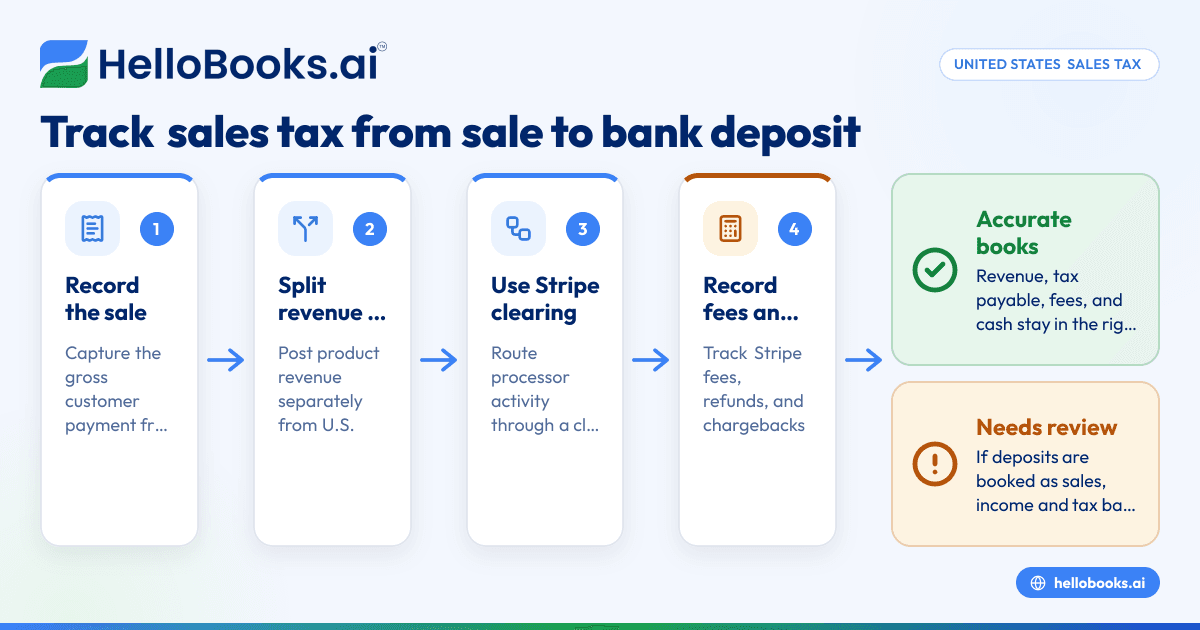
Build a simple accounting flow
A practical flow for ecommerce books looks like this:
- Record the customer sale at gross amount.
- Split product revenue from sales tax collected.
- Post the payment to a Stripe clearing account.
- Record Stripe fees separately as an expense.
- Match the actual payout to the bank deposit.
- Review refunds and chargebacks before closing the month.
- Compare sales tax payable balances to your filing support.
This flow works whether you issue invoices, use checkout links, or sell through a web store that settles into Stripe.
Why a clearing account helps
A Stripe clearing account acts like a holding bucket. It records what Stripe collected before payouts hit your bank.
Without it, you force your bank feed to do too much work. The bank only shows the net result. It does not explain gross sales, taxes, and fees well enough to support accurate bookkeeping.
That is why many growing businesses move from spreadsheets to accounting software in the USA that can separate the parts of each transaction more reliably.
A simple chart of accounts for ecommerce sales tax tracking
You do not need a complex chart of accounts to improve sales tax tracking. You need a clear one.
Here is a practical setup many small ecommerce businesses use:
Income accounts
- Product sales
- Shipping income, if you charge customers for shipping and track it separately
Liability accounts
- Sales tax payable
- Customer credits or refunds payable, if needed
Asset accounts
- Operating bank account
- Stripe clearing account
- Accounts receivable, if you invoice customers
Expense accounts
- Merchant processing fees
- Refund adjustments, if your accountant prefers separate tracking
This setup makes reports easier to read. It also makes month-end reviews faster because tax, fees, and revenue are not mixed.
How should you handle invoices, sales receipts, and online orders?
The goal is consistency. Every transaction type should end with the same accounting result: revenue, sales tax, fees, and cash must each land in the right place.
Invoiced ecommerce orders
If you invoice a customer and they pay through Stripe, record the invoice with revenue and sales tax separately. Then apply the payment against that invoice. After that, record fees and payout timing through the clearing account.
Sales receipts at checkout
If customers pay instantly at checkout, you may not need accounts receivable. But you still need to separate revenue from sales tax and route the payment through a Stripe clearing account.
Manual invoices and offline payments
Some ecommerce businesses also take phone or email orders. In those cases, keep the same structure. Do not treat manual invoices differently just because they are not website orders.
That consistency matters during reconciliation. It also matters when you work with an outside bookkeeper or find an accountant for cleanup.
Refunds, returns, and chargebacks
Refunds are one of the biggest reasons sales tax and revenue drift apart in the books.
If you refund a customer, you usually need to reverse the original sale components. That means:
- Reduce revenue for the refunded product amount
- Reduce sales tax payable for the tax portion, when appropriate
- Record any processor fee impact that is not returned
- Match the resulting cash movement or deduction from future payouts
Chargebacks add another layer. A chargeback may pull cash from future Stripe payouts. It can also include extra fees. If your books only look at bank deposits, chargebacks can disappear into net payout numbers.
Review these items weekly if volume is high. Review them at least monthly if volume is lower. Waiting until quarter-end often creates cleanup work that costs more than the original bookkeeping time saved.
State-by-state sales tax liability tracking
Sales tax in the United States is not one national balance. Ecommerce businesses often need visibility by state, and sometimes by local jurisdiction depending on their filing needs.
This article is general information, not tax or legal advice. Sales tax registration, filing rules, and nexus questions depend on your facts and state requirements.
Why state detail matters
If you sell across multiple states, one total sales tax payable account may not be enough for operations. You may still use one liability account in the general ledger, but your supporting report should show the amount collected by state for each filing period.
That helps you answer:
- How much sales tax was collected from customers in Texas?
- Did refunds reduce the amount due for Illinois?
- Does the filing support agree to what sits in sales tax payable at month-end?
When books and filings stop matching
Books and sales tax returns often stop matching because of one of these issues:
- Orders are recorded on one date and payouts on another
- Refunds are posted late
- Sales tax is included in revenue
- Fees are netted against sales
- Marketplace or platform settlements are mixed with direct website sales
- Manual journal entries override detail from the source system
A monthly tie-out helps catch these issues before filing time.
Using automation and ai sales tax workflows
Small businesses do not need more reports. They need fewer manual steps.
A solid automation setup can pull sales detail, split tax from revenue, track Stripe fees, and match payouts to bank deposits. That reduces month-end guesswork.
Some teams describe this as ai sales tax support, but the real value is not the label. The value is that your system recognizes patterns, groups related transactions, and flags exceptions before your close is finished.
For example, automation can help by:
- Matching one Stripe payout to dozens of sales events
- Spotting a missing refund entry
- Identifying when a deposit does not align with processor activity
- Keeping sales tax payable separate from revenue
- Making reconciliation reports easier to review
This is where AI accounting software can help a finance lead who is tired of exporting CSV files every week.
Month-end checklist for accurate ecommerce sales tax books
A monthly close process keeps small issues from becoming filing problems.
1. Reconcile Stripe activity
Compare the processor activity for the month to what is posted in your books. Make sure gross collections, fees, refunds, and payouts all appear.
2. Reconcile bank deposits
Match Stripe payouts to actual deposits in the bank account. Investigate any payout that does not match or is posted in the wrong month.
3. Review sales tax payable
Check that sales tax collected is not sitting in income. Review liability balances against your detailed sales tax support by state.
4. Review refunds and credits
Confirm all returns, customer credits, and chargebacks are posted in the same period as the related activity where possible.
5. Compare revenue reports
Compare ecommerce platform sales reports, invoice totals, and general ledger revenue. Differences should be explainable.
6. Lock your process
Document who reviews exceptions, who posts adjustments, and when the month is considered closed.
A simple recurring checklist is often more valuable than a complicated accounting policy manual.
Common mistakes small ecommerce businesses make
Booking net deposits as sales
This is the most common mistake. It hides fees and sales tax liabilities.
Mixing sales tax with revenue
If tax goes into income, your profit and loss statement becomes misleading.
Ignoring timing differences
Sales may happen on 03/31/2026, while the payout lands on 04/01/2026. That timing gap must be handled consistently.
Posting refunds without reversing tax
This can overstate what you owe in sales tax payable.
Relying only on spreadsheets
Spreadsheets can work at low volume, but they usually become fragile as transactions increase. A better approach is software built for recurring transaction matching, such as bank reconciliation software paired with strong sales capture.
When should you move beyond spreadsheets?
Move beyond spreadsheets when your team spends too much time checking payout math, fixing duplicated entries, or hunting for missing refunds.
A few signs:
- You have sales in multiple states
- Stripe payouts bundle many transactions
- Your month-end close takes more than a few days
- You cannot explain the balance in sales tax payable quickly
- Your accountant keeps making manual cleanup entries
At that point, the right accounting software for small business setup can save time and improve reporting accuracy.
If you also create manual bills and customer invoices outside your store, using connected invoice software can help keep records consistent across channels.
Choosing a system for ecommerce bookkeeping
The best system is the one your team will actually use every week.
Look for a setup that can:
- Separate revenue and sales tax automatically
- Support clearing accounts for payment processors
- Make bank reconciliation easy to review
- Track expenses and fees cleanly
- Support financial reporting without heavy spreadsheet work
For small businesses that have outgrown basic tools, a QuickBooks alternative may be worth considering if manual reconciliation still eats up too much time.
HelloBooks is designed for teams that want cleaner books with less data entry. If your ecommerce sales, invoices, and bank activity keep falling out of sync, automation can help you close faster and track liabilities more clearly.
If you want a simpler way to manage ecommerce bookkeeping, book a demo at book a demo or compare options on the pricing page.
Frequently asked questions
Is sales tax collected from customers revenue?
Usually, no. Sales tax collected is generally recorded as a liability until it is remitted. It should not usually inflate your sales revenue on the profit and loss statement.
Why do Stripe deposits not match my daily sales?
Stripe deposits are net payouts. They can include processor fees, refunds, chargebacks, and timing differences between sale dates and payout dates. That is why the bank deposit rarely equals gross sales.
Do I need a separate account for sales tax payable?
In most cases, yes. A separate liability account helps keep collected tax out of revenue and makes filings easier to support. Many businesses also keep supporting detail by state outside the main ledger.
Read next
This article covers one part of a bigger topic. For the complete picture, read our guide to sales tax.