
Key takeaways
What this article covers, in order:
- Key takeaways
- What is sales tax reconciliation in the United States?
- Why does sales tax reconciliation matter every month?
- How do you reconcile sales tax each month?
- Where do sales tax reconciliation errors usually come from?
- Can AI sales tax tools help with reconciliation?
Sales tax reconciliation in the United States is the monthly process of matching your taxable sales, exemptions, payments, refunds, and tax collected across every system you use. The goal is simple: make sure your books, payment data, and sales tax reports agree before you file and remit.
If you skip this step, small gaps turn into bigger problems. You can underpay tax, overstate revenue, miss exempt sales, or spend hours fixing old periods during a state notice or year-end close.
Key takeaways
- Sales tax reconciliation compares orders, cash received, refunds, and tax collected across your store, payment processor, and accounting records.
- Small businesses should reconcile sales tax every month, even if they file less often.
- The most common causes of mismatches are timing differences, refunds, shipping treatment, exemptions, and duplicate entries.
- A clean process starts with one source for sales, one source for cash, and a clear mapping into your general ledger.
- Automation can reduce manual work, especially when paired with AI bookkeeping and strong bank reconciliation habits.
- This article is general information, not tax or legal advice.
What is sales tax reconciliation in the United States?
Sales tax reconciliation in the United States means proving that the tax you collected from customers matches what your systems show and what you plan to report to the state. You are not just checking one total. You are tying together several moving pieces.
At a minimum, you usually compare:
- Gross sales
- Taxable sales
- Nontaxable or exempt sales
- Sales tax collected
- Refunds and credit memos
- Payment processor deposits
- Bank deposits
- General ledger balances
For many small businesses, the numbers live in different places. Orders may sit in an ecommerce platform. Payments may land in Stripe. Accounting entries may live in QuickBooks. Refunds may be posted later by a customer service team. If those systems do not line up, your filing can be wrong even when each system looks reasonable on its own.
A monthly reconciliation helps you catch issues while they are still easy to fix. It also makes your close process faster and reduces stress when a state asks questions later.
Why does sales tax reconciliation matter every month?
Because sales tax is collected from customers and held by your business until remittance, mistakes affect both compliance and cash. If you collect $8,000 of tax but only report $7,200, you may create exposure with the state. If you report $8,500, you may pay too much and hurt cash flow.
Monthly reconciliation also helps you separate tax from revenue. This matters because sales tax collected is generally not income. It is a liability until you remit it. When businesses skip reconciliation, they often leave tax inside sales accounts or bury it in clearing accounts. That can distort gross margin and monthly performance.
This process matters even more when you:
- Sell in multiple states
- Use more than one sales channel
- Offer tax-exempt sales
- Issue many refunds
- Have shipping charges with different tax treatment by state
- Use marketplace platforms plus direct sales
If your buyer asks for clean books during due diligence, or your lender wants reliable monthly reports, unresolved sales tax balances create friction. Clean reconciliations support stronger financial reporting and a smoother close.
How do you reconcile sales tax each month?
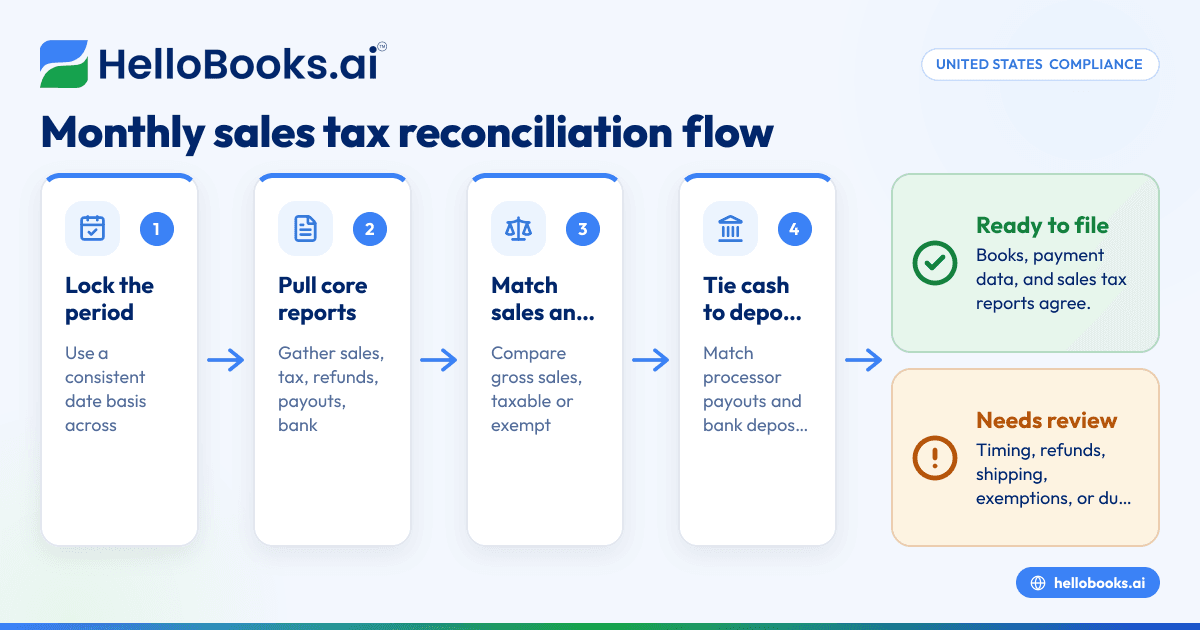
Start by matching taxable sales, tax collected, and cash by period across all systems. Then investigate every difference until your sales tax payable balance makes sense and agrees to your filing support.
Here is a practical month-end process for a small business in the United States.
1. Lock the reporting period
Choose the month you are reconciling using the same date basis across reports where possible. For example, use order date or invoice date for sales reports and be consistent month to month. If one system uses payout date and another uses sale date, note that timing difference before you compare totals.
Create a simple checklist with the exact reports you will pull every month. Consistency matters more than fancy formatting.
2. Pull the core reports
Most businesses need these reports:
- Sales summary by month
- Sales tax report by jurisdiction or transaction
- Refunds and credit memos report
- Payment processor settlement or payout report
- Bank statement or deposit report
- General ledger detail for sales, sales tax payable, cash clearing, and refunds
If you sell through more than one channel, pull reports from each one. Keep them in one folder with the month in the file name.
3. Match gross sales first
Before you look at tax, make sure your total sales make sense. Compare your sales platform total to your accounting total for the month. If there is a difference, common reasons include:
- Entries posted to the wrong month
- Refunds netted against sales in one system but separate in another
- Manual journal entries
- Duplicate imports
- Unposted invoices
You need this step because if gross sales are off, taxable sales and tax collected will usually be off too.
4. Reconcile taxable and nontaxable sales
Now split sales into buckets:
- Taxable sales
- Exempt sales
- Sales for resale, if documented
- Shipping or delivery charges
- Discounts
- Returns
This is where small issues become large filing errors. For example, your store may flag a customer as exempt, but the exemption certificate may be missing or expired. Or a shipping charge may be taxed differently than expected in a given state. Your reconciliation should identify these items for review before filing.
5. Tie sales tax collected to the ledger
Once taxable sales look right, compare tax collected in the sales system to your sales tax payable account in the general ledger. The balance should move in a logical way:
Beginning balance
- tax collected this month
- payments to states
- adjustments or approved corrections
= ending balance
If this rollforward does not work, your books need cleanup. Do not assume the filing report is correct just because it came from your storefront or tax app.
6. Match payments to deposits
Next, compare customer payments to payment processor reports and bank deposits. This helps you separate sales tax issues from payout timing issues.
For example, a $12,000 day of sales may become a $11,620 deposit because of processor fees, refunds, or reserve holds. If you only compare sales to bank activity, it can look like revenue is missing. A proper reconciliation accounts for fees and timing between capture and deposit.
This is a good place to use bank reconciliation software so your cash movement is easier to trace.
7. Review refunds and chargebacks
Refunds often create the biggest monthly differences. Check:
- When the original sale happened
- When the refund was issued
- Whether the sales tax was reversed
- Whether processor fees were refunded
- Whether the accounting entry hit the right month
Chargebacks can be even messier. Sometimes the cash leaves before the accounting team posts the reversal. That creates temporary gaps between sales, tax, and cash.
8. Clear exceptions and document them
Keep a short reconciliation memo or worksheet with:
- Total difference found
- Reason for the difference
- Entry made, if any
- Open items to monitor next month
This turns reconciliation from a one-time scramble into a repeatable process. It also helps when ownership changes or an outside accountant reviews your books later.
Where do sales tax reconciliation errors usually come from?
Most errors come from timing, mapping, and manual overrides. One system records a sale when the order is placed. Another records cash when the payout settles. A third records tax when an invoice posts. Those differences are common, but they need to be tracked.
Here are the most frequent causes.
Timing differences
A late-night sale on 03/31/2026 may settle into your bank on 04/01/2026. If your sales report uses sale date and your payout report uses settlement date, totals will never match without a timing schedule.
Refunds posted in a different period
If the sale was in February and the refund happened in March, your monthly tax collected will change. The accounting entry must follow the same treatment as the operational record.
Wrong account mapping
Some systems map sales tax into income instead of a liability account. Others split state and local tax incorrectly. A mapping review often fixes long-running issues.
Exemptions not handled consistently
A customer may be marked exempt in one system but taxed in another. Or the sale is treated as nontaxable without support. This can lead to both filing errors and audit risk.
Manual journal entries
Year-end cleanup entries can solve one problem while creating another. If someone books a manual reduction to sales tax payable without support, your filing tie-out breaks.
Marketplace and direct sales overlap
If you sell both through a marketplace and through your own website, make sure you understand which channel's activity belongs in your books and reporting workflow. Double counting can happen when both systems feed the ledger.
Can AI sales tax tools help with reconciliation?
Yes, but they work best when your source data is clean and your account mapping is correct. AI can speed up matching, flag exceptions, and reduce manual review, but it still needs a clear workflow and human oversight.
A good ai sales tax workflow does not replace accounting judgment. It helps your team spot unusual tax amounts, missing exemptions, duplicate transactions, and month-end mismatches faster. It can also help classify transactions and organize backup for review.
For a small business, the practical value is time. Instead of exporting reports into spreadsheets and tracing differences line by line, you can automate much of the tie-out between sales, tax, and bank activity. That matters when your controller is also running payroll, approving bills, and answering customer questions.
When evaluating tools, ask:
- What reports can I reconcile from one place?
- Can I review exceptions before posting?
- How are refunds and adjustments handled?
- Can I trace from ledger entry back to source transaction?
- Does the workflow fit my month-end close process?
If your team still spends too much time fixing imports and coding entries, AI accounting software or accounting software in the USA may be worth exploring as part of a broader close process, not just tax.
What should be on a monthly sales tax reconciliation checklist?
Use one checklist every month. It should cover sales, cash, tax, refunds, and filings so nothing slips between teams.
Below is a practical checklist you can copy into your close process.
Sales and order data
- Pull monthly sales report by date
- Pull taxable and exempt sales detail
- Review top unusual transactions
- Confirm discounts and shipping treatment are reflected correctly
- Check for duplicate orders or duplicate imports
Payment and bank data
- Pull payment processor payout report
- Match deposits to the bank statement
- Separate fees, reserves, and chargebacks
- Investigate unmatched payouts
General ledger review
- Review revenue accounts
- Review sales tax payable
- Review refund and returns accounts
- Review clearing accounts
- Confirm journal entries have support
Filing support
- Compare tax report totals to ledger movement
- Review any state-level differences
- Save support files in one folder
- Prepare notes for open items
- Confirm remittances reduce the payable balance
A simple monthly checklist is often more valuable than a complex tax binder nobody updates.
What if your numbers still do not match?
Do not force the filing to match by posting a plug entry. Find the reason. A plug may make this month look clean, but it usually creates a larger problem next month.
Work through differences in this order:
- Confirm date ranges match.
- Confirm the same sales channels are included in every report.
- Confirm refunds are included the same way.
- Confirm processor fees are not being mistaken for missing revenue.
- Confirm tax collected is booked to a liability account.
- Review manual journal entries.
- Trace a sample of transactions from order to payout to ledger.
If the difference is small but recurring, that is often a system mapping issue. If the difference is large and new, look first at refunds, new sales channels, or changes in your import process.
This is also the point where stronger workflows matter. Many businesses outgrow spreadsheets long before they notice it. If your monthly close depends on copy-paste work across Stripe, QuickBooks, and bank exports, consider accounting software for small business or expense management software to reduce manual touchpoints.
How often should a small business in the United States reconcile sales tax?
Every month. Even if you file quarterly or annually, monthly reconciliation catches issues early and keeps your liability account accurate.
Monthly work is easier because the transaction volume is smaller and the context is fresh. Your team remembers the refund spike, the platform change, or the one large exempt customer. Waiting until quarter-end means sorting through three months of noise at once.
A monthly cadence also improves cash planning. You can see how much tax you are holding and avoid treating that balance like spendable cash. For growing businesses, this matters a lot. A strong tax process is not only about filing correctly. It also protects working capital.
When should you automate the process?
You should automate when reconciliation depends on too many exports, too many people, or too many manual checks. A good rule is this: if month-end sales tax tie-out takes more than a few hours or breaks every month, it is time to improve the workflow.
Automation helps most when:
- You sell across several channels
- You process many small transactions
- You issue frequent refunds
- You have multi-state activity
- You close books monthly for management reporting
The best setup is one where sales, expenses, and bank activity feed cleanly into your books with minimal rework. If that is your pain point, invoice software and automated bookkeeping tools can help reduce the number of moving parts your team has to reconcile.
If you need help building a cleaner month-end process, HelloBooks can help you simplify bookkeeping, reconciliation, and reporting. You can book a demo to see the workflow or compare options on the pricing page.
Frequently asked questions
Is sales tax reconciliation the same as filing a sales tax return?
No. Reconciliation is the internal process of proving your numbers before filing. Filing is the submission and payment step with the state based on those reconciled numbers.
Should sales tax collected be recorded as revenue?
Usually, no. Sales tax collected is generally recorded as a liability until it is remitted. If it sits in revenue, your sales and margins may be overstated.
Why do Stripe deposits not match my sales report?
Because deposits are usually net of fees, refunds, chargebacks, and timing differences. Reconcile sales to payouts first, then payouts to bank deposits.
Read next
This article covers one part of a bigger topic. For the complete picture, read our guide to sales tax.