
Key takeaways
What this article covers, in order:
- Key takeaways
- What is sales tax payable cleanup in the United States?
- Why do sales tax payable mismatches happen?
- How do you know your sales tax payable account needs cleanup?
- What should you compare during a sales tax payable cleanup?
- Step-by-step: how small businesses fix filing mismatches before month-end close
Sales tax payable cleanup in the United States means finding and fixing the gap between what your books say you owe and what your filed sales tax returns say you owe. Small businesses usually do this before month-end close by tracing sales, tax collected, refunds, exemptions, and payments so the liability account matches reality.
If you skip this cleanup, your close gets slower and your balance sheet becomes less reliable. The result is often rework, missed filing issues, and confusion when cash paid to a state does not match the sales tax payable balance in your ledger.
Key takeaways
- Sales tax payable cleanup compares your general ledger, sales records, filed returns, and actual payments.
- The goal is to explain every difference before month-end close, not just force the account to zero.
- Common causes include timing gaps, incorrect tax coding, refunds, marketplace transactions, and manual journal entries.
- A simple monthly checklist helps small businesses catch issues before they become quarter-end problems.
- Clean sales tax liability records support faster closes, cleaner audits, and more accurate cash planning.
- Good systems, including AI accounting software, can reduce manual cleanup work.
What is sales tax payable cleanup in the United States?
Sales tax payable is the liability account that tracks sales tax you collected from customers and still owe to state or local tax agencies. Cleanup is the process of validating that account and correcting differences before you close the month.
For a small business in Chicago, Houston, or Detroit, this usually means reviewing four records side by side:
- Sales in your invoicing or payment system
- Sales tax collected during the month
- Sales tax returns prepared or filed
- Payments made to tax authorities
When those records do not line up, the problem often sits in the sales tax payable account. The balance may be too high, too low, or out of date.
A healthy cleanup process answers three basic questions:
- How much sales tax did we collect this month?
- How much do we actually owe based on filings?
- Why does the ledger differ from the filed amount or payment history?
This matters because sales tax payable sits on the balance sheet. If it is wrong, your liabilities are wrong. That can affect internal reporting, lender reporting, and the quality of your close.
Why do sales tax payable mismatches happen?
Sales tax mismatches are common because data flows through several systems. A business may create invoices in one tool, collect payments in Stripe, record journal entries in QuickBooks, and prepare returns from a spreadsheet.
A mismatch often starts with one of these issues:
Timing differences
You may collect tax in one month and file or pay it in another. If your accounting team records the payment in the wrong period, the payable balance becomes misleading.
Wrong tax treatment on transactions
A taxable sale may be coded as non-taxable, or the reverse. Credits, refunds, shipping charges, and discounts also create confusion if tax treatment is inconsistent.
Manual entries
Many cleanup problems come from journal entries made to “fix” a balance without supporting detail. That may solve the current month on paper, but it creates bigger issues later.
Return adjustments
A return may include prior-period corrections, vendor discounts where applicable, or small adjustments. If those adjustments are not posted back to the ledger, the books and filed returns drift apart.
Marketplace and channel complexity
Some businesses sell through multiple channels. If one channel handles tax differently than another, the total collected and total owed may not be posted consistently.
Refunds and credit memos
A refund reduces taxable sales and may reduce tax due. If the refund is processed in the customer system but not reflected correctly in accounting, your payable account can stay overstated.
How do you know your sales tax payable account needs cleanup?
If your sales tax payable balance changes in ways you cannot explain, it needs review. Start when the ledger, returns, and payment history no longer tell the same story.
Other warning signs include:
- You cannot tie the month-end liability to a filed return
- Old balances remain in the account for several months
- Payments are posted directly to expense instead of liability
- Tax collected on invoices differs from tax reported on returns
- Refunds and credit memos are not reducing the payable balance
- Your close team asks the same sales tax questions every month
In many small businesses, this starts quietly. The first month may show only a $200 difference. Six months later, the account may be off by several thousand dollars, and no one knows which period caused it.
That is why month-end cleanup is more effective than a once-a-year fix. The shorter the review period, the easier it is to trace the source.
What should you compare during a sales tax payable cleanup?
Compare the ledger, transaction detail, returns, and cash payments for the same filing period. If one source uses a different date range, fix that first before you investigate other differences.
Use the same filing period your business follows for sales tax reporting. Then compare these records in order.
1. General ledger activity
Pull the sales tax payable account activity for the month. Look at the opening balance, all debits and credits, and the ending balance.
Check whether entries came from normal transactions or manual journals. If you see unsupported manual entries, flag them first.
2. Tax collected from sales records
Pull transaction-level sales tax from your invoice or payment system. Summarize by filing period. Include invoices, credit memos, refunds, and voids.
This gives you the raw operational number for tax collected or reversed during the month.
3. Filed or draft sales tax return
Use the return prepared for the same period. This is usually the best view of what the business believes it owes for filing purposes.
If the return includes prior-period adjustments, note them separately. Do not bury them inside the current month.
4. Tax payments made
Review bank activity and payment postings. Confirm the payment amount, date, and ledger entry. A payment should generally reduce the liability account, not hit an operating expense account.
If your team uses bank reconciliation software, this step gets easier because payment matching is clearer.
Step-by-step: how small businesses fix filing mismatches before month-end close
The best cleanup process is simple and repeatable. You do not need a huge tax team. You need one owner, one checklist, and a rule that every difference must be explained.
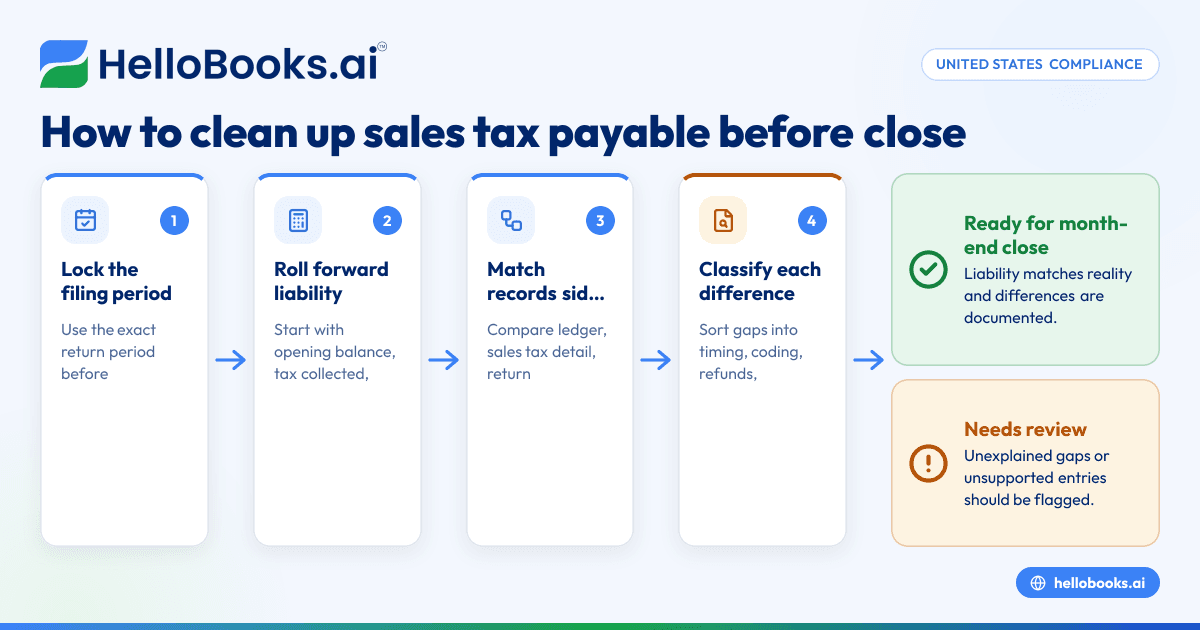
1. Lock the period you are reviewing
Use one date range only. If your sales tax filing is monthly, review that exact month. If your filing frequency differs, align the review to the filing period and the close calendar.
This avoids the most common error in cleanup: comparing a monthly ledger to a partial return period.
2. Roll forward the liability account
Create a simple schedule:
- Opening sales tax payable balance
- Plus tax collected
- Less refunds or reversals
- Less payments made
- Plus or minus return adjustments
- Equals ending expected balance
This rollforward shows whether the ending balance makes sense.
3. Match tax collected to return totals
Now compare transaction detail to the sales tax return. If there is a difference, sort the gap into one of these buckets:
- Timing
- Coding
- Missing transaction
- Duplicate transaction
- Refund issue
- Prior-period adjustment
- Manual entry problem
This step is where many teams realize they do not have a clean transaction trail. If your business still relies on spreadsheets and ad hoc exports, AI bookkeeping tools can help reduce those breaks in the process.
4. Verify all payments cleared correctly
Match each tax payment to:
- The bank transaction
- The ledger entry
- The filing period
- The return amount it relates to
A payment posted to the wrong month will make your payable account look wrong even if the cash amount is correct.
5. Post correcting entries with support
Do not force the account to match using a single plug entry. Post the smallest correction that explains the difference. Attach notes and support so future reviewers understand what changed.
Examples include:
- Reclassifying a payment from expense to liability
- Reversing a duplicate tax accrual
- Correcting a refund entry
- Recording a return adjustment separately
6. Save a monthly reconciliation file
Keep a month-end folder with:
- Ledger detail
- Tax collected report
- Return copy or draft
- Payment proof
- Reconciliation schedule
- Notes on adjustments
This creates a repeatable control. It also helps if your CPA, controller, or outside accountant reviews the close later.
Can ai sales tax tools reduce cleanup work?
Yes. ai sales tax tools can reduce cleanup work by pulling transaction data faster, flagging mismatches, and making liability rollforwards easier to review. They do not replace judgment, but they can cut manual tracing and help teams spot errors before month-end close.
The biggest advantage is consistency. Small businesses often struggle because each month is rebuilt from scratch. A better system creates the same workflow every period.
For example, software can help by:
- Pulling tax detail from invoices and payments automatically
- Highlighting unexpected changes in the payable balance
- Matching payments to liability entries
- Flagging duplicate or unusual manual journals
- Keeping backup documents in one place
This is especially useful when one person handles both bookkeeping and compliance. In that setup, time pressure leads to shortcuts. Automation helps preserve the audit trail.
If you are evaluating accounting software in the USA, look for strong transaction visibility, clear liability reporting, and easy reconciliation support.
What are the most common fixes during month-end cleanup?
The most common fixes are reclassifying tax payments, correcting transaction tax codes, recording refunds properly, and reversing unsupported manual entries. Most cleanup work falls into a few repeat issues, so patterns matter more than one-off exceptions.
Once you know the usual causes, you can build controls to stop them from repeating.
Reclassify payments posted incorrectly
A frequent issue is when a sales tax payment is booked to taxes expense. That makes the profit and loss wrong and leaves the payable liability too high.
The fix is usually to move the amount from expense to the sales tax payable account.
Correct tax coding on sales transactions
If invoices or sales receipts use the wrong tax code, the liability created in the ledger will not reflect the actual filing.
Correct the transaction source when possible. If the return has already been filed, document whether the fix affects the current period or a later adjustment.
Record refunds and credits correctly
Refunds should reduce sales tax liability when appropriate. If the system records the customer refund but the tax reversal does not flow into accounting correctly, your payable balance will stay overstated.
Review credit memos, voids, and customer refunds together. They often create hidden differences.
Reverse duplicate entries
A duplicate import or duplicate journal can create extra liability. This happens when data is loaded twice or a manual accrual is posted on top of system-generated entries.
The fix is simple, but only after you confirm the source of the duplicate.
Separate prior-period adjustments
If you discover an old error, do not hide it in the current month without explanation. Record it clearly so your team knows what belongs to the current filing period and what is a correction from an earlier one.
This article is general information, not tax or legal advice. If you are unsure how an adjustment affects a filed return, ask a qualified tax professional.
How can you prevent sales tax payable mismatches next month?
Prevention starts with cleaner transaction data, fewer manual workarounds, and a standard monthly reconciliation. The goal is not perfection. The goal is finding issues while they are still small and easy to explain.
Here are practical controls that work for small businesses.
Use one source of truth for tax detail
Try not to prepare returns from one report and book entries from another. The more versions you have, the more likely totals drift apart.
Limit manual journals to the liability account
Require support for every manual journal touching sales tax payable. If possible, have a second person review unusual entries before close.
Reconcile monthly, not just at filing time
Even if your filing frequency is not monthly, your review should be. Monthly reviews shorten the search window and reduce quarter-end surprises.
Keep refunds and exemptions organized
Refunds, resale certificates, and exempt sales need clear support. If support is missing, cleanup becomes guesswork.
Review channel and payment system mappings
If you use Stripe, an online store, or other payment tools, confirm how tax, fees, and refunds map into your accounting system. Mapping errors often look like tax problems when they are really posting problems.
Standardize your close checklist
A short checklist is often enough:
- Pull sales tax payable ledger
- Pull tax collected report
- Compare to return
- Match payments
- Post corrections
- Save reconciliation support
If your current process still depends on spreadsheets and manual exports, it may be time to consider accounting software for small business that gives you stronger controls around invoicing, expenses, and month-end reporting.
A simple example of sales tax payable cleanup
Imagine a wholesale business in Houston closes June with a $12,400 sales tax payable balance. The June return draft shows $11,900 due. The business also paid $11,500 during the month for a prior filing period.
At first glance, the numbers look inconsistent. But a cleanup reveals:
- $11,500 payment was for May and reduced the old payable
- June tax collected was $11,900
- A $500 customer refund in June did not reverse tax correctly in the ledger
- The ledger also contains a duplicate $500 manual accrual
After reversing the duplicate accrual and fixing the refund entry, the June ending liability now ties to the return and payment history.
That is the real purpose of cleanup. It is not about making one report look neat. It is about making the full story consistent across sales, returns, cash, and the ledger.
When should a small business get outside help?
Bring in outside help when you cannot explain old balances, your filing history does not match your books, or you are making repeated manual fixes every month. A controller, CPA, or tax advisor can help separate bookkeeping issues from filing issues.
This is especially useful when:
- You have several months of unexplained balances
- Your business changed systems recently
- You sell across many states
- You are preparing for diligence, financing, or an audit
- Internal staff turnover broke the month-end process
If you need support beyond software, you may also want to find an accountant who can review your process and help rebuild the reconciliation workflow.
Read next
This article covers one part of a bigger topic. For the complete picture, read our guide to sales tax.